DonationCoder.com forum
 
Read-only archive. This is a static copy of the DonationCoder.com forum. Reading and searching work as before; logging in, posting and private messages do not.
Archive of 2026-10-21 · About this archive · Main site

Author Topic: IDEA: Pull icon from exe and put on the containing folder  (Read 18,607 times)

kunkel321

  • Supporting Member
  • Joined in 2009
  • **
  • Posts: 626
    • Participated in NANY Challenge Once
IDEA: Pull icon from exe and put on the containing folder
« on: February 09, 2021, 05:54 PM »
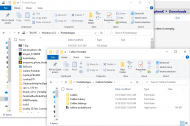
I have a Portable setup on my work computer (not sure if that's relevant to the request).  As seen in the back window, I have a PortableApps folder.  For the most part, there is a subfolder for each portable app.  And--mostly--each folder has an exe in it of the application, for example Calibre Portable in the front window.  I was simply going through and manually customizing the folder by navigating to the exe file and choosing the first image that is compiled in it.  That way, the folder has the same image as the application in it.  I figured that could be automated with AHK, or some other language...

I guess the rules would be:
-look inside of folder for the first exe file found.
-look for first icon resource in that found exe file.
-set the folder's icon to be that icon resouce.
snack idea 2-9-2021.png

Any takers?  :P

mouser

  • First Author
  • Administrator
  • Joined in 2005
  • *****
  • Posts: 40,931
    • Gathering Badge
    • Plugin Coding Medal
    • Participated in NANY Challenge Seventeen Times
    • Cody Award
    • Coding Snacks
    • Volunteers/Staff
Re: IDEA: Pull icon from exe and put on the containing folder
« Reply #1 on: February 09, 2021, 07:05 PM »
That's a nice idea.. I have some code to pull an icon from an exe.. Wouldn't be too hard to do adapt the code, but hopefully a standalone tool already exists for this?

skwire

  • I eat Coding Snacks for breakfast...
  • Global Moderator
  • Joined in 2005
  • *****
  • Posts: 5,297
    • Participated in NANY Challenge Seventeen Times
    • Coding Snacks
    • Superboy Coder
    • Cody Award
    • Volunteers/Staff
    • Gathering Badge
Re: IDEA: Pull icon from exe and put on the containing folder
« Reply #2 on: February 09, 2021, 07:26 PM »
That's a nice idea.. I have some code to pull an icon from an exe.

There's no need to extract the icon as this is done via hidden "desktop.ini" files within the folder in question.  Here's a sample:

Code: (text)
[.ShellClassInfo]
IconResource=C:\path\to\program\program.exe,0
[ViewState]
Mode=
Vid=
FolderType=Generic

https://hwiegman.home.xs4all.nl/desktopini.html

kunkel321

  • Supporting Member
  • Joined in 2009
  • **
  • Posts: 626
    • Participated in NANY Challenge Once
Re: IDEA: Pull icon from exe and put on the containing folder
« Reply #3 on: February 09, 2021, 07:56 PM »
Interesting.  So what you'd need to do I guess is just identify the path of the exe, then edit the 'desktop.ini.' 

Edit to idea/request:
As I look through my subfolders, I see that some of the applications have secondary exe files in with the main application.  Often those have different icons.  As such, the "first" exe found is not always the correct one.  Perhaps the solution to this, would be to find the exe that has the same name as the folder.  Unfortunately, the exe's name is often slightly different. 

Maybe it would make sense to navagate to the correct exe, then select it and activate the tool (via hotkey I guess).  The tool would then get the path to that exe, then edit the parent folder's desktop.ini folder... 

EDIT:  On a related, but different topic:  About 10 years ago, a fellow named Kilmatead, made a tool in AutoIt for customizing folder icons.  It is here
https://forum.zabkat.com/viewtopic.php?f=22&t=8816
I just checked and the download still works.  And the app works on my current Win 10 laptop. 

Lots of options.  Sadly Kilmatead disappeared from the forums years ago and is assumed, either dead, or abducted by aliens. 

MilesAhead

  • Supporting Member
  • Joined in 2009
  • **
  • Posts: 7,736
    • Coding Snacks
Re: IDEA: Pull icon from exe and put on the containing folder
« Reply #4 on: February 09, 2021, 09:19 PM »
If you wish to do this with a lot of folders it may be worth checking out a macro record/playback utility.  If you select the exe in the folder then start recording mouse actions and keystrokes you could play it back on other selected exe files.  In my W10 explorer shift right click brings up the context menu that has "copy as path."  After clicking that pressing Alt up arrow will move you up in explorer so that the containing folder is selected.  Right click and click Customize tab, then click Change Icon.  Click browse button.  Now you can paste in the path of the exe that is in the clipboard.

If you only have a hundred or so folders you wish to customize, assuming the macro playback works, you could do 10 at a time until they are all customized.  If you have hundreds of folders then yes you may want to try to find a dedicated utility somewhere.

kunkel321

  • Supporting Member
  • Joined in 2009
  • **
  • Posts: 626
    • Participated in NANY Challenge Once
Re: IDEA: Pull icon from exe and put on the containing folder
« Reply #5 on: February 09, 2021, 10:26 PM »
... it may be worth checking out a macro record/playback utility. ...
Actually I only figured I'd do one folder at a time, so yea a macro makes sense. 

I did some googling, and it appears that Win 10 can capture a file's path via Shift+RightClick.  I'm trying to simulate that in AutoHotkey.  Windows doesn't seem to be seeing the "Shift" part though...  :- /

Code: ( autohotkey)
!^g::
sleep, 1000
Send, {LButton Down}
sleep, 100
Send, {LButton Up}
sleep, 100
Send, {Shift Down}
Send, {RButton Down}
sleep, 100
Send, {Shift Up}
Send, {RButton Up}
return

EIDT:  This works!

Code: ( autohotkey)
!^g::
sleep, 1000
Click
sleep, 100
Send, {Shift Down}
sleep, 100
Click, Right
sleep, 100
Send, {Shift Up}
return

EDIT2:
This is the most kludgy thing I've seen in a while...  And its unreliability attests to this!  LOL
I got tiried of working on it.  I might try to finish it later.

Code: ( autohotkey)
#NoEnv ; For security
#SingleInstance force
#Persistent

;Navigate to file in Win Explorer.  Hover mouse over file.
!^g::
sleep, 1000
Click ;Selects file
sleep, 100
Send, {Shift Down}
sleep, 100
Click, Right ;Pops up special context menu with "Copy as path."
sleep, 100
Send, {Shift Up}
Send aaa{Enter} ;Need correct number of a's to select Copy as path.
sleep, 100

Send, {Alt Down}
sleep, 100
send, {Up} ;Tells Wind Explorer to browse up one level.
sleep, 100
Send, {Alt Up}
sleep, 100

Send, {AppsKey} ;Parent folder will be selected.  Shows context menu.

sleep, 100
Send, {Up} ;Goes to bottom memu item (which is Properties.)
sleep, 100
Send, {Enter}
Send, {Shift Down}
sleep, 100
send, {Tab} ;ShiftTabTab highlights General tab in Properties dialog.
sleep, 100
send, {Tab}
sleep, 100
Send, {Shift Up}
;Still needs to ArrowLeft 5x to highlight Customize tab.
;Then Alt+i to change icon. Icon resource path box will be highlighted.
;Paste path into box and {Enter}. 

return
« Last Edit: February 09, 2021, 11:14 PM by kunkel321 »

c.gingerich

  • Supporting Member
  • Joined in 2011
  • **
  • Posts: 748
    • Participated in NANY Challenge Six Times
    • Coding Snacks
Re: IDEA: Pull icon from exe and put on the containing folder
« Reply #6 on: February 09, 2021, 10:44 PM »
Not sure if this is what you wanted: https://www.nirsoft.net/utils/iconsext.html

Never mind... Didn't fully read your post.

MilesAhead

  • Supporting Member
  • Joined in 2009
  • **
  • Posts: 7,736
    • Coding Snacks
Re: IDEA: Pull icon from exe and put on the containing folder
« Reply #7 on: February 10, 2021, 03:23 PM »
Maybe one of these freewares will be easier than coding it yourself?  :)

publicdomain

  • Honorary Member
  • Joined in 2019
  • **
  • Posts: 732
    • Participated in NANY Challenge Three Times
    • Linux User
Re: IDEA: Pull icon from exe and put on the containing folder
« Reply #8 on: February 10, 2021, 11:01 PM »
Any takers?  :P

I'm in! Chances are "AppFolderIcon" gets completed tomorrow / in a couple.

:Thmbsup:

Vic

4wd

  • Pedantic Old Bastard
  • Supporting Member
  • Joined in 2006
  • **
  • Posts: 5,652
    • Coding Snacks
Re: IDEA: Pull icon from exe and put on the containing folder
« Reply #9 on: February 11, 2021, 02:36 AM »
Using skwire's info, this should work if you go via Send To or the context menu if you add it in the registry ... can't test it, I'm sitting in a car  :P

Code: ( powershell)
# FolIco.ps1

param (
  [Parameter(Mandatory = $true)][string]$file
)
$deskini = "$(Split-Path "$($file)" -Parent)\desktop.ini"
$ini = "[.ShellClassInfo]`nIconFile=`"$($file)`"`nIconIndex=0`n[ViewState]`nMode=`nVid=`nFolderType=Generic"
$ini | Out-File -LiteralPath "$($deskini)" -Force
(Get-Item -LiteralPath "$($deskini)").Attributes = 'Hidden'

Shortcut in the archive to put in C:\Users\<user>\AppData\Roaming\Microsoft\Windows\SendTo
"I will not follow where the path may lead, but I will go where there is no path, and I will leave a trail." - Muriel Strode, 1903
« Last Edit: February 11, 2021, 05:24 AM by 4wd »

Nod5

  • Supporting Member
  • Joined in 2006
  • **
  • Posts: 1,175
    • Coding Snacks
    • Participated in NANY Challenge Three Times
    • Plugin Coding Medal
Re: IDEA: Pull icon from exe and put on the containing folder
« Reply #10 on: February 11, 2021, 10:39 AM »
Neat idea, so I made an AutoHotkey version with a hotkey and also a command line mode for easy use from FARR.

Uses COM to get the focused file's path more reliably than sending keys to the context menu.
Uses SHGetSetFolderCustomSettings method which makes the new folder icon show immediately, see Microsoft doc.

Code: ( autohotkey)
#NoEnv
SetWorkingDir %A_ScriptDir%
#SingleInstance force
ListLines, Off
SetBatchLines, -1
SetWinDelay, -1

; SetExplorerFolderIcon.ahk
; 2021-02-11
; by Nod5
; In Explorer press [F8] to set the focused file's first icon as parent folder icon
; -----------------------------------
; Default mode: 
;   Select a file in Explorer and press [F8].
;   To close the script right click its tray menu icon and Exit.

; Command line mode:
;   Pass as parameter a HWND window handle to a specific Explorer window
;   to act on that window's focused file and parent folder.
; 
; Optional: use this script from FARR (Find And Run Robot)
;   Create a FARR alias and use this as the result line (modify the path):
;   Set Explorer parent folder icon | C:\some\folder\SetExplorerFolderIcon.ahk %LASTHWND%
; -----------------------------------

; if parameter is Explorer HWND then act on that window and exit
if (vHwnd := A_Args[1])
{
  if WinExist("ahk_class CabinetWClass ahk_id " vHwnd)
    GetFocusedFileSetIcon(vHwnd)
  ExitApp
}
; else hotkey mode: create Explorer hotkey and await user action
else
{
  Hotkey, IfWinActive, ahk_class CabinetWClass
  Hotkey, F8, GetFocusedFileSetIcon
}
return

GetFocusedFileSetIcon(vHwnd := "")
{
  vFile := ExplorerGetFocusedFilepath(vHwnd)
  if FileExist(vFile)
  {
    SplitPath, vFile, , vFolder
    SetFolderIcon(vFolder, vFile, 0)
  }
}


; function: ExplorerGetFocusedFilepath(vHwnd := "")  v210211
; return filepath of focused item in vHwnd (or active) Explorer window
ExplorerGetFocusedFilepath(vHwnd := "")
{
  vHwnd := vHwnd ? vHwnd : WinActive("A")
  if vHwnd and WinExist("ahk_class CabinetWClass ahk_id " vHwnd)
    for Window in ComObjCreate("Shell.Application").Windows
      if (Window.HWND = vHwnd)
        ; https://docs.microsoft.com/en-us/windows/win32/shell/shellfolderview-focuseditem
        return vFile := Window.Document.FocusedItem.Path
}


; function: SetFolderIcon() update Explorer folder icon in desktop.ini via SHGetSetFolderCustomSettings
; by teadrinker 2017-10-09 https://www.autohotkey.com/boards/viewtopic.php?p=174984#p174984
; https://docs.microsoft.com/en-us/windows/win32/api/shlobj_core/nf-shlobj_core-shgetsetfoldercustomsettings
; https://docs.microsoft.com/en-us/windows/win32/api/shlobj_core/ns-shlobj_core-shfoldercustomsettings
SetFolderIcon(folderPath, iconPath, iconIndex)  {
   static FCSM_ICONFILE := 0x10, FCS_FORCEWRITE := 0x2
   if !A_IsUnicode  {
      VarSetCapacity(WiconPath, StrPut(iconPath, "UTF-16")*2, 0)
      StrPut(iconPath, &WiconPath, "UTF-16")
   }
   VarSetCapacity(SHFOLDERCUSTOMSETTINGS, size := 4*5 + A_PtrSize*10, 0)
   NumPut(size, SHFOLDERCUSTOMSETTINGS)
   NumPut(FCSM_ICONFILE, SHFOLDERCUSTOMSETTINGS, 4)
   NumPut(A_IsUnicode ? &iconPath : &WiconPath, SHFOLDERCUSTOMSETTINGS, 4*2 + A_PtrSize*8)
   NumPut(iconIndex, SHFOLDERCUSTOMSETTINGS, 4*2 + A_PtrSize*9 + 4)
   DllCall("Shell32\SHGetSetFolderCustomSettings", Ptr, &SHFOLDERCUSTOMSETTINGS, WStr, folderPath, UInt, FCS_FORCEWRITE)
}

; -----------------------------------
; notes on desktop.ini files
; -----------------------------------
; https://docs.microsoft.com/en-us/windows/win32/shell/how-to-customize-folders-with-desktop-ini
; "text file that allows you to specify how a file system folder is viewed."
; See also https://hwiegman.home.xs4all.nl/desktopini.html

; Format:
; -----
; [.ShellClassInfo]
; IconResource=C:\test\file.exe,0     ; <filepath, icon-index>
; -----
; To remove the custom folder icon delete desktop.ini

; If we just write the file then the new folder icon does not show immediately (must close/reopen Explorer)
; If we instead use SHGetSetFolderCustomSettings the new icon shows immediately.
; SHGetSetFolderCustomSettings also hides the desktop.ini file.
; https://docs.microsoft.com/en-us/windows/win32/api/shlobj_core/nf-shlobj_core-shgetsetfoldercustomsettings
; https://docs.microsoft.com/en-us/windows/win32/api/shlobj_core/ns-shlobj_core-shfoldercustomsettings
; AutoHotkey function: SetFolderIcon()
; by Teadrinker 2017-10-09 https://www.autohotkey.com/boards/viewtopic.php?p=174984#p174984
; -----------------------------------
« Last Edit: February 11, 2021, 10:48 AM by Nod5 »

kunkel321

  • Supporting Member
  • Joined in 2009
  • **
  • Posts: 626
    • Participated in NANY Challenge Once
Re: IDEA: Pull icon from exe and put on the containing folder
« Reply #11 on: February 11, 2021, 03:20 PM »
Hey thanks folks! 

The AHK one works like a carm.  I don't think the PowerShell one is working though(?)  I went with the "Send to" option.  It does open the PowerShell window, but nothing appears in the window, and it doesn't appear to do anything.  It's all good though.  I've got a bunch of different AHK scripts that I use, so there's no point in breaking with tradition.  :- }

Thanks again.

EDIT:  Also, extra points for 4wd, for writing code from his car...  Username checks out too!  LOL

4wd

  • Pedantic Old Bastard
  • Supporting Member
  • Joined in 2006
  • **
  • Posts: 5,652
    • Coding Snacks
Re: IDEA: Pull icon from exe and put on the containing folder
« Reply #12 on: February 11, 2021, 09:56 PM »
I don't think the PowerShell one is working though(?)  I went with the "Send to" option.  It does open the PowerShell window, but nothing appears in the window, and it doesn't appear to do anything.

Nothing appears in the window, it just writes the desktop.ini file into the directory.

Probably had to do what nod5 did and signal Windows to update.

Also, it seemed like IconResource was Vista only but maybe I read the MS docs wrong.
"I will not follow where the path may lead, but I will go where there is no path, and I will leave a trail." - Muriel Strode, 1903
« Last Edit: February 12, 2021, 12:18 AM by 4wd »

publicdomain

  • Honorary Member
  • Joined in 2019
  • **
  • Posts: 732
    • Participated in NANY Challenge Three Times
    • Linux User
Re: IDEA: Pull icon from exe and put on the containing folder
« Reply #13 on: February 15, 2021, 09:33 PM »
Any takers?  :P

Hello dear kunkel, thanks for your valuable interaction via PM.

AppFolderIcon v0.1.0 is complete:

AppFolderIcon_v0-1-0.png


DCmembers download: https://www.dcmembers.com/publicdomainvic/download/appfoldericon-v0-1-0/

Github source code: https://github.com/publicdomain/appfoldericon

AppFolderIcon thread: https://www.donationcoder.com/forum/index.php?topic=51087.0

Enjoy! :Thmbsup:

Vic
« Last Edit: February 15, 2021, 09:48 PM by publicdomain »

kunkel321

  • Supporting Member
  • Joined in 2009
  • **
  • Posts: 626
    • Participated in NANY Challenge Once
Re: IDEA: Pull icon from exe and put on the containing folder
« Reply #14 on: February 15, 2021, 11:17 PM »
Wow!  Very cool!  Thanks so much Vic!  I'll comment on the AppFolderIcon tread.  FYI to others:  Vic has made this app so that it intelligently determines which exe file is the most likely to contain the desired icon image -- Good stuff! 

mouser

  • First Author
  • Administrator
  • Joined in 2005
  • *****
  • Posts: 40,931
    • Gathering Badge
    • Plugin Coding Medal
    • Participated in NANY Challenge Seventeen Times
    • Cody Award
    • Coding Snacks
    • Volunteers/Staff
Re: IDEA: Pull icon from exe and put on the containing folder
« Reply #15 on: February 16, 2021, 06:32 PM »
Just a reminder to folks to consider sending some donationcredits to people on the forum (click the gold coin under their name) who work on these coding snacks -- show them you appreciate what they are doing!

kunkel321

  • Supporting Member
  • Joined in 2009
  • **
  • Posts: 626
    • Participated in NANY Challenge Once
Re: IDEA: Pull icon from exe and put on the containing folder
« Reply #16 on: February 16, 2021, 11:05 PM »
Just a reminder to folks to consider sending some donationcredits to people on the forum (click the gold coin under their name) who work on these coding snacks -- show them you appreciate what they are doing!
Cool!  I never even noticed that those icons are all links! 

MilesAhead

  • Supporting Member
  • Joined in 2009
  • **
  • Posts: 7,736
    • Coding Snacks
Re: IDEA: Pull icon from exe and put on the containing folder
« Reply #17 on: February 17, 2021, 03:37 PM »

AppFolderIcon v0.1.0 is complete:

I have one of those cheapie W10 Laptops that tops out at .NET 4.0.  Unfortunately the Windows Update mechanism never worked correctly.  So I am kind of stuck with what I've got.  I wonder if there is something Win32 based that would have a similar function?  Maybe a VBasic scriptoid or some such? So far I have owned 2 laptops and they have both been Windows Update out of luck.  I am batting a thousand! I cannot even use restore points.  I image with Macrium Reflect Free to recover from disasters.  8)


kunkel321

  • Supporting Member
  • Joined in 2009
  • **
  • Posts: 626
    • Participated in NANY Challenge Once
Re: IDEA: Pull icon from exe and put on the containing folder
« Reply #18 on: February 17, 2021, 07:52 PM »
@MilesAhead, No doubt the AutoHotkey one that Nod5 made will work for you -- yes?

MilesAhead

  • Supporting Member
  • Joined in 2009
  • **
  • Posts: 7,736
    • Coding Snacks
Re: IDEA: Pull icon from exe and put on the containing folder
« Reply #19 on: February 18, 2021, 06:56 PM »
@MilesAhead, No doubt the AutoHotkey one that Nod5 made will work for you -- yes?

I forgot about that one.  Thanks.  I'll try it.  :Thmbsup:

Edit:  Works fine.  8)
« Last Edit: February 18, 2021, 07:08 PM by MilesAhead »

Original address: https://www.donationcoder.com/forum/index.php?topic=51070.0