I have only just started to use LaunchBar Commander, so I am probably doing something silly!
The problem that I am experiencing is my list of Download folder contents disappearing before I can select anything. It works fine when the LaunchBar is floating, but not when it is left-docked.
I have attached three screenshots:
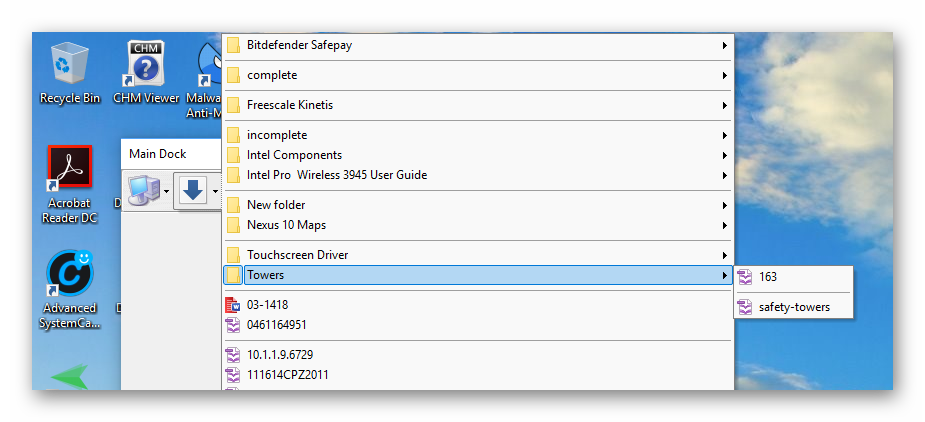
Floating.png: shows the normal behaviour. If I left-click the blue down-arrow button, my Download folder contents are shown in the 'fly-out' list, and I can also display the Towers sub-folder.
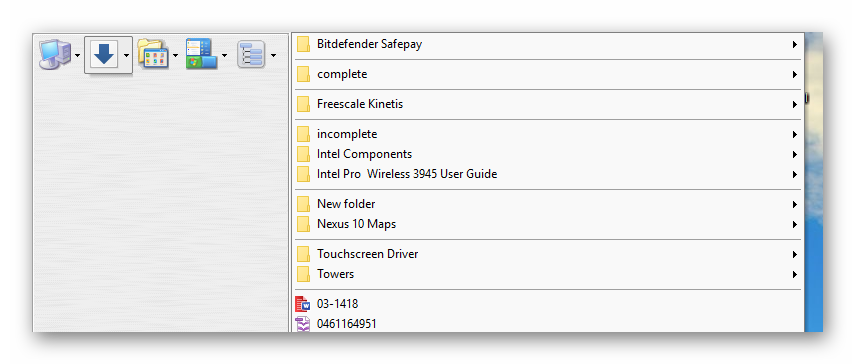
Left Dock_A.png: left-clicking on the blue down-arrow button shows the Download folder contents while the mouse cursor is over the button.
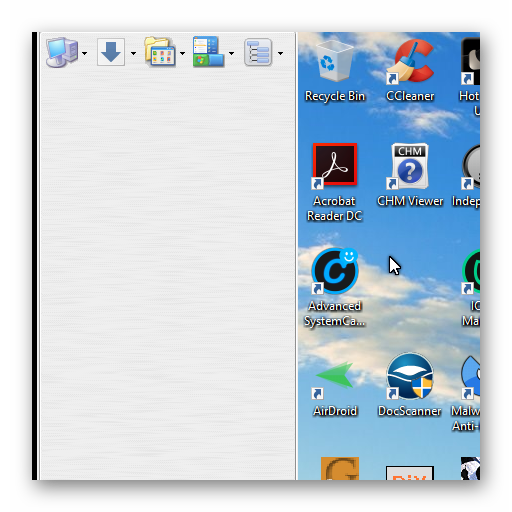
Left Dock_B.png: moving the mouse cursor to the previously-displayed contents makes it disappear.
This problem may have already been discussed, but I have not searched the forum yet!
The problem that I am experiencing is my list of Download folder contents disappearing before I can select anything. It works fine when the LaunchBar is floating, but not when it is left-docked.
I have attached three screenshots:
Floating.png: shows the normal behaviour. If I left-click the blue down-arrow button, my Download folder contents are shown in the 'fly-out' list, and I can also display the Towers sub-folder.
Left Dock_A.png: left-clicking on the blue down-arrow button shows the Download folder contents while the mouse cursor is over the button.
Left Dock_B.png: moving the mouse cursor to the previously-displayed contents makes it disappear.
This problem may have already been discussed, but I have not searched the forum yet!