DonationCoder.com forum
 
Read-only archive. This is a static copy of the DonationCoder.com forum. Reading and searching work as before; logging in, posting and private messages do not.
Archive of 2026-10-21 · About this archive · Main site

Author Topic: Mouse over hints  (Read 10,223 times)

Maxstacks

  • Participant
  • Joined in 2013
  • *
  • Posts: 4
Mouse over hints
« on: July 12, 2013, 08:01 PM »
Windows 7
LBC 1.133

How to hints work.

Do i have to type in the hint for every link I add to LBC before it will pop up when I mouse over. I drag and drop many URLs from my browser to the launch bar while I am working, do I have to then go back and type in hints for everyone. Some are just temporary and it would be nice to have some sort of info pop up without me have to do each one individually.

Any help would be appreciated.


Maxstacks

  • Participant
  • Joined in 2013
  • *
  • Posts: 4
Re: Mouse over hints
« Reply #1 on: July 12, 2013, 11:20 PM »
Hi: Any chance of a reply to this as I am rebuilding my system and I really would like to include LBC from the start.

mouser

  • First Author
  • Administrator
  • Joined in 2005
  • *****
  • Posts: 40,931
    • Gathering Badge
    • Plugin Coding Medal
    • Participated in NANY Challenge Seventeen Times
    • Cody Award
    • Coding Snacks
    • Volunteers/Staff
Re: Mouse over hints
« Reply #2 on: July 13, 2013, 12:02 AM »
Right now you have to set the hints manually for each item -- but i think it's a good idea to have an option for a dock to automatically use captions as hints when the captions are not shown on the dock.. I will add it.

Maxstacks

  • Participant
  • Joined in 2013
  • *
  • Posts: 4
Re: Mouse over hints
« Reply #3 on: July 13, 2013, 12:20 AM »
Thank you very much. That is so responsive and just what i needed. I'll start installing right now.

I look look forward to the implementation.

dluby

  • Charter Member
  • Joined in 2006
  • ***
  • Posts: 253
Re: Mouse over hints
« Reply #4 on: July 19, 2013, 11:55 AM »
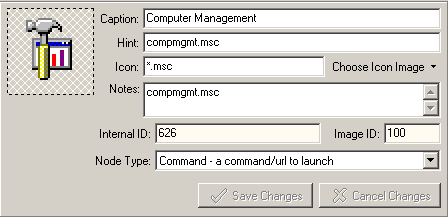
I have version 1.133.01 but none of my hints are showing.  Is there something I have accidentally disabled that is preventing the hints from displaying? Attached is an example of one of the nodes:

mouser

  • First Author
  • Administrator
  • Joined in 2005
  • *****
  • Posts: 40,931
    • Gathering Badge
    • Plugin Coding Medal
    • Participated in NANY Challenge Seventeen Times
    • Cody Award
    • Coding Snacks
    • Volunteers/Staff
Re: Mouse over hints
« Reply #5 on: July 19, 2013, 12:17 PM »
You also have to enable hints on the DOCK (node) as a whole.

dluby

  • Charter Member
  • Joined in 2006
  • ***
  • Posts: 253
Re: Mouse over hints
« Reply #6 on: July 19, 2013, 12:33 PM »
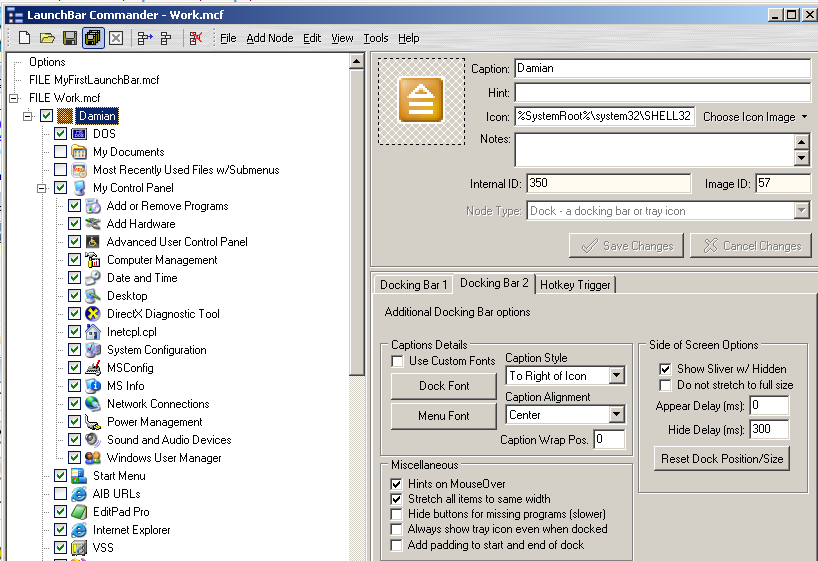
Is this where you mean as it's already checked:

mouser

  • First Author
  • Administrator
  • Joined in 2005
  • *****
  • Posts: 40,931
    • Gathering Badge
    • Plugin Coding Medal
    • Participated in NANY Challenge Seventeen Times
    • Cody Award
    • Coding Snacks
    • Volunteers/Staff
Re: Mouse over hints
« Reply #7 on: July 19, 2013, 12:43 PM »
Yeah that's where I meant.
Try this -- if you actually click on a menu on your bar, do the hints THEN start to kick in on mouse over?

Maxstacks

  • Participant
  • Joined in 2013
  • *
  • Posts: 4
Re: Mouse over hints
« Reply #8 on: July 21, 2013, 06:01 AM »
Hi:

Any chance of a patch to allow 'automatically use captions as hints' before a full version release with this capability?

Very eager to get this ability.

Thanks.

dluby

  • Charter Member
  • Joined in 2006
  • ***
  • Posts: 253
Re: Mouse over hints
« Reply #9 on: July 22, 2013, 07:11 AM »
Hi Mouser, no clicking a menu makes no difference. It's not meant to be!

MaxStacks idea is partly what I was trying to use my hints for.

dluby

  • Charter Member
  • Joined in 2006
  • ***
  • Posts: 253
Re: Mouse over hints
« Reply #11 on: July 25, 2013, 11:31 AM »
Still no hints!  I'll try it at home to see if it works there (but it may not be an issue there).

Original address: https://www.donationcoder.com/forum/index.php?topic=35430.0