topbanner_forum
  *

avatar image

Welcome, Guest. Please login or register.
Did you miss your activation email?

Login with username, password and session length
  • Thursday December 4, 2025, 6:54 pm
  • Proudly celebrating 15+ years online.
  • Donate now to become a lifetime supporting member of the site and get a non-expiring license key for all of our programs.
  • donate

Recent Posts

Pages: prev1 ... 322 323 324 325 326 [327] 328 329 330 331 332 ... 1514next
8151
Screenshot Captor / Re: Resolution of Screenshot Captor
« Last post by mouser on February 06, 2014, 06:54 PM »
Thanks James -- I appreciate the good nature of the request.  :up:

And I don't disagree the icons seem exceedingly small on your screenshot.  It looks like you have a high resolution screen set up (maybe with large font setting to make the text bigger)?

There is actually one or two things I can try, to see if it helps -- remind me if i don't post a test version in the next week.
8152
have you just upgraded from XP mouser?
Or are you one of those productive people who dont mess around with all the possible UI options on their OS


both.
8153
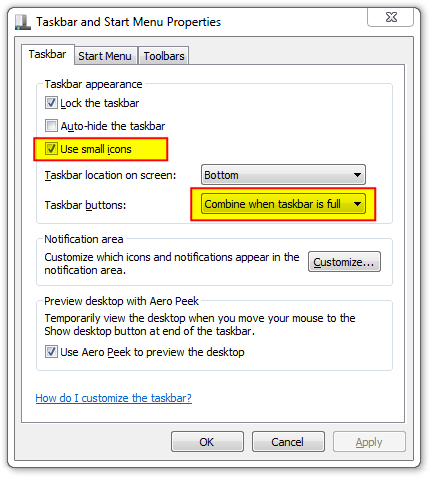
This is a public service announcement for those of you who do not like the Windows 7 taskbar being so damn tall eating up desktop space for no reason.

You can change it go to back to the sane pre-Windows7 height and format:
Screenshot - 2_6_2014 , 5_39_47 PM_ver001.png

It's the small icons setting which reduces the height.  I also change the taskbar buttons (grouping) option so that each program running gets it's own taskbar entry until it runs out of space; I hate the new behavior of combining taskbar buttons for multiple copies of explorer, etc.

Note: One thing that happens when you reduce the taskbar height is you lose the full date shown in the bottom right.  To solve that I install Tclock and configure it to show full textual date+time on the taskbar.
8154
Screenshot Captor / Re: Resolution of Screenshot Captor
« Last post by mouser on February 06, 2014, 03:49 PM »
One important thing to remember is that for most of those icon buttons, there is a menu item.  The only ones that's not true for are the object buttons (arrow, highlight box, text box, etc.).

There is an optional "scanner" toolbar, that you can enable from the scanner tab of the options.
8155
Screenshot Captor / Re: Resolution of Screenshot Captor
« Last post by mouser on February 06, 2014, 02:23 PM »
those icons look like they are supposed to -- that's normal for them to be that small..
8156
General Software Discussion / Re: Continuing with XP
« Last post by mouser on February 06, 2014, 12:32 PM »
It's true, if you aren't doing a lot of questionable web surfing and downloading, i really don't see the big deal with sticking with XP for a netbook.

Like stoic says, it's not like anything terrible happens when microsoft stops officially supporting it.  People will still be using it for years.

In fact you could make a strong case that for a netbook, better to not move to the more resource demanding windows 7.
8157
Living Room / Re: good Videos [short films] here :)
« Last post by mouser on February 06, 2014, 08:36 AM »
changing batteries goes beyond sad. it's absolutely heartbreaking. it's been a long time since i cried while watching something.

it got me in the end.
8158
General Software Discussion / Re: Continuing with XP
« Last post by mouser on February 06, 2014, 07:41 AM »
What shades says is true -- trying to run a virtual machne on a computer with 2gb of ram is going to be a nightmare.  It won't just be a slow virtual machine, but when the vm is running your entire computer will likely be painful to use because of the vm trying to use all the memory.
8159
General Software Discussion / Re: Continuing with XP
« Last post by mouser on February 06, 2014, 07:23 AM »
App's idea makes sense.
8160
General Software Discussion / Re: Continuing with XP
« Last post by mouser on February 06, 2014, 06:04 AM »
I sympathize with your wife -- personally I find the look and feel of XP the best, and windows 7 user interface is not to my liking.

Having said that, adjusting to using Windows 7 is really pretty painless.  All the programs will still run, it still has the start menu and everything is mostly in the same place.

So, my advice is to set up a new machine with windows 7 and get her set up on it and give her some time to get used to it.

Your idea of using a virtual machine to host XP would be ok for something that you had an occasional use for, but i wouldn't want to try to do prolonged work on such a machine because of performance issues.
8161
Thought it might be nice if we collected some online articles that help you decide which tiny computer kit to get if you want to experiment in the land of Arduino, Raspberry Pi, Beagle Bone, etc.


Anyone know any other good write ups?
8162
try selecting any word and triggering it.
8163
There are a few little tools that can do this -- but i made one i think is pretty good:

SelectoSurf:
https://www.donation...dex.php?topic=6714.0

It's made in AutoHotkey with source so you can always change how it works if you need to.
8164
Living Room / Re: Programmers: What size monitors do you guys prefer?
« Last post by mouser on February 04, 2014, 03:04 PM »
Anyone use a rotated monitor in portrait mode for coding?
8165
2. Repeating:  It would be nice if "Arrow Mode" was sticky.   i.e. So I can do multiple arrows or callouts without having to click the Arrow Icon on the Toolbar each time.  (Maybe SSC could stay in Arrow Mode until I either choose another tool, or press Esc?)

there is an option for that:
Screenshot - 2_4_2014 , 9_27_11 AM.png


3. Quick Typing:  It would be nice if I could click-n-drag to create the arrow, then immediately start typing text to add a callout

nice idea, i will try to add an option for that.


1.  Set default style for Arrows / Callouts:


it should be remembering your last settings.
8166
Living Room / Re: Programmers: What size monitors do you guys prefer?
« Last post by mouser on February 04, 2014, 09:04 AM »
But do have a good test in the shop to view the actual brightness of the screen, that is, IMHO very, important too.

I never appreciated brightness issues until i tried a different monitor one day that was noticeably clearer and brighter than what i was used to.  It was actually labeled a "glossy" monitor when most these days are labeled as "matte".  I have to say i much preferred the glossy one, though they seem to be rare for some reason.
8167
Living Room / Re: LillyPad Arduino Projects
« Last post by mouser on February 04, 2014, 08:30 AM »
Awesome, can't wait to see some photos!
8168
Living Room / Re: Programmers: What size monitors do you guys prefer?
« Last post by mouser on February 04, 2014, 06:42 AM »
If anyone wants to join me in jumping to 27", this is the one i'm looking at -- newegg is currently having a bit of a sale on it:

LG 27EA83R-D

http://www.newegg.co...Item=N82E16824005494
8169
Living Room / Programmers: What size monitors do you guys prefer?
« Last post by mouser on February 04, 2014, 06:35 AM »
I have never worried much about monitor size for my computer, but I do care a lot about resolution, and really love having lots of real estate.

In the past I always aimed for a multi-monitor setup, with monitor resolutions of 1600x1200.
My current setup is three 19" 1600x1200 lcd monitors.
(The text font size is just fine for me with those).

But i'm looking to buy a new central monitor, and i'm trying to decide whether to get a 24" (1920x1200) (apx, $320), or to go all the way up to a 27" (2560x144) ($500).

I love the idea of the additional screen real-estate on the 27".  But I have a real concern about the screen being "too large" for daily coding.

For tv/movies, the bigger the better.

But for programming, I need to be staring at lots of small text -- and I sit about 2.5 feet away from the screen.

So at a certain point, a large screen is going to mean having to move my eyes around uncomfortably.

Thoughts?
8170
N.A.N.Y. 2014 / Re: NANY 2014: Mug-shots here
« Last post by mouser on February 03, 2014, 03:44 PM »
Hey we know what the mugs look like, we want to see what you folks look like!
8171
Mircryption / Re: Irssi Bot Using Blowssi
« Last post by mouser on February 02, 2014, 10:54 AM »
I'm afraid i don't have irssi experience so you are way ahead of me.  But just wanted to say, Nice work  :up:
8172
Living Room / Breaking madden - fun video game experiment
« Last post by mouser on February 01, 2014, 02:32 AM »
An entertaining experiment (with lots of animated gifs) where someone took a football video game and pitted some lopsided teams against each other.

I'd like to see more experiments with "breaking" video games.

Over the course of the season, I've discovered lots of different ways to hack Madden NFL 25 into a thing that no longer resembles football as we know it. I've played around with rules, injury settings, all manner of player ratings, player dimensions, and anything else the game's developers have made available to us.

This time is special, though, because I'm pulling out every single one of the stops at the same time. No other scenario I've built in Madden has been so abjectly cruel or unfair; no other scenario has even been close.


from http://waxy.org/
8173
Dr.Windows / Re: List index out of bounds (3)?
« Last post by mouser on January 31, 2014, 01:41 AM »
Fixed in version 1.06 -- sorry it took so long!  :-[
8174
Living Room / Re: Happy New Year! 马年大吉!
« Last post by mouser on January 31, 2014, 01:36 AM »
Happy new year to you, xbeta!  :Thmbsup:
8175
Living Room / Re: Hard Drive Brand Reliability Data
« Last post by mouser on January 30, 2014, 01:47 AM »
From slashdot:

"A recent study of hard drive reliability by Backblaze was deeply flawed, according to Henry Newman, a longtime HPC storage consultant. Writing in Enterprise Storage Forum, Newman notes that the tested Seagate drives that had a high failure rate were either very old or had known issues. The study also failed to address manufacturer's specifications, drive burn-in and data reliability, among other issues. 'The oldest drive in the list is the Seagate Barracuda 1.5 TB drive from 2006. A drive that is almost 8 years old! Since it is well known in study after study that disk drives last about 5 years and no other drive is that old, I find it pretty disingenuous to leave out that information. Add to this that the Seagate 1.5 TB has a well-known problem that Seagate publicly admitted to, it is no surprise that these old drives are failing.'"
Pages: prev1 ... 322 323 324 325 326 [327] 328 329 330 331 332 ... 1514next