topbanner_forum
  *

avatar image

Welcome, Guest. Please login or register.
Did you miss your activation email?

Login with username, password and session length
  • Monday December 22, 2025, 5:37 pm
  • Proudly celebrating 15+ years online.
  • Donate now to become a lifetime supporting member of the site and get a non-expiring license key for all of our programs.
  • donate

Recent Posts

Pages: prev1 ... 279 280 281 282 283 [284] 285 286 287 288 289 ... 454next
7076
Site/Forum Features / Re: Shortcomings of DC and How to Improve
« Last post by tomos on March 03, 2011, 06:08 AM »
on the "looks" front:

Although a modern look is not essential for this site in my opinion, simply because the site lives from its great community, it certainly is a pity and could turn off new users.
We're using same theme and maybe same version for more than 2-3 years i guess.

I personally dont see that as a problem - I think the site looks really good (it's nudone's artwork that makes it, but I mean that in general too).
Do you, mahesh2k, phitsc (or anyone), really think people wouldnt come back because the theme isnt changed :tellme: or because it isnt 'modern'?
I'm curious actually - any examples of a 'modern' forum (looks-wise) ?
Most of the forums I visit are software related and are bog-standard/out-of-the-box = ugly as sin :)

(dont get me wrong, I'm not against any change to the theme & or forum software - I presume, as said above, that a forum upgrade would bring improvements and be better for the future of the site, etc.)
7077
Thanks for the tip Zaine.

On the same page is Lucinda Williams' new album. I'm not familiar with her music, and listening here I find she sings, eh, a bit oddly... but I happened to hear it a two or three times lately (via npr) and it's really grown on me. They do say until March 1 so it will probably be pulled soon.

http://www.npr.org/2...nda-williams-blessed


[edit] it's gone now... [/edit]
7078
+ 1 to being challenged by idea of writing a review - personally I often only use aspects of a programme and therefore dont feel qualified to review...

I'd find those recipes very good too. "Say you want to do this, so take that tool, install, click here, select there, clicky here and done" in a somewhat more elaborate prose could be really helpful. But I wonder if that would still be a review, even if the recipe is really helpful.

could be called (e.g.) a context review, or something like [How-to/Mini-Review] using XYZ.
I think this is a good idea. I'd like to do a review but as said above didnt feel qualified (and havent really been using any new software anyways) - I will have to look at my options again...

I think the How-to idea was mentioned in another thread - with the suggestion to have a seperate home for them. At the moment I would suggest they could be posted in the mini-reviews section so long as the title expresses the, eh, "how-to" aspect. Presumably if you posting a how-to you are saying this app is good at this and also maybe pointing out any weaknesses, etc.
7079
General Software Discussion / Re: OS recommendations for Pent.III 128MB laptop
« Last post by tomos on March 01, 2011, 04:04 PM »
thanks Ath & Eóin, I'm happiest with XP (dont have a copy of 2000, although I could probably buy a copy fairly cheap...)

If you are going to use it for writing, is the built-in keyboard good enough for that, or are you adding an extra keyboard?

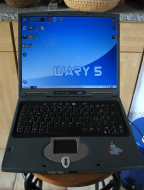
it's a high quality machine, build anways. Keyboard feels good - it's slightly curved (ergonomic). Size is good too. So I prob wont be using external keyboard. I really just want a machine to mess around on a bit though...

6335353764462500001_99N2182002_NSK-A4002_Taiwan_NEW.JPG
7080
General Software Discussion / Re: OS recommendations for Pent.III 128MB laptop
« Last post by tomos on March 01, 2011, 03:33 PM »
I found this from scancode in the thread "Turning Windows 2003 Server into a workstation?"
NOTE: no drivers on offer for Windows Server 2003 but just wondering would it be worth it trying to strip out all these services (list in spoiler below) from XP with hopefully similar success (see his specs below)

I've been running on eXPerience's Micro2003 for a while (over 10 months), and simply love it.
Also used a clean install of 2003EE, and worked fine. It's a really good Desktop OS.

on a system with:
128 mb ram
800mhz processor
1GB HDD

what's removed
[LINK: https://www.donation....msg110784#msg110784]

I haven't run into any compatibility issues, but ymmv.
Micro2003 is mainly a gaming system, but I used it because it's running on a 1gb HDD ;)

eXPerience's Micro2003 is a modified version of Win2k3, with a lot of features removed.

Here are some snips from the NFO file.

Statistics:

Installation Time From End Of Formatting... 4 Mins 45 Secs <-- Mine was faster.
RAM Usage On First Installation............ 39.2 Mb        <-- 40.4 MB
Handles.................................... 2135
Threads.................................... 156
Processes.................................. 14
WINDOWS Folder............................. 165 Mb
Items In System32.......................... 521
ISO File Size.............................. 93.0 Mb

Standalone system only! - The "Network Connections" service has been kept, but this service is only there to allow the smooth install of Ethernet card drivers, or modem drivers. The "Network Connections" service is not there to support LAN networking! You could try plugging another PC into yours and see what happens, it might work, but LAN networking is not necessarily functional in this install.
(Not true. I'm on a mixed (wireless/wired) network, and the Micro2003 computer is running a FTP server, HTTP server, SMO server.) The only problem is that you can't use DNS names, only the IP address.


Single User Only! - you cannot create extra users. You can only use the account that is installed by default. You actually can create another "Administrator" but beware - it cannot save any of the settings in Windows! For example you log in with a created Administrator account called "Bobby" and change the desktop from blue to black, every time you log in as "Bobby" you will be back to the blue wallpaper again. None of the settings stay saved. Also, the new user would have a Windows 95 style theme as well. The main account that this installation gives you is not affected if you make up another Administrator account, but for the above reasons, making any new Administrator account is pointless. You cannot make a new "User" account at all, if you do, you will not be able to log in with the new account unless it is an Administrator's account and even then, it will not save any settings. Despite all of the above you can still of course change the existing account name. Just look in Control Panel and you will see "User Accounts" there.
(I believe Micro2003 uses minlogon, but I'm not sure. You don't want to mess with that.)


No Webcams, Scanners or Digital Cameras! - You cannot use these items in this version of Windows because the "Windows Image Acquisition" service is removed.
(I had to add that from a Win2k3 CD. A bit messy to add.)

FTP Sites - There is no "built in" support for downloading from FTP sites, try using Filezilla or WS_FTP if you need to do that. This functionality is gone because the "Application Layer Gateway" service is gone, along with ALG.EXE that normally runs in Task Manager taking up about 6Mb RAM for what amounts to no reason.
(Opera FTW)


No Visiting Windows Update! - You cannot visit Windows Update with this version of Windows because Internet Explorer is removed. DO NOT INSTALL WINDOWS UPDATES!

(You don't need updates. Most stuff is removed anyways)


No Printing! - You cannot use a printer with this version of Windows, because the "Print Spooler" service is removed.
(I got a printer working once bypassing the spooler. YMMV.)

No Password Storage - Windows will not save stored passwords, however, this only really applied to Internet Explorer and Outlook Express, which are removed. You will be OK using Firefox or Opera web browsers and Thunderbird email client for emails. Those are self contained programs and take care of storing/remembering your passwords by themselves.
(Sure, who can't remember their passwords?)

No CD-ROM Autoplay - When you insert a CD that would bring up a screen to install the program contained on the CD, this does not happen in this version of Windows, you will have to explore the CD manually and run whatever file it is that runs the program's setup - usually "setup.exe" on the root of the CD.
(Wee! No more autorun viruses!)

No Smart Card Detection!
(Some dongle protected software might not run :'()

No Scheduled Tasks! - You cannot set programs, like AntiVirus or Hard Disk Defrag programs to run in the future. If you are going to run those types of programs you will have to manually scan or defrag whenever it is convenient. Despite this, one program that will schedule its operations is Perfectdisk defrag, you do not need Task Scheduler for this program to run a scheduled defrag.
(I never used it, I don't need it.)

No Remote Desktop! - There is no Remote Desktop in this version of Windows - because the "Terminal Services" service is removed.
(Replaced with TightVNC and Remote Desktop Client)

No Themes! - You cannot have the Luna (Blue/Olive/Silver) desktop themes in this version of Windows, the only theme you can choose is "Windows Classic" which it is already set to by default.
(UXTheme.dll patch + DeviantART)

No "Uninterruptible Power Supply" service! - I always thought "UPS Service" delivered parcels but apparently not - if you have this type of device then it will not work on this version of Windows. A UPS is only used for emergencies like if you have a power cut - thats if you even have such a device.
(Your UPS will still feed your 'puter. You won't be able to see batt status and stuff tho.)


If you can cope with that, you'll be fine.
BTW, I found at least two live rapidshare links. (Yep, it's Warez. So? Sue me! Of course, you should replace the CD KEY with your LEGALLY PURCHASED one)

7081
General Software Discussion / OS recommendations for Pent.III 128MB laptop
« Last post by tomos on March 01, 2011, 03:33 PM »
Looking for recommendation for an OS for an old laptop (oooh, a 5:4 screen :-* )

Specs: It's an Acer TravelMate 611WXV ("610 series" also has "Model Nr. ([Japanese characters here]) 2009").
Current OS is Windows ME - in a language I dont understand

All I know about the thing is
  • Pentium III 850Mhz
  • 128 MB RAM

specs probably something like this.
I could add 256MB for around 30 euro see

Uses: Want a machine mainly just for writing. I will mainly use it offline (and wouldnt mind if it were completely offline)

RE OS install I have done a few but really am mostly pretty challenged by it. So ideally something simple!

Possible Options:

1) I'd really love to be able to install XP (familiarity of XP) but this machine couldnt handle it with that memory - could a stripped down (nlite) version work though? (if so any tips there?) I could invest in the extra memory to bring it up to 384mb...  [edit] see also post #2 [/edit]
2) then there's the world of free OS's - absolutely no experience here. As long as it's easy to install. I have no idea about drivers here (in fact I've no idea about drivers for XP :-[ either*)
3) I also have a copy of windows 98... but think I'D prefer option #2 :)


* On the Acer drivers page, it offers drivers for Windows 2000 up to XP. Nothing for Linux...
7082
Being English, I'm not very good at these displays of advanced emotion and that sort of thing, and I shall probably blush.

<ahem>

Hoorah!

 :-[

well done ;D
7083
ahh poor Cody . . . we'll cheer him better -
hip hip :D horay

thanks to mouser and everyone for a wonderful site :Thmbsup:
7084
The Getting Organized Experiment of 2009 / Re: The busy man is never wise
« Last post by tomos on March 01, 2011, 01:47 PM »
The real stress test of productivity is to unlock more productivity and until we separate our pseudo-work productivity from our dreams turned goals turned projects - productivity is just us hiding behind our own little delusions that what we do is on par with what the rulers of our society has social engineered to achieve.

Psuedo work link is interesting and very true.
The link describes how to work more effectively, by not working too long at any one time.
But what does that mean, in the context of what you say, to seperate this ineffectiveness from "our dreams turned goals turned projects" ?
[1] Do you simply mean to seperate it from out productive work?

And the last sentence - I think there's a grammatical error towards the end there that makes it more difficult to understand:
productivity is just us hiding behind our own little delusions that what we do is on par with what the rulers of our society has social engineered to achieve.
-
[2] the underlined bit is missing a word I think(?) - engineered "us" maybe?
7085
Announce Your Software/Service/Product / Re: Bvckup
« Last post by tomos on March 01, 2011, 01:03 PM »
Also, while I have you here, may I also persuade you to have a look at this marvelous blog footer? I (rather unwisely) spent almost 6 weeks of my time on it, but I think it's my best design work to date. Gotta learn the ropes, you know... pretty and functional beats just functional :)

I've enjoyed looking at your desing work :up: :)

A bit more...
Assorted bits and pieces of some interest - [...] a bit of a logo and web design goodness
7086
re donating via amazon payments -
it's set at $50 with no visible way of changing - is it possible to change this after logging in to amazon?
Thanks!
7087
Site/Forum Features / Re: Shortcomings of DC and How to Improve
« Last post by tomos on February 28, 2011, 09:13 AM »
On a practical note (not directly related to the dialogue here, but on-topic).

One thing that has bothered me over the years is -
sometimes people put a lot of effort into gathering info about a particular subject. Think of Steven Avery's list of software free for business use. Crush's and my list of Disc Catalogers. I'm sure there's others. These tend to die a death because the load of maintaining them is too much/too boring/too whatever, for one person.
I would love to see some sort of a wiki aspect/area that this kind of thing could be moved to. Re Stephen's efforts, I posted an index of sorts here. As I say in that post "It's a brilliant resource, it deserves as much promotion as it can get !!". If it were a wiki it could continually be updated and would get better and better known - instead of sinking into oblivion...

This may have been suggested before (I believe it was but only casually) and certainly doesnt fit into the forum setting, and I have no idea about the technicalities but I'm just throwing it out here again.


Re Reviews -
I can see why the reviews section (full- as opposed to mini-) died a death - too much work.
I wonder could a wiki style section be good for that too? Give it a structure - e.g. add your pros and cons.
7088
Found Deals and Discounts / Re: [Giveaway] PDF Decrypter Pro
« Last post by tomos on February 27, 2011, 03:30 PM »
thanks Stefan :Thmbsup:
7089
Found Deals and Discounts / Re: NITRO PDF PROFESSIONAL 6
« Last post by tomos on February 27, 2011, 09:49 AM »
ah, my bad.. i saw the link for NovaPDF and read that as NitroPDF. i thought there was a new version out already. :-[

oups, my bad :) - I'll edit my post above
7090
General Software Discussion / Re: Most Pirated Software?
« Last post by tomos on February 26, 2011, 03:17 PM »
Another personal (self-interested :-\) report:

At some stage I decided to not use illegal software on my work machine (self-employed) and I got to say it feels good. I did go this road initially out of self-interest (having pirated stuff or using it illegally on a work machine could be risky) but it has brought me along a road of finding good cheap, or free, or donationware alternatives to the big names. I'm no saint, (lets just say I wont pay Adobe for software that they are selling but refuse to develop...) but just wanted to point out that the non-pirated road can be a nice road to take ;)
7091
Found Deals and Discounts / Re: NITRO PDF PROFESSIONAL 6
« Last post by tomos on February 26, 2011, 01:23 PM »
[edit] sorry - thread about NITRO this post about NOVA - my mistake... [/edit]

or, if you prefer, you can get version #7 for 9$ 

6. NovaPDF Professional Desktop Edition v7 (retails at $49.95) now $9
Purchase link: https://sites.fastsp...elyticnovapdfspecial
7092
@ lotusrootstarch -
I'm wondering why you keep coming back - i.e. what (if anything) do you find positive here to make it worth your while coming back and posting.
7093
Is there anything I can use to basically center (horizontally and vertically) a single window?

I use Tic Tac, forum thread here
See the last post on that page for info about a version without systray icon (TicTac lite) that's the one I use -
Download: http://www.favessoft.com/hotkeys.html
Both use Win Key and the numberpad with numlock ON

There's a mousecentric version as well that I havent used
https://www.donation...ex.php?topic=23601.0
7094
Living Room / Re: Recommendation for removing eye flash
« Last post by tomos on February 25, 2011, 03:33 AM »
I'm sorry to hear about your cat. IMO, app's second upload looks the best of the lot.

+1 on both counts --
I know I said earlier that I prefered app's first shot. It's more realistic, but it's true, it does give that very startled look...


I try and avoid flash usage altogether whenever I can help it, most automatic cameras are guilty of excessive flash usage and it's the best way to mess up a perfectly good shot.

+ 1
7095
Living Room / Re: Recommendation for removing eye flash
« Last post by tomos on February 24, 2011, 03:13 PM »
cat's eye looks good app
human eye looks a bit odd...
7096
Living Room / Re: Recommendation for removing eye flash
« Last post by tomos on February 24, 2011, 02:33 PM »
hi bob
the problem here is that the eyes are totally over exposed/white.
I can select the eye area and tone it down - like this

Sam Resize 1.jpg


(sorry to hear the sad news, Tom)
7097
40hz's historical explanation today is very revealing and thought provoking.

where's that ? :)
7098
Post New Requests Here / Re: IDEA: gridmove forum
« Last post by tomos on February 24, 2011, 12:05 PM »
https://www.donation...dex.php?topic=3824.0

Nope, that takes me to a topic. "IDEA: drag window to edge automatically resizes it".

it's the thread that "gave birth" to gridmove, and where it is still actively discussed :)
7099
Hadn't seen anything further and just wondered.  Were you able to get it working?

yes,
apologies for not reporting back - it did turn out to be cable related.
I havent tested it since, but I think the USB cable was screwed - I think it may have been put in one of the other sockets (network or fax). The problem seems to have been complicated by the fact it was a long (3m, - 10 feet or so) cable. I replaced that with a shorter usb cable attatched to an extension. This had worked previously (and also works since) but the printer was not recognised with it. I rang HP and they were saying they'd replace the printer (they didnt seem surprised) but they guy did ask me to try with a shorter cable first. They got me to do a reset on the printer as well - it's possible that helped too. When I moved the printer nearer and used a shorter cable it worked.
I really should have fully checked out the cable possibilities before anything else, but I didnt - live n learn...

So, thanks to all for your help!
7100
Living Room / Re: The Lost Thing (Video)
« Last post by tomos on February 24, 2011, 06:32 AM »
video can't be found, what is it about anyway?

is available elsewhere
https://encrypted.go...c&hl=en&aq=f

and here's the trailer

Pages: prev1 ... 279 280 281 282 283 [284] 285 286 287 288 289 ... 454next