topbanner_forum
  *

avatar image

Welcome, Guest. Please login or register.
Did you miss your activation email?

Login with username, password and session length
  • Saturday December 6, 2025, 12:50 am
  • Proudly celebrating 15+ years online.
  • Donate now to become a lifetime supporting member of the site and get a non-expiring license key for all of our programs.
  • donate

Recent Posts

Pages: prev1 2 3 4 [5] 6 7 8 9 10 ... 146next
101
N.A.N.Y. 2022 / NANY 2022: Tickertape using dotmatrix displays (IoT/ESPEasy)
« Last post by Ath on December 31, 2021, 05:13 AM »
NANY 2022 Entry Information

Application Name Dotmatrix display support for ESPEasy
Version 2021-10
Short Description Use 8x8 dotmatrix displays to build a tickertape display
Supported OSes ESP8266/ESP32 microcontrollers
Web Page ESPEasy documentation for the plugin
Download Link Github releases page for ESPEasy (use the DISPLAY build)
System Requirements
  • ESP8266 or ESP32 microcontroller (best get one with min. 4MB and USB support on board for easy connection)
  • Dotmatrix displays based on MAX7219 chip
  • Level converter 3v3 - 5V
  • Proper power supply
Version History
  • Included in the ESPEasy release build since October 2021
Author Ath


Description
I've been helping with some development on the ESPEasy platform, a firmware for ESP8266/ESP8285 and ESP32 WiFi enabled microcontrollers, for some time. (See also my entry for NANY 2021)
By request on the ESPEasy Github issue tracker, there was a desire to add support for dotmatrix display using the MAX7219 chip.
I found an open source Arduino library that has quite extensive support for these chips/displays, called Parola, that offers some fancy features for displaying all kinds of information on such displays.
After some investigation, I found that, with some work, I could add that as a feature to ESPEasy.
The hard parts were in a) getting the library to work with ESPEasy without triggering watchdog resets, and b) designing and building a usable UI for configuration.
a) was solved by adding some 'yield()' calls, allowing for background tasks and the watchdog to process as needed.
b) was solved by getting feedback from other developers on the project :)

Features
  • Display text, with several effects including a tickertape style, on groups (zones) of such display modules
  • User defined zones from 1 to 254 of display modules
  • Use of variable content, like date/time, or measured values like temperature etc.
  • Brightness control per zone
  • Draw bar-graphs on groups (zones) of displays
  • Address separate pixels of each display
  • Repeating content display

Planned Features
Any reasonable request that comes in ;)

Screenshots
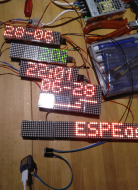
A group of displays showing some different content:
123768877-0511a280-d8c9-11eb-804e-dcccd758186e.jpg

Display contents:
  • Date (DD-MM) with animation
  • Date (YYYY-MM-DD) with animation (scroll left, in progress)
  • Clock (24h), updated every minute, no animation, no flashing colon
  • Date/Time (YYYY-MM-DD HH:mm) with animation (scroll left, in progress)
  • Bar-graph with 3 bars, type 2 (single line) mimicking temperatures (-14, +4, +26) on a +40 to -20 (left to right) scale and a zero-point around 1/3rd from the right (the left module reflected weirdly in the photo, but it does work)
  • Text (ESPEasy is great fun!) with animation (scroll left, in progress)

Top-right is a 'proper power supply', as these displays can use quite some current when many LEDs are lit.
Bottom-left is the ESP8266 controller (a Wemos D1 mini clone)
Between the controller and the bottom display is a level converter for 3V3 to 5V.

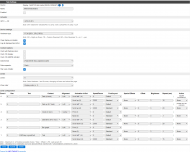
The configuration of the zones: (from the documentation page, linked above)
Screenshot - 03_07_2021 , 22_17_39.png
(For details best visit the official documentation page)

Usage
Installation
  • Download the latest ESPEasy release from the Github releases page.
  • Extract the entire .zip file in an empty folder
  • Start the ESP.Easy.Flasher.exe (Windows) or get the esptool flash tool for other OS-es)
  • Select the .bin file with 'DISPLAY' in the name (either ESP8266 or ESP32, depending on the controller used) or 'MAX' when using an ESP32 with 16 MB Flash
  • Upload the .bin file (for ESP32 initially the '-factory.bin' should be used) to the controller.
  • After successful completion, reset the controller
  • Connect to the WiFi Accesspoint exposed by the unit (ESP-Easy, ESP32 or MAX-ESP32), password 'configesp'
  • Enter the credentials for your WiFi network the ESP controller can connect to (2.4GHz only)
  • Find the ip-address of the using, either by looking at the log available via the USB serial link, your WiFi router or network scanning tool
  • Open a webbrowser with the ip-address to the unit to configure the device
  • On the Devices page add the 'Display - MAX7219 dot matrix' plugin to the task list, give it a name, and configure using the documentation
  • Connect the hardware as suggested in the documentation
  • Enable the plugin, and enjoy the display :D

Uninstallation
Disconnect the device.
Install another firmware on the controller.
Delete all downloaded and extracted files.

Tips
Use a decent power supply to power the displays!

Known Issues
Toying with IoT stuff can be addictive ;D
102
Living Room / Re: When you make your 100'th Post
« Last post by Ath on December 15, 2021, 12:32 AM »
It's been a while since the last message here, but Allen is the next winner in this category:

Screenshot - 15-12-2021 , 07_29_56.png

 :Thmbsup:
103
N.A.N.Y. 2022 / Re: N.A.N.Y 2021: Desktop Maid
« Last post by Ath on December 06, 2021, 05:28 AM »
Your title should say 2022, in 2021 we create NANY 2022 entries Fixed 8)
104
Living Room / Re: Nuclear missile silo keyboard repurposed for usb
« Last post by Ath on December 02, 2021, 12:32 AM »
( can this count as my NANY? :D )
Sure you can :Thmbsup:

But the $64,000 question: Is it usable as a daily driver?
105
N.A.N.Y. 2022 / Re: NANY 2022 Pledge: Something Stupid This Way Comes
« Last post by Ath on November 24, 2021, 03:19 PM »
PBOD - Progress Bars Of Deozaan ;D
106
Screenshot Captor / Re: Capturing an image larger than the screen
« Last post by Ath on November 24, 2021, 02:05 PM »
That should be possible using the Scrolling Window caption, but then select the Manual mode. There are some tutorials available, created by Mouser, but I've never used them, as I've been using these scrolling captures for ages, I know what to do 8)
Does have a little learning curve, but it works like a charm.
107
Screenshot Captor / Re: Mouse hover hints on main window not working
« Last post by Ath on November 16, 2021, 10:15 AM »
Well, then not unimportant: Do tooltips work in other applications?, as there is a global Windows setting that is possibly messed up :tellme:
108
Screenshot Captor / Re: Mouse hover hints on main window not working
« Last post by Ath on November 15, 2021, 12:48 PM »
It is working fine over here, so don't know why it shouldn't work on your system. Do you run SSC As Administrator, by any chance? Or have software active that changes the behavior of the mouse? These may interfere with showing tool-tips.
109
General Software Discussion / Re: Collect data from web
« Last post by Ath on November 12, 2021, 03:09 PM »
Obviously rtila is better, but for me is enough with this now.
Well, as usual with your questions, the solution you choose doesn't have much to do with the question you asked >:(
110
General Software Discussion / Re: Collect data from web
« Last post by Ath on November 10, 2021, 07:01 AM »
How does this:
At the present moment i am happy with email grabber, Only collects email in the most simple way.

Align with the original request in any way ? :
I would like a software able to find data in the web :

What type of software is this and what are the best. Better is free.

?
111
Developer's Corner / Re: 'Trojan Source' bug
« Last post by Ath on November 04, 2021, 04:34 PM »
A couple of days in and VSCode 1.62 has a 'fix' for the issue, by default showing those UTF directional attributes as just that, without interpreting them. And that can be turned off, if desired :up:.
112
Screenshot Captor / Re: Problem with right click menu navigation
« Last post by Ath on November 04, 2021, 02:45 PM »
EDIT: Solved thanks to assistance from the developer of PowerPro.
Anything you can share? Might be helpful for other users that find this thread.
113
General Software Discussion / Re: Record video with the video camera of my laptop
« Last post by Ath on October 25, 2021, 11:52 AM »
Best use for LMGTFY - https://lmgtfy.app/?...mera+of+my+laptop+HP.

Tried that before but it didn't stick  :(
114
General Software Discussion / Re: Record video with the video camera of my laptop
« Last post by Ath on October 25, 2021, 08:41 AM »
A 3 second google search reveals this: https://answers.micr...82-999d-5003a2c78ad8
115
Screenshot Captor / Re: May be a bug?
« Last post by Ath on October 23, 2021, 11:02 AM »
Is that application written in Delphi, by any chance? Especially when using older Delphi versions, applications can behave quite strangely on window 'visibility' to other applications.
116
General Software Discussion / Re: Obtain a scrolling screenshot in any window
« Last post by Ath on October 20, 2021, 07:39 AM »
Screenshot captor does it's ultimate best to try and scroll a target window with any means it has available, but still it doesn't succeed in all situations. Then indeed the Manual method is the solution. It just depends on the way that application is built.
117
General Software Discussion / Re: Collect data from web
« Last post by Ath on October 19, 2021, 01:16 PM »
118
General Software Discussion / Re: Seperate in pages a pdf
« Last post by Ath on October 17, 2021, 10:41 AM »
 >:(
119
Screenshot Captor / Re: shortcut keys not working
« Last post by Ath on June 13, 2021, 06:13 AM »
The first question was the other way around; Is your screenshotcaptor running with administrator rights by accident? In that way it can't intercept the hotkeys from your normal windows user-session.
120
General Software Discussion / Re: Which Windows 10 Updates should be avoided?
« Last post by Ath on June 12, 2021, 09:04 AM »
Is there any chance you can replace the Windows OS on your computer with a Linux distro (too many available to give an example)? Then you won't ever have this dilemma again :tellme:.
121
Screenshot Captor / Re: shortcut keys not working
« Last post by Ath on June 10, 2021, 12:40 PM »
By default, what you want is how it normally works.
Are you running SSC using the Run as Administrator option? (Can be set at the shortcut, manually) or use a replacemant tool for UAC (as deployed in some corporate controled computers)
122
Post New Requests Here / Re: Windows command-line app for Telegra.ph
« Last post by Ath on May 18, 2021, 12:29 AM »
I did try learning and using Autohotkey, but again not luck.
-c.gingerich (May 17, 2021, 03:31 PM)
That is not the easiest one to start with because of its somewhat cryptic syntax; I've dabbled in AutoIt3, but AHK has been a real challenge and I've never really picked that one up (even though I've done quite a few programming languages).
123
Post New Requests Here / Re: Windows command-line app for Telegra.ph
« Last post by Ath on May 17, 2021, 03:22 PM »
What programming language have you tried?
You should use the best tool for the job:
Most suitable to process would be JS (Javascript), as that's what the first 2 letters of the word JSON come from... Node.js should be the way to go for a command-line tool.
Next choice up (assuming a Windows OS) should be C#/.NET as that makes it very easy using one of the JSON libraries (NewtonSoft comes to mind)
And the runner up would probably be Java, but there are some that don't like that (for probably the wrong reasons), where also plenty of libraries are available, org.json and Google GSON are popular choices.
124
Review
Pointing at the start of the thread is probably more useful: Review
125
Do not think I am too dumb to program and use my own tool for that matter.
Please don't get me wrong, I've not tried to suggest even anything near that, sorry if you think I did :huh:


In my humble opinion a program that limit text to a speficific character amount is made for such matter.
Please elaborate, as I do not see any relation between a tool to gather text to be posted in a web form (as initially requested) and a password generator.
Any decent password generator tool has a setting for the length of the password(s), so using this tool to provide a password of a specific length feels counter-intuitive.
Pages: prev1 2 3 4 [5] 6 7 8 9 10 ... 146next