This is what programmers do these days
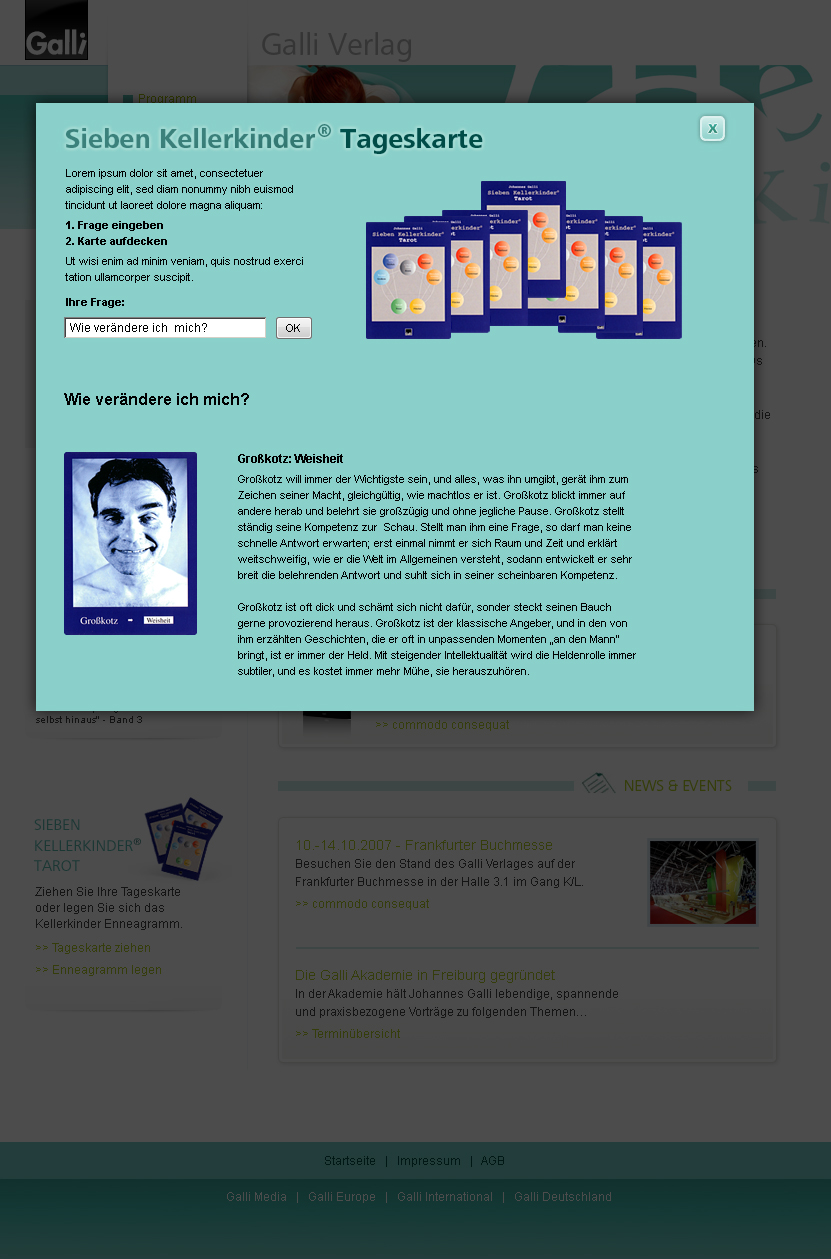
I have to "design" a page with a little DHTML:
They use libraries
I have to use Highslide JS, which I think is quite solid. My page is loaded by highslide; it's a normal .html-page.
The Specs
I have all the images, and the texts, and a few "prototypes" printed on paper. What I don't have is a clue! I thought I know a little about CSS, but I can't for the time of my life figure out how to position those cards like in the prototype.
The card deck is right of the instructions. On the card deck there are 7 cards, 85x117 pixels; they overlap partially and are laid out in an arch (I think thats the word). For three days now I have been struggling to use the proper combination of "position", "top", "left", "margin-left" and "whatnot" to lay out the cards according to specs.
The Problem
I thought this would be easy, but I must be overlooking something.
So, how do I layout the cards with css and add an event handler to each one that raises it by, say, 20 pixels? I think I can hook into that raise-script to display the front of the card (135x183) and its explanation myself.
The Bounty
I don't have any credits left to offer, so I offer my help in setting up secure communications (email, irc, and jabber) as a return.
I have to "design" a page with a little DHTML:
- User inputs question
- Question is displayed below instructions and card deck
- User selects a card from card deck
- selected card is raised
- random card and its explanation are displayed below the re-displayed question
They use libraries
I have to use Highslide JS, which I think is quite solid. My page is loaded by highslide; it's a normal .html-page.
The Specs
I have all the images, and the texts, and a few "prototypes" printed on paper. What I don't have is a clue! I thought I know a little about CSS, but I can't for the time of my life figure out how to position those cards like in the prototype.
The card deck is right of the instructions. On the card deck there are 7 cards, 85x117 pixels; they overlap partially and are laid out in an arch (I think thats the word). For three days now I have been struggling to use the proper combination of "position", "top", "left", "margin-left" and "whatnot" to lay out the cards according to specs.
The Problem
I thought this would be easy, but I must be overlooking something.
So, how do I layout the cards with css and add an event handler to each one that raises it by, say, 20 pixels? I think I can hook into that raise-script to display the front of the card (135x183) and its explanation myself.
The Bounty
I don't have any credits left to offer, so I offer my help in setting up secure communications (email, irc, and jabber) as a return.


 index.php.txt