


 Recent Posts
901
Mini-Reviews by Members / Vivaldi: Promising yet.
« Last post by Tuxman on November 07, 2015, 09:33 AM »Basic Info
Intro:
I've been using Mozilla Firefox since its humble beginnings as Phoenix (from the ashes of the Mozilla Suite). Having been a rather proud user for quite a while, I don't quite like the direction Mozilla is taking, including the oversimplified Australis UI and some other weird decisions; however, the latest beta 43.0 made DownThemAll! 3.0 (beta), one of the last extensions which stuck me to Firefox, not work anymore due to some signing issues. DTA!'s author had already said that he will stop further development when Firefox gets rid of XUL support which will be "soon" anyway.
So, basically, that's the last straw for me. Mozilla is obviously not interested in having me as a user and extension developer anymore, so I'm available for the browser market again. It is a nice coincidence that I have been playing with Vivaldi for a couple of months now. The only thing that held me back was that it is Chromium-based, but since Mozilla is turning Firefox into just another Chrome clone, it really does not matter anymore. (Yes, I am aware of Pale Moon, but I'm not too sure that it will survive although its author claims a bright future.)
Actually, Vivaldi is quite impressive even after some time spent with it.
Who is this app designed for:
Vivaldi is interesting for those who want a nice-looking web browser which offers more options than Edge and looks better than Maxthon. Ramblings aside, Vivaldi was invented by the same guy who was responsible for the pre-Chromium Opera browser, so it can be seen as just another Opera 12 successor, being in a productive competition with Otter (for those who look back to the original experience).
The Good
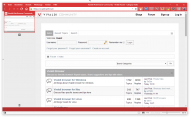
The first thing you'll notice: Tabs on the left side. Tabs with preview thumbnails on them. Tabs on any side you wish. Amazing. Also, the browser window is automatically colored in the favicon's primary color. (This can be turned off.) Additionally, Opera 12's best UI features are present here, including a sidebar panel. (Note that there doesn't seem to be MDI support [yet?], you can only see one tab at a time.) At least the UI is not boring.
Vivaldi also understands most of Chrome's add-ins (see below for why this is not quite complete yet) and it can be configured rather well. It has built-in mouse gestures (I know some people like them, I personally don't) and configurable key shortcuts. The underlying Chromium engine renders pages pretty OK, although on some systems (like mine) you'll have to disable GPU "optimizations" (via vivaldi://flags) to unblur the text. This usually happens with all Blink-based browsers though.
The needs improvement section
Vivaldi is not the fastest browser when it starts. While looking at the running processes, I remember again why Chromium actually sucks so much:
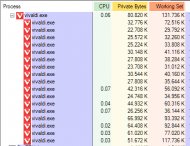
Vivaldi opens one process per active extension and tab, so add-ins like The Great Suspender (basically simulating Firefox behavior) and trying to get all other add-ins fixed so they remain in the background (the Developer View of the add-in manager shows it) will probably help.
While we're at add-ins: I noticed that some add-ins which (theoretically) work with Vivaldi need some refinement. FoxyProxy opens two new tabs after the installation, Xmarks's buttons do not do anything; often those are already known bugs but reporting them will mostly lead to a response. It seems that Vivaldi gains traction by now. I also found one bug in Vivaldi, concerning the vivaldi://flags window, but that was already known too.
TL;DR: Don't expect a bug-free browser environment by now.
Why I think you should use this product
If you don't care too much about Chromium's quirks, Vivaldi might be the best Chromium available.
How does it compare to similar apps
"Similar apps" - in terms of "Opera 12 successors" - are rare, and, as far as I know, all of them are based on Chromium. The most advanced "other one" is Otter which makes a slow progress too, but it has a completely different project direction.
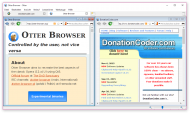
For those who want the real deal (the "original" Opera 12 feeling), Otter might be the better choice. Vivaldi, on the other hand, comes with fresh ideas. I don't know if Vivaldi is, in comparison, "better" than <your favorite browser>, but it's well worth a try.
Conclusions
Vivaldi is the best Opera 12 since Opera 12's demise. 4/5 unless they fix the "needs improvement" part.
| App Name | Vivaldi |
| App URL | http://www.vivaldi.com |
| App Version Reviewed | 1.0.303.52 (Beta) |
| Supported OSes | Windows, OS X, Linux (unknown minimum versions) |
| Support Methods | Forums and a (write-only) bug tracker as well as a quite helpful IRC channel |
| Upgrade Policy | Free updates (for now) |
| Pricing Scheme | Freeware (for now) |
| Screencast Video URL | https://www.youtube..../watch?v=qaaOfO4p348 |
Intro:
I've been using Mozilla Firefox since its humble beginnings as Phoenix (from the ashes of the Mozilla Suite). Having been a rather proud user for quite a while, I don't quite like the direction Mozilla is taking, including the oversimplified Australis UI and some other weird decisions; however, the latest beta 43.0 made DownThemAll! 3.0 (beta), one of the last extensions which stuck me to Firefox, not work anymore due to some signing issues. DTA!'s author had already said that he will stop further development when Firefox gets rid of XUL support which will be "soon" anyway.
So, basically, that's the last straw for me. Mozilla is obviously not interested in having me as a user and extension developer anymore, so I'm available for the browser market again. It is a nice coincidence that I have been playing with Vivaldi for a couple of months now. The only thing that held me back was that it is Chromium-based, but since Mozilla is turning Firefox into just another Chrome clone, it really does not matter anymore. (Yes, I am aware of Pale Moon, but I'm not too sure that it will survive although its author claims a bright future.)
Actually, Vivaldi is quite impressive even after some time spent with it.
Who is this app designed for:
Vivaldi is interesting for those who want a nice-looking web browser which offers more options than Edge and looks better than Maxthon.
Ramblings aside, Vivaldi was invented by the same guy who was responsible for the pre-Chromium Opera browser, so it can be seen as just another Opera 12 successor, being in a productive competition with Otter (for those who look back to the original experience).The Good
The first thing you'll notice: Tabs on the left side. Tabs with preview thumbnails on them. Tabs on any side you wish. Amazing.
Also, the browser window is automatically colored in the favicon's primary color. (This can be turned off.) Additionally, Opera 12's best UI features are present here, including a sidebar panel. (Note that there doesn't seem to be MDI support [yet?], you can only see one tab at a time.) At least the UI is not boring.Vivaldi also understands most of Chrome's add-ins (see below for why this is not quite complete yet) and it can be configured rather well. It has built-in mouse gestures (I know some people like them, I personally don't) and configurable key shortcuts. The underlying Chromium engine renders pages pretty OK, although on some systems (like mine) you'll have to disable GPU "optimizations" (via vivaldi://flags) to unblur the text. This usually happens with all Blink-based browsers though.
The needs improvement section
Vivaldi is not the fastest browser when it starts. While looking at the running processes, I remember again why Chromium actually sucks so much:
Vivaldi opens one process per active extension and tab, so add-ins like The Great Suspender (basically simulating Firefox behavior) and trying to get all other add-ins fixed so they remain in the background (the Developer View of the add-in manager shows it) will probably help.
While we're at add-ins: I noticed that some add-ins which (theoretically) work with Vivaldi need some refinement. FoxyProxy opens two new tabs after the installation, Xmarks's buttons do not do anything; often those are already known bugs but reporting them will mostly lead to a response. It seems that Vivaldi gains traction by now. I also found one bug in Vivaldi, concerning the vivaldi://flags window, but that was already known too.
TL;DR: Don't expect a bug-free browser environment by now.
Why I think you should use this product
If you don't care too much about Chromium's quirks, Vivaldi might be the best Chromium available.
How does it compare to similar apps
"Similar apps" - in terms of "Opera 12 successors" - are rare, and, as far as I know, all of them are based on Chromium. The most advanced "other one" is Otter which makes a slow progress too, but it has a completely different project direction.
For those who want the real deal (the "original" Opera 12 feeling), Otter might be the better choice. Vivaldi, on the other hand, comes with fresh ideas. I don't know if Vivaldi is, in comparison, "better" than <your favorite browser>, but it's well worth a try.
Conclusions
Vivaldi is the best Opera 12 since Opera 12's demise. 4/5 unless they fix the "needs improvement" part.


