topbanner_forum
  *

avatar image

Welcome, Guest. Please login or register.
Did you miss your activation email?

Login with username, password and session length
  • Saturday September 19, 2026, 5:49 am
  • Proudly celebrating 15+ years online.
  • Donate now to become a lifetime supporting member of the site and get a non-expiring license key for all of our programs.
  • donate

Recent Posts

Pages: prev1 ... 12 13 14 15 16 [17] 18 19 20 21 22 ... 404next
401
Same here.  It also gets me into my work systems from home without having to either (a) use their machine or (b) give them access to mine.  I set up a VM using VirtualBox, connect to VPN from there, and then RDP into my work box.  The other options are nice in a bind, and I've used them before.  But RDP is my choice when it's available.
402
There are enough free software tools, already mentioned above, that don't need a Windows Pro license.

I think that she was just offering an alternative.  If they have a pro license already, then this is the path of least resistance.
403
Hey, what's your Youtube channel abour?

https://www.donation....msg443025#msg443025

That's the thread in which he introduces the project.


I might aughta play with some of this stuff one of these days - But the (lack of IoT security) paranoid in me makes it difficult

Because of that, there are some things I won't use IOT, but others... if someone turns my lights on and off, I don't really care.  I just keep it behind a firewall on a different subnet.
404
Yeah! ...I'm not crazy.

Something like this perhaps?

Same thing as what I mentioned above- just a different brand :)
405
While doing a livestream on my youtube channel i realized it would be nice to have a dedicated little light bulb that could be triggered to turn on in certain events, like if a certain person used a certain keyword in the chat, etc.

It would be nice to have a programmable little piece of lightup hardware (arduino? raspberry pi?) for such purposes..

I did something similar using a hacked Amazon Dash Button, A simple smart outlet, and IFTTT.

Since you're just using twitch notifications, you don't need the button to send the signal... hook it up to the twitch actions to hit the Meross smart plug in IFTTT.

And those are just the prebuilt actions.  If you have a pro account on IFTTT, you can create custom actions, and use webhooks from the Twitch API

The IFTTT options for Twitch -

ifthis.png

Lifx bulbs are a bit more expensive, but I prefer those to the plugs.

You can also set up chat bots to listen for certain things in chat- refer to the API reference:  https://dev.twitch.tv/docs/irc

406
Living Room / Re: My new project is now live: Co-op For Two on YouTube
« Last post by wraith808 on January 12, 2021, 08:05 AM »
This sound scary but youtube probably recommended me your video and I watched it without knowing it was you.

I'm surprised now after read this post.

Perhaps from your browsing habits they know that you visit this forum?  It would be interesting to see the link that they drew, and how they did it.
407
General Software Discussion / Re: Windows 10 Announced
« Last post by wraith808 on January 08, 2021, 11:55 AM »
You can't set microsoft accounts to be no password enabled.  The best you can do is set it to use a Pin.
408
N.A.N.Y. 2021 / Re: NANY 2021: yaydl
« Last post by wraith808 on January 08, 2021, 07:40 AM »
Also found some more relative url without a base, but you know that already :(
409
N.A.N.Y. 2021 / Re: NANY 2021: yaydl
« Last post by wraith808 on January 08, 2021, 07:28 AM »
Another one for you -

> yaydl "https://www.youtube..../watch?v=bS4Q-WWyl3Q" --only-audio
Fetching from YouTube.
thread 'main' panicked at 'Could not find ffmpeg - no processing is done.: Os { code: 2, kind: NotFound, message: "The system cannot find the file specified." }', src\ffmpeg.rs:34:10
note: run with `RUST_BACKTRACE=1` environment variable to display a backtrace


Checking the source I see that you're just using the system's ffmpeg - should probably be listed as a requirement above.
410
N.A.N.Y. 2021 / Re: N.A.N.Y. 2021 - Alternate Mug Design
« Last post by wraith808 on January 07, 2021, 11:26 AM »
It's still happening.  My daughter… 

Fingers crossed for a good recovery!
-cranioscopical (January 07, 2021, 10:28 AM)

Her boyfriend is actually active military, so they test them really quickly.  The quick results said no COVID, so hoping that the long-term results say the same.  He was diagnosed with Strep Throat, though that doesn't explain all the symptoms.  I have hopes that the other test comes back negative also, but they say that the quick results can give false negatives.  He's still quarantined and has to stay off-base.
411
N.A.N.Y. 2021 / Re: N.A.N.Y. 2021 - Alternate Mug Design
« Last post by wraith808 on January 06, 2021, 04:01 PM »
It's still happening.  My daughter and her boyfriend might have it right now... both are really sick and quarantining.  My son might also have it from a different vector at work.  Thankfully, in both cases, they're covered by their jobs.  We're not through this by a long shot.
412
N.A.N.Y. 2021 / Re: N.A.N.Y. 2021 - Alternate Mug Design
« Last post by wraith808 on January 06, 2021, 02:59 PM »
Shouldn't that say 2020?

No... the New Year is 2021 :)
413
N.A.N.Y. 2021 / Re: NANY 2021: yaydl
« Last post by wraith808 on January 06, 2021, 02:55 PM »
You slept as ordered.
414
N.A.N.Y. 2021 / Re: Welcome to NANY 2021
« Last post by wraith808 on January 04, 2021, 02:35 PM »
Stopped being shipped?  What is that a reference to?

The vendor increasingly failed to ship the mugs to me (must be a problem with Germany) every year until NANY 2020 when I did not receive any shipment at all.

So, well, as I said: I don’t do it for the mugs. I won’t get any anyway.  ;D

If the mug/vendor isn't working you can also get credit for the amount.  I've done that a few years, as I'm running out space for mugs.
415
N.A.N.Y. 2021 / Re: Welcome to NANY 2021
« Last post by wraith808 on January 04, 2021, 10:12 AM »
Haha, as if the mugs would actually exist... they stopped being shipped last year!  :P

Thank you for another round of NANY, everyone!


Stopped being shipped?  What is that a reference to?
416
Living Room / Re: Gadget WEEKENDS
« Last post by wraith808 on January 02, 2021, 10:04 PM »
I ordered the capture card and the converter cable, and they should be here on Sunday.  I'll try it and see how that goes before looking into any other options.
Keen to hear how well it works. Including which Android app to use - there are a few in the in Google Play and some appear to show ads.

So it worked quite well, with negligible perceived lag!
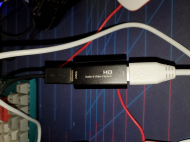
20210102_224943-1280x960.jpg
The cable connection- the HDMI from the Pi is at the bottom, then the capture card, then the adapter (used micro usb as that's what my old Samsung tablet has)
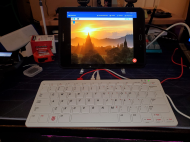
20210102_224932-1280x960.jpg
So when I first connected it, it asked if I wanted to open the app, and had a tick for always perform this action, which I did not tick.  After that, a dialog warning to safely disconnect came up.  I went ahead and connected- bad choice.  As soon as I connected, I couldn't click the dialog as its over the display area.  I had to reboot and try again, clicking the dialog before I connected the Pi.  It comes up not in full screen, but if you tap the display, it expands.  Tap it again to unexpand.
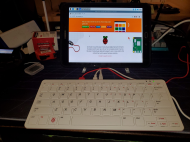
20210102_225253-1280x960.jpg
The Pi fullscreen.

20210102_225309-1280x959.jpg
A closer view of the screen.

I used USB Camera Pro - Connect EasyCap or USB WebCam (https://play.google....p;hl=en_US&gl=US).  They have a free version with ads, but with the refund policy on the play store, I figured I'd just go with the regular one, see if it worked, and if so keep it.  Better than even starting out with ads as it was only $5.49US.

micro usb to HDMI - https://smile.amazon.../product/B00LN3LQKQ/
capture card - https://smile.amazon.../product/B08CH9FC22/
usb-c to HDMI - https://smile.amazon.../product/B072V9CNTK/

The capture card appears to be out of stock right now :(  This looks like the same one - https://smile.amazon.com/dp/B08CXMLZCY/.  It's about $5USD more than I paid though.
417
2020.  Don't cry because it's over.  Cry because it happened.
418
Hey. Hey guys? Hindsight is actually 2020 now.
419
N.A.N.Y. 2021 / Re: NANY 2021: Wox Rolz Die Roller Plugin
« Last post by wraith808 on January 01, 2021, 02:12 PM »
Yeah... I was just trying to get something that would be quick to reference when I needed a roll rather than going to the full-fledged site or opening an app.  That does look cool though! 
420
Living Room / Re: Show us a picture of your.. CAR!!!
« Last post by wraith808 on January 01, 2021, 02:05 PM »
Necro-thread arise! Again!

I just remembered the Elio again. Checking out their website, it looks like the last update was just over a year ago, in December 2019.

After the past several years of "it will be released next year" it seems pretty likely that they'll never be more than vaporware. :(

It's a shame because I really liked the concept and wanted to get one. I hope people who prepaid are being compensated or reimbursed somehow.

Not to my knowledge.  I only went in for $150, but I've heard nothing from them.  That was one of the reasons I just took the lowest reservation level.  As of today, the membership reservation site is not responding, but this was the first time I'd checked in a while, so it's possible that this is just transient (though I doubt it, as other sub-domains are down, also).  But I'd given up on this a while ago.  Their valuation is very low right now, and the stock even lower, trading at $1.24 (though that's better than the lowest, when it was in spitting distance of penny stock range).  It spiked for some reason in November, but I don't know why that was.

A pretty good article - https://www.makestha...ht-around-the-corner

Checking in at the owners' site, no one there seems to think much of the chances of this materializing either - https://www.elioowners.com/

It's sad that many of them are in for the full price of the car :(
421
Living Room / Re: My new project is now live: Co-op For Two on YouTube
« Last post by wraith808 on January 01, 2021, 01:56 PM »
That looks great!  A friend and I tried to do something similar for video games, but haven't gotten it down yet.  I love how you have the playthrough and review videos separated. A suggestion to possibly grab some of those people that just value your opinions, you have a TL;DR section at the beginning of the review videos.
422
Living Room / Re: Gadget WEEKENDS
« Last post by wraith808 on December 31, 2020, 10:23 PM »
I ordered the capture card and the converter cable, and they should be here on Sunday.  I'll try it and see how that goes before looking into any other options.
423
Living Room / Re: Gadget WEEKENDS
« Last post by wraith808 on December 31, 2020, 05:25 PM »
I'm officially confused.  The original video was about setting up a display that's not a display for the raspberry pi, which was really interested in, and thanks for the video.  The other things were a tangent I guess?  I think?  Maybe?  I dunno.

  • A tablet is not a display for the Raspberry Pi.
  • If you use an HDMI -> USB -> USB OTG converter, and your tablet supports USB webcams, you can wire up the tablet to be a display for the Raspberry Pi.
  • Or if you use remote desktop software like AnyDesk, you can accomplish the same thing wirelessly.


The video was about using a tablet as a display for a Raspberry Pi.  I, of course, know that a tablet is not by design a display for a Raspberry Pi.  But the video was about repurposing a tablet in a unique manner.  Therefore, I thought that everything else, since it was answering that post, was about that.  Anydesk lets you remote into the raspberry pi.  I have an all in one raspberry pi, so it has a keyboard attached, and a mouse on it.  That wouldn't work for me, as i said before, so I wasn't interested in that.

I hope we can lay this to bed at this time.  The thread went off on a tangent, and I got a bit confused by that.

Onward!  :Thmbsup:
424
N.A.N.Y. 2021 / NANY 2021: Wox Rolz Die Roller Plugin
« Last post by wraith808 on December 31, 2020, 02:31 PM »
NANY 2021 Entry Information

Application Name Wox Rolz Die Roller Plugin
Version 1.0.0
Short Description Plugin for the Wox launcher that uses Rolz.org to roll dice and show the results.
Supported OSes Windows on any version that Wox is supported on
Web Page http://thinkshui.net...wox-rolz-die-roller/
Download Link https://u.pcloud.lin...Mr7aafRwEpQANm1yot0X
System Requirements: Same as Wox
Version History
  • 2020-12-31 - 1.0.0 - Initial Release
Author wraith808


Description
I just started using the Wox Launcher, and think it might be my new launcher of choice. I use Rolz.org a lot for rolling dice for RPGs, and figured that a good project for a plugin was to allow the use of the API from within Wox Launcher.

Installation
Either download the plugin package from my site and drag it onto the search screen or install it directly from search by typing

Code: Text [Select]
  1. wpm install Rolz Roller
 

The plugin page can be found at http://www.wox.one/plugin/352.

How to Use
The keyword for the roller is rolz, and it uses the same syntax shown on https://rolz.org/. Click the result to copy the text to the keyboard. A sample query is shown below:

Rolz Roller Screenshot.png
425
Living Room / Re: Gadget WEEKENDS
« Last post by wraith808 on December 31, 2020, 08:22 AM »
I'm officially confused.  The original video was about setting up a display that's not a display for the raspberry pi, which was really interested in, and thanks for the video.  The other things were a tangent I guess?  I think?  Maybe?  I dunno.
Pages: prev1 ... 12 13 14 15 16 [17] 18 19 20 21 22 ... 404next