topbanner_forum
  *

avatar image

Welcome, Guest. Please login or register.
Did you miss your activation email?

Login with username, password and session length
  • Saturday September 19, 2026, 4:04 pm
  • Proudly celebrating 15+ years online.
  • Donate now to become a lifetime supporting member of the site and get a non-expiring license key for all of our programs.
  • donate

Recent Posts

Pages: prev1 ... 144 145 146 147 148 [149] 150 151 152 153 154 ... 1515next
3701
Mouser's Zone / Re: Bug report: automatic screenshotter stops
« Last post by mouser on May 03, 2017, 03:31 AM »
Yeah that's worth looking at.

Here's the Process Explorer download page: https://technet.micr...processexplorer.aspx

What you want to do is double-click on ScreenshotCaptor.exe to bring up the properties dialog and then click the "Performance" tab to give you something like this:
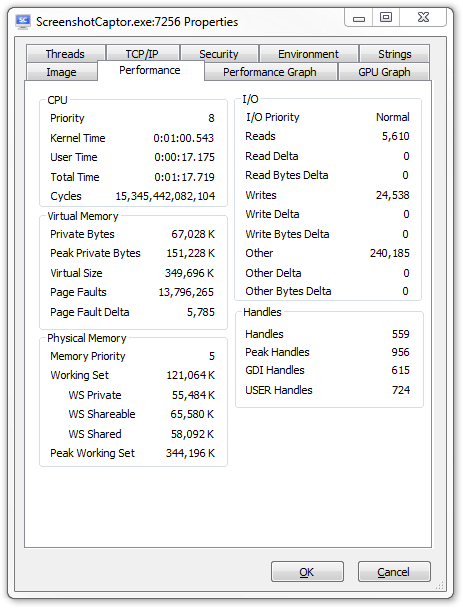
Screenshot - 5_3_2017 , 3_36_00 AM.png

What we care about most are the "Handles" values.

Since you report that "The most recent time it hung, it had created 1034 files in the first day's directory and then switched to the second day and had created 694 files in there before it stopped", it would be interesting to see the Process Explorer handles numbers at 4 times:
  • 1. When the program starts up.
  • 2. After about 500 screenshots.
  • 3. After about 1000 screenshots.
  • 4. When it hangs.
3702
LaunchBar Commander / Re: Icon - Custom on Files & Font Size
« Last post by mouser on May 02, 2017, 07:48 PM »
Can I set my own icon for the text file that is shown in the menu?.. Can i set a custom icon to each file type thats shown in a directory
No and that is not likely to be something I would add.

How do I make the fontsize of the icons text larger
There is no way to change the icons in the menus YET, but that sounds like something I could add.
3703
Mouser's Zone / Re: Bug report: automatic screenshotter stops
« Last post by mouser on May 02, 2017, 02:00 PM »
And you say the icon is the red color that it normally only briefly turns while capturing?
I think the best way to identify the problem -- if you are willing -- is for me to send you a debug version that will log some messages to a file while it's running and help me see where it gets stuck.
3704
Living Room / Re: Animal Friends thread
« Last post by mouser on May 01, 2017, 07:27 PM »
This helpful dog makes me laugh:
3705
I can vouch for him as an honest and responsible person.

We all could have told you that :)
3706
Mouser's Zone / Re: Bug report: automatic screenshotter stops
« Last post by mouser on May 01, 2017, 04:44 PM »
Question:
Are you using filenames (or folders) with dates+times in them, or by chance are you using filenames that are identical other the automatic numbering?

I'll have to set up a test myself to see what might be causing the trouble.  One thing that would be useful to know is if the hanging happens after X number of shots (regardless of the speed of capturing), or if it's happening after some amount of time, even if its only capturing once per hour for example.

Another possibility might be that screenshotting is failing when the pc goes to sleep or something... It may be that that is what the problem is -- I should be able to fix it if I can narrow down the proximal cause..
3707
Screenshot Captor / Re: Show current printer when printing image
« Last post by mouser on May 01, 2017, 02:15 PM »
That's a nice idea.  I'll put it on my todo list.
3708
You are probably right, I will change it.
3709
Check the "Blend mode" and try "normal" or "multiply".
And make sure transparency is set to 255.
3710
Android Apps / Re: WhenLast (Android app) - v2.14 Beta - Dec 31, 2016
« Last post by mouser on April 29, 2017, 09:50 PM »
Sure it does!
3711
Screenshot Captor / Re: problem with screenshot captor automatic mode
« Last post by mouser on April 29, 2017, 01:51 PM »
I'll have a look -- sounds like it might be a little tricky to pin down the problem due to how long it will take to reproduce.
Hopefully Automatic Screenshotter will solve your problems and be even better.
3712
Android Apps / Re: WhenLast (Android app) - v2.14 Beta - Dec 31, 2016
« Last post by mouser on April 29, 2017, 01:47 PM »
Yeah EXPORT just wants to save a file somewhere.  You have to copy that file to your new phone somehow and then import it.
The other alternative of course is the SYNC mechanism.
3713
Screenshot Captor / Re: feature requests for automatic capture mode
« Last post by mouser on April 29, 2017, 01:46 PM »
Agreed. Will do.
Though Automatic Screenshotter is a far better tool for this kind of thing -- I wrote it specifically for folks who were using Screenshot Captor to to automatic capturing :)
3714
Screenshot Captor / Re: feature requests for automatic capture mode
« Last post by mouser on April 28, 2017, 08:30 PM »
Yep. Automatic Screenshotter sounds like what you want  :up:
3715
I stand corrected -- I was finding JPG files too.

Seems PNG searching is not working in xnview OR I am misunderstanding something.
3716
N.A.N.Y. 2008 / Re: Coin Jar Calculator
« Last post by mouser on April 27, 2017, 08:37 PM »
Hamradio's CoincCalc has been going strong for 10 years.
It's fun to read the comments:
http://www.coincalc....?start=0&search=
3717
General Software Discussion / Re: Navicat Warning
« Last post by mouser on April 27, 2017, 06:45 PM »
Just wanted to say thank you for taking the time to post your review  :up:
3718
Living Room / Re: Animal Friends thread
« Last post by mouser on April 26, 2017, 06:59 PM »
This guys was in hospital for over a month and lost 50 pounds.  At first his dog doesn't recognize him and is suspicious:


The reaction when he finally recognizes him is priceless.


from http://boingboing.ne...s-with-suspicio.html
3719
Ok I see now that when SC saves to jpg, tiff, gif, it puts it into the standard "comment" field.
But when saving PNG files, SC puts it into a "png key" called "Description".
So the trick when searching is to search the Description tag (maybe called Caption for some apps?)

For example xnview CAN see the description but lists it under IPTC tag of "Caption".

For example in xnview:
Screenshot - 4_26_2017 , 6_22_42 PM.png
3720
Screenshot Captor / Re: Too Many Entries in System Settings
« Last post by mouser on April 26, 2017, 01:46 PM »
3721
Screenshot Captor / Re: Too Many Entries in System Settings
« Last post by mouser on April 26, 2017, 01:44 PM »
I'm guessing that there may be something missing from the uninstall program that isn't removing the program completely
Based on the original post, even when SC is being used PORTABLY, without any installer, the poster was having this same problem.
So it would seem to be an issue that only effects rare people, and has nothing to do with the installer.  But what is causing it is a mystery?
Are you always installing it and running it from the same place?
3722
Clipboard Help+Spell / Re: Presets not pulling highlighted text [Issue/Bug]
« Last post by mouser on April 26, 2017, 05:57 AM »
I tested here (in notepad on Windows 7) and it still worked..
Can you tell me a little bit more about how you are triggering the application of the preset?
Are you doing it in a 3rd party application?
3723
Last week Bloomberg published an article exposing how easy it is to “hack” Juicero’s produce packs by squeezing them with your hands, deeming the $699 (now $399) WiFi-connected juice press completely unnecessary. Nearly overnight, Juicero has become the posterchild for Silicon Valley excess....

I hope this post serves as a lesson to other hardware startups that spending tens of millions of dollars on product development prior to shipping a single unit is a goal that’s not worth striving for.

Juicero’s Press is an incredibly complicated piece of engineering. Of the hundreds of consumer products I’ve taken apart over the years, this is easily among the top 5% on the complexity scale.

3724
I've posted before about how I had the most amazing time playing the board game Pandemic Legacy.
Pandemic (2007) is one of the most famous cooperative board games, and it is a great game in its own right.  But the idea of a Legacy game is to add elements to the game that change each time you play it.
Stickers are applied to cards, new boxes are opened revealing new pieces to play with, and new surprises are unveiled as an ongoing story unfolds over the course of a 12-24 games.

It is an incredible experience -- by far the best gaming experience I've hard in decades of playing board games.

It really makes me want to get into making one of these kinds of games..

Anyway, the designers of Pandemic Legacy recently gave a couple of talks on the development of the game, and the talks are surprisingly insightful and useful for anyone considering working on this kind of thing, and I hadn't realized how seriously they considered some of the issues that just seemed to flow naturally during the course of the games..

Highly recommended for anyone interested in this kind of thing..

Video 1:


Video 2:
http://gdcvault.com/...y-Games-From-Risk-to
3725
I've promoted v2.42 beta to an official release.

v2.42.0 - April 25, 2017
  • [Improvement] Deleting clip(s) keeps the selection where it was, does not move the list of clips to top or bottom; other situations where clip list position was lost are now fixed as well.
  • [BugFix] Custom group filter sql expressions were being capped at 500 character length.
  • [Improvement] Statusbar now shows linecount of each clip.
  • [BugFix] When StayOnTop option is set (View menu), some dialogs were showing behind the main form.
  • [Feature] New (customizable) hotkey to quickly toggle clipboard monitoring on and off.
  • [Improvement] The hotkey that used to be used to trigger a copy even when CHS monitoring is disabled now does double duty, and can be used to tell CHS to trigger a copy and *NOT* store the clip if CHS monitoring is enabled.
Pages: prev1 ... 144 145 146 147 148 [149] 150 151 152 153 154 ... 1515next