topbanner_forum
  *

avatar image

Welcome, Guest. Please login or register.
Did you miss your activation email?

Login with username, password and session length
  • Thursday March 19, 2026, 7:57 am
  • Proudly celebrating 15+ years online.
  • Donate now to become a lifetime supporting member of the site and get a non-expiring license key for all of our programs.
  • donate

Recent Posts

Pages: prev1 ... 118 119 120 121 122 [123] 124 125 126 127 128 ... 386next
3051
Living Room / Re: Do we have any musical people on DC?
« Last post by Deozaan on March 12, 2015, 09:34 PM »
Or there's this one:

Ever wonder why all those pop songs sound kinda the same? Well, it's pretty simple; They all use the same 4 Chords!

3052
Don't know if it's specific to my phone, (which is basically the same as the A6000 with a lower screen resolution), but if you go to Settings->Networked apps you can set which apps you've downloaded have access to Mobile Data and/or Wi-Fi.

On my devices, it's Settings -> Data Usage -> [3 dots menu in top-right corner] -> Mobile hotspots.

Then you can put a checkmark on any SSID that should be considered a mobile hotspot, which will restrict apps from downloading from that SSID in the background. (e.g., no Google Play Store app updates automatically downloading unless you specifically open the Google Play Store)
3053
Somehow the URL is missing an "s?" in the middle of it:

https://play.google....onelycatgames.Xplore
3054
Living Room / Re: Stuff you need to know
« Last post by Deozaan on March 12, 2015, 11:14 AM »
A friend fooled me with the title of this composition.
What did you think it was about?

Exactly what it is. A bunch of partial truths and feel-goodisms you'd likely find on Buzzfeed or other clickbait websites.
3055
Your problem is that you have Android KitKat and under that you're severely limited in where apps can write to the SD card.  You'd either have to keep using the system default file manager, root the device to change the external media write policy, or upgrade to Android Lollipop.
One word of caution about upgrading to Lollipop.  I've been reading some of the Android Central forums, as well as some forums for specific Android apps, and there have been LOTS of complaints about Lollipop, including a number of people reporting that it rendered their tablets or phones useless.  It's true that some people are happy with Lollipop, but there were so many people reporting serious problems that I decided not to upgrade when I had the chance to do so.   When I say Lollipop, I'm referring to Android 5.0, 5.01, and 5.02.  There are reports that 5.1 will soon be available.  Given the reports on 5.0, 5.01, and 5.02, I'm planning to wait to see whether Google finally got it right with 5.1 before I install it.  You might be wise to wait as well.

Lollipop didn't render my tablet useless, but it removed some features (such as silent mode and automatically adjusting brightness) and made other things I access multiple times each day more cumbersome to deal with. The little annoyances with Lollipop added up and after a couple of months I'd had enough, so I reverted back to KitKat.
3056
I want system wide recycle bin. Any suggestion ?

Don't delete anything except when you're using ES File Explorer. (c:
3057
1. Backup and Restore - At least photo, videos and contacts, if not sms and notes etc.

Titanium Backup (requires root).

I always root my device, and this is a very useful tool. But if you can't/don't want to root, you can also try Helium Backup which doesn't require root. I've never used it so I can't vouch for it, but I've used plenty of other apps by Koushik Dutta AKA ClockworkMod and he's a pretty good developer.


2. Undelete or Recycle option - To restore files deleted by mistake.

ES File Manager, as suggested by others.

4. Quick note taking - Simple, may or may not have voice note mode.

Google Keep or Evernote

5. PDF reader - Small just for reading pdf files.

Google Drive, Google Play Books, or I think even ES File Manager has a PDF reader.

6. Calender task and reminder on home screen

Google Calendar (use the widget to show it on your home screen).

Also, take a look at Chronus if your device allows you to customize your lock screen. It's nice to see the clock, the weather, and upcoming calendar items all at once.
3058
Cool. Thanks for the tip about Camelizer.
3059
General Software Discussion / Re: Avoid AdBlock Plus for Android!
« Last post by Deozaan on March 08, 2015, 01:18 PM »
I've used AdAway and AdFree in the past, but for some reason I can't get them to block ads anymore, so that's why I installed ABDfA. In fact, I still have AdAway and Adfree installed. Yet nothing seems to block ads on my Nexus 7 2013 so I guess I might as well uninstall it all.

I once had an Android device that was in that state. Finally had to do a reinstall/'factory reset' and then AdAway worked once more.

I remember ad blocking broke when I updated the OS to KitKat. It had something to do with the location of the hosts file changing or something similar. I managed to get it to work again using AdAway in combination with Adfree. But then I updated my tablet to Lollipop and ad blocking stopped working again. Lollipop had too many bugs and annoyances, so I "retrograded" back to KitKat (Cyanogenmod 11) but I still can't get ad blocking to work.
3060
Living Room / Re: Use a unique password for this site
« Last post by Deozaan on March 06, 2015, 11:48 PM »
@Deozaan: That is not the default address, unless maybe you use that HTTPEverywhere extension.

It defaults to HTTP.

So sorry to have brought this up. It's legit though.

I still don't get what the big deal is, or why you're freaking out about it. It's pretty obvious that you're not going to have an encrypted connection if you don't use https.

It's a discussion board. It's not your bank account.
3061
Living Room / Re: Use a unique password for this site
« Last post by Deozaan on March 06, 2015, 11:41 PM »
I have no idea what you're talking about. I see the connection is encrypted when I visit this page:

https://www.donation....com/forum/index.php

Make sure you're visiting the https site, and not just http.

Though, because I'm not using https myself, it is stripping the S from the https when I paste the link... Which I think means it will be there for anyone else who is using https.

Screenshot - 15-03-06, 22-42-54.png
3062
General Software Discussion / Re: Avoid AdBlock Plus for Android!
« Last post by Deozaan on March 04, 2015, 08:37 PM »
I used to never see ads in the browser or before YouTube videos, or in other apps. Now they're everywhere. In apps, in the browser, before YouTube videos. Everywhere.
3063
DC Gamer Club / Re: GOG insomnia sale- with a twist!
« Last post by Deozaan on March 04, 2015, 07:17 PM »
Not I.

I either already own most of the games from GOG that I feel are must-haves, or I haven't seen any in the sales that interest me enough to jump on the sales.

EDIT: As soon as I posted this, I checked and saw one of the "cards" flip over to a new sale and I decided to grab it. :D
3064
General Software Discussion / Re: Avoid AdBlock Plus for Android!
« Last post by Deozaan on March 04, 2015, 07:12 PM »
Appears to be an issue that has been raised before:

https://adblockplus....iewtopic.php?t=11849

https://adblockplus.org/en/android-faq
Why does Adblock Plus appear to consume so much traffic?
To filter ads, all traffic has to pass through Adblock Plus. Android considers this to be the traffic caused by the app, while it is in reality the sum of all traffic.

Note that the posters on that thread still don't seem in agreement about the nature of the bandwidth.. some say adblock plus is eating bandwidth, some say its just a reporting problem..

That link led to this one, which may be a major contributor to the issues I'm noticing:

I installed Adblock Plus yesterday before watching some streaming video in MxPlayer on the bus ride home. After seeking a few times to get to my place in the video, I was able to watch a few minutes of video, but was running into major buffering issues. I got through maybe 5 minutes of video over 15-20 minutes. After, I stopped watching the video, I noticed that Adblock Plus was still downloading.

When I got home, I saw that Adblock Plus had used 550MB of data, over the half hour that I had it installed. The entire video would have been around 200MB. I'm wondering if there is an issue with Adblock Plus not terminating connections, and that it continued to download the different parts of the video stream after I had seeked to a different position. This would explain the bandwidth usage and the buffering issues. There were no other applications installed that would have been using that much data. After uninstalling Adblock Plus, the issue went away.

It seems Adblock may not terminate the connection when dealing with streaming video, so if you do any seeking, the video will continue to download to completion from where you were before seeking, as well as to the place you were after seeking. And if you seek multiple times, you're creating multiple simultaneous download streams that eat up data like crazy!

FWIW, I use AdAway which updates the hosts file to loopback any ad servers - probably not as all-encompassing as ABPfA is supposed to be but then it doesn't use any CPU cycles or data unless I'm running it to update the hosts file.

I've used AdAway and AdFree in the past, but for some reason I can't get them to block ads anymore, so that's why I installed ABDfA. In fact, I still have AdAway and Adfree installed. Yet nothing seems to block ads on my Nexus 7 2013 so I guess I might as well uninstall it all.
3065
And now an announcement by Valve that the next version of their game engine, Source 2, will be free for developers:

Valve’s sudden entry into the engine race, with an official announcement of Source 2, seems to have put them right up front alongside frenzied rivals Unity and Unreal. (Poor old Crytek, eh?) Meeting with studio founder Erik Johnson today, I learned that when they say Source 2 is “free”, they mean it. Unlike Unity’s (much lowered) subscription rates (for larger teams), and Epic’s revenue cut of successful projects, Valve won’t be asking for any money at all. Well, sort of… They just require that the game be launched on Steam, along with anywhere else you might want to sell it.

That’s pretty huge. But it’s important to point out it’s also pretty smart. In real-terms, it does mean Valve are going to be getting – in fact – 30% of your revenue, as is standard for anything sold on Steam. However, and crucially, developers are going to be free to also sell their game anywhere else, which means you can also use stores that take far lower cuts. Use Source 2, put your game on Steam and take advantage of Steamworks, the community features, and so on, but direct all your customers to your Humble store where only see 5% won’t reach you.


from Rock, Paper, Shotgun
3066
General Software Discussion / Re: Avoid AdBlock Plus for Android!
« Last post by Deozaan on March 04, 2015, 05:57 PM »
I suppose that if it is something like what mouser explained, it's not that the bandwidth was counted wrong. I compared the bandwidth on certain dates with my router's bandwidth log and they match up. But perhaps the bandwidth on my tablet was attributed to the wrong source? I suppose it's possible that the majority of that bandwidth belongs to the Netflix app, as my wife does like having Netflix going while she's doing other things.

But I still don't understand how it could do that. First of all, the Netflix app doesn't have any ads. Secondly, she has a separate user account on my tablet, so it calculates her bandwidth separately than mine. Additionally, AdBlock Plus isn't installed for her on her account, so it shouldn't be filtering her Netflix app anyway.
3067
General Software Discussion / Avoid AdBlock Plus for Android!
« Last post by Deozaan on March 04, 2015, 01:34 PM »
Hi folks,

Today my mom asked me how to check how much data she was using on her phone, so while I was walking her through the process, I followed the steps on my own tablet and came to a shocking discovery:

AdBlock Plus has consumed almost 60GB of data in the past 30 days since I installed it:
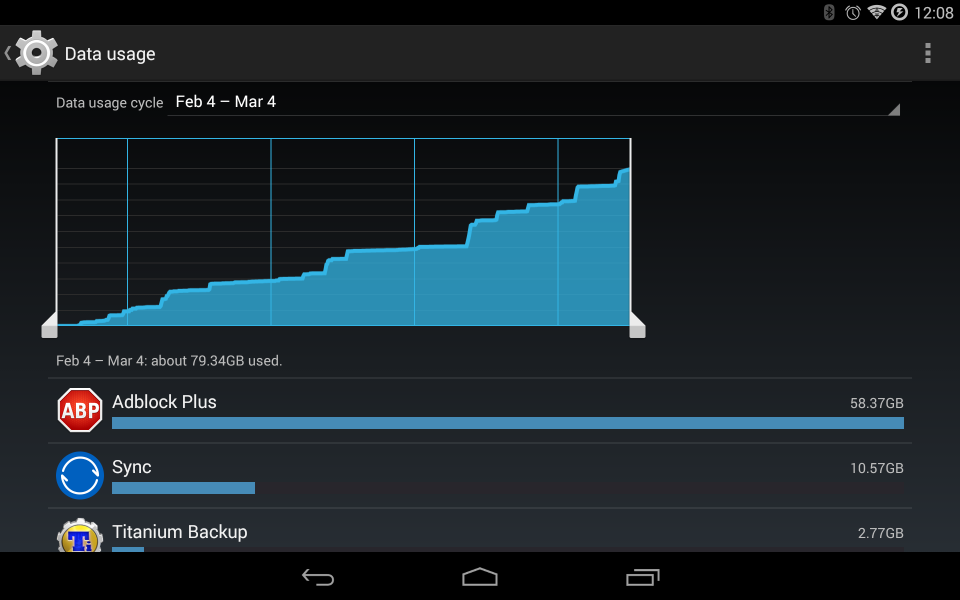
ABP Bandwidth.png

The two apps that follow behind at 10.5GB and 2.75GB are (in reverse order) Titanium Backup, which backs up my device and uploads the backup to cloud storage, and Sync, which syncs the backups to my PC. And the only reason Sync used up so much was because when I downgraded from 2.0 yesterday, I had to re-sync all the files again (about 6GB) to my devices.

In other words, the rightfully most bandwidth heavy apps only used ~2.75GB and 4GB (under normal circumstances) of data in the past 30 days. Yet for some reason an app that is supposed to be saving me bandwidth by stopping ads from downloading at all is somehow using nearly 60GB of data!

And it would be nice if it even worked. But I still have ads on my device.

So I've uninstalled it, and I'm putting out the warning to others in case they are using it, not realizing the potential damage it could have on their data plans.
3068
Living Room / Re: $15,000 bounty for a Mark One 3D printer
« Last post by Deozaan on March 03, 2015, 10:34 PM »
Unless it's illegal, I don't see why this isn't going to happen soon.
3069
General Software Discussion / Re: BitTorrent Sync 2.0 Sucks!
« Last post by Deozaan on March 03, 2015, 10:25 PM »
Thanks to Lanux128 in the IRC channel for pointing out that you can manually type in the version number in the URL to get older downloads:

http://syncapp.bittorrent.com/1.4.110/

Though oddly enough I can't get BTSync to work (yet) since attempting to uninstall 2.0 and downgrade to 1.x...

Got it working again. :Thmbsup:
3070
General Software Discussion / BitTorrent Sync 2.0 Sucks!
« Last post by Deozaan on March 03, 2015, 09:15 PM »
Does anyone have the installer for version 1.x? I want to revert my installation. I hate the new "improved" 2.0.

It went from a great, flexible, powerful sync application to a simple, "idiot-proof" application by taking away all the features I liked (such as being able to choose where you sync your files to instead of everything having to be in a monolithic folder structure like Dropbox).
3071
Developer's Corner / Unity 5 now free for everyone!
« Last post by Deozaan on March 03, 2015, 01:29 PM »
Unity has had a model of a free version vs. a Pro version where many of the nicer features of the engine were available only to folks who owned a license for the Pro version. But today Unity has announced the launch of the latest version of their engine, Unity 5, along with a new license, which can be summed up in an image:

B_MDKRFU0AEdTxQ.png

The free version is now being called the Personal edition, but all Unity 5 engine features are available for free until you make over $100,000, at which point you must buy a Professional license ($75/mo subscription or $1,500 (about 1.5% of $100,000)) but never any royalties.


More details can be found here:
http://blogs.unity3d...3/03/unity-5-launch/
3072
Developer's Corner / Unreal Engine 4 is now free* for everyone!
« Last post by Deozaan on March 03, 2015, 01:15 PM »
Unreal announced yesterday that Unreal Engine 4 is now free* for everyone. What this means is that you can download and use the software to make a game for free. The only time you have to pay them money is if you are successful, paying 5% gross if you make more than $3,000 per quarter.

Unreal Engine 4 is now available to everyone for free, and all future updates will be free!

You can download the engine and use it for everything from game development, education, architecture, and visualization to VR, film and animation. When you ship a game or application, you pay a 5% royalty on gross revenue after the first $3,000 per product, per quarter. It’s a simple arrangement in which we succeed only when you succeed.

This is the complete technology we use at Epic when building our own games. It scales from indie projects to high-end blockbusters; it supports all the major platforms; and it includes 100% of the C++ source code. Our goal is to give you absolutely everything, so that you can do anything and be in control of your schedule and your destiny. Whatever you require to build and ship your game, you can find it in UE4, source it in the Marketplace, or build it yourself – and then share it with others.

Read more about it here:
https://www.unrealen...com/blog/ue4-is-free
3073
Living Room / Re: Sorry, Ebooks. These 9 Studies Show Why Print Is Better
« Last post by Deozaan on March 02, 2015, 06:14 PM »
I prefer digital for reading and especially for making notes.

I feel like I'm destroying something when I write in a paper book. But in a digital book I feel free to make all the notes and highlights I want. Not only am I no longer restricted by margin space, but I also won't lose my notes due to the book getting worn out and/or destroyed.
3074
DC Gamer Club / Re: GOG insomnia sale- with a twist!
« Last post by Deozaan on March 02, 2015, 04:50 PM »
For those who are slightly more lazy than I am:

http://www.gog.com/
3075
Thanks for putting together the newsletter!

Doing these newsletters makes me realize that Skwire has been on fire updating his apps lately!

If by lately, you mean the past couple of years (or longer), I agree with you. :Thmbsup:
Pages: prev1 ... 118 119 120 121 122 [123] 124 125 126 127 128 ... 386next