topbanner_forum
  *

avatar image

Welcome, Guest. Please login or register.
Did you miss your activation email?

Login with username, password and session length
  • Wednesday December 3, 2025, 6:59 am
  • Proudly celebrating 15+ years online.
  • Donate now to become a lifetime supporting member of the site and get a non-expiring license key for all of our programs.
  • donate

Recent Posts

Pages: prev1 ... 8 9 10 11 12 [13] 14 15 16 17 18 ... 1514next
301
How strange.. I think it must be something with the windows thumbnail cache.  Does anyone know a good tool to tell windows to recover from a problem caching thumbnails in windows explorer?
302
Clipboard Help+Spell / Re: DBISAM Engine Error #9732 and #11949
« Last post by mouser on October 15, 2021, 08:02 AM »
Sorry for the delayed response.

Try closing those errors and let the app start up, then go to View -> Options and then choose "Backup/Maintenance" tab near bottom of options, and then press "Verify, Repair, Optimize Database" button in upper right.
This kind of error has occasionally happened if an antivirus program is somehow blocking the program from accessing its database files.
303
Find And Run Robot / Re: How to Restore INI file from BackupIni directory
« Last post by mouser on October 12, 2021, 10:10 AM »
Should be plain text openable and readable in a text editor.  You should be able to rename it FindAndRunRobot.ini and overwrite the one in the normal directory where your FARR saves it's settings..
304
Another small one, ZoomKeys:
Screenshot.png

Simple extension that takes a clip that has a static scale/position setting, and animates some keyframes for the clip based on those values.  It can create a pleasant zoom-in, zoom-out, or combination.
Normally when I have the mental energy I will create such an effect myself when I want to show in a zoomed-in area, but more often I get lazy and just cut to a zoomed-in view.  So this automates that process.

note: it currently does not support easing, since that API is not working for the current Adobe Premiere.


305
DC Gamer Club / Re: Valve Announces Steam Deck: A Nintendo Switch-like PC
« Last post by mouser on October 10, 2021, 05:22 AM »
That's awesome.  More of this from companies please.
306
KodeZwerg's Realm / Re: BoomerangReplica *early access* by KodeZwerg
« Last post by mouser on October 06, 2021, 10:13 PM »
Any update?
307
If anyone here is a Premiere user on an apple mac product, drop me a message --- it would be nice to test out these tools on that platform.
308
Living Room / Re: Whoever understands NFTs let's make one for DonationCoder
« Last post by mouser on October 03, 2021, 06:13 PM »
I apologize for not replying sooner -- I've just been distracted by lots of stuff -- I will reply!
309
They are not released yet.. I was thinking of releasing for this year's NANY..
310
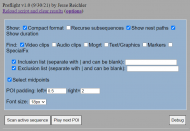
A minor new extension coded:
Preflight

"This extension helps facilitate doing manual preflight checks of your sequence to look for problems.
Scans the active sequence according to your options and makes a list of timestamps of potentially interesting items, that you can easily jump to and select.
In essence, this extension reuses the code from my Timestamper extension but with it's own independent options to make it easier for you to configure it to list only timeline objects that are important to you.
The list of timeline events makes it easier to jump around and check for any problems.
For example, I find that I occasionally have mistakes in my multicamera edits where I zoom in on a clip and erroneously switch to a different camera; I can use the Preflight extension to find all clips with special effects (including zooms), and then rapidly select them each in turn to check that they are correct.
Pressing the preview POI button will jump to the next interesting timestamp in the list and play a section around this timestamp.  Or hit "Preview all" to have it play through each point of interest in order.  In this way you can very quickly preview all of the transitions, mogrts, etc. without having to rewatch the entire video.
"
Screenshot.png


311
Screenshot Captor / Re: Cropping objects on canvas
« Last post by mouser on September 24, 2021, 09:06 PM »
If I understand you correctly, you dropped one image onto another and said to add it as an object (that you can move around and rescale and rotate).  And you are asking if you can crop it too?  SC has no function for copping objects on images.  What you could do is select it, choose File -> Save selected region as new file, then delete it.  Then go crop the newly saved file that should be just the object, and re-drop it back on the image.
312
Living Room / Re: Show us a photo of your mutt or other creatures..
« Last post by mouser on September 24, 2021, 06:26 AM »
It looks like Wiggins is ready to lodge a complaint about the plan to get rid of the sofa.
313
Living Room / Re: Trying to remember an old flash game?
« Last post by mouser on September 21, 2021, 09:07 PM »
Train of afterlife sounds like it but i don't think it was the one i remember. Gris looks nice.
314
Site/Forum Features / Re: Forum upgraded
« Last post by mouser on September 17, 2021, 11:40 AM »
Yeah I upgraded us to 2.0.18 as soon as it was released :)
315
General Software Discussion / Re: Montage Videos
« Last post by mouser on September 16, 2021, 05:49 PM »
Can you say a little more about what you want to do, the source and length of the video clips, etc.?
316
yeah definitely feels a bit risky going.
317
I;m at Gencon 2021 again this weekend.  Let me know if you're here too!
318
Can you try restarting windows and see if it fixes it? SC relies on windows to do the heavy lifting of showing thumbnails and occasionally gets stuck making them and a reboot fixes it.
319
Another extension coded:
CFT

Automates the process of inserting a freeze-frame retro-style intro:
SampleOutput.png cansorbleep.png

Plus does a few more things that I commonly do, to make editing my videos easier.  Like saving an increasing version# in the file, exporting thumbnail images, rendering for youtube with the project filename, etc.

[UPDATED 10/15/21]
Updated screenshot to show a couple more new items added to this extension:
  • A censor-bleep action that adds keyframes to drop the volume around the playhead, and add a mogrt that plays a beep sound and shows a censor bar over the person's mouth.
  • And a simple action that applies a sound fx processing to the audio clips that I use for sound reduction if I record with A/C running.


320
Another extension coded:
Multicam Deluxe

This one is a doozy -- it automates the elaborate process I use to turn dual (multi) camera footage into a sequence with a 3rd virtual camera angle that is top down with a small front inset picture-in-picture, and some other helper stuff for that.

SampleOutput.png


321
Clipboard Help+Spell / Re: New and Old Clips not showing
« Last post by mouser on September 06, 2021, 03:06 PM »
How strange.  It looks like it's have some trouble with your clip database - like maybe it's not even getting past it's original startup.

A couple things I would do:
1. exit CHS and manually backup your entire CHS data directory (by default under your documents).

2. Then startup chs and go to the Backup Maintenance tab of option (it's near the end).
3. Try doing a very/repair/optimize action (upper right button).
4. Maybe try turning off the Backup on Program Start) ..

It seems like it's getting stuck somewhere in the startup process.  This could be an antivirus blocking access to the database, or something else misconfigured.

THe other thing to try for sanity is to download CHS portable version and run that in a new directory, make sure everything works as expected with a clean install.
322
That's not a bad idea -- I get the idea why that would be useful.
I wouldn't want to make it a simple button, but I could add a function for this in a menu, to clear the contents, release the database file, and then overwrite the database files.

However, I think if you are in a position where you might need to do this, you probably have (or could make) a batch file or script that does other things.  And the proper thing to do with respect to CHS is:
a) terminate the app
b) WIPE (not just delete but use a wipe tool to overwrite) the entire CHS data directory, which would include the CHS database as well as the image file store, and the backups.

It's always a bit nervewracking to write code that does serious permanent deletion, for fear of a mistake causing people to lose data unintentionally.  Maybe someone could share their scripts or tools for this.
323
And my second extension, again designed to automate another thing I do a LOT of in my editing, "SoundFxAdder":
SampleOutput.png

It scans a sequence looking for mogrts, graphic still images, or text overlays (which some options for filtering them based on type, etc.), and then can insert an AudioClip synchronized to them.

This is something I have been doing by hand to give a little "bloop" sound whenever something interesting is editing on screen.

Will work in batch mode or show you a list and let you jump around and individually add with a click, and features some safety checking to make sure you don't overwrite some existing audio.


324
Clipboard Help+Spell / Re: New and Old Clips not showing
« Last post by mouser on September 01, 2021, 10:31 AM »
And if you copy something new to the clipboard, it still doesn't show in the New group?
If you keep the window open while copying some text, do you see anything? do you hear the clipboard copy sound?
I assume you've exited the program and restarted it?


One way that can happen to have your sections blank is if you have a search filter set -- but i can see from your screenshot that you don't.
325
I will be releasing these as part of NANY 2022:

Code is now available on github: https://github.com/dcmouser/jrPremiere


Some of you know I've gone pretty far down the rabbit hole of video editing for my latest project, a Boardgame YouTube channel (see this thread).

I've actually spent a lot of time creating custom After Effects (motion graphic) scripts and templates for the channel, to speed up the process of creating nice looking edits and overlays.

This week I decided to learn how to code an Adobe Premiere extension, to automate the generation of YouTube timestamps and to make it easier to navigate around the interesting parts of nested sequences.

Here's a teaser screenshot of my extension called "TimeStamper":

TimeStamperSampleOutput.png


From the README:

Scans your active sequence and builds a timestamp list of "notable" clips and mogrt item times in your active sequence.
Mogrt items are listed with text field values.
The timestamp list is presented on the extension panel as a clickable list to quickly jump to locations.
The timestamp list is exported to a timestamp text file in your project directory in YouTube timestamp format, for easy copy+paste into a YouTube video description to provice clickable timestamp links for your video.


Pages: prev1 ... 8 9 10 11 12 [13] 14 15 16 17 18 ... 1514next