topbanner_forum
  *

avatar image

Welcome, Guest. Please login or register.
Did you miss your activation email?

Login with username, password and session length
  • Saturday September 19, 2026, 12:58 pm
  • Proudly celebrating 15+ years online.
  • Donate now to become a lifetime supporting member of the site and get a non-expiring license key for all of our programs.
  • donate

Recent Posts

Pages: prev1 ... 111 112 113 114 115 [116] 117 118 119 120 121 ... 225next
2876
I think you've come up against the "path too long" problem, should be able to get around it hopefully - I'll see what I can come up with.
2877
Living Room / Re: Help Proofreading a submission
« Last post by 4wd on August 25, 2013, 10:45 PM »
epub would be nice thanks so I can read it on my phone, (I hate sitting in front of the computer to read).

Bit busy today, so don't expect anything from me yet.
2878
Living Room / Re: Help Proofreading a submission
« Last post by 4wd on August 25, 2013, 09:18 PM »
That depends, I'm crap at review stuff, (even simple ones), but if you don't mind me limiting myself to typo/grammar/structure/logic I'll give it a go.


Obligatory Contract: I reserve the right to shoot myself in the head if the going gets too tough.  Failing either eyesight, hand coordination, nerve, or caffeine to accomplish such, I offer to bow out gracefully.  All provided electrons will be returned to their rightful owner.
2879
When the installer is used, can I then tell where it should be installed?

No need to tell it where the executable is, just put it in F:\SetFolDate then run it and click install.

Based on the earlier version (I was not yet aware of this new release, as I am reading it just now) it would be:

F:\SetFolDate

and with below registry-patch

//
Code: Text [Select]
  1. REGEDIT4
  2.      
  3. [HKEY_CLASSES_ROOT\Directory\shell\Adjust Timestamp Newest]
  4. [HKEY_CLASSES_ROOT\Directory\shell\Adjust Timestamp Newest\command]
  5. @="\"F:\\SetFolDate\\SetFolDate.exe\" \"%1\" /n"
  6. [HKEY_CLASSES_ROOT\Directory\shell\Adjust Timestamp Oldest]
  7. [HKEY_CLASSES_ROOT\Directory\shell\Adjust Timestamp Oldest\command]
  8. @="\"F:\\F:\SetFolDate\\SetFolDate.exe\" \"%1\" /o"

//

That would be correct but that reg file is no longer compatible with v0.2.0.0 since the latest version only takes one argument.  (It'll work with the later version but the Newest/Oldest argument will be ignored and it'll open the date option window instead.)

So briefly:

v0.1.0.0 requires the reg file
v0.2.0.0 just run it to install

GData and Bitdefender reported: Gen:Trojan.Heur.AutoIT.1

As mouser said, it's just those programs being lazy.  Rather than judge a program by its actions they've judged it by the language it was written in.

Anyway, source code is included, one of the guys/gals here will yell at me if it does something it shouldn't.  It's only 125 lines and most of that is the two windows, (install and date options).

Minor thing: if one selects multiple folders but decide not to do anything, the small adjust time panels remain open.
One has to click cancel one by one.

It is no problem for me!!
Don't get me wrong.

Maybe in case of multiple folders, there cud be something like ; For All ?

Unfortunately, that's the way Windows works with the context menu - it passes multiple selections one at a time.

eg. If you select folder AAA, BBB, and CCC then use the context menu, the following commands are executed:

SetFolDate.exe "AAA"
SetFolDate.exe "BBB"
SetFolDate.exe "CCC"

Three separate commands sent all at once, so you end up with three separate instances of the program running.

The only way to end them all would be to have a button that killed any occurance of the process.

Unless I can find a way to get all selected folders all at once so you get this:

SetFolDate.exe "AAA" "BBB" "CCC"

You're kind of stuck with how it works at the moment.

The only other option is take make it use command line arguments so it doesn't open a window at all.  But then you need context menus to cover either every combination or the most common ones.

EDIT: I just noticed you use DOpus ... I've got an idea ;D
2880
Living Room / Re: search nearby
« Last post by 4wd on August 25, 2013, 07:31 AM »
A couple of ideas:

Yellow Pages

Put laboratory for business and the postcode, it'll get you out to about a 10 mile radius.  You can try and narrow down the business specifics.

You could also try Google Maps and enter medical laboratory within 50 miles of xxxxx, united kingdom - change xxxxx to the town/city.  Use the Royal Mail Postcode Finder to get it if you don't know it.  Click the Find an address tab, enter the postcode, then click the Find an address button.

Otherwise, if you know specifically what type of laboratory you're after, there's probably a registry that keeps records, (eg. Dental Laboratories have the Dental Laboratory Association in the UK), and you may be able to contact them for a list.
2881
Oh, by the way, I started with Commodore C64 ....

Bah! 64k RAM? Too easy.

Vic20 for me and only AU$1500 for the C1540 Floppy drive - OMFG, what a lot of money I've wasted on computers  :-\

Anyway, back to the topic in hand....

SetFolDate v0.3.0.6
2882
General Software Discussion / Re: One-drag video conversion?
« Last post by 4wd on August 25, 2013, 02:51 AM »
VidCoder

1) Install it.
2) Run it.
3) Select an output directory.
4) Make sure Preset is set for Normal, (default).
5) Drop files on window.
6) Hit Encode.

2013-08-25 17_46_19-VidCoder.png

It'll save the settings for the next time it's run, so you'll only have to drop files on it and press Encode next time.

You're unlikely to save space on 3gp files since they're already MP4-AVC/AAC usually.  As for AVI and MKV it depends what codecs the contents are encoded with, if it's already MP4-AVC then space saved will be minimal.

For DAT, should save a bit since they're normally MPEG2.
2883
NOTE: This is all redundant due to new version.

By the way, would it not be possible to rightclick on a folder, run setfoldate.exe /n from the contextmenu?
i.e. avoiding running from the dos-prompt?

What is it with you young people?

Don't you like typing?

 ;D

Code: Text [Select]
  1. REGEDIT4
  2.  
  3. [HKEY_CLASSES_ROOT\Directory\shell\Adjust Timestamp Newest]
  4. [HKEY_CLASSES_ROOT\Directory\shell\Adjust Timestamp Newest\command]
  5. @="\"x:\\xxxxxxxxxx\\SetFolDate.exe\" \"%1\" /n"
  6. [HKEY_CLASSES_ROOT\Directory\shell\Adjust Timestamp Oldest]
  7. [HKEY_CLASSES_ROOT\Directory\shell\Adjust Timestamp Oldest\command]
  8. @="\"x:\\xxxxxxxxxx\\SetFolDate.exe\" \"%1\" /o"

Save the above as SetFolDate.reg and then edit it to point to where you've put SetFolDate.exe, for example:

@="\"x:\\xxxxxxxxxx\\SetFolDate.exe\" \"%1\" /n"

becomes

@="\"C:\\path\\to\\SetFolDate.exe\" \"%1\" /n"

if SetFolDate.exe is in directory C:\path\to

DO NOT change anything other than the drive and path and take note that any \ within the path needs to become \\ as per example.

Save the changed SetFolDate.reg and then double-click on it, when it asks if you want to merge the key, click Yes.

You now have two new context menu items for directories.

2013-08-25 17_28_30-.png

I've updated the archive to include the .reg file.

Got an idea for another version.
2884
There's also a UDF available for AutoIt.
2885
It's attached to my first post in a 7zip archive.
2886
If it's searches you do often, you may want to check out Everything's bookmark feature and set one up for that particular search.

eg.

Entering apf: (Audio Personal Family) would limit to specific folder, filetype and sort method.

You could then enter apf: meet to get any file in a particular folder, of a particular type with meet in the name.
2887
Finished Programs / Re: DONE: Folder Properties Auto-Update....
« Last post by 4wd on August 24, 2013, 09:23 AM »
I've got it displaying the latest file in real time but need to iron out a couple of things.

Hopefully get it done in a week after other jobs have been got rid of.
2888
No longer valid, see here.

Open a CLI, (DOS prompt), and use the executable, (in the attached archive).

eg.

C:\> SetFolDate.exe R:\test /n
2889
SetFolDate v0.3.1.5
  • Fixed: Wasn't properly migrating date when recursion was active.

There are two executables in the archive, one for Windows Explorer, (SetFolDate.exe), and one for file managers, (SetFolDateFM.exe) - they are not interchangeable.

To install the Explorer version, copy SetFolDate.exe it where you want it to reside and run it.  Click Install and it will be added to the context menu for folders - Done!
If you choose Install (No GUI), then an extra context menuitem will be created that when chosen does NOT open the GUI - it will use the last saved options.
To uninstall, run it again and choose Remove.
NOTE: You may need to use Run as Administrator if you have UAC enabled.


The file manager version accepts the following arguments: SetFolDateFM.exe [/r] <source path> <folder 1> <folder 2> ... <folder n>
Where: [/r]               = Tells it to run without showing the GUI
           <source path> = parent folder of the selected folders
           <folder n>      = list of folders, (sans parent path), separated by a space, (quoted if needed)

eg. Parent folder:     C:\Windows
     Selected folders: Help inf Logs "Offline Web Pages"

If you copy it somewhere and run it, it will generate a DOpus User Command on your Desktop which you can import into DOpus.

See dcwul62's post on adding to the DOpus filetypes so that it won't show up under Explorer.


Interface is self-explanatory:
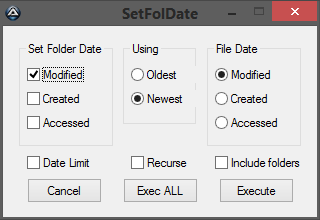
2014-01-28 14_11_17.png

Left side is the date you want to set for the folder, right side is the date to use from either the oldest or newest file in that folder.  You can choose to recurse through the folder in which case the sub-folder date will be set from the appropriate file within that sub-folder.

Date Limit tells it to ignore files that have a date earlier than 01-Jan-1980 which Explorer can't display but other file managers can.
2890
Everything seems to handle .xxx and ..xxx OK, listing those folders and whatever is in them.

2013-08-24 13_38_53-..test_ - Everything.png

2013-08-24 13_45_33-another .txt - Everything.png

I'm using the latest beta which has yet to give any problems on my machines.
2891
Living Room / Re: Intel Rapid Storage Technology, hard drive problem.
« Last post by 4wd on August 23, 2013, 10:29 PM »
need to:
2) Identify make and model of drive
3) Which chipset you have. (utility here)

Might also help to know make/model motherboard and exactly which port the OS drive is plugged into.
2892
Finished Programs / Re: DONE: Folder Properties Auto-Update....
« Last post by 4wd on August 23, 2013, 01:16 AM »
OK, just tried it on my machine and it froze at 16709 files, I also noticed that the same filename seemed to keep reappearing on the statusbar - which is weird.

And when I started it off again, that same filename kept turning up again.

EDIT: I might just disable the statusbar and see if that makes a difference.

EDIT2: OK, it looks like it's linked to the statusbar - more directly, due to using 'dir' to get the last file created.  So I'll just disable it until I can find another way to get the latest file.

Archive up there.
2893
Living Room / Re: Interesting "stuff"
« Last post by 4wd on August 22, 2013, 10:19 PM »
I'll send the last one to my sister who had her birthday yesterday - I didn't get a reply to the email I sent on her birthday.

If I don't get a reply to this one I'll know it's true and inform you.
2894
4wd, yours will have to come from the next batch of books I order.

No problem, how do you want payment?

Can I use up some DC credits?
2895
General Software Discussion / Re: Chrome’s insane password security strategy
« Last post by 4wd on August 21, 2013, 10:42 PM »
On the whole I'm not all that bothered about Chrome's lack of password security primarily because I think even the significantly better security in Firefox is insufficent. I mean it's reasonably good all the way up until you use it and from then until you close it not so much.

Which is why anybody who uses Firefox' Master Password feature should at least be using the Master Password+ addon to at least give you auto-logout/lock capability, (but most of all to stop multiple simultaneous "Enter Master Password" prompts).
2896
General Software Discussion / Re: Chrome’s insane password security strategy
« Last post by 4wd on August 20, 2013, 11:40 PM »
Aaaand it's in Chromium too.  Damn.  And it was such a fast browser...  :(

Just had a look and Comodo Dragon does implement a Master Password:

2013-08-21 14_39_49-Settings - Search results - Comodo Dragon.png

Appears to work the same as Firefox's.
2897
I should receive six paperbacks about Thursday 22nd or Friday 23rd.

* one of superboyac
* one for Perry Mowbray
* one for local library
* one apiece for two fellow church members
* one for a neighbor of my parents

4wd, do you want an autographed copy?

Why not, any idea what the postage to non Nth America was going to be?
2898
General Software Discussion / Re: Replacing the Control Panel
« Last post by 4wd on August 20, 2013, 07:25 AM »
If you know of one that is missing, let me know and I will research how to add it.

Advanced User Accounts - netplwiz.exe (Win 7) or nusrmgr.cpl (Win XP)

For Windows 7, see here - for Windows XP, see here.
2899
Non-Windows Software / Re: What Android apps do you use to read digital books?
« Last post by 4wd on August 19, 2013, 09:43 PM »
Some of the stuff I read isn't exactly mainstream, and I don't think I'd like to be profiled for it.

I would have thought that anarchy had become mainstream in recent years.
2900
Found Deals and Discounts / Re: H. P. LOVECRAFT Bundle! Pay what you want!
« Last post by 4wd on August 19, 2013, 05:54 AM »
Do you have any links for Usenet? (I never use Usenet, and the last time I did was probably 15 years ago.)

Check PM

Usenet version comes with subtitles also.
Pages: prev1 ... 111 112 113 114 115 [116] 117 118 119 120 121 ... 225next