topbanner_forum
  *

avatar image

Welcome, Guest. Please login or register.
Did you miss your activation email?

Login with username, password and session length
  • Wednesday March 18, 2026, 6:10 pm
  • Proudly celebrating 15+ years online.
  • Donate now to become a lifetime supporting member of the site and get a non-expiring license key for all of our programs.
  • donate

Recent Posts

Pages: prev1 ... 71 72 73 74 75 [76] 77 78 79 80 81 ... 386next
1877
General Software Discussion / Re: Windows 10 Announced
« Last post by Deozaan on April 13, 2017, 09:28 PM »
Dynamic Lock lets you automatically lock a Windows 10 PC when you’re away from it.

Is this 1995 or something  :P

I know it's more than just that, well at least it better be lol.

I think the idea is that it detects the presence of a Bluetooth device (such as a smart watch) and locks when you're away and automatically unlocks when you come back.
1878
General Software Discussion / Re: Scan options Screenshot Captor
« Last post by Deozaan on April 13, 2017, 03:41 PM »
Just drag and drop the images onto each other in Screenshot Captor. That will allow you to combine the images into a single image.
1879
General Software Discussion / Re: Windows 10 Privacy Concerns
« Last post by Deozaan on April 13, 2017, 03:36 PM »
If you want to see more details about what information Microsoft is collecting on you, check out this link, which was posted in the IRC channel last night:

https://technet.micr...dows-diagnostic-data

Get some snacks and drinks, because it's a loooooong read.
1880
General Software Discussion / Re: imgur bbcode?
« Last post by Deozaan on April 12, 2017, 10:31 AM »
You have to use the version of the link that has the extension at the end

To expand on that, it's because the img tags are not specifically for imgur, but for any image link. So it needs a known image type to know how to read the image.

But don't forget that it's often recommended to upload the image to the forum here and attach it instead of linking to an external site. So we don't lose relevant content in a few years.
1881
Have I Been Pwned is a website/service that allows you to check to see if your email address (or other info) can be found within the database(s) of various sites that have had data breaches over the years. It was mentioned earlier on this site in this thread.

But consider this a friendly reminder/suggestion to occasionally check and see which sites have mishandled your data.

https://haveibeenpwned.com/
1882
Living Room / Re: how to learn finance
« Last post by Deozaan on April 11, 2017, 02:48 AM »
This may not be the appropriate place for this, but I've recently discovered Betterment, which seems like a good resource for investing for the future.

At least in the U.S.A. I'm not sure if their services are different or restricted in other areas of the world.


For more details on why you may want to use Betterment, read more info here:

https://www.betterme....com/why-betterment/
1883
Didn't Unity 8 just launch in the last release? Or it's going to launch with 17.04?
1884
General Software Discussion / Re: Windows 10 Announced
« Last post by Deozaan on April 05, 2017, 10:29 PM »
I found this to be a decent overview of the major new features of the Creators Update:

1885
General Software Discussion / Re: Windows 10 Announced
« Last post by Deozaan on April 05, 2017, 09:50 PM »
I used the Media Creation Tool to create a USB installation media and used that to update my copy of Windows to the Creators Update. It took about an hour to install the update (not counting the time it took to creation the installation media) and worked without a hitch.

I'm currently on Version 1703 (OS Build 15063.0), but already some more updates are downloading. I guess that's what happens when you disable the "Download Updates" option before installing it.

Windows 10 1703 15063.0.png

EDIT: After the updates finished installing I'm now on 15063.13.

Windows 10 1703 15063.13.png
1886
General Software Discussion / Re: Looking for a new browser
« Last post by Deozaan on April 05, 2017, 12:37 PM »
It may be worth looking into Brave (also kind of discussed here). It doesn't quite do everything in your list (not portable AFAIK, few addons, etc.), but it's designed with respecting privacy in mind and it seems lean, uncluttered, and fast.
1887
Living Room / Re: What books are you reading?
« Last post by Deozaan on April 03, 2017, 02:34 PM »
For about the past two years, I've had a tab constantly open to Packt's Free Learning eBook of the Day so I can claim any book they offer on any topic that seems remotely interesting to me.

So I've got a decently large collection of Packt books by now, and most of them I haven't even cracked the cover on (so to speak) yet. This is largely because many of the books were a "maybe someday I'll wanna know more about this" type of thing. But also because they tend to give away older books which may be somewhat outdated, since technology changes so quickly. And also, of course, the fact that it's free means if I'm on the fence about something, I'll grab it "just in case" rather than exercise greater discernment about whether or not I truly want to read a book about that topic.

But lately I've actually started looking through some of the books and being pleasantly surprised at how much useful information is in them.

These are the latest ones I've started to delve into, because even though I code in C# while using Unity, I never really learned much about C# outside of the context of Unity.

C# Unity.png
Learning C# by Developing Games in Unity 5.x - Second Edition

C# .NET.png
C# 6 and .NET Core 1.0 - Modern Cross-Platform Development
1888
Interesting. This is the same link, and perhaps the same article, mentioned here:

happened across this offer on Techradar -- no idea if it still valid or not -- the article is 14 days old
Get 50GB free VPN bandwidth [Windscribe] every month for life
(Normally free version is 10GB)

But now the article says it is only 4 days old even though it has been 4 months since tomos wrote about it.
1889
Living Room / Re: File Encryption - now effectively outlawed in the US?
« Last post by Deozaan on April 02, 2017, 11:25 AM »
Not only that, but it seems the FBI can arrest and charge you for hacking even if you never hacked anybody:

http://www.thedailyb...o-hacked-no-one.html
1890
General Software Discussion / Re: Windows 10 Announced
« Last post by Deozaan on April 02, 2017, 12:30 AM »
Any Microsoft Insiders interested in this upcoming offering?

I don't know if I'll be using (m)any of the new features of the Creators Update, but I'm looking forward to having it on my machine because of what it paves the way for in the future (e.g., delta updates).
1891
Living Room / Re: File Encryption - now effectively outlawed in the US?
« Last post by Deozaan on April 02, 2017, 12:23 AM »
I think I am going to have to start making file encryption apps.  8)

How can we be sure that components/libraries/tools we use don't have backdoors?

You can't. But using open source standards (read: tools, libraries, and tools) should help alleviate those concerns.
1892
DcUpdater / Re: LATEST VERSION INFO THREAD - DcUpdater - 1.31.01 - Apr 1, 2017
« Last post by Deozaan on April 01, 2017, 01:42 PM »
Wow.

I thought this was officially abandoned. Even SC seemingly stopped using it. :(
1893
Enpass was recently mentioned in the thread on recent LastPass vulnerabilities so I figured it was a good time to update any interested party on my use of it since I last mentioned it in this thread.

I've been using Enpass since August 2015, so about 1.5 years. (Which is also almost as long as it has been since anybody posted in this thread.)

It does enough right that I'm still using it. But the experience can be somewhat cumbersome at times, especially on mobile or where browser extensions come into play (at least on Windows). I've found it works great on Linux, and will quickly fill out forms with the press of a hotkey (Ctrl+\ by default). But that hotkey doesn't work for me on Windows, and the browser extension requires many extra clicks just to copy the password to the clipboard compared to LastPass.

Often times when there's a new update, a dialog will pop up telling me there's an update, and showing the changelog. Except the changelog text area is almost always completely blank.
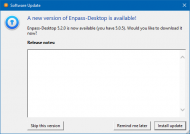
Enpass Update.png

And on mobile I have it configured to allow me to unlock my database with a PIN within X hours after I use my master password to unlock it. But because my device is getting a bit long in the tooth (Nexus 7 2013) it often closes Enpass in the background to free up memory/resources for whatever app is currently in use. This means I frequently have to type my long and secure master password on my mobile device, which isn't fun using a mobile keyboard, and is made even worse when using Enpass' provided keyboard, because it hides numbers and symbols behind "alternate character" displays. So even though Enpass does provide a mobile keyboard that technically supports autofill, I most often find myself switching tasks to the Enpass app itself to login and copy my username/email then switch back to the app and paste, then switch back again to Enpass to copy the password, then switch back to the app to paste and finally login. And maybe a third switch back and forth if the site/app also requires 2FA TOTP.

Mostly I just wish things were more streamlined in it. Especially the browser extensions. As I said, on Linux, it's great. I just press Ctrl+\ and if I've logged into Enpass recently it will autofill. Otherwise a small dialog will popup where I type in my master password and then it autofills. I rarely interact with the main application itself on Linux, and I wish the experience was similar on Windows (and Android). As it is, getting a password from the browser extension often requires:

  • Clicking the extension icon.
  • Searching for the site if it didn't find/list it automatically.
  • Clicking on the little "i" symbol on the side of the list for the site to display the saved login details (with password(s) still masked).
  • Clicking on the two overlapping rectangles symbol which represents copying to the clipboard.
  • Clicking into the form and pasting.
  • The previous step closes the extension popup, which means I may have to repeat the process 2-3 times in order to fill out username, password, and sometimes 2FA TOTP.

Whereas with LastPass, it takes two clicks. I really wish Enpass would get me straight to the info I want instead of hiding it behind extra clicks. One or two clicks doesn't seem like much of a difference, but multiply it by 2 or 3 for each login and then consider all the times you ever have to login to anything and they add up and become frustrating over time.

All that said, I'm still using Enpass. I like the cost (free on desktop, one-time purchase on Android). I like that it handles TOTPw so I don't need yet another app/device. I like how it all runs locally and doesn't require a connection to some master server. I like how it can also optionally sync across devices using a variety of cloud storage options. I like how it allows you to customize how it generates your password, or add other fields to be saved with your passwords, etc. There's a lot to like about it. But there's also plenty of room for improvement.

If you're looking for a password manager, I'd recommend giving Enpass a try. But if you're satisfied with your current password manager, I certainly can't say it is by and large the best one out there and worth transitioning over to.

Perhaps we could also hear from 40hz to see if he's still using Enpass, and why or why not.
1894
Another password manager that allows similar choices in cloud storage is Enpass (https://www.enpass.io/).  I haven't tried Enpass - I'm happy enough with SafeInCloud.

I've been using Enpass since it was recommended/suggested about 1.5 years ago by 40hz in this thread asking for LastPass Alternatives.

I started to write up a bit of a review of it here, but figured I didn't want to derail this topic, so I'll finish it up and post it into the thread linked above.
1895
Ouch. Things are looking worse and worse for LastPass. This is the third vulnerability found in LastPass this month.

The flaw, which affects the latest version of the LastPass browser extension, was briefly described on Saturday by Tavis Ormandy, a researcher with Google's Project Zero vulnerability reporting team. When people have the LastPass binary running, the vulnerability allows malicious websites to execute code of their choice. Even when the binary isn't present, the flaw can be exploited in a way that lets malicious sites steal passwords from the protected LastPass vault. Ormandy said he developed a proof-of-concept exploit and sent it to LastPass officials. Developers now have three months to patch the hole before Project Zero discloses technical details.

"It will take a long time to fix this properly," Ormandy said. "It's a major architectural problem. They have 90 days, no need to scramble!"
1896
Thanks.

@Shades: I found some stuff in the Event Viewer, but nothing I can tell that is related to installing updates.
@IainB: I perused some links and did some of the suggested troubleshooting steps. Still no solution.

I think I may end up waiting until the Creator's Update is released and then use the Media Creation Tool to download and make a bootable thumb drive with the latest version of Windows and try for a forced upgrade or Reset or whatever.
1897
Living Room / Re: Animal Friends thread
« Last post by Deozaan on March 26, 2017, 02:10 AM »
This one cracks me up every time:


[Big dog hits small dog in face with wagging tail]
1898
So, I've tried repeatedly to get this update to install. But it just keeps failing, reverting the changes, and then immediately when I get back into Windows 10 it downloads the update again and tells me I need to restart to finish installing it.

I even tried manually downloading the update and installing it. It, too, told me I needed to reboot to finish installing it. When I did that, it did the usual thing and after a while it said it failed to install and reverted the changes.

I've searched and found other people asking around how to get this update to install, many times without a response. But even in the cases where I did see a response, nowhere have I found anyone saying they were able to resolve the situation.

Anyone here have any experience getting stubborn updates to take? Normally I'd just let a failed update sit there and not install, but this results in Windows 10 nagging me to restart my computer and threatening to do it for me "outside of active hours" if I don't take care of it myself. Halp!

KB4013429 Failure.png
1899
General Software Discussion / Re: Windows 10 Announced
« Last post by Deozaan on March 26, 2017, 01:39 AM »
Which programs would benefit from that (especially keyboard) improvement. I am not a regular windows 10 user but the times I have used it I have not come across a place where that benefits me (I haven't turned it off). Is it Office? Edge? or?

You have to think of it from the "Windows 10 on all the devices" perspective. Doesn't really help much in a traditional desktop, except if you include voice recognition to help Cortana understand you. But once you start adding touch screen devices where you're likely to use an on-screen keyboard or a stylus to write with, and it will learn how you type so it can suggest spelling corrections or just do general prediction of what word(s) you're likely to use next, or it will learn what your handwriting looks like so it can convert your chicken scratch (if it's anything like mine) to real words.

I disabled Cortana and told Windows 10 not to try to improve my keyboard whatever. But like wraith808, I did that Back in 2015 when Windows 10 first launched and haven't had to worry about it since.
1900
General Software Discussion / Re: Windows 10 Announced
« Last post by Deozaan on March 25, 2017, 05:23 PM »
Doesn't this go without saying? How else can they "improve your typing/voice recognition" or keyboard suggestions? Google does the same with with the Google Keyboard (Gboard?) on Android devices, as well as with the voice searches.
Pages: prev1 ... 71 72 73 74 75 [76] 77 78 79 80 81 ... 386next