topbanner_forum
  *

avatar image

Welcome, Guest. Please login or register.
Did you miss your activation email?

Login with username, password and session length
  • Tuesday April 7, 2026, 10:45 am
  • Proudly celebrating 15+ years online.
  • Donate now to become a lifetime supporting member of the site and get a non-expiring license key for all of our programs.
  • donate

Recent Posts

Pages: prev1 ... 529 530 531 532 533 [534] 535 536 537 538 539 ... 1515next
13326
FARR Plugins and Aliases / FARR PLUGIN BUG CLEANUP - Help Requested
« Last post by mouser on June 13, 2011, 11:36 AM »
Hi guys,

I think it's time that a major effort is made to discover which older plugins are causing some crashes when they are combined with other plugins.  People are really starting to struggle with this and get confused.

Most of the root cause of this problem can probably be traced back to my over-complicated plugin interface and changing api.
I think in most (all?) cases, it's just a matter of making sure the shared fscript/fsubscript dlls are updated.  It's not a big deal.

But regardless, the important thing is that we make it so that new users don't fall into this trap with out of date troublesome plugins.

Could i get a volunteer or two to help me find and locate the problem plugins?
13327
hi palesaint.

actually this is a longstanding known problem.. i apologize for the inconvenience.  there is a bug in some of the older fsubscript dlls i think that interact with other plugins.

we REALLY need to identify which plugin release is at fault for this and make a serious effort to block it so this stops happening to people.
13328
Find And Run Robot / Re: Execute a command line rather than just a program
« Last post by mouser on June 13, 2011, 11:16 AM »
You should be able to launch any command that you can normally run on the commandline by using the alias: run

So just type:
run putty username@servername
run gvim some.file.name


Now as for specifying working directory.. i'm afraid there is no easy way to do this currently, though it's not a bad idea and i could add it pretty easily.

you could also probably find a commandline tool that takes another commandline to run and a working directory and executes it; if you did find such a tool you could easily make your own run-like alias to do what you want.  let me know if you find an existing solution otherwise i might add it.
13329
Developer's Corner / Simple Machines Forum 2.0 Is Released
« Last post by mouser on June 13, 2011, 10:56 AM »
After years in development, the Simple Machines Forum team has announced that their SMF Forum v2.0 has left beta stage and been released to the public.

SMF is the free forum software we have used on DonationCoder.com (though we are still using the 1.0 branch).  It is a very powerful and intuitive forum software, and is in the handful of top online forum software systems.  If you don't plan on adding many modifications to your forum, I have no hesitation recommending it.

Screenshot - 6_13_2011 , 10_52_04 AM_thumb.png

http://www.simplemac...x.php?topic=437328.0
13330
What made you choose launchy over my farr program?
13331
oops :(

I think mouser is going to wake up and have an, "Oh, f#$%," moment.


exactly.  have been playing board games for the last 4 hours with the dc server admin and 2 other friends.  wasn't the smartest thing to do to press send and not even check back in until now.  bad show :down:
13332
Newsletter for June 12th, 2011
"Summer Server"


1. Newsletter Editorial

Greetings and welcome to another edition of the DonationCoder newsletter!  We've got a pretty full edition this time so I'll keep my comments here short.  If this is the first of our newsletters that you've received let me explain a bit how we create the newsletter.  Each month we go through our forum and try to select noteworthy topics and discussions and compile them into newsletter form.


2. User-to-User: Your Input Requested

We welcome everyone's participation on the forum, no matter what your level of computer knowledge or how long you've been a DC member. If you're still waiting to make your first post, see the links below for some good places to jump in.


3. Software Updates

I updated a bunch of my applications since the last newsletter.  Mostly minor bugfixes, but one new big release of an application called "Little Voice Commander" which is designed to encourage young toddlers to babble and speak.  I also started a new series on Top 10 Tips for my Find and Run Robot; if you've ever been curious about it, that might be a good thing to browse.


4. Member Releases

We've had quite a few software releases by DC members lately.


5. Website Discoveries, Debates, and Discussions

What's new in cyberspace? What exciting new sites have been discovered by forum members?  What's the current hot topic and debate? Read on to find out..


6. Fun, Games, Humor and Amusements on the Web

If you've read the newsletter up to this point, take a break and check out the lighter side of the forum - humor, videos, and games..


7. General Software Discussion

Almost half the posts on the forum fall into the category of general software discussions, questions, recommendations, etc. This is one of the most active sections of the DC forum and a great resource if you're trying to solve a software or hardware related problem. We get so much traffic on this board that we've split the recent content into sections in the newsletter - general software and specific software discussions.


8. Specific Software Discussion

This section of the newsletter draws attention to some of the standout discussions about specific programs that have been started since the last newsletter.


9. Developer's Corner

The title of this section shouldn't scare you off - there is definitely something of interest for everyone here! It's more than just a section for the discussion of software development, it's also where we discuss web design, entrepreneurial ideas, and general productivity issues.  It's great to see that the section has been pretty active recently.


10. Hardware Hideout

We tend to focus on websites and software on the forum, but that doesn't mean that DC forum members aren't always on the lookout for cool new gadgets and information on maximizing their computer's performance.

13333
After getting SSC to remember my region size ("Preferences>Saving and Loading Files> On Image File Load>Reselect Active Region")

Actually that's something different -- I think what you probably did was perform first a "Grab selection region" capture and then after that perform the "Grab repeat last size+pos" capture, both of which can have custom hotkeys assigned or be triggered from menu.

Also note that the new Screenshot Captor has a menu for reselected the last selected region from within the main interface, which is different but similar and may be useful to people when you have already captured a bunch of larger images (wheras the "Grab repeat last size+pos" option is more useful for repeatedly capturing a small area of the screen).
13334
TIP 5: Watch the FARR Video Series

This is a short tip but perhaps the most useful one.  I recorded over 3 dozen video screencasts showing how to use basic and advanced features in FARR.  It's hard to think of a faster way to tour the abilities and options in the program than to watch these videos:

https://www.donationcoder.com/3ds

(Note there are two groups of videos on FARR; start at the bottom of the page and work your way up).
13335
Sorry i missed this the first time -- I will try to do something about this.
13336
Find And Run Robot / Re: Latest FARR Release v2.107.04 beta - Sep 23, 2012
« Last post by mouser on June 12, 2011, 12:43 AM »
nothing to worry about, just me distinguishing between insignificant builds.
13337
Find And Run Robot / Re: Latest FARR Release v2.107.04 beta - Sep 23, 2012
« Last post by mouser on June 11, 2011, 09:50 PM »
Minor Update:

Version 2.99.01 - June 11, 2011
  • [MinorFeature] You can now drag files onto custom toolbar button to open them with the toolbar command; as always you can still just select a result and click the toolbar button.
  • [MinorFeature] You can now use Ctrl+Backspace and Ctrl+Delete to delete previous and next words from search edit cursor position, and ctrl+left/right arrows to move cursor by words; i still don't know why people use this feature but users demanded it.
  • [MinorChange] Changed wording of result context menu items for adding scoring rules.
  • [BugFix] Fixed problem where FARR window would sometimes slightly change size after multiple executions.

Also I released a new plugin: fprocs (lists running processes and provides alt+tab, process termination, and switchto-instead-of-run functionality).
13338
FARR Plugins and Aliases / Re: FARR Plugin: FProcs - v1.01.01 - June 11, 2011
« Last post by mouser on June 11, 2011, 02:45 PM »
If anyone has any feature requests let me know.
13339
General Software Discussion / Re: URL Snooper
« Last post by mouser on June 11, 2011, 12:01 PM »
most wireless should work with urlsnooper, only some won't.
13340
General Software Discussion / Re: URL Snooper
« Last post by mouser on June 11, 2011, 11:24 AM »
There are a variety of reasons that auto-detection of adapter could fail, including firewall.
Easiest thing is just to set the adapter manually.

There are a few rare network adapters (wireless) that may not work with URL Snooper.
13341
FARR Plugins and Aliases / Re: FARR Plugin: FProcs
« Last post by mouser on June 11, 2011, 03:07 AM »
Note there are several other plugins that already do this kind of thing as well:
13342
FARR Plugins and Aliases / FARR Plugin: FProcs - v1.01.01 - June 11, 2011
« Last post by mouser on June 11, 2011, 02:10 AM »
This is a plugin for my Find and Run Robot program.

Download from: https://www.donation...rProcs/FarrProcs.zip

This plugin is triggered by default with: fprocs

It shows a list of running processes -- with top-level windows (like you see with alt+tab) at the top of the list.

Screenshot - 6_11_2011 , 2_09_52 AM.png

Filter the list and hit enter or select any item to switch to that active window.

Or right-click for more options including the option to terminate the process.

See advanced options for the plugin to tell fprocs to always switch to an application if it is already running, no matter how it is launched.
13343
TIP 4: Make Your Own Aliases

Many people probably happily use FARR without ever creating their own "alias group", but alias groups are actually very easy to work with and are the key to most of FARR's more interesting features.

First let's start with the basic question: "What is a FARR alias group?"

In FARR, the concept of an "alias group" is quite broad -- but in essence an alias group is a keyword or regular expression pattern that you type to show some custom results.

The very simplest example would be an alias group that is just a keyword with one result.  So for example let's say you want to be able to type "ed" to launch your favorite text editor, which is currently "C:\apps\X-Notepad++\Bin\Notepad++\unicode\notepad++.exe".  You can use an alias group for this.

The easiest way to create such a simple alias group is simply to:
  • Find the program (notepad++.exe in our example) by searching for it in the FARR window by typing its real name (notepad++)
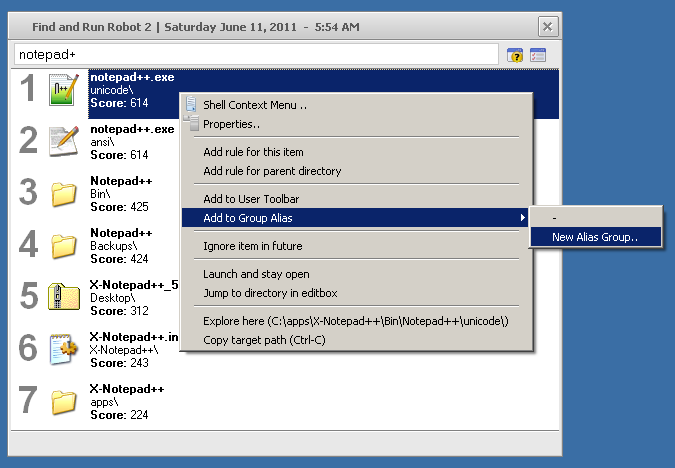
    farr-tip-4-1-find-the-program2.png
  • Then right-clicking on the notepad++ result and saying "Adding to Group Alias" and then choosing "New Alias Group.." at bottom of menu.
    farr-tip-4-2-create-new-alias-group2.png
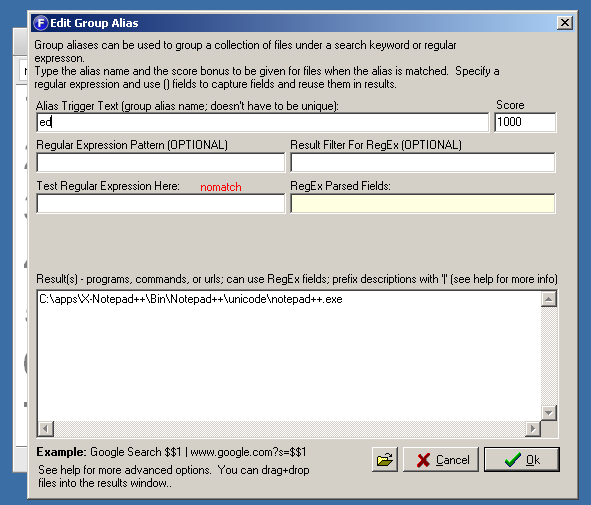
  • Then in the dialog that is shown, type in "ed" for the Alias Trigger Text, and leave the rest as is, and hit OK.
    farr-tip-4-3-named-the-alias2.png
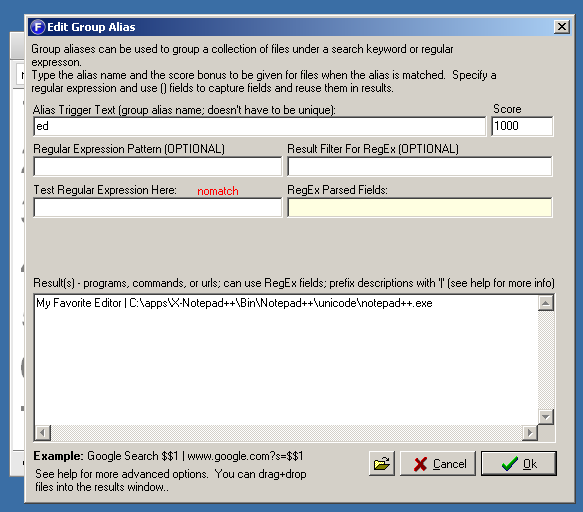
  • TIP: If you want to give a custom label to the result, go down to the Result area and prefix it with "My Favorite Editor|"
    farr-tip-4-4-customize-label2.png

You've now created a new alias group called "ed" which will show the notepad++ result; you can try it by typing "ed" in the main FARR search area.
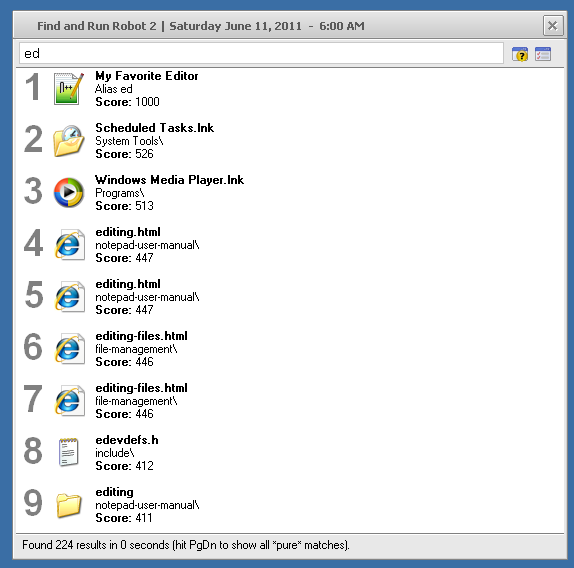
farr-tip-4-5-use-the-alias2.png

Now you aren't limited to just one result in an alias -- that's why it's called an alias "group".  You can add multiple items to that "ed" alias group, and make it act like a menu to your favorite text editors.

There are a lot more advanced things you can do with alias group, including regular expression aliases, launching applications with arguments, performing web searches, etc.  You can find more help on the forum or in the help file.

IMPORTANT: You can browse and edit both your custom aliases and the built-in aliases, by going to the options and choosing the "Aliases/Groups" tab; aliases are organized into files that you select at the top; your custom aliases can be found in the "myaliases.alias" file there, and that is the only set of aliases that you can directly edit (though you can uncheck any alias to disable it).  This is a great way to explore the built-in alias selection that comes with farr.

Advanced users can share their alias files with others.  On the forum and in the built-in set of aliases you will find some great aliases to perform all kinds of actions, including a ton of web search functionalities, package tracking, dictionary/music searches, etc.


Thanks to ewemoa for the screenshots!
13344
General Software Discussion / Re: Google's ChromeOS Laptops for $20/month
« Last post by mouser on June 09, 2011, 10:10 AM »
Sounds like a brilliant idea to me on the part of google.  And a good deal for consumers, at least in the beginning.

Of course i'm assuming the plan is for google to subsidize these and just lose money on them for years until they can destroy the market for normal OS/laptops and make it unprofitable for their competition to stay in business.

What comes after that is anyone's guess -- though we shouldn't be surprised to eventually see advertisements on our laptop cases, boot screens, etc.

Yipee! Welcome to the future!
13345
General Software Discussion / Re: Web vs. Device?
« Last post by mouser on June 08, 2011, 04:07 PM »
Is it just me or does this pattern sound familiar:

Given *ANY* technological or software announcement X,
  • If that same announcement X was made by Microsoft: It's boring and not worth anyone mentioning it anywhere.
  • If that same announcement X was made by Google: It's breathlessly significant engineering feat and tecnological world changer discussed by every website on planet for a month (after which everyone can forget about it until the next new beta announcement).
  • If that same announcement X was made by Apple: It's a Business Marketing Masterpiece bound to shake up the computer industry.
13346
Thanks for sharing, that sounds like it could come in handy.  Scripts are in ahk (autohotkey) source, in case anyone was wondering.
13347
Living Room / Re: Tablet Discussion - in the market to buy
« Last post by mouser on June 08, 2011, 08:42 AM »
Recent Nook vs. Kindle blog: http://kindleworld.b...tures-also-free.html
13348
DesktopCoral / Re: DesktopCoral and Dexpot (and others)
« Last post by mouser on June 08, 2011, 08:29 AM »
Can you elaborate more about what doesn't work? Maybe attach some screenshots?
13349
DesktopCoral / Re: Using Informer Widget with Coral - Please Help me do it!
« Last post by mouser on June 08, 2011, 07:39 AM »
Since I don't use these programs it's a little hard for me to test.  Perhaps it's time i installed them in a virtual machine for just this purpose.

Applications that write directly onto the desktop will have no problem displaying themselves over Desktop Coral areas, but more standard placement apps may not want to -- they may see the space as reserved.  The real question is whether other methods to force the desired window into position over the Desktop Coral area would work.  If someone can confirm to me that this will work and not render the functions of the application (Informer in this case) non-functional, then a solution might be to give Desktop Coral commands for forcibly moving certain windows into its area.  But there's no point in coding that if the target application is going to move itself out on its own or be non-functional once moved.
13350
interesting, ill have to check that out -- perhaps it has to do with some inferior way i am painting the background.
Pages: prev1 ... 529 530 531 532 533 [534] 535 536 537 538 539 ... 1515next