topbanner_forum
  *

avatar image

Welcome, Guest. Please login or register.
Did you miss your activation email?

Login with username, password and session length
  • Wednesday December 3, 2025, 10:23 am
  • Proudly celebrating 15+ years online.
  • Donate now to become a lifetime supporting member of the site and get a non-expiring license key for all of our programs.
  • donate

Recent Posts

Pages: prev1 ... 48 49 50 51 52 [53] 54 55 56 57 58 ... 1514next
1301
Mousers Media Browser / Re: Mouser's Media Browser v1.08.01 - Dec 12, 2019 beta
« Last post by mouser on December 11, 2019, 05:45 PM »
Try redownloading for latest version (1.09); the new version should detect and remove missing files better.
Let me know if you still find it leaving thumbnails of deleted files.

ps.
The reason I ask how you deleted the files, is that there are essentially two ways to delete files, one is using the Delete key, which tells MMB to handle the deletion; the other is to use the right-click context menu, which let's windows explorer do the deletion; the latter case I wasn't updating the view, but I now am.

ps2.
If the program detects a change in the monitored directories, it has two options.  One is to do a full rescan of the folder(s); this is slow but would detect any changes you make outside the program (renaming, moving files in or out, etc.).  MMB will do this is there are only a few files show (< 100 files).  What I've added now is that if there are > 100 files, and it detects a change in the folders, it will simply rescan your selected images and find any that are now gone.  This should handle most cases, though it does mean that for large directories, if you add files outside the program, you will need to do a File -> Rescan to see them.
1302
Find And Run Robot / Re: %cliptext% then ENTER/RETURN
« Last post by mouser on December 11, 2019, 04:56 PM »
Ok, yes this can be done in a couple of ways.. I just need to wake up first and remember how :)

Can you tell me how you are triggering the search in FARR from your macro? Is it from the commandline or are you sending keystrokes, etc?
1303
Mousers Media Browser / Re: Mouser's Media Browser v1.08.01 - Dec 12, 2019 beta
« Last post by mouser on December 11, 2019, 04:51 PM »
Delete is now instantaneous (even within large folders) -- there is a quirk in that the actual view of the deleted file remains in the viewer pane until focus is moved to another file.

Well that's a bug then, it shouldn't stay in the viewer, so I must be overlooking something..

Can I ask how you are triggering the delete?
1304
Mousers Media Browser / Re: Mouser's Media Browser v1.08.01 - Dec 12, 2019 beta
« Last post by mouser on December 11, 2019, 11:03 AM »
If you're feeling adventurous you can redownload and try the latest beta, with fast deletes even in huge folders..
1305
Find And Run Robot / Re: %cliptext% then ENTER/RETURN
« Last post by mouser on December 11, 2019, 09:45 AM »
Can you elaborate a little, I'm not sure I fully understand what you are asking.
1306
Mousers Media Browser / Re: Mouser's Media Browser v1.08.01 - Dec 12, 2019 beta
« Last post by mouser on December 11, 2019, 09:18 AM »
Looking at the code, I see that it's actually a bit worse than I thought -- when you perform an operation like a delete, it actually re-scans the entire set of files and then compares the new and old so it can do some updates of the thumbnails "smartly".. For small directory this yields a good result of minimal visual disturbance when the folder changes.   But what that means is that for a huge recursive directory, its going to be even slower than doing a full refresh rescan, without the ability to abort.

So.. I will put on my todo list some more sophisticated updating of the folder after changes.. For deletes it should be able to just instantly remove the files.. maybe i can detect renames and additions too.  But then in the worse case with a large collection of files I'll just trigger a normal refresh so you can at least abort..


Until then, I suggest folks avoid using the delete feature within the program when inside folders with hundreds or thousands of images, because of the slow speeds, at least one-off deletes (you can mass delete files pretty efficiently).
1307
Mousers Media Browser / Re: Mouser's Media Browser v1.08.01 - Dec 12, 2019 beta
« Last post by mouser on December 11, 2019, 09:05 AM »
Yeah I'm guessing what's happening with the slow delete is that it's triggering a "rescan" of the folder, which is slowing things down substantially.. It's designed to detect changes in folders and rescan, but maybe i can fix that and make it smarter about when a file is deleted not doing a full rescan.

As for the incorrect thumbnail.. let me know if you find any more clues..
1308
Multi Photo Quotes / Re: Latest Multi Photo Quotes Release v2.08.01 - Dec 8, 2019
« Last post by mouser on December 11, 2019, 08:18 AM »
v2.08.1 - Dec 8, 2019 beta
  • [BugFix] Mobile phone or other photos with rotation information are now auto-rotated to correct orientation.
1309
Mousers Media Browser / Mouser's Media Browser v2 - Dec 30, 2019
« Last post by mouser on December 11, 2019, 08:08 AM »
WEB PAGE: https://www.donation...ousers-media-browser

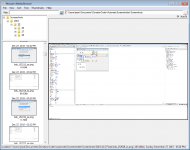
This will be a small utility for browsing directories containing images.

I decided to make a standalone utility that could be used as a helper for other tools, like my other NANY (Automatic Screenshotter).

It will start out with a fairly simple feature set but there is plenty of room for improvement.

Key feature:
  • Lots of viewing modes to find the one that works best for you.
  • Option to show recursive contents of folder tree (with search filtering and sorting)

Note that there are excellent powerful free image viewers/browsers (irfanview, xnview, etc.), and it would be foolish to try to compete with these.  My aim here is to make a more streamlined, focus helper utility.
mmb1.png

mmb2.png

mmb3.png

Screenshot - 12_11_2019 , 8_11_53 AM.png

Screenshot - 12_18_2019 , 11_51_43 AM.png


v2.0.1 - Dec 30, 2019
  • [Improvement] Recent Folder list now can be edited by hand in options; hopefully solves some people not being able to access it.
  • [Improvement] Settings file location shown in about box.
  • [MajorFeature] New virtual date tree.
  • [Bugfix] Fixed superfluous directory rescanning.
  • [Improvement] Remembers last selected file.
  • [Improvement] Shows file comments for selected file.
  • [Improvement] Added virtual tree options for starting with expanded nodes, and showing a node for each day of the month.
  • [Improvement] Better behavior inside folders where new screenshots are being added live.
  • [Improvement] Improvements to thumbnail sizing and thumbnail sizing options.
  • [Improvement] Image dimensions shown in statusbar.
  • [Improvement] New age filter.
  • [Improvement] Faster scanning speed.
  • [Improvement] Dramatically increased sorting speed.
  • [BugFix] Exiting while running scan was needlessly slow.
  • [BugFix] Searching with sort by date sometimes didnt sort some images.
  • [BugFix] Was reporting wrong folder search count.
  • [BugFix] Sorting was not always being performed properly after scanning.
  • [BugFix] In large folders after sorting, sometimes thumbnail showed wrong image.
  • [BugFix] Alphanumeric filename sort was case sensitive.
  • [Improvement] Reports scanning progress on large (recursive) directories and allows cancellation of scan; especially useful for large recursive directory trees.
  • [Improvement] Exponentially faster refresh after deleting files from large directories and refreshing after removed files.
  • [Improvement] Faster easier rename dialog.
  • [Improvement] Program remembers last subfolder selected on exit and restart.
  • [Improvement] Remembers selected image even after rescanning.
  • [Improvement] New Action menu with items for delete, rename, browse, clipboard, etc.
  • [BugFix] Switching root folder from GoTo menu would sometimes not update to show new folder contents.
  • [BugFix] Mobile phone or other photos with rotation information are now auto-rotated to correct orientation.
  • [BugFix] Better error handling if selected (or last) folder is missing.
  • [BugFix] Ctrl-clicking on thumbnails would not toggle to unselect them
  • [BugFix] Deleting a file left deleted image in viewer.
  • [BugFix] Sometimes scrollbars were not being shown in large folders.
  • [BugFix] When launching MMB with the folder commandline, it was first loading last folder.

v1.01.1 - December 29, 2015
  • First release
  • Thanks to DC member HamRadio for the icon!


Originally released as part of NANY 2016, see here: https://www.donation...ex.php?topic=42114.0
1310
N.A.N.Y. 2016 / Re: NANY 2016 Pledge/Alpha: Mouser's Media Browser
« Last post by mouser on December 11, 2019, 07:50 AM »
I have now locked this thread; updates can be found in:
The new OFFICIAL FORUM SECTION: https://www.donation...ndex.php?topic=49204

v1.08.1 - Dec 12, 2019 beta
  • [Improvements] Reports scanning progress on large (recursive) directories and allows cancellation of scan; especially useful for large recursive directory trees.
  • [BugFix] Mobile phone or other photos with rotation information are now auto-rotated to correct orientation.
  • [BugFix] Better error handling if selected (or last) folder is missing.
  • Bugfix: Ctrl-clicking on thumbnails would not toggle to unselect them

Download beta:
1311
Android Apps / Re: Updating my Android Apps
« Last post by mouser on December 11, 2019, 07:36 AM »
Objectively terrible numbers, but that's ok, never expected much and the apps are free so it's not like it matters  :P
1312
Android Apps / Re: Updating my Android Apps
« Last post by mouser on December 11, 2019, 04:33 AM »
A screenshot of user counts for my android apps, in case anyone is interested:
Screenshot - 12_11_2019 , 4_33_01 AM.png
1313
Screenshot Captor / Re: Screenshot Captor Ver 4.31.2 Stopped Working - Windows 8.1
« Last post by mouser on December 10, 2019, 10:00 PM »
It's a clue that the installed version isn't working properly but the portable is.. It could be some problem with Screenshot Captor saving files in the normal user documents area that it wants to.. Or it could be a security program blocking it, or it could be some other issue.

You might try uninstalling screenshot captor, and then manually deleting the entire "C:\Program Filesx86\ScreenshotCaptor" directory as well as the "C:\Users\YOURUSERNAME\Documents\DonationCoder\ScreenshotCaptor" directory and then try reinstalling..
1314
Living Room / Re: AI Dungeon - A text adventure of infinite possibilities
« Last post by mouser on December 10, 2019, 09:28 PM »
Yeah I was reading about this, it's really a fantastic use of generative text AI research.
1315
Screenshot Captor / Re: Screenshot Captor Ver 4.31.2 Stopped Working - Windows 8.1
« Last post by mouser on December 10, 2019, 08:51 PM »
Hmmm... I have never heard of such behavior..
You could try 1 of 2 things:
  • 1. Run the installer again, and this time make sure to check the box during the installer that tells it to erase all of your past Screenshot Captor settings, so you start with a clean install.  This would help if something got messed up about your settings.
  • 2. Or, download the portable zip version and unpack it to a new directory and trying running that copy and see if it does any better; that will also skip using your old settings.
1316
N.A.N.Y. 2019 / Re: NANY 2019 - Android App - Fasting Schedule
« Last post by mouser on December 10, 2019, 12:01 AM »
New article showing that intermittent fasting schedule improve health and weight loss:
https://www.npr.org/...ght-loss-study-finds

On the entire planet earth there are only 10 users of my Fasting Schedule app..  Can it really be that useless  :mad:
1317
Automatic Screenshotter / Re: Automatic Screenshotter v1.14.01 beta - Dec 9, 2019
« Last post by mouser on December 09, 2019, 11:29 PM »
v1.14.1 - Dec 9, 2019
  • [Improvement] Improved logging and display of pruning delete events.
1318
Clipboard Help+Spell / Re: Maybe someone can help with regular expressions
« Last post by mouser on December 08, 2019, 09:19 AM »
For doing replacement stuff, c-sanchez is probably right.. you may be better off using a language like python to do the search and replacement stuff..
1319
Multi Photo Quotes / Re: Problem with rotation
« Last post by mouser on December 08, 2019, 05:14 AM »
Sorry for the delay in getting back to you on this; I have confirmed the problem and will be releasing a fixed update in the next couple of days.

Can you send me a message through the forum (or via email [email protected]) so I can get help testing the new version to make sure the problem is fixed?
1320
Find And Run Robot / Re: New feature idea: Aliases conditional on active window
« Last post by mouser on December 08, 2019, 03:03 AM »
I can definitely see the value of having farr results be conditioned on the current/last active window..

But I am wary of trying to add stuff to the alias configuration dialog to support this.. it feels like an awkward match.

What you want COULD be done using a FARR plugin.. the only trouble is the complexity involved in writing a FARR plugin.. 

It seems to me a cleaner approach might be an easier and more flexible system for writing short script-like plugins..  That would let you more easily write a mini script to do what you want.
1321
Find And Run Robot / Re: request: FARR window position and size as FARR variables
« Last post by mouser on December 08, 2019, 02:50 AM »
That's an interesting idea.. so the goal is for a script or plugin to be able to know the size and position of the FARR window... Normally you could get that with a windows call, but i guess if the FARR window disappears before the tool is launched it's too late..

My only concern with using the Farr variables is the idea that farr would have to save that file after every launch..

I could certainly make the size+position available as variables that can be passed to a launched app/script, or retrievable from a plugin call, that would be easy..
1322
N.A.N.Y. 2020 / Re: NANY 2020 Release - Android App - DiscussionList
« Last post by mouser on December 08, 2019, 02:01 AM »
Any last requests?
1323
Living Room / Re: When you make your 100'th Post
« Last post by mouser on December 06, 2019, 09:10 PM »
 :Thmbsup:
1324
Living Room / Favourite youtube channels
« Last post by mouser on December 04, 2019, 12:54 AM »
I stumbled upon this guy's channel today and have been addicted to it:
https://www.youtube....Zs_ltFFvn0FDHT6kmoXA

A couple of random videos:


He's a british tourist who knows russian very well and some other languages, and just heads off into the remotest villages in the soviet union, india, bolivia, etc.  And just makes friends.  He's fearless and just goes with the flow wherever he is..
1325
Living Room / Re: When you make your 100'th Post
« Last post by mouser on December 02, 2019, 11:18 PM »
 :Thmbsup: :Thmbsup: :Thmbsup:
Pages: prev1 ... 48 49 50 51 52 [53] 54 55 56 57 58 ... 1514next