topbanner_forum
  *

avatar image

Welcome, Guest. Please login or register.
Did you miss your activation email?

Login with username, password and session length
  • Wednesday December 3, 2025, 9:01 am
  • Proudly celebrating 15+ years online.
  • Donate now to become a lifetime supporting member of the site and get a non-expiring license key for all of our programs.
  • donate

Recent Posts

Pages: prev1 ... 35 36 37 38 39 [40] 41 42 43 44 45 ... 1514next
976
Could we get some scroll bars on the HTML Source preview tab?
yep, done.

Is the blob interrogator in there yet, or is that yet to come?
it's there, in view menu.

Here's an interesting twist.  After I posted the last screenshot, two more of the exact same clip showed up out of nowhere spaced a couple of minutes from the original two.

Ok I see these have different hashes, so the contents of the seemingly duplicate clips are different.  See my reply above about this, and go into the blobs with the blob interrogator and let us see which formats are different...

I have noticed that MS excel this can happen also -- its happening maybe because these MS Office apps are doing something strange.. perhaps copying to the clipboard in two separate events in quick succession, for some reason I don't understand.  Or perhaps CHS is trying to read the clipboard before the app finishes with it..

Here's something that may fix it.  I've added a new option to increase the delay between the triggering of a clipboard event and CHS acting on that trigger, so that 2 quick success triggers will only result in the final capture:
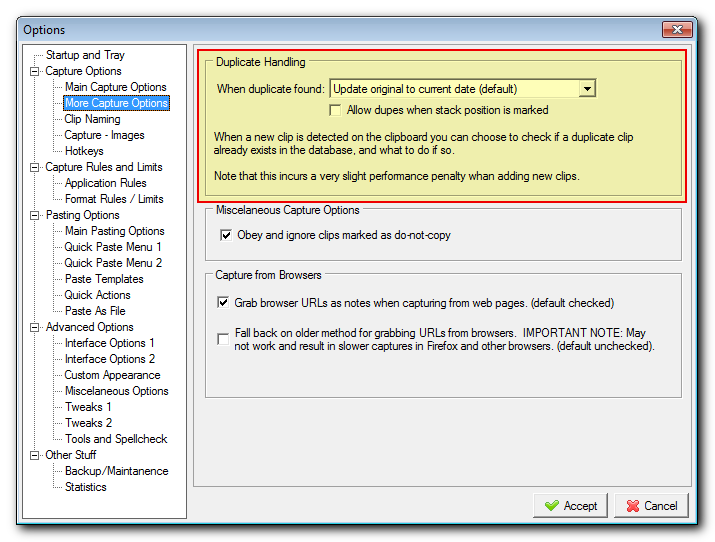
Screenshot - 2_21_2020 , 8_12_03 PM.png

As I said earlier, the other fix which will be available in a future version of CHS will be if the clips are duplicates except for a one or two irrelevant data formats, to mark those formats as IGNORE or IGNORE-FOR-PURPOSES-OF-CALCULATING-UNIQUE-HASH.

Other possible solutions would be: Having a list of applications that CHS should increase delay-before-capture behavior, or some kind of smart process to overwrite the previous clip when the subsequent one happens in super fast succession.
977
Can you see if the duplicate clips have identical clob hash values?
I see the hashes are different.  But now with the new Clip Blob interrogator you should be able to view both blobs with hashes for each format and see WHERE they differ.  If they only differ in a format chunk that is irrelevant, I will soon have options that let you ignore those formats.
978
New version uploaded, with clipboard blob viewer.  You can access it through the View menu.. Let me know what you think and of course report any bugs.
979
Screenshot Captor / Re: Congratulations Mouser for #1!!
« Last post by mouser on February 20, 2020, 10:45 PM »
Awesome!  :Thmbsup:
980
nice would be the ability to name image (and vector) clips. Could e.g. then be saved in favourites with clarity as to what exactly it is (often not clearly visible in thumbnail).
You can customize clip titles.
981
Can we actually *stop* image thumbnails showing in the quick-paste menu /sub-menus?


Try these options:
Screenshot - 2_20_2020 , 6_53_48 AM.png
982
Next version will include a little clipboard viewer tool you can bring up:
Screenshot - 2_21_2020 , 5_01_41 AM.png
983
Updated with some fixes.  No more blank captions on quick-paste popup if a clip has no text or image.
Grabbing urls when copying from web pages is now done by looking at the html source content (and saved in Notes field of clips); in addition to being more robust it captures much faster and solves the slow firefox capture in previous versions.

I'd appreciate testing on more web browsers to see if there are any where CHS can't capture the urls. (i have tried firefox, ie, and chrome).
984
The vector clips from Freehand shown here are identical:

Ok, so what you are saying is you copied something multiple times, and CHS is not figuring out that the clips are identical and should be regarded as duplicates?
I noticed this happening in firefox too, but as you point out, the hashes were different, so I'm guessing that their is something in the blob data that is NOT identical, like perhaps a timestamp.

The solution to this is:
  • 1. Live with it and don't worry about having duplicate clips in such a case since it won't happen too often.
  • 2. Wait for rules that would let you ignore blob items irrelevant to the content, which could solve your problem if the timestamp (or whatever) is not the main vector content.
  • 3. I may add display of hash values for the individual format chunks in a blob so you could ID which one is changing..

I'll also try to add a better caption in the quick paste menu for blob data that has no text.
It might be nice to have a hex viewer dialog you could bring up for blob contents so you could actually see the raw contents of the blob data for this kind of debugging.
985
it's very nice that the url is saved when copying text from a webpage
Yeah i think i will add code to grab those source urls and put them into the normal clip info, so they are available in the grid and even if you don't store html.
986
Can you give me some screenshots to show me what you are talking about regarding #1 and #2?
987
LaunchBar Commander / Re: back up restore question
« Last post by mouser on February 19, 2020, 06:19 PM »
That shouldn't be happening -- I'd like to find out why and fix it.  It sounds unacceptable.

But whats most likely happening is not that its losing your data but that it's forgetting what launch bar FILE you had open last.

So go to the options and choose from the File menu to open your launchbar file..

If the program is crashing on you please do tell me anything you can about what seems to be causing the crash -- you shouldn't have to worry about that happening.
988
Any more thoughts about what features are most important that still need to be added to make this multi-format stuff useful?
989
Is there a database schema somewhere so we can understand what's available to construct a WHERE clause from?

I will try to make one.  The help file needs some real updating.
990
Find And Run Robot / Re: minor bug: FARR locks #filecontents file if empty
« Last post by mouser on February 19, 2020, 06:32 AM »
I have confirmed the bug and fixed it in my version; will be fixed in next release.
991
Jibz's Tools / Re: dina download page still links to v2.92 (not v2.93)
« Last post by mouser on February 19, 2020, 05:15 AM »
Belated thanks for the post -- let me get Jibz (Dina author) to check it out.  :up:
992
Updated with some improvement to the organization of the options dialog.
993
Here's a little trick, create a virtual folder(group) showing you only Large clips in your database (those bigger than 100k):
Screenshot - 2_18_2020 , 9_24_57 PM.png


There are actually now 2 fields related to a clip's size.  DataSize is total size of clip INCLUDING any external image size.  BlobSize does not include size of external image.

You can click on the little button to the far left on the column header to see and show more clip field names.
994
Find And Run Robot / Re: minor bug: FARR locks #filecontents file if empty
« Last post by mouser on February 18, 2020, 07:07 PM »
Will fix. Thanks for report!
995
I'm still not seeing images in a the HTML Preview tab. 


Try re-downloading to get the latest version and then enable this option:
Screenshot - 2_18_2020 , 5_07_02 PM.png
996
Yeah I think we're getting very close to the time when donationcoder will be changed to https by default.
997
Ok new version uploaded.. I'd like to get some feedback before I do too much more.
You might want to click the small button to the far left on the grid header row to show some of the columns to see more Blob info, etc.
998
So what I've done so far:

  • I've migrated the core clipboard capturing and pasting functions from using a single format (plaintext or image), to using a multi-format "blob" data structure.
  • So when capturing it captures all formats in the clipboard and saves the collection (blob) of formats in the database.
  • It has some basic options for what formats you want it to ignore, and tries to identify redundant formats that can be ignored, for example unicode/oemtext/dib bitmaps that are equivalent to other stored formats.
  • It also handles plaintext and images specially; while preserving their order in the blob collection (if multiple formats found), it pulls out images to external png files with comments, and pulls out plaintext to sit in the database as a separate searchable field.  In this way, I'm hoping to get the best of both worlds (multi-format support but more convenient access to plaintext and images and minimizing database size).
  • Order of the multiple formats in a blob is preserved even in the case of images and plaintext, which may occasionally be important to some scenarios.
  • A single checkbox in the option will toggle the program from capturing multiple formats vs the old pure-plaintext behavior of CHS, so if you don't want the new formats and prefer a leaner pure plaintext database you can still use CHS that way.
  • Duplicate checking should be somewhat improved, and work for multiple-format blobs and images.

What's left to be done:
  • Lots more testing -- I'm hoping to get some help with that from the forum.
  • There are a bunch of ancillary things regarding copying+pasting that I might not have fully implemented in the new code (flashing clipboard icon on capture, dealing with stubborn situations where the clipboard is being used by another app, updating clip modification dates on pasting, etc.).
  • There are a few functions that are specifically plaintext related, like when performing format presets, and pasting text using sendkeys, that I have not fully moved over, or that use some old code.  I still have to go through and update all of those functions.  They will will only work with plaintext, but I think the existence of multi-format blob data may confuse some of these functions.
  • Similar behavior might be expected after manually editing a clip -- you will have changed the PLAINTEXT content of the clip, but not the unicode/richtext version, So I think what has to happen in such cases is a clearing of the unicode/richtext data in such cases.
  • I want to add more features to help you see how much space is being used by the multi-format data, and to do some maintenance operations on it to keep your database lean (like functions for removing multi-format data from old clips, etc.).
  • I would like to add more flexible rules for deciding which formats you want saved.. For example being able to specify a custom list of formats to keep or ignore, and maybe setting arbitrary limits on size, or based on the application running.  I'm not sure the best way to do this that would satisfy experts and novices alike..
  • Verify that the new image capture/pasting DIB format works in all cases.
999
New version uploaded.
I had to make some more elaborate changes to the multi-format "blob" data used by chs, such that previous blob data in clips from prior alpha versions won't be readable by this version.

I've still got quite a bit of work to do bringing everything in line with the new code, but CHS should be pretty good at saving and restoring the complete set of formats associated with clips, and hopefully handling duplicate detection, etc.
1000
Clipboard Help+Spell / Re: Multi-language support possible?
« Last post by mouser on February 16, 2020, 05:56 PM »
Yes, and that link will be where I will be upload updates.
Pages: prev1 ... 35 36 37 38 39 [40] 41 42 43 44 45 ... 1514next