


 Recent Posts
9626
General Software Discussion / Re: Has anyone discovered any cool Windows 7 third-party utilities?
« Last post by 40hz on November 22, 2009, 03:18 PM »(Note: spotted this in a recent post by Ramblinrick over at his What's on My PC website. Link to original article: http://whatsonmypc.w...09/11/20/win7inabox/ )
------------------------------------------------
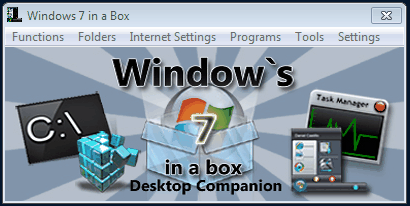
Yet another "training wheels" type utility called Windows 7 in a Box - but this one's a little bit different because it's completely portable and very comprehensive.
Info and download: http://www.big-daddy...m/windows7inabox.htm
From the "Windows 7 in a Box" website-
Ramblinrick also pointed out another great use for this app in his article:
From the What's on My PC website-
Now that is a dynamite idea! I'm definitely going to start passing out copies of this little app to anybody (e.g. friends, family, clients) I'm asked to do enduser Win7 phone support for. Bound to save everyone (especially me!) some time.
With thanks to What's on My PC for making the find.
(Check out the rest of WOMPC when you get a chance. Very nice website!)
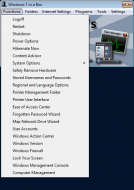
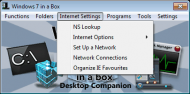
A few more screenshots:

------------------------------------------------
Yet another "training wheels" type utility called Windows 7 in a Box - but this one's a little bit different because it's completely portable and very comprehensive.
Info and download: http://www.big-daddy...m/windows7inabox.htm
From the "Windows 7 in a Box" website-
For everyone who made the big switch to Windows 7 here is the ultimate Desktop Tool. Windows7 in a Box. Windows7 in a Box was designed to help guide you through the brand new operating system from Microsoft .
Everything from Theme settings to Parental Controls. Sits on your desktop, easy to navigate, and puts an end to all the frustration of endless searching for settings.
Spyware,Adware,and Malware free.
Windows7 in a box can make the complete novice seem like a pro in just seconds.
No need to install anything.Sits on your Desktop or wherever you place it (it even runs off of a thumb drive).
Just locate what your looking for and click! It cant get any simpler than that.
Ramblinrick also pointed out another great use for this app in his article:
From the What's on My PC website-
I can see myself using this app to quickly assist other Windows 7 client users without having to go through the navigation process of locating specific settings and functions.
http://whatsonmypc.w...09/11/20/win7inabox/
Now that is a dynamite idea! I'm definitely going to start passing out copies of this little app to anybody (e.g. friends, family, clients) I'm asked to do enduser Win7 phone support for. Bound to save everyone (especially me!) some time.
With thanks to What's on My PC for making the find.
(Check out the rest of WOMPC when you get a chance. Very nice website!)
A few more screenshots:


 First up - apologies to all for me being in a snarly mood when I sarcastically referred to the MS forensic package as a "backdoor exploit." (We all know it's not.) Bad choice of words on my part even if I was making a lame-assed joke when I said it.
