topbanner_forum
  *

avatar image

Welcome, Guest. Please login or register.
Did you miss your activation email?

Login with username, password and session length
  • Friday December 5, 2025, 2:08 am
  • Proudly celebrating 15+ years online.
  • Donate now to become a lifetime supporting member of the site and get a non-expiring license key for all of our programs.
  • donate

Recent Posts

Pages: prev1 ... 375 376 377 378 379 [380] 381 382 383 384 385 ... 1514next
9476
Clipboard Help+Spell / Re: CHS and REXX
« Last post by mouser on May 13, 2013, 10:55 PM »
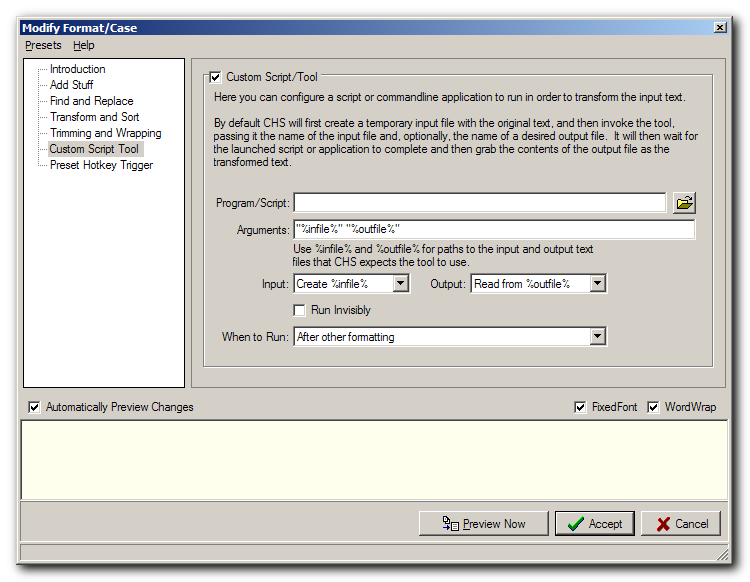
The place that you would interface a custom script is on the "Custom Script Tool" tab page of the Modify Format option:
S5_13_2013 , 10_50_29 PM.png

After you configure your tool, use the Presets menu and choose Save As to save it.  You can even set a custom hotkey from the "Preset Hotkey Trigger" tab before saving.

The key to understanding how to use custom tools/scripts with CHS is to see from that dialog that CHS will first save the clipboard text to a file, and then pass that file as an argument to the script, and then expect the script to either save changes to that same file, or to a different file or output it to stdout.

So what you need to do to use REXX or any other scripting tool, is test calling your tool from a dos commandline.  Some scripting languages will let you call them directly like "myscript.py %infile%" but others may require you to call them with the full path to the interpreter like "C:\Python.exe myscript.py %infile%".

Then just test your script from the commandline until it does what you want.

There are some sample tools in the Tools\ directory of CHS to help you see how a tool should behave.
9477
Clipboard Help+Spell / Re: Conflict with LibreOffice/OpenOffice
« Last post by mouser on May 13, 2013, 11:11 AM »
Email me ([email protected]) and I'll send you a debug version which will log what's going on as it happens and we can see if we can catch this hang in action.
9478
App,

My best friend and I loved watching star trek TNG and we made an art of finding things to laugh hysterically about.. I can't believe we missed that Riker sitting method.
9479
Thank you for the offer.
I'm afraid that Screenshot Captor cannot currently be translated. It's something I've thought about.. Perhaps soon I will add the ability.
9480
Clipboard Help+Spell / Re: Conflict with LibreOffice/OpenOffice
« Last post by mouser on May 12, 2013, 08:56 PM »
Happy to be of service.. Let me know if it holds up over time.
9481
Screenshot Captor / Re: Previous version?
« Last post by mouser on May 12, 2013, 07:17 PM »
Ok let's see.

First, yes if you really want the last v3 release, I can upload it.

But I would strongly strongly urge you to instead try to get v4 working well for you, since there is no reason it shouldn't work just exactly like v3 for the things you are talking about.  Let's talk about those items:

Pasting into MS Word:
The new SC has a few different ways to copy a screenshot to the clipboard.  You could try the different ways.  Copying a raw bitmap to clipboard from SC works same exact way it did in v3 so i really don't think that's your problem.  What you could try however is setting the DPI within screenshot captor of an image, and maybe the DEFAULT DPI used by screenshot captor.  This *WILL* effect the size of an image as seen in ms office apps if you paste them from the file.  Experiment with DPI settings in SC and see if you see a change in your ms office pasting.  The lower the DPI, the larger it should appear in ms office.

Storing INI file:  Again this really shouldn't refelect a change in sc3 vs sc4, so i wonder if the issues you are experiencing aren't more caused by starting over with a new installation with default settings rather than upgrading to v4?  By default SC will store its settings in your documents\donationcoder\screenshotcaptor folder IF you are running on windows Vista/7/8.  But you can change this by editing the configdir.ini file in the Screenshot Captor program files directory, and set the location for the ini file to anywhere you want.

Let me know.
9483
Clipboard Help+Spell / Re: Conflict with LibreOffice/OpenOffice
« Last post by mouser on May 12, 2013, 05:45 PM »
See how this beta performs for you:

What I've done:
I added code to CHS to have it automatically re-establish the clipboard chain when it sees a new Open Office / Libre Office process.  In fact as a test I'm having CHS re-establish the clipboard chain any time you try to capture from a new process.  Let's see what effect that has.

This should solve the 5-second delay when copying clips within Open Office / Libre Office, and I hope the related occasional hanging that you've experienced.
9484
Find And Run Robot / Re: Launch Maximized with Alias
« Last post by mouser on May 12, 2013, 05:14 PM »
NOTE: the help file says /winmax but then the example shows /WINMAX
one of these may work and the other not.. let me know and i'll fix help file.
9485
Find And Run Robot / Re: Launch Maximized with Alias
« Last post by mouser on May 12, 2013, 05:13 PM »
Yes.
Look for the "Alias Listing/Launching Tricks" in help file under "Advanced Use" and you'll see:

Customize the Appearance:
You can customize the text that gets displayed with each entry by prefacing custom text with |
For example:
Play Solitaire | c:\program files\games\solit.exe

File Window Options:
You can customize the way programs are launching by adding one of a few optional window modifiers to the very end of your file specification:
/winmax
/winmin
/winhid
/closeafter (force farr window to close after launching even if not set to by deafult)
/stayopen (dont close farr window after launching)
/icon=localfilename_from_aliasdir.ico (icon file must be in same dir as the source xml file defining the alias)
/hideifnoexist (hide the result if the file specified does not exist)
/runasadmin (run the file as admin)
/winvermin=M.m (major and minor minimum windows versions required to include alias result)
/winvermax=M.m (major and minor minimum windows versions required to include alias result)
/hint="text here" (shows hint on statusbar when item is selected, instead of showing launch command)

For example:
Play Solitaire | c:\program files\games\solit.exe /WINMAX
9486
Clipboard Help+Spell / Re: Conflict with LibreOffice/OpenOffice
« Last post by mouser on May 12, 2013, 04:56 PM »
Ok I have a preliminary possible fix for this.. I'll upload a beta and we can see if it helps.
9487
Clipboard Help+Spell / Re: Conflict with LibreOffice/OpenOffice
« Last post by mouser on May 12, 2013, 04:37 PM »
It seems to me that a workaround is that AFTER the open-office (libre-office) application is launched, use the right-click tray of CHS and say to "re-establish the clipboard chain".. The question is whether i can figure out a way to do that automatically so user doesn't have to worry.
9488
Clipboard Help+Spell / Re: Conflict with LibreOffice/OpenOffice
« Last post by mouser on May 12, 2013, 04:31 PM »
Some research has revealed that this is a longstanding bug caused by Open Office / Libre Office.. I'm not sure exactly what's going on, but more about the bug here:
9489
Clipboard Help+Spell / Re: Capture from ZIM Desktop Wiki fails
« Last post by mouser on May 12, 2013, 03:55 PM »
Ok i've tracked down the bug, and I think it's a bug that will surely explain some previously reported rare missed clip capturing reported by others.

The problem was that CHS was detecting the case where multiple clips were very rapidly put on clipboard and ignoring such events.  This avoided some degenerate behavior when some app was out of control copying stuff to clipboard, but what I suspect is happening with ZIM (and i suspect other apps on rare occasions) is that the app is sending multiple items to clipboard in quick succession, and the first item is probably not in standard text format -- resulting in CHS ignoring the first item because its format is bad, and then ignoring the second item because it was coming too fast on the heals of the first.

So.. I'll have a new beta version up tomorrow for testing.  My only concern is that we'll see some reports of problems do to removing the old protect-against-too-rapid-clipboard code.  We shall see.
9490
General Software Discussion / Re: Best method for a dead simple web site?
« Last post by mouser on May 12, 2013, 01:28 PM »
I'd also say wordpress.
9491
Site/Forum Features / Re: Promo "User Bars/Banners" for DonationCoder.com
« Last post by mouser on May 11, 2013, 10:35 PM »
I've added a new box to this collection -- see link in first post for the full collection.

Sample:
DcMontage_125x125_IHangOut.png
9492
no need for more testing, i have it reproducing on my end i think.. so let me track it down.
9493
FlipSuite and Flipbook Printer / Re: Errors when loading video
« Last post by mouser on May 11, 2013, 02:37 PM »
Strange, that's the latest version but I don't get that error.
I do note that the codec used by this video file is somewhat confusing to the program -- it does have a little bit of trouble with the file (it can't seek to the last frame and the video wont pause properly within the main media view tab),
but it will layout and print from my copy of flipsuite, which is same version as yours.

So I don't have a great answer for you, however a workaround would be to try to use a video conversion tool to convert the video file into a more standard format (like a standard avi file (this file is an AVI file but its H265 codec)) and then try loading the conversion file.

Sorry I don't have a better answer.
9494
FlipSuite and Flipbook Printer / Re: Errors when loading video
« Last post by mouser on May 11, 2013, 02:28 PM »
Can you tell me which version of FlipSuite you are using?
9495
FlipSuite and Flipbook Printer / Re: Errors when loading video
« Last post by mouser on May 11, 2013, 02:23 PM »
Thanks, I've downloaded it; you can remove it now if you want.
Let me test and report.
9496
FlipSuite and Flipbook Printer / Re: Errors when loading video
« Last post by mouser on May 11, 2013, 02:17 PM »
Can you upload the video someplace for me to test it?
9497
Living Room / Wary of Bitcoin? A guide to some other cryptocurrencies
« Last post by mouser on May 11, 2013, 12:12 PM »
Personally i think this whole bitcoin stuff is pretty confusing and insane.. but then i feel the same way about traditional currency, the stock market, and monetary policy.  None of it makes a lick of sense to me -- it all seems like a bad joke or a carny game.

But the technology and issues it raises are quite interesting.  Here's a nice new article discussing some of the new "alternatives" to bitcoin:

http://arstechnica.c...er-cryptocurrencies/

S5_11_2013 , 12_09_31 PM_ver001_thumb001.png
9498
Living Room / Re: Does anyone here use Bitcoins?
« Last post by mouser on May 11, 2013, 12:09 PM »
An interesting read on alternative new crypto currencies:
http://arstechnica.c...er-cryptocurrencies/
9499
Site/Forum Features / Re: Google ad test
« Last post by mouser on May 10, 2013, 10:58 PM »
ps. I wrote a very long post summarizing my thoughts about advertising on the website and about Project Wonderful in particular: https://www.donation...ndex.php?topic=34904
9500
ps.
I don't really expect many people to read this whole thing -- but I thought it was time I (and others) started writing longer original content on the site.. whether it's reviews or commentary or whatever.  Just to give some variety and a few meatier pieces.  So this is me firing the first shot.
Pages: prev1 ... 375 376 377 378 379 [380] 381 382 383 384 385 ... 1514next