topbanner_forum
  *

avatar image

Welcome, Guest. Please login or register.
Did you miss your activation email?

Login with username, password and session length
  • Friday January 16, 2026, 9:40 am
  • Proudly celebrating 15+ years online.
  • Donate now to become a lifetime supporting member of the site and get a non-expiring license key for all of our programs.
  • donate

Recent Posts

Pages: prev1 ... 373 374 375 376 377 [378] 379 380 381 382 383 ... 386next
9426
Post New Requests Here / Re: IDEA: Screen Dimmer
« Last post by Deozaan on September 27, 2006, 12:41 AM »
Pretty much every other CRT in the place is set at the default of 60hz and it bugs me so much.

Do your colleagues a favor and change it to 75hz or 85hz. I'm sure they'll appreciate.

FWIW, I'd refuse working with a CRT anymore. My workplace provided me with a cheapy 19" CRT and had no interest getting me a TFT. So I brought my own. If you've beginning troubles with your eyes, it'd be best to do something now before it'll get worse. Also use a RSI-preventing tool (like Workrave) to remind you doing pauses.

I've told a few about how to change their refresh rate, yet one of my nearby co-workers is still flickering just as bad on 85hz as it does on 65hz. Problem with pauses is that I work at a technical support center, so sometimes I get phone calls that last two hours. It's usually at least once a day I get calls that last longer than one hour. And when the call queue is high, we're not really encouraged to take a 5-10 minute anti-rsi break.

It doesn't make much sense to me, because they vaguely went over the whole ergonimic thing (which I've never been taught in much detail) and said something about taking a five minute break every hour or something along those lines, but I don't see how that's possible given the line of work and the pressure (as slight as it may be) to take calls.

Good news is that my employer is awesome enough that they just might give me LCDs if I complain enough.

You're welcome Deozaan.
too bad i only have one monitor, so i cant try the multimon setting, but i can confirm the transparency setting works for me, see pic.

anyone that has multi monitor, can you please confirm whether the multimon setting works or not.

Hmm. I just resorted to turning the brightness and contrast all the way down on my LCD (at home) at night. Works well enough for now, but I'd like to be able to just toggle it with a hot-key.

Where is Skrommel, anyway? I don't remember seeing him around much lately.
9427
Developer's Corner / Re: Nice blog on rapid game prototyping
« Last post by Deozaan on September 26, 2006, 09:11 PM »
Nice read, and interesting article it links to on Gamasutra (in the first post).

Good stuff.
9428
Developer's Corner / Re: Game Engines and Apps
« Last post by Deozaan on September 26, 2006, 05:57 PM »
Alice 2.0
http://www.alice.org/
Free, Open Source.

Alice v2.0 is the next major version of the Alice 3D Authoring system, from the Stage3 Research Group at  Carnegie Mellon University. It has been completely rewritten from scratch over the past few years. The focus of the Alice project is now to provide the best possible first exposure to programming for students ranging from middle schoolers to college students.
-Alice Website

Example videos of the program can be found here: http://www.alice.org/Alice_movies/

Alice uses it's own programming language that is mostly completely visual (drag and drop) as an effort to help absolute beginners to programming learn basic concepts while allowing them to see instant, visual results. A 3D "Hello World" program is much more impressive to a beginner than a simple text output.

Alice - Code.png

Object placement is easy using the built in world viewer. It has buttons in the upper-right corner that allow you to move the object horizontally (along the X and Z axes) and vertically (Y axis), rotate them, resize (scale) them, and more. The program comes with a built-in gallery of objects (at the bottom of the screenshot) and even lets you connect to the online gallery from within the program. It is streamlined, as if the files were already on your computer, except there is some download time to place them into your world.
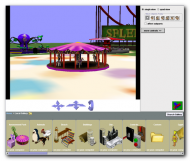
Alice - Object Placement.png

My personal experience with it is that it is very exciting to see what can be done so easily, except it it so easy it's hard to figure out. The program comes with four tutorials that show you how to use the GUI and covers some basics of making objects move across the stage. However, these tutorials teach very little about how to actually piece together your coding in ways that go beyond the very basics of actions. Documentation on how to make your own functions, how to pass variables, etc. is practically non-existent. I can't find any websites with Alice tutorials or documentation. The only thing I've been able to find are a couple of books that are between about $25-$45 on Amazon.com. I also found the books on the SafariX website, but they cost just about the same thing for the equivalent of a rental. Not worth it to me, especially for a programming reference book.

At first I thought development on Alice was dead, but there is a community forum that gets a few posts every day, one of them very recently talking about the updates on Alice v3.0. This forum is also the only source of free help I can find on how to use the program. There are a couple of people who seem to know it fairly well, but a lot of the time it seems they're just trying to figure it out themselves.

It seems powerful enough to make relatively simplistic games, if you can figure out how to work it, and may be perfect for beginners to manipulate 3D objects with instant results. But for a powerful, make-any-kind-of-game-you-want type engine, it's best to look elsewhere.

Overall, I would like to use it a lot more and get to know the controls and what the limits of it actually are, because it looks robust enough for a decent one-player game. If only I could figure out how to keep the motion I create from being all choppy (I don't know how to get the animation to transition from one motion to another without a pause in between them), how to use variables, create my own functions, or even type in my own code using the internal syntax that I'm sure is being used underneath all that drag and drop stuff. I'm hopeful that the books would describe how to do all of these things (except typing my own code, which I just don't think is supported), but again, the price just to learn it is a bit steep if you only find out that it's not good enough to suit your needs and you never want to touch it again.

Pros:
  • Free/Open Source.
  • Instant results.
  • Very little/No coding experience required.
  • Installation free. Just unzip and run.
  • Online forums where you can ask questions and hope somebody else is there to answer.
  • You can import files from other modeling programs like 3DSMax that export into .ase format. There are also some utilities you can download that will convert some formats into .ase, so just because the modeler doesn't do it, doesn't mean it can't be done.
  • It has the ability to connect to a VR Headset for more interaction, though I lack the know-how and technology to figure out how to do that.

Cons:
  • Other than 4 very basic tutorials and a couple of example worlds, almost no freely available documentation on how to use it.
  • It's not completely stable. It crashes sometimes, but most of the time just reports an error and you can try again. (It has a SlowAndSteady mode, which is supposed to be more stable.)
  • Online forums where you can ask a question and hope somebody is there and will answer.
  • Practically no documentation on how to use it.
  • Not designed specifically to make games. Its primary function is for storytelling.
  • You can't export it to a stand-alone exe file. You record a movie of it (but you need your own video capturing software) and take screenshots, but it can only be run (and thus interactive for a game) within the Alice program.
  • No advanced mode that allows you to type in your own code.
  • Oh, and did I mention it has practically no documentation on how to use it?

Summary: It's exciting to see something in which you can have such instantaneous results from without knowing all the details about how to manipulate objects in 3D space. It's great to be able to put an object on the stage and use some simple commands to get those objects doing things. Unfortunately it's a bit frustrating to see this program seem so simple to operate but then have a hard time figuring out how to use it. That coupled with the lack of documentation included with the program (not even a help file that describes the classes and methods used within the program) or online, and the fact that the only way to find comprehensive help on the subject is to shell out $25-$45 dollars is disheartening.

Here is a link to videos of projects made with Alice, along with a description of the curriculum used: Building Virtual Worlds. (most of the images are broken, but most of the videos I tried worked.) Be sure to check out the Calvin and Hobbes video (it's a little more than halfway down) if you were ever a fan of the comics!

EDIT: I posted a link to this thread in the Alice Forums, and a couple of people have responded with their opinions and suggestions to add to this mini-review. Alice Forum member DrJim's opinion regarding Alice for creating games is a simple "Don't." For some of the reasons I already listed, being that you can't export Alice worlds to anything beyond HTML and a video capture. Mr Nemo agreed about Alice's primary use being something different than to make games, but pointed out that two-player, head-to-head gameplay was possible (see Spy vs. Spy video from above Building Virtual Worlds link) and that while Alice cannot export into a standalone .exe, it is freely available on the internet for anyone to download and run. He also reiterated that since Alice is open source, a person who was adequately motivated could indeed modify the code to provide more support for game creation.
9429
Developer's Corner / Re: Game Engines and Apps
« Last post by Deozaan on September 26, 2006, 03:03 PM »
a comprehensive list of engines could be asking for too much maybe, especially given that their are entire large sites devoted to listing engines, but maybe a comprehensive list of the very TOP engines, or engine REVIEW SITES ?

I really do hope we see more game development by dc members!

Okay, maybe not a comprehensive list of all of them, but I would like a large list of good, usable engines to give people some variety and choice. And how about a link to one of those sites devoted to listing engines?
9430
Developer's Corner / Game Engines and Apps
« Last post by Deozaan on September 26, 2006, 02:57 PM »
Hi everyone. I would like to make a list of game engines as a general resource, but also to start doing (mini) reviews on them. So if you've ever used a game engine, I'd like to know what it is, where to find more information about it, and what your thoughts were about your experience with it. It should also be useful to know how advanced you are as a programmer with the language the engine required you to use. Please include the following:

  • Name of engine.
  • Its website or where to get it.
  • Whether it is 2D or 3D (or both).
  • How much it costs. Be sure to include separate pricing (if they have it) for personal/educational use and commercial use.
  • A short description of it (maybe something pasted from the website). Be sure to include some of its features.
  • Screenshot(s) of it or a game made with it. (Be sure to include the URL to the game's website, if possible).
  • Choose to be an optimist or pessimist: List the additional features of the commercial edition or the limited features of the personal/learning editions. (The difference between educational and commercials versions, basically.)
  • What programming language(s) it uses and your general skill in that language. If it uses its own language, your estimation of the learning curve would be great. Also the availability of online/free documentation/tutorials on how to learn it.
  • Your experience with it, bad and good. Perhaps more detail into a description of it, if you'd like.
  • Any other information you might want to share.
  • Links to galleries/documentation

Even if you've never used a game engine, if you don't see it here and you know about it, please provide as much of this information as possible. If one is already listed, go ahead and quote the original post and add any information/comments you want to about it.

If you can think of more things that should be in my numbered list, let me know and I'll edit the original post to include it.

Again, the ultimate goal of this is to create a comprehensive list of engines, including their pros and cons, ease of use, learning curve, availability of support (included help files, online documentation/tutorials/forums/community), and other information.


Mentioned Engines/Apps:
(alphabetically and who mentioned them)

Adventure Game Studio (3D) reviewed by Gothi[c]
Alice 2.0 (3D) reviewed by Deozaan (Updated Sept. 27, 2006)
Allegro reviewed by Gothi[c] (2D/3D)
Blender3D reviewed by Gothi[c]
CDX (2D) reviewed by Gothi[c]
Crystal Space 3D reviewed by Gothi[c]
Game Maker (2D/3D) reviewed by Gothi[c]
Haaf's Game Engine (2D) reviewed by mouser.
Irrlicht 3D reviewed by Gothi[c] (3D Engine, does not include sound or networking)
Ogre 3D reviewed by Gothi[c] (3D Engine, does not include sound or networking)
Panda3D reviewed by Mahesh2k
Quest 3D reviewed by Gothi[c]
SDL reviewed by Gothi[c] (Primarily 2D, but supports 3D via OpenGL)
Sphere (2D) reviewed by Gothi[c]
Stencyl (Flash)
Torque 3D
Torque 2D
Unity (3D)
9431
Living Room / Re: Interesting Links
« Last post by Deozaan on September 26, 2006, 03:28 AM »
like a game engine?

Yes, but Alice 2.0 isn't really made for designing games with much complexity. Alice seems primarily for telling stories, with the allowance of using a Virtual Reality Headset (VRH) to orient the camera, but has some programming aspects so that it will react to keyboard controls and mouse clicks, etc. So technically you could make a game in it, but again, it's not designed to make the next Final Fantasy or Grand Theft Auto.
9432
Living Room / Re: Have you ever been on a trampoline - NUDE! ???
« Last post by Deozaan on September 26, 2006, 02:45 AM »
Yes I have. When I was a youngling. Ah, the good old days.
9433
Post New Requests Here / Re: IDEA: Screen Dimmer
« Last post by Deozaan on September 26, 2006, 01:58 AM »
for the flickering, have you tried increase the refresh rate? right click on desktop>properties>setting>advanced>monitor
pick the highest refresh rate the monitor supports.

and for Skrommel's ghoster, try change the jump value to 0:
jump=0
this will make the entire screen dim (as oppose to the default, just the background)
and you can also choose the level of dimness by changing the transparency value, 255 = complete dark.
;transparency=0-255         Makes the ghosting more or less translucent.
;jump=1 or 0                Makes the active window show through the ghosting.

Cool. Thanks kimmchi! Only only problem now is that it doesn't work on my second montior. I've changed the Multimon value to 1 and 0 with no change to my second monitor. And sadly it doesn't seem to remember my settings when I close it.

It also seems to make no difference what I set the transparency to. In fact a few of them don't seem to change anything when I make changes.

And yes, I've changed the refresh rate to the highest possible on my monitors at work. They are CRT and aren't too bad, but it still bugs my eyes every now and then. Pretty much every other CRT in the place is set at the default of 60hz and it bugs me so much.
9434
Living Room / Re: Xara X1 Massive discount (expires 28th September)
« Last post by Deozaan on September 25, 2006, 05:47 PM »
So I decided to try to look into what I had bought, and I can't find any information on X1. Just Xtreme. Are they basically the same thing but with Xtreme has a few more features?

For the most part.  Xara X1 was undoubtedly a solid version of Xara, though some of the additions to xtreme are really cool (and definitely worth the upgrade if you find you like X1 -- no better vector editing app out there ;)

Changes are here--http://xara.com/products/xtreme/whatsnew.asp

Heh. I'm more interested in finding out What's Old. I know that back in the early days when you and I first met, Allen, that you used Xara to make animations. I thought it was weird to have one file for every frame (at that time I was using PSP & Animation Studio) but now that I've gotten Flash I can't stand the idea of going back to the old way. So I know Xara is tried and true for you, but I've never explored it before and don't know how it compares next to Flash.

I guess I'll just look at Xtreme and subtract the things I see in What's New and that will tell me what X1 is all about. Thank goodness for common math education!
9435
Post New Requests Here / Re: IDEA: Screen Dimmer
« Last post by Deozaan on September 25, 2006, 05:36 PM »
So anyway, I'd like an app that has a user-customizable amount to dim the screen. I'd use it for night time computer use to get rid of the brightness headaches. Could also be useful to dim the whiteness on monitors that flicker.

I'm not sure, but perhaps this one will work?

http://www.quickgamma.de/indexen.html

It might, but I'm at work and don't want to install it on these computers, but the flickering on these monitors is very annoying. I'd prefer a Skrommel 205Kb stand-alone screen dimmer. DonationCredits are waiting to be donated to the author of software that meets my satisfaction.  :Thmbsup:

EDIT: Changed some words for clarity
9436
Living Room / Re: Xara X1 Massive discount (expires 28th September)
« Last post by Deozaan on September 25, 2006, 05:31 PM »
One of the few programs I've run across that actually wouldn't install until I closed everything else (firewall, anti-virus, etc.)

That's useful information to know!
9437
Living Room / Re: Xara X1 Massive discount (expires 28th September)
« Last post by Deozaan on September 25, 2006, 05:10 PM »
It's from the UK and it comes in a DVD case with some documentation.

Documentation is good! I don't feel so bad about the shipping now.

So I decided to try to look into what I had bought, and I can't find any information on X1. Just Xtreme. Are they basically the same thing but with Xtreme has a few more features?
9438
Living Room / Modern Chat vs. BBS
« Last post by Deozaan on September 25, 2006, 05:09 PM »
Found a humorous fictionalized account of two times coexisting, bringing the modern chatter into the world of the old BBS systems.

It's over a month old, but I just heard about it today:

As an ex-sysop, I wonder occasionally how a modern chatter would do on an old style BBS.

WWIV-Menu>
==SYSOP Chat Mode Activated==
Sysop: Hey, i need to take the bbs off for a minute to get fido.
User: asl?
Sysop: It'll just be down for a few minutes, call back later, ok?
User: wtf hax?
Sysop: Sorry, I don't understand what you're saying. I've got to reboot too, so I'm going to disconnect you.
User: omfg hax, wtf is tis, spiware? a55h013!
Sysop: Do you require medical assistance? I've got your address on record from the age-check, would you like me to call a medic?
User: roflroflflfoolol who r u

Read the rest of it at Slashdot.org
9439
Post New Requests Here / Re: Screen Dimmer
« Last post by Deozaan on September 25, 2006, 01:45 PM »
+1.

What does that mean?
9440
Living Room / Re: Xara X1 Massive discount (expires 28th September)
« Last post by Deozaan on September 25, 2006, 01:41 PM »
Cool beans, I just bought it.

$8 shipping is kind of silly for a CD.  :down:
9441
Post New Requests Here / IDEA: Screen Dimmer
« Last post by Deozaan on September 25, 2006, 03:05 AM »
I was just looking through An App a Day when I found Day 10 - Jedi Concentrate. It was neat, but has some flaws. But that's beside the point.

I think it would be great to have an app that you could toggle on or off that just dimmed the entire screen no matter what app had focus. So I decided to check out Skrommel's software to find what I was looking for and I noticed that Skrommel has already made a few of these "An app a day" programs. Jedi Concentrate included, except it's called Ghoster or something like that. (By the way, it doesn't work on my second monitor.) The next best thing I found was DimSaver.

So anyway, I'd like an app that has a user-customizable amount to dim the screen. I'd use it for night time computer use to get rid of the brightness headaches. Could also be useful to dim the whiteness on monitors that flicker.

Thanks in advance!

9442
Living Room / Re: Game: Funny Farm
« Last post by Deozaan on September 24, 2006, 03:07 PM »
I was guessing a few more on this game when the site told me it had exceeded it's CPU quota. Looks like we may have overloaded it somewhat:

Screenshot - 9_24_2006 , 2_04_33 PM.png

I managed to unlock the pages about baseball and drugs:


9443
Living Room / Accessibility Game: Tone Memory
« Last post by Deozaan on September 24, 2006, 02:43 PM »
I've been trying to create a simple accessibility game for the visually impaired that uses audio tones to give clues on how to solve the puzzle. Lo and behold, today I came across a memory game that uses sounds instead of pictures.

It comes in four different sized grids, increasing the difficulty: 4x3, 4x5, 6x6, and 6x6 where the tones swap places with each other if it isn't a match. Here are a few thumbails of the game in action:

Click for full size images

Tone Memory - Menu.png
The main menu

Tone Memory - Match 1.png
I've just matched two tones so they are disappearing

Tone Memory - Match!.png
I got a match!

After you've finished, it tells you how long you took, your accuracy, and other things.

Now go give Tone Memory a try on zefrank.com.

Also worth mentioning (though not specifically accessibility friendly) is zefrank's Animated Memory which has you matching animated pictures instead of just static images.
9444
Living Room / Re: Interesting Links
« Last post by Deozaan on September 24, 2006, 04:22 AM »
Alice is still pretty pixallated for me.

I Like the hi-depth,realism of 3D Studio Max, & Lightwave, Bryce

From my understanding, Alice isn't the modeling program. You still use 3DS Max or Bryce or Lightwave to make the models, then you put them in Alice and make them do stuff. Or something.
9445
Living Room / Re: Windows Passwords
« Last post by Deozaan on September 24, 2006, 03:10 AM »
Our very own f0dder made a nice little application that's good for storing private information.

fSekrit is the one. Just don't forget your password to unlock your passwords!

I also came upon a little program some time ago that will reveal a password underneath those asterisks. It was on one of those big lists of freeware, so I snagged it in case I ever needed it, but I've never had to use it yet. Although now that I think about it, I remember a time or two forgetting my FTP passwords and wishing I would have remembered to use it.

Anyway, it's a small little thing called Revelation which can be found at http://www.snadboy.com/.

From the looks of it, he has a donation link on his site, too.
9446
Living Room / Re: Game: Funny Farm
« Last post by Deozaan on September 24, 2006, 02:32 AM »
This is fun.

If you want to add your support, just click on Save game and paste your code here.

Here's where I am right now, with most of it done by App103 before me:


9447
Living Room / Re: Cool Flash Game - Surf the Tunnel of Death
« Last post by Deozaan on September 23, 2006, 08:36 PM »
That's kind of fun. I got to 192.
9448
Developer's Corner / Re: Free Computer Books, Tutorials & Lecture Notes
« Last post by Deozaan on September 22, 2006, 08:46 PM »
Great find! Thanks.
9449
Developer's Corner / Re: Why I Prefer Procedural/Relational Over OOP
« Last post by Deozaan on September 22, 2006, 08:12 PM »
Hey thanks, this looks like a good read. Ever since I saw Spore and heard it was procedural I thought that I wanted to program procedurally. :-)
9450
That's what it looks like from the screenshot. . .

EDIT: But you probably have to pay for your own domain name. Nope just checked the website, domain is free, too.

But if you start to distribute larger files or your programs get very popular, you might have to think about paying for more storage or bandwidth. That's the only downside to it I can see. Oh, and it's Microsoft.

I'd also be cautious about whether or not you actually own the domain. You don't want to start an awesome website and have Microsoft steal it because you didn't read the terms of service.
Pages: prev1 ... 373 374 375 376 377 [378] 379 380 381 382 383 ... 386next