topbanner_forum
  *

avatar image

Welcome, Guest. Please login or register.
Did you miss your activation email?

Login with username, password and session length
  • Saturday September 19, 2026, 2:00 am
  • Proudly celebrating 15+ years online.
  • Donate now to become a lifetime supporting member of the site and get a non-expiring license key for all of our programs.
  • donate

Recent Posts

Pages: prev1 ... 33 34 35 36 37 [38] 39 40 41 42 43 ... 47next
926
FARR Plugins and Aliases / Re: Plugin: AlbumDisplayer (BETA)
« Last post by Nod5 on July 05, 2008, 09:26 AM »
the problem is this: for search as you type to work, I need to let the FARR inputbox to keep focus. But to launch a match from the html page through enter I need that match (and the page) to have focus. But since the enter key currently has no use in the plugin when the input box has focus, maybe I can modify it so that the enter redoes the search and immediately loads the first match. Let me look into that.

In the meantime, pressing tab + enter is a pretty fast way to launch the first match.
927
FARR Plugins and Aliases / Re: Plugin: AlbumDisplayer (BETA)
« Last post by Nod5 on July 05, 2008, 09:20 AM »
indeed it does! Via the farr:// commands we can mix html and FARR functionality a lot. We could for example make a html menu for each match and from that menu choose from multiple things for FARR to do with the match (pass it to an audioplayer like above, or copy it to clipboard, or pass it to another FARR plugin, or...)

re: launching the first result. I'm not exactly sure how to do it. Do you see a good way?
928
FARR Plugins and Aliases / Plugin: AlbumDisplayer (BETA)
« Last post by Nod5 on July 05, 2008, 08:57 AM »
AlbumDisplayer (BETA) -- please testdrive/pick apart and give feedback! :Thmbsup: If anyone would like to post about this at some other place, please don't until there's been some more feedback confirming that it works for others (it works perfect on my system but you never know...)

-----------------------------------
AlbumDisplayer
by nod5 ( nod5.dcmembers.com )
a plugin for FARR Find and Run Robot; www.donationcoder.com/Software/Mouser/findrun/
using FARR javascript SDK by ecaradec
using tooltip html/javascript code by dynamicdrive.com
using static index, created/updated by script made in autohotkey
-----------------------------------

Setup:
(0) Extract and copy folder "AlbumDisplayer" and all its files to FARR Plugin directory
(1) edit path in AlbumDisplayerIndexer.ini
(2) run AlbumDisplayerIndexer.exe to make index
(3) edit audioplayer path in album.html
(4) type "rplugins" in FARR and click "OK"

Tip: put link to AlbumDisplayerIndexer.exe in autorun folder to re-index at each Windows reboot

Use:
Type "alb searchphrase". Example: "alb beatles yellow sub"

Click on a match to send its folder as a parameter to the specified audio player
(confirmed working in the audioplayer XMPlay)

Note: AlbumDisplayer only works for folders that contain a folder.jpg image file.
Note: requires FARR 2.15.01 or newer

download: -- link removed use newer version below -- (md5 9e11f51b5f31f54951fee0b3b67284b6 )

short flash screencast: http://nod5.dcmembers.com/albumdisplayerbeta.htm
albumdisplayerbeta.jpg
929
Find And Run Robot / Re: Tip: Htmlviewurl works for local files too! :)
« Last post by Nod5 on July 03, 2008, 04:35 AM »
Good news! :Thmbsup:

A related issue is that we currently can give the html focus like so:
<BODY onload="document.getElementById('aa').focus()">
<a id=aa href=www.google.com>aa</a>
The html page elements can then be navigated with tab/ctrl+tab without clicking to activate the page. But when then tabbing to the last element on the page FARR only sometimes loops back to the first element (just like IE does) but sometimes the tab stops working. Clicking on the html page solves that problem - then tabbing works and loops around. But the next time FARR loads a page the issue can return. Save this as html and load with igo to try it:
<BODY onload="document.getElementById('aa').focus()">
<a id=aa href=www.donationcoder.com>a</a><br>
<a href=www.donationcoder.com>a</a><br>
930
Find And Run Robot / Re: Tip: Htmlviewurl works for local files too! :)
« Last post by Nod5 on July 02, 2008, 04:40 PM »
I updated my FARR html view mode test project: an album launcher. Here's a glimpse in the form of a short flash screencast:
http://nod5.dcmembers.com/farr_album_test.htm
test.jpg
I think it could be really neat when search as you type searching works! (still needed: a way to force the cursor back to the FARR inputbox).

Though I still think a native, non-html based way to display search matches as a list of images would be more powerful. Then we could select multiple match images (representing folders) and drag and drop them to some external application for example, right click them to do context menu operations on them, and so on. And that would bypass the index that my test above requires.
931
General Software Discussion / Re: Any "Create shortcuts, and move them" thingy?
« Last post by Nod5 on July 01, 2008, 05:45 PM »
Curt, I added the second part now:
"The (optional) companion tool Shortcutta moves shortcuts from a folder to the active Explorer window's folder when a hotkey is pressed. "
http://nod5.dcmember....com/shortcutty.html   (v080701)
932
that's good news grorgy!
933
Neat idea! A possible drawback: some program update helper utilities like http://www.filehippo.com/updatechecker/ also finds, and look for updates for, some non-installed programs if they are in the system's default programs folder. Process Explorer for example. I'm not sure if update helpers would find such programs if they were placed in some other root folder.
934
When viewing an internet page in FARR's html view mode and that page tries to close it's own window then FARR displays a "do you want to close window?" popup. So far so good. But clicking "yes" gives the error message below multiple times and then FARR freezes and a FARR restart is required.
error.png

To test it, save this as test.html, display in FARR and click close:
Code: HTML [Select]
  1. <a href="JavaScript:window.close()">Close</a>
935
General Software Discussion / Re: Any "Create shortcuts, and move them" thingy?
« Last post by Nod5 on June 26, 2008, 04:12 AM »
[...] right now I am not able to even try the first one, because all I get is a File Not Found / 404
I put the .zip in the wrong folder, fixed now.
936
Yes, the statusbar issue goes away after restarting FARR (that's why it is a "very, very small" and not just a "very small" issue ;D). The horizontal scroll issue remains after restart.
937
A very,very small issue: when first activating "Hide StatusBar completely" (in options > display options) and then de-activating it, the statusbar re-appears without expanding the FARR window accordingly. So the status bar partly covers the last match in the list. If no match is displayed, like when the inputbox is empty, then the statusbar party covers the input box. Restarting FARR solves the issue.
status.png
Something similar seems to happen when horizontal scroll bars appear - they also "steal" windowspace from the match list (concealing parts of the last match) instead of expanding the FARR window to accommodate them.
938
General Software Discussion / Re: Any "Create shortcuts, and move them" thingy?
« Last post by Nod5 on June 25, 2008, 05:17 PM »
Curt, I made Shortcutty, http://nod5.dcmember....com/shortcutty.html
But it only creates shortcuts in one folder specified in the .ini file. To be able to dynamically vary what folder to put the shortcuts in another script is needed that does this: when a hotkey is pressed grab the path to the then active explorer folder, then copies all shortcut files made with Shortcutty to that folder (the output folder in Shortcutty and the input folder in the second script must be the same). I can put that together too but not tonight. If you want to make that complementary script yourself, or add such functionality to some other script, this is the central line of code needed in it:
FileMove, %xfolder%\*.lnk, %xtargetfolder%, 1 
939
FARR Plugins and Aliases / Re: Google Translation Plugin
« Last post by Nod5 on June 24, 2008, 05:39 AM »
Neat! :Thmbsup:
940
General Software Discussion / Re: Any "Create shortcuts, and move them" thingy?
« Last post by Nod5 on June 24, 2008, 05:26 AM »
Curt, ok now I get it.
There's an autohotkey command for creating shortcuts:
FileCreateShortcut, Target, LinkFile [, WorkingDir, Args, Description, IconFile, ShortcutKey, IconNumber, RunState]
So it would be easy to make an explorer context menu entry that passes the right clicked file's path to the script which then creates a shortcut in some set folder. I get the impression that you want to vary what target folder to put the shortcuts in. That complicates things but only slightly. It would for example be possible to let the context menu entry + script to always copy the shortcuts to some temp folder. Later, when navigating to some target folder in explorer, some hotkey could copy all temp shortcuts to that folder.
941
General Software Discussion / Re: Any "Create shortcuts, and move them" thingy?
« Last post by Nod5 on June 23, 2008, 03:05 PM »
I read this four times but still don't understand exactly what you're asking for...  ;D

Is this it: you want a shortcut for C:\folder\file.exe , you right click it and select "thingy" and thingy creates a shortcut BUT immediately moves it to some other folder, say C:\folder2\ ?   :tellme:
942
FARR Plugins and Aliases / Re: Google Translation Plugin
« Last post by Nod5 on June 23, 2008, 07:19 AM »
czechboy, some ideas:

- decrease fontsize for lang list from fs24 to fs20

- it would be good if a default input/output language could be locked if the user adds them to the plugin settings. Specifying other languages in the FARR input box would then only temporarily override the default.

- maybe let more than one space at the end of the searchphrase trigger toggling of output language.
example: "gt sunshine " translates from english to german, "gt sunshine  " (two spaces) translates from english to spanish, three spaces = french, and so on for some set default languages.

- put current input/output language name in status bar
943
FARR Plugins and Aliases / Re: google dollar exchange rate plugin -- sketch
« Last post by Nod5 on June 23, 2008, 06:38 AM »
I added the more complex google syntax after all. Please testdrive it for bugs TucknDar and others  :)

Currency Converter Mini now has two modes: default and advanced.
To use default, enter your default input/output currency to options once and after that just type "ex 100 "
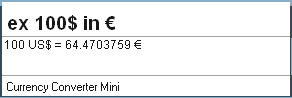
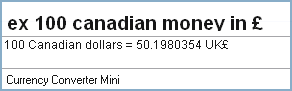
To use advanced, type in a way that google currency converter understands: "ex 100$ in € " ("ex 100 $ in €" also works but does an extra search at "ex 100 ")
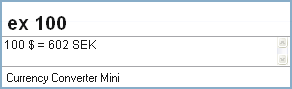
def.png

adv1.png

adv2.png

I also noticed that the plugin uses google for every default search now so the cache is not working. I'll try to fix that too.
// plugin script :
displayname="Currency Converter Mini";
versionstring="1.03.01";
releasedatestring="23.6.2008";
author="nod5";
updateurl="";
homepageurl="";
shortdescription="Convert from one currency to another via google.";
longdescription="Set default input/output currency in options (examples: $ £ GBP SEK canadian money or anything google accepts).\nDefault mode: \"ex 50 \".  Advanced mode: \"ex 50$ in € \" where $ and € are currency names. \"ex\" means exchange rate.";
advconfigstring="Currency Converter Mini";
readmestring="Currency Converter Mini";
iconfilename="favicon.ico";

aliasstr="ex";
regexstr="^ex ((?:\d|\.|\,|\w|€|£|\$| )*) $";
scriptregex=/^ex (\d(?:\d|\.|\,|\w|€|£|\$| )*) $/;
regexfilterstr="";
keywordstr="";
scorestr="300";

// type
UNKNOWN=0; FILE=1; FOLDER=2; ALIAS=3; URL=4; PLUGIN=5; CLIP=5;
// Postprocessing
IMMEDIATE_DISPLAY=0; ADDSCORE=1; MATCH_AGAINST_SEARCH=2;
// search state
STOPPED=0; SEARCHING=1;

var pre_string = "{\\rtf1\\ansi\\ansicpg1250\\deff0\\deftab709{\\fonttbl{\\f0\\fnil\\fcharset0 Arial;}}{\\colortbl ;\\red255\\green0\\blue0;}{\\*\\generator Msftedit 5.41.15.1507;}\\viewkind4\\uc1\\pard\\lang2057\\f0\\fs18 ";
var post_string = "\\par\n}";

var exrate = "";

function doQuery(querykey,querynokeyword){

querynokeyword = querynokeyword.replace(/,/g,'.');

// if non-digit, then assume custom currency input
// so google entire string if structured "111aaa in bbb "
//    else do nothing

var xtest = querynokeyword.search(/\D/g);
if (xtest != -1) {

var xtest = querynokeyword.search(/\d[^ ]*? (?:|[^ 0-9]*? )(?:|[^ 0-9]*? )in [^ 0-9]*?(?: [^ 0-9]*?|)/g);
// finds matches for:
// "ex 10$ in € "
// "ex 10 $ in € "
// "ex 10 swedish money in american money "

if (xtest == -1) {
  FARR.setStrValue("window.richeditmode",display);
 return;
}

  var url = "http://www.google.com/search?hl=en&q="+querynokeyword;
  var xmlhttp=new ActiveXObject("MSXML2.XMLHTTP");

  xmlhttp.onreadystatechange = function(){
    if (xmlhttp.readyState == 4) {
      var string = xmlhttp.responseText;
      string = string.match(/><b>\d.*?[^<(?:f|b)]*? = \d.*?<\/b>/g);
      string = string[0].replace(/<[^>]*?>/g,"");
      string = string.replace(/>/g,"");
      string = string.replace(/&#215;/g,"x");

      FARR.setStrValue("statusbar","Currency Converter Mini");
      FARR.setStrValue("window.richeditmode",pre_string+string+post_string);
      }
    }
  xmlhttp.open("GET",url,true);
  xmlhttp.send(null);

return;
}
//-----------------------------------


FARR.setStrValue("window.richeditmode","");

if(exrate == ""){
  var url = "http://www.google.com/search?hl=en&q=1"+myinputcurrency+"+in+"+myoutputcurrency;
  var xmlhttp=new ActiveXObject("MSXML2.XMLHTTP");

  xmlhttp.onreadystatechange = function(){
    if (xmlhttp.readyState == 4) {
      var string = xmlhttp.responseText;
      string = string.match(/<b>1 .*? = (?:\d|\.|\,)*? /g);
      var splitstring = string[0].split("=");
      var exrate = splitstring[1].slice(1,-1);
      string = exrate * querynokeyword;
      string = Math.round(string);
      string = querynokeyword+" "+myinputcurrency+" = "+string+" "+myoutputcurrency;
      FARR.setStrValue("statusbar","Currency Converter Mini");
      FARR.setStrValue("window.richeditmode",pre_string+string+post_string);
      }
    }
  xmlhttp.open("GET",url,true);
  xmlhttp.send(null);
}
else {
var string = exrate * querynokeyword;
string = Math.round(string);
string = querynokeyword+" "+myinputcurrency+" = "+string+" "+myoutputcurrency;
FARR.setStrValue("statusbar","Currency Convert Mini");
FARR.setStrValue("window.richeditmode",pre_string+string+post_string);
}

}

myinputcurrency="";
myoutputcurrency="";
function onOptionsChanged() {
    var options=new ActiveXObject("MSXML2.DOMDocument");
    options.load(currentDirectory+"\\options.xml")
    myinputcurrency=options.selectSingleNode("options/myinputcurrency").getAttribute("value");
    myoutputcurrency=options.selectSingleNode("options/myoutputcurrency").getAttribute("value");
}

function onInit(c) {
    currentDirectory=c;

    var options=new ActiveXObject("MSXML2.DOMDocument");
    if(!options.load(currentDirectory+"\\options.xml") ||
        options.selectSingleNode("options/myinputcurrency").getAttribute("value")=='' ||
        options.selectSingleNode("options/myoutputcurrency").getAttribute("value")=='') {
        options.loadXML("<options>\n"+
                        "<myinputcurrency label='exchange from :' value=''/>\n"+
                        "<myoutputcurrency label='exchange to :' value=''/>\n"+
                        "</options>");

        options.save(currentDirectory+"\\options.xml");
        options=null;
        FARR.showOptions();
    } else {
        onOptionsChanged();
    }
}


function onSearchBegin(querykey, explicit, queryraw, querynokeyword) {
  if(!explicit) {
    if(aliasstr.indexOf(querynokeyword)!=-1) {
      FARR.setState(querykey,1);
      FARR.emitResult(querykey,aliasstr, aliasstr, iconfilename,ALIAS,IMMEDIATE_DISPLAY,300);
      FARR.setState(querykey,0);
    }
    return;
  }
  FARR.setStrValue("statusbar","Currency Converter Mini");

    display = pre_string+"Type amount and hit \\b space\\b0"+post_string;

var xtest = queryraw.search(/(?:\d\D| \D)/g)
if (xtest != -1)
    display = pre_string+"use google syntax:  ex 100$ in € "+post_string;
  FARR.setStrValue("window.richeditmode",display);
}

function onRegexSearchMatch(querykey,querynokeyword) {
  var match_reg = querynokeyword.match(scriptregex);
  doQuery(querykey,match_reg[1]);
}

lanux128, I don't really have time to add the RatesFx at the moment. Hopefully someone else does.
944
FARR Plugins and Aliases / Re: google dollar exchange rate plugin -- sketch
« Last post by Nod5 on June 22, 2008, 10:08 AM »
I'm glad it works!

On custom currencies, see this and the post after.

I earlier considered adding modifiers for other currencies. But in the end I just aimed for the slimmest and quickest possible conversion from one specific currency to another. Adding modifiers could conflict with that somewhat. I could parse the string after "ex" for space separated substrings ("111 aaa bbb ") an if so treat the latter as modifiers. But then a users that wants "111 aaa bbb " would see results for "ex 111 " and "ex 111 aaa " on the way, which is ugly. (Using format "111aaa bbb" might work though). I'll think about it but at the moment I think complex conversions is well handled by the igo method ("igo 200 $ in €") or czechboys Google Calculator plugin (see link above).
945
lanux, see this for ultrafast conversion from one specific currency to another. It now works again with a little help from czechboy.

Apart from that doing, for example, "igo 200$ in €" gives a google page with the conversion. The output is somewhat cluttered but can be read without scrolling.
igo.png
946
FARR Plugins and Aliases / Re: google dollar exchange rate plugin -- sketch
« Last post by Nod5 on June 22, 2008, 06:56 AM »
That indeed solves it. Thank you czechboy! :) I was focusing so intensively on finding the problem with the second * that I didn't notice that it was the first * was the real culprit. Doh!    :huh: ;D :-[

TucknDar, I can't reproduce that plugin configuration dialog crash. What currencies have you entered (if any)? What version of fscript.dll ? My config works fine with fscript.dll v1.0.0.7 (MD5 86b830da7611128f97b6b4b63b18f53e )

// plugin script :
displayname="Currency Converter Mini";
versionstring="1.02.02";
releasedatestring="22.6.2008";
author="nod5";
updateurl="";
homepageurl="";
shortdescription="Convert from one currency to another via google.";
longdescription="To run the plugin, type \"ex 50 \" but replace 50 with the amount you want converted.\nSet input/output currency in advanced plugin options. (examples: $ £ GBP SEK canadian money )\nTest your input/output first by googling \"1 __ in __\", where _ is your input/output.\nAfter a FARR restart the first conversion uses google. Later conversions use the cached exchange rate.\nThe alias \"ex\" stands for exchange rate. The plugin converts one way, between two fixed currencies.\nFor other conversion needs just use google.";
advconfigstring="Currency Converter Mini";
readmestring="Currency Converter Mini";
iconfilename="favicon.ico";

aliasstr="ex";
regexstr="^ex ((?:\d|\.|\,)*?) $";
scriptregex=/^ex ((?:\d|\.|\,)*?) $/;
regexfilterstr="";
keywordstr="";
scorestr="300";

// type
UNKNOWN=0; FILE=1; FOLDER=2; ALIAS=3; URL=4; PLUGIN=5; CLIP=5;
// Postprocessing
IMMEDIATE_DISPLAY=0; ADDSCORE=1; MATCH_AGAINST_SEARCH=2;
// search state
STOPPED=0; SEARCHING=1;

var pre_string = "{\\rtf1\\ansi\\ansicpg1250\\deff0\\deftab709{\\fonttbl{\\f0\\fnil\\fcharset0 Arial;}}{\\colortbl ;\\red255\\green0\\blue0;}{\\*\\generator Msftedit 5.41.15.1507;}\\viewkind4\\uc1\\pard\\lang2057\\f0\\fs18 ";
var post_string = "\\par\n}";
var history = "";
var exrate = "";

function doQuery(querykey,querynokeyword){

querynokeyword = querynokeyword.replace(/,/g,'.');

if(exrate == ""){
  var url = "http://www.google.com/search?hl=en&q=1"+myinputcurrency+"+in+"+myoutputcurrency;
  var xmlhttp=new ActiveXObject("MSXML2.XMLHTTP");

  xmlhttp.onreadystatechange = function(){
    if (xmlhttp.readyState == 4) {
      var string = xmlhttp.responseText;
      string = string.match(/<b>1 .*? = (?:\d|\.|\,)*? /g);
      var splitstring = string[0].split("=");
      var exrate = splitstring[1].slice(1,-1);
      string = exrate * querynokeyword;
      string = Math.round(string);
      string = querynokeyword+" "+myinputcurrency+" = "+string+" "+myoutputcurrency;
      FARR.setStrValue("statusbar","Currency Converter Mini");
      FARR.setStrValue("window.richeditmode",pre_string+string+post_string);
      }
    }
  xmlhttp.open("GET",url,true);
  xmlhttp.send(null);
}
else {
var string = exrate * querynokeyword;
string = Math.round(string);
string = querynokeyword+" "+myinputcurrency+" = "+string+" "+myoutputcurrency;
FARR.setStrValue("statusbar","Currency Convert Mini");
FARR.setStrValue("window.richeditmode",pre_string+string+post_string);
}

}

myinputcurrency="";
myoutputcurrency="";
function onOptionsChanged() {
    var options=new ActiveXObject("MSXML2.DOMDocument");
    options.load(currentDirectory+"\\options.xml")
    myinputcurrency=options.selectSingleNode("options/myinputcurrency").getAttribute("value");
    myoutputcurrency=options.selectSingleNode("options/myoutputcurrency").getAttribute("value");
}

function onInit(c) {
    currentDirectory=c;

    var options=new ActiveXObject("MSXML2.DOMDocument");
    if(!options.load(currentDirectory+"\\options.xml") ||
        options.selectSingleNode("options/myinputcurrency").getAttribute("value")=='' ||
        options.selectSingleNode("options/myoutputcurrency").getAttribute("value")=='') {
        options.loadXML("<options>\n"+
                        "<myinputcurrency label='exchange from :' value=''/>\n"+
                        "<myoutputcurrency label='exchange to :' value=''/>\n"+
                        "</options>");

        options.save(currentDirectory+"\\options.xml");
        options=null;
        FARR.showOptions();
    } else {
        onOptionsChanged();
    }
}


function onSearchBegin(querykey, explicit, queryraw, querynokeyword) {
  if(!explicit) {
    if(aliasstr.indexOf(querynokeyword)!=-1) {
      FARR.setState(querykey,1);
      FARR.emitResult(querykey,aliasstr, aliasstr, iconfilename,ALIAS,IMMEDIATE_DISPLAY,300);
      FARR.setState(querykey,0);
    }
    return;
  }
  FARR.setStrValue("statusbar","Currency Converter Mini");
    display = pre_string+"Type amount and hit \\b space\\b0"+post_string;
  FARR.setStrValue("window.richeditmode",display);
}

function onRegexSearchMatch(querykey,querynokeyword) {
  var match_reg = querynokeyword.match(scriptregex);
  doQuery(querykey,match_reg[1]);
}

I will put this in a proper plugin package later.
947
FARR Plugins and Aliases / Re: google dollar exchange rate plugin -- sketch
« Last post by Nod5 on June 22, 2008, 06:04 AM »
Thanks! Will try it now.
948
FARR Plugins and Aliases / Re: google dollar exchange rate plugin -- sketch
« Last post by Nod5 on June 22, 2008, 05:58 AM »
Yes, this doesn't work at the moment. It did work previously so something must have changed (at google or in the FARR update).

Here is the problem:

The plugin uses javascript to extract a part of the google search results page. Here is an example snippet from google:
<tr><td><img src=/images/calc_img.gif width=40 height=30 alt=""></td><td>&nbsp;</td><td nowrap><h2 class=r><font size=+1><b>1 US$ = 0.506303478 British pounds</b></h2></td></tr><tr><td>
The plugin tries to extract "<b>1 US$ = 0.506303478 " from the snippet through this code:
string = string.match(/<b>1 .* = (?:\d|\.|\,)*? /g);
But somehow that does not stop at "0.506303478 " anymore but grabs a longer string. I can't see the error here. The last ? is supposed to make the search ungreedy (and I think it ought to work even without it). I just now also tried to use /gU but that doesn't work either. I'm sure there is some other way to do it but I'm bad at regexp in javascript and will have to look it up some more. If anyone spots a solution right away, please post it here.
949
Find And Run Robot / Re: Tip: Htmlviewurl works for local files too! :)
« Last post by Nod5 on June 20, 2008, 07:13 PM »
s.newave, as for the arrow keys, something like that could probably be implemented through javascript in each .html file ( for example http://code.google.com/p/js-hotkeys/ and then set up/down to send tab/ctrl-tab), but if a general solution is possible to build into FARR then all the better.
950
Find And Run Robot / Re: Tip: Htmlviewurl works for local files too! :)
« Last post by Nod5 on June 20, 2008, 04:30 AM »
Thanks, that was it.
Once we have some way to force focus back to the inputbox and get farr:// links working then I can implement the mp3 album cover displayer idea. Yay!
edit: removed code, it was buggy
Pages: prev1 ... 33 34 35 36 37 [38] 39 40 41 42 43 ... 47next