topbanner_forum
  *

avatar image

Welcome, Guest. Please login or register.
Did you miss your activation email?

Login with username, password and session length
  • Wednesday March 18, 2026, 11:40 pm
  • Proudly celebrating 15+ years online.
  • Donate now to become a lifetime supporting member of the site and get a non-expiring license key for all of our programs.
  • donate

Recent Posts

Pages: prev1 ... 33 34 35 36 37 [38] 39 40 41 42 43 ... 48next
926
FARR Plugins and Aliases / FARR plugin: FarrWebMetaSearch 1.6.0
« Last post by phitsc on January 08, 2010, 05:20 PM »
Description
FarrWebMetaSearch is a generic web retrieval FARR plugin that show results in list mode. It is therefore targeted at web sites delivering list-like results. Results are selected using regular expressions. FarrWebMetaSearch searches live as you type!
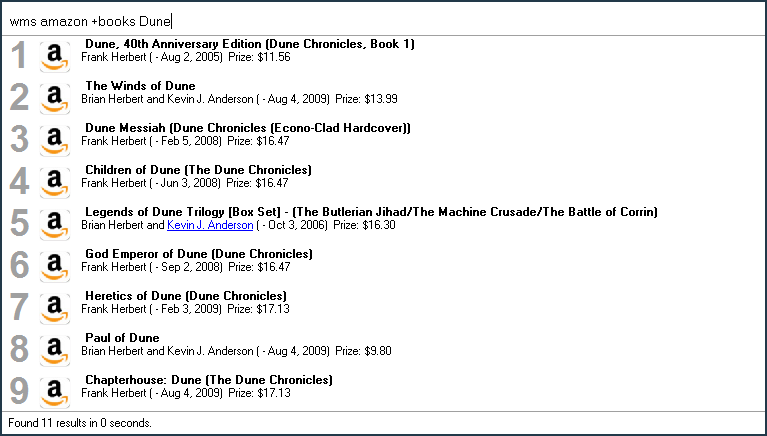
FarrWebMetaSearch.png

Screencast
http://donationcoder...h/webmetasearch.html
YouTube: http://www.youtube.c.../watch?v=pxKcvQ-uHjQ

Download & Install
Download the FarrWebMetaSearch installer from here then double-click FarrWebMetaSearchSetup.exe to start the installation. I've tested the installer on both Windows XP and Windows 7 32-bit. If you'd rather install the plugin manually, you can download it from here, then unzip it into the FARR plugins directory (usually C:\Program Files\FindAndRunRobot\Plugins) and restart FARR.

Basic usage
Type

wms [search] [+subsearch] [search term]

to use a pre-configured search.

Typing +, - or / after the search name will display available subsearches. [+subsearch] is optional. It currently has to follow right after the search name.

If [search] is configured as a web search, [search term] will be searched live as you type. If [search] is configured as a feed, [search term] will filter the found results. In this case [search term] is optional.

Tip: Type wms ? and hit enter to open the help file.

Searches
The following searches are currently available:
  • Amazon
  • Amazon.de
  • CDDB
  • C++ Reference
  • Engadget (feed)
  • Google
  • IMDB
  • Jamendo
  • Kindleforum (feed)
  • MSDN
  • OneLook
  • Play.com
  • Tages Anzeiger Front (feed)
  • Twitter

Version history
1.6.0 - 9. July 2010
  • can now search local files (see help file)
  • New / updated searches:
    • google (by Alien282)
    • fixed MSDN search

1.5.1 - 11. February 2010
  • implemented status bar icons
  • implemented two stage regex
  • replacing many more character entity references. now supports all the French characters as well.
  • New / updated searches:
    • amazon and amazonde (much improved!)
    • imdb (improved)

1.5.0 - 5. February 2010
  • implemented sortOrder parameter
  • implemented isHidden parameter
  • implemented context submenus
  • now supports more than 9 context menu items
  • now clears context menus for subsearches
  • subsearches / abbreviations are now case-insensitive
  • now prints the number of listed searches in the status bar
  • updated help file
  • New / updated searches:
    • onelook (by Perry Mowbray)
    • timeanddate (by Perry Mowbray)
    • autohotkey (ewemoa)
    • cheatsheet
    • amazon (fixed typo)

1.4.2 - 29. January 2010
  • Now filters for subsearch abbreviations too
  • Added some logging capability. Type 'wms !' to enable / disable logging.
  • Added %PLUGINALIAS% variable
  • Updated help file
  • New / updated searches:
    • onelook (by Perry Mowbray) - with more subsearches, abbreviations and help file!

1.4.1 - 26. January 2010
  • subsearch filtering now matches at the start (no longer anywhere in the string)
  • show abbreviation of subsearches (if they have one). e.g. wms amazon +books (b)
  • Shift + Enter launches search result in FARR's internal HTML view
  • replace more special characters in FARR output (  and °)
  • fixed problem with subsearches having isFeed=true

1.4.0 - 24. January 2010
  • Shift + Enter shows info about search (using FARR's internal HTML view)
  • Subsearches can now have abbreviations ( [Subsearch|Abb] )
  • Searches can now define context menu items (see play search for an example)
  • Fixed 'feeds not showing subsearches on entering +'
  • new / updated searches:
    • onelook (by Perry Mowbray) - added four new subsearches
    • jamendo (by Perry Mowbray)
    • cppreference - replaced with a different one providing better information
    • play - added 'buy item' and 'show basket' context menu items

Previous releases:
Spoiler
1.3.0 - 15. January 2010
  • search term (%SEARCHTERM%) and search URL (%SEARCHURL%) are now available as variables in the resultPattern, farrPath, farrCaption and farrGroup parameters
  • search term (%SEARCHTERM%) is now available as a variable in the searchUrl parameter. If searchUrl does not contain the %SEARCHTERM% variable, the search term is appended at the end (as it was until now)
  • properly handle and report server errors
  • show down-arrow icon on status bar to switch to FARR's extended view (which doesn't handle html tags properly though)
  • new / updated searches:
    • onelook (by Perry Mowbray) - added name subsearch

1.2.0 - 14. January 2010
  • Fixed bug with search parameters defined as empty string
  • Updated help file Search config files
  • new / updated searches:
    • onelook (by Perry Mowbray)
    • kindleforum (feed)
    • play.com

1.1.0 - 9. January 2010
  • Type wms ? + Enter to show help file
  • Added about list items
  • Updated help file (still needs better treatment of .config files)

1.0.0 - 8. January 2010
  • Changed search behaviour for news feeds
  • Improved amazon.com search. Now gives more relevant results when searching for 'neural control' (and other titles with more than one author ;))
  • replace more special characters in FARR output, e.g. © and ®
  • resultPattern can now contain the %SEARCHTERM% variable, which will be replaced by the entered search terms
  • added new searches:
    • onelook (thanks Perry Mowbray!)
    • engadget (feed)
    • twitter
  • changed to TiddlyWiki help file format (although it's far from complete)

0.9.1 - 31. December 2009
  • use FARR's launching functionality to open URLs

0.9.0 - 29. December 2009
  • First release


Credits
Thanks!
  • to Carroll (hamradio on donationcoder.com forums) for designing the icons
  • to Perry Mowbray for his extremely cool and powerful onelook search (and for beta testing ;))
  • to everyone who gave me feedback on the NANY 2010 event

<a href="https://www.donation...ex.php?topic=20951.0">
<img src="https://www.donation...0/nanyrib_2010_t.png">
</a><br />
<a href="https://www.donationcoder.com/nany2010/">NANY 2010</a>
927
N.A.N.Y. 2010 / Re: NANY 2010 Final Release: FarrWebMetaSearch
« Last post by phitsc on January 08, 2010, 02:57 AM »
Ah... your html is working!! I didn't try adding links... does it work if you add the links to the poster, thread, etc??
It does format them like links, but it's not possible to follow them.

But my real question: what are you developing this in, ie what RegEx variant is used?
The plugin is implemented in C++ using Microsoft's TR1 extension, i.e. I'm using the TR1 regex functionality. The regex variant used is ECMAScript.

and a previous: any chance of a substitution in the RegEx with the FARR Search term?
I have already implemented this. Will make a new release as soon as possible.
928
N.A.N.Y. 2010 / Re: NANY 2010 Final Release: FarrWebMetaSearch
« Last post by phitsc on January 07, 2010, 12:25 PM »
FarrWebMetaSearch as news reader, used to check unread donationcoder.com posts :D

FARR_WMS_as_feed_reader2.png
929
N.A.N.Y. 2010 / Re: NANY 2010 Final Release: FarrWebMetaSearch
« Last post by phitsc on January 06, 2010, 07:00 AM »
Perry, I noticed in your screen shot here that you managed to change the colour of some FARR output. It seems that <font color=red>$5</font> is doing the trick. It would be interesting to know where you learned that this is possible? I've actually been asking for this once, but the responses I got didn't indicate that this was already implemented.
930
Find And Run Robot / Re: Hide the [close] button in FARR launcher window
« Last post by phitsc on January 06, 2010, 03:06 AM »
Not sure if that is possible, but rbeeger's slenderFARR skin might suite you. I think it now comes with FARR as well, so it's probably not necessary to download and install it.
931
N.A.N.Y. 2010 / Re: NANY 2010 Final Release: FarrWebMetaSearch
« Last post by phitsc on January 05, 2010, 06:47 AM »
I'll raise you one question: what's the way to switch to small icons. Define does but this plugin does not?? I've got the appropriate tickbox ticked??
I'm afraid that's a question I have to answer. As far as I know it's up to plugin to switch to small icon mode. At least that is what I do for my other plugins. I did not implement this for FarrWebMetaSearch yet. And I'd love to remove it from my other plugins as well! If only mouser would move this up a bit on his FARR todo list  ;)
932
N.A.N.Y. 2010 / Re: NANY 2010 Final Release: FarrWebMetaSearch
« Last post by phitsc on January 05, 2010, 06:43 AM »
Very cool! Thanks for the contribution. I'll add it in the next official release if you don't mind (which will come soon).
933
N.A.N.Y. 2010 / Re: NANY 2010 Final Release: FarrWebMetaSearch
« Last post by phitsc on January 05, 2010, 06:42 AM »
non quick gets to the dictionary: basically the same as "define" but there could be more dictionaries.
And you get direct feedback if what you've typed actually exists (typos etc.).
934
FARR Plugins and Aliases / Re: FARR plugin: FARR Windows Search 0.1.0
« Last post by phitsc on January 02, 2010, 01:38 PM »
Is it possible to search directly from within a folder?  For example, I have a c:\downloads folder and I would like to search for the quicktime installer that I downloaded.  If I type ws quicktime, i do not get any returns.  If i type ws downloads, it will find this folder and once I open that folder then I can see my quicktime file.  I did have to add c:\downloads to FARRs search folders option.

Just wondering if there was a more direct way.  Thanks for a great app!
Not sure if you're confusing the Windows Search plugin with FARR's built in searching functionality. It sounds like what you want is to type the name of something you've downloaded into the c:\downloads folder in FARR in order to launch it. If that is what you want, then what you did (add c:\downloads to FARR's search folder list) was the absolute right thing to do. What the Windows Search plugin does is offer you a way to query the Windows Search index (Microsoft's pendant to Google Desktop Search). It's main "advantage" (well, it's more a different aspect than an advantage) over FARR's built-in search is that it searches inside files (of supported types) instead of just file names. It finds file names too. But if you wanted to find what you've downloaded with the WS plugin, you'd have to make sure c:\downloads is indexed and you'd have to wait until the indexing service passed over it (while FARR's search is immediate).
935
N.A.N.Y. 2010 / Re: NANY 2010 - The Event Concludes
« Last post by phitsc on January 01, 2010, 03:34 PM »
What a cornucopia!
-cranioscopical (January 01, 2010, 08:39 AM)
I wish I had already added a dictionary site to the FarrWebMetaSearch plugin ;)
936
N.A.N.Y. 2010 / Re: NANY 2010 Final Release: FarrWebMetaSearch
« Last post by phitsc on December 31, 2009, 07:36 AM »
What are you talking about: you've got another 21 hours before the whistle blows!!!  :D :D
I wish my wife would be of that opinion too ;)

I'll add a thread for the plugin on the FARR plugins board next year by the way.
937
N.A.N.Y. 2010 / Re: NANY 2010 Final Release: FarrWebMetaSearch
« Last post by phitsc on December 31, 2009, 07:22 AM »
I'm afraid I have no time to look into the launching problem before the year ends. So 0.9.1 is my final NANY release.

The first post contains a list of stuff I'm going to add next year :)

Thanks guys for checking the plugin out and giving me feedback. And many thanks to Perry for organising the event!
938
N.A.N.Y. 2010 / Re: NANY 2010 Teaser: FarrWebMetaSearch
« Last post by phitsc on December 31, 2009, 05:22 AM »
BTW, have you considered using XPath expressions?
No, I haven't. Sounds like a very good idea though.
939
N.A.N.Y. 2010 / Re: NANY 2010 Teaser: FarrWebMetaSearch
« Last post by phitsc on December 31, 2009, 05:22 AM »
I upgraded to 0.9.1 and am no longer experiencing the problem mentioned earlier :)

Thanks!
Ok, thanks for letting me know!
940
N.A.N.Y. 2010 / Re: NANY 2010 Teaser: FarrWebMetaSearch
« Last post by phitsc on December 30, 2009, 02:00 PM »
ewemoa, are you running Windows XP?
941
N.A.N.Y. 2010 / Re: NANY 2010 Teaser: FarrWebMetaSearch
« Last post by phitsc on December 30, 2009, 08:47 AM »
the msdn ones dont trigger a search for me.. i think you may have to add http:// to the urls.
Might this be a FARR Windows 7 specific problem? MSDN launches fine for me when I run FARR on Windows XP. Also, when debugging on Windows 7, the plugin's EFuncName_Allow_ProcessTrigger never seems to get called. No idea why amazon launches though.
942
N.A.N.Y. 2010 / Re: NANY 2010 Teaser: FarrWebMetaSearch
« Last post by phitsc on December 30, 2009, 07:21 AM »
working well.. very cool!

the msdn ones dont trigger a search for me.. i think you may have to add http:// to the urls.
I intentionally don't add the http:// to the urls (actually, I removed it :D), because otherwise FARR will not show the 'group' field (which I'm using to display additional information), but the url instead. Then, when an item is launched I add it again before launching. You're right though, MSDN doesn't work for me any more either. What I'll do now is change the launch code to use FARR's launch command instead of calling ShellExecuteEx myself. Will that use FARR's internal launch 'logic' (like external tools ewemoa is using) and the different launch methods FARR supports?

Thanks guys for checking it out!  :)
943
N.A.N.Y. 2010 / Re: NANY 2010 Teaser: FarrWebMetaSearch
« Last post by phitsc on December 29, 2009, 03:36 PM »
I've uploaded a preliminary release for anyone interested to try out. The download link is in the first post. Just download and unzip into the FARR plugins directory, then restart FARR (or goreload). The alias is wms.

A few things to note:

  • I've concentrated on the plugin functionality, so the searches themselves are not very sophisticated and numerous yet. For one thing, it would most certainly be possible to extract more relevant information. But more importantly, they probably won't give you the exact same results as the search on the actual web site would.
  • Most search icons are from google image search, so I'm most certainly not allowed to distribute them with the plugin. Don't know what to do about these yet.
  • There's no documentation about how to configure the searches yet. If you want to try configuring your own search (which I urge everyone to do :Thmbsup:), just check out the ones included. They are in the searches subdirectory.
  • Each time you modify a search configuration file, you need to reload the plugin (goreload)
  • There's no proper logging / debugging capability yet. If your search doesn't show after 'goreload', run DebugView while you're reloading the plugin. The regular expressions are checked for validity when the plugin is being loaded and invalid searches are (currently silently) discarded.
  • I've found this site quite useful for coming up with regular expressions. If someone knows something better please let me know.
  • The searches included are:
    • Amazon US (this search shows how to configure search options)
    • Amazon DE (because that's where I usually shop. Well, used to, before I bought a Kindle ;))
    • CDDB
    • C++ Reference
    • IMDB (proofed difficult to split up using regular expressions)
    • MSDN (which is why I actually wanted to code the plugin :))
    • Tages Anzeiger Front Seite (which shows how use the plugin to show a news feed)
944
N.A.N.Y. 2010 / Re: NANY 2010 Teaser: FarrWebMetaSearch
« Last post by phitsc on December 24, 2009, 03:10 AM »
I've implemented the possibility to specify search options. Adding either one of +, / or - right after the search name (and before the search term) will list the available options:

wms_options.png

Using it will give you this:

wms_kindlebooks.png

Options are specified like so:


description=Amazon
searchUrl=http://www.amazon.com/s/ref=nb_ss?url=search-alias%3Daps&field-keywords=
resultPattern=<div class="productImage"><a href=".*">\s*<img[\w\s="\('\)\{\};]*src="(.*)"[\w\s="/]*>\s*</a></div>\s*<div class="productData">\s*<div class="productTitle"><a href="(.*)">(.*)</a>\s*(?:[<\w\s=">]*)(?:[\w\s]*)(?:by\s|\s~\s)(?:<a href=".*">)?([\w\s,]*)(?:</a>)?</span><span class="binding">\s*\((?:<span class="format">.*</span>)?(.*)\)</span></div>(?:\s*<div class="newPrice"><a href=".*">Buy new</a>:&nbsp;(?:<strike>\$[\d\.]*</strike>\s*)?<span>\$([\d\.]*)</span></div>)?
farrCaption=$3
farrGroup=$4 ($5)  Prize: $$6
farrPath=$2

[books]
searchUrl=http://www.amazon.com/s/ref=nb_ss?url=search-alias%3Dstripbooks&field-keywords=

[kindlebooks]
searchUrl=http://www.amazon.com/s/ref=nb_ss?url=node%3D154606011&field-keywords=
resultPattern=<div class="productImage"><a href=".*">\s*<img[\w\s="\('\)\{\};]*src="(.*)"[\w\s="/]*>\s*</a></div>\s*<div class="productData">\s*<div class="productTitle"><a href="(.*)">(.*)</a>\s*(?:[<\w\s=">]*)(?:[\w\s]*)(?:by\s|\s~\s)(?:<a href=".*">)?([\w\s,]*)(?:</a>)?</span><span class="binding">\s*\(<span class="format">(.*)</span>(.*)\)</span> - <span class="format">.*</span></div>(?:\s*<div class="newPrice"><a href=".*">Buy</a>:&nbsp;(?:<strike>\$[\d\.]*</strike>\s*)?<span>\$([\d\.]*)</span></div>)?
farrGroup=$4 ($5 - $6)  Prize: $$7

945
N.A.N.Y. 2010 / Re: NANY 2010 Teaser: FarrWebMetaSearch
« Last post by phitsc on December 24, 2009, 03:02 AM »
I've recorded a short teaser screen cast.

 :-*

This link would be good in your first post: it's great!!

Done. Thanks for the suggestion!
946
Kafka - The trial, for anyone who hasn't read it yet. Very frightening when it actually happens in the real world.
947
N.A.N.Y. 2010 / Re: NANY 2010 Teaser: FarrWebMetaSearch
« Last post by phitsc on December 23, 2009, 08:19 AM »
just realised FarrWebMetaSearch could be (mis)used to read news feeds. because they are xml they are actually simpler to split up with regular expressions than 'normal' web pages.

here's an example:


description=Tages Anzeiger Front
searchUrl=http://www.tagesanzeiger.ch/rss.html?
resultPattern=<item>\s*<id>\d*</id>\s*<title>(.*)</title>\s*<description><!\[CDATA\[(.*)\]\]></description>\s*<category>.*</category>\s*<link>(.*)</link>\s*<guid.*</guid>\s*<pubDate>(.*)</pubDate>\s*</item>
farrCaption=$1 ($4)
farrGroup=$2
farrPath=$3


will give you this:

WMS_as_news_reader.png
948
N.A.N.Y. 2010 / Re: NANY 2010 Teaser: FarrWebMetaSearch
« Last post by phitsc on December 21, 2009, 02:14 PM »
I've recorded a short teaser screen cast.
949
N.A.N.Y. 2010 / Re: NANY 2010 Teaser: FarrWebMetaSearch
« Last post by phitsc on December 17, 2009, 02:10 PM »
I've changed the configuration files from xml to ini-style (see implementation notes in first post). Makes it much easier to handle the (already complex) regular expressions, as you don't have to encode < and > etc.. And then xml would be overkill for this anyway.

Capturing IMDB's output turned out to be a hard nut to crack. I'm afraid I can't offer anything satisfactory.
950
N.A.N.Y. 2010 / Request for Assistance
« Last post by phitsc on December 17, 2009, 05:00 AM »
I'm looking for assistance with my FarrWebMetaSearch FARR plugin. The plugin can show search results from a web page whereby the results are extracted with a regular expression. So I'm looking for people who are either fluent with regular expressions or are more patient than I am ;) If you're interested please PM me so I can send you a preliminary version of the plugin and some instructions.
Pages: prev1 ... 33 34 35 36 37 [38] 39 40 41 42 43 ... 48next