topbanner_forum
  *

avatar image

Welcome, Guest. Please login or register.
Did you miss your activation email?

Login with username, password and session length
  • Sunday December 21, 2025, 2:40 pm
  • Proudly celebrating 15+ years online.
  • Donate now to become a lifetime supporting member of the site and get a non-expiring license key for all of our programs.
  • donate

Recent Posts

Pages: prev1 ... 365 366 367 368 369 [370] 371 372 373 374 375 ... 454next
9226
Post New Requests Here / Re: IDEA: hotkey to toggle left/right mouse buttons
« Last post by tomos on August 29, 2008, 06:35 AM »
:) Try SwapMouseButtons!

thanks Skrommel  :up:  :D

I've only gotten round to trying that today - I had to give my left arm a rest so was just using right mouse for the last week (I'm left-handed)

Anyways,
when I click Win+S first a small "0" in a box shows just SE of cursor,
when I click again, a "1" shows again just below/right of cursor
These dont go away, I mean there's always one of them there ..

But a bigger problem is that on second click the mouse settings box opens - it opens the logitech tab with a wizard to help you asking which side of keyboard the mouse is etc.

I will try uninstalling the logitech soft - only installed it to see could I get around this problem some way - and see if that helps
Was thinking maybe it using this hotkey too but can find no indication othat - but you never can tell !
9227
Living Room / Re: using 2 mice - can I have different settings for each?
« Last post by tomos on August 29, 2008, 06:25 AM »
Check GlovePIE - 

thanks Jabberwock - they've exceeded bandwidth for the month so I'll try again in a couple of days.

EDIT/ got it from chip.eu 
will have a look :up:
9228
Living Room / Re: What's the time? Ask WorldClock
« Last post by tomos on August 29, 2008, 03:37 AM »
when you say chip in do you mean to tell you the time here ?!?
Exactly 9:00am actually :)

actually i meant the time-zone. e.g. mouser and i are 13 hours apart. :)

so what's your time zone then  :P
gmt+1 here :)
9229
Living Room / Re: Show us the View Outside Your Window
« Last post by tomos on August 29, 2008, 02:07 AM »
Lovely photos, BTW Tom. Olympus 5050 by chance  :D

thanks, and, close - 5060 :) still chugging away in spite of being dropped on the floor for a second time recently :-[
9230
Living Room / Re: What's the time? Ask WorldClock
« Last post by tomos on August 29, 2008, 02:00 AM »
when you say chip in do you mean to tell you the time here ?!?
Exactly 9:00am actually :)
9231
Living Room / Re: Show us the View Outside Your Window
« Last post by tomos on August 28, 2008, 04:37 PM »
I've been meaning to post here for a while
but seeing this reh outside my window today prompted me to finally post (I think they're called "roe" deer in english?) *

aP8280045m.jpg

here's what I usually look at when I take a mini-break from computer
(weeping willow I think, looks great in the wind esp)
aP7169838cropM.jpg

there's loads of suburban style houses too but I wont show you those  :P
Re people being envious of country views I was in town (pop.100,000) last night and was wondering a bit about living on the land ...
Can be too quiet for my taste sometimes

* that was taken with a 3x zoom only so it was quite close - they're tiny deer really, but when they go they could be African antelopes - springing in the air and somehow they seem a lot bigger cause of the power/strength they have

Edit/ from those pictures it could be lots of places but just for the record I'm on northern edge of the Pfälzer Wald in Germany
9232
General Software Discussion / Re: SQLNotes...what is it exactly?
« Last post by tomos on August 28, 2008, 03:54 AM »
10:54 »
Down again.   :(

it's been trying to load for at least 5 minutes now

14:32 » now it just says
"Server is too busy"
9233
Hmmm...I own True Image 7, 8, and 10. For partitioning and imaging drives, I've never found anything better suited for my purposes, free or paid. Never had any trouble with any drive, either. Go figure.
 :)

but true image doesn't partition (.. or does it?)
9234
General Software Discussion / Re: New Super-PikyBasket Suite is shareware
« Last post by tomos on August 27, 2008, 03:33 AM »
Piky Folders looks interesting - is that new ?
Anyone tried it?
9235
General Software Discussion / Re: PC Upgrade - A few questions
« Last post by tomos on August 27, 2008, 03:26 AM »
I sometimes wonder about using two identical drives in a computer -
the chances could be that they might both give up around the same ?
maybe it just me imaging the worst possible scenario  :tellme:
9236
Living Room / Re: Codex Transportica - recognition at InspirationBit.com
« Last post by tomos on August 25, 2008, 02:04 PM »
very interesting reading about the font(s)

i'll be doing a tutorial for inspirationbit.com about how i did the Transportica banner image, but it might take me a while to finish it

look forward to that one, let us know when it's out!
9237
Living Room / Re: MacBook Air Parody (by Wreckedcarzz)
« Last post by tomos on August 25, 2008, 01:59 PM »
enjoyed that, cant even complain it's not pc :P
9238
Living Room / Re: Hands on A Hard Body Documentary: Full Length on Google Video
« Last post by tomos on August 25, 2008, 01:20 PM »
thanks mouser, that helped me on my own marathon - doing a years worth of accounts
really enjoyed it :Thmbsup:
9239
Living Room / Re: What May Happen in the Next 100 Years (Predictions from 1901)
« Last post by tomos on August 25, 2008, 09:01 AM »
I thought you was writing that harmonov, nise wone :Thmbsup:


a bit like lol-speak isn't it !?!
9240
Mini-Reviews by Members / Re: AirObic/ Aerobic Vertical mouse - first impressions
« Last post by tomos on August 25, 2008, 01:33 AM »
Another alternative is the Evoluent Vertical mouse(http://www.evoluent.com/)
more confusion with names,
apparently the Evoluent mouse = the Evolution mouse (maybe European/American naming). So that's the one my sister has
My sister has recently bought the Evolution vertical mouse & she's still not happy with it after two weeks. (she lives a good few thousand miles away so I cant drop by & check!)
says she finds it very heavy & hasnt yet gottten used to the new movements. I'll pass on your book recommendation to her.

How you hold your shoulders directly affects your wrists.  The book that's helped me the most in this area is "8 Steps to a Pain Free Back," which is $16 on Amazon.  (http://www.amazon.co...219617750&sr=1-1)  My back, shoulder, and wrist pain has been reduced drastically using the methods in this book... $16 very well spent.  For those of you who like getting something for nothing, here is a youtube video of a seminar Esther (the author) gave at Google (http://www.youtube.c.../watch?v=-yYJ4hEYudE)
Agreed -
I used have much more problems with wrist/arm/elbow but simply attempting to sit straight/properly seems to have been the solution to most of them.
I suspect to be honest, that my shoulder problem is related to being stressed/tense when I work AND to using right-handed mouse with my left hand without changing the buttons around.

Will have to defer that video till later (it's over 50 minutes). Thanks for the links :)
9241
Mini-Reviews by Members / Re: AirObic/ Aerobic Vertical mouse - first impressions
« Last post by tomos on August 25, 2008, 01:20 AM »
Price is too high in my opinion.

Thanks for the review, it'll be interesting to see how  you get on.

If it eases discomfort in your arm/wrist perhaps almost no price is too high.
-cranioscopical (August 24, 2008, 05:21 PM)

agreed, I shouldn't moan :) I think it's just the fact I'm so ambiguous about it ...
9242
FARR Plugins and Aliases / Re: FCalc/FarFox Plugin Delays
« Last post by tomos on August 24, 2008, 05:11 PM »
please add a 'remove msg' feature, I accidently quoted my previous msg here instead of modified it, but I can't remove this

that's funny, I have the options "Quote/Modify/Remove"
9243
Mini-Reviews by Members / Re: Aerobic Vertical mouse - first impressions
« Last post by tomos on August 24, 2008, 03:55 PM »
I've been avoiding doing my accounts ....
9244
Mini-Reviews by Members / AirObic/ Aerobic Vertical mouse - first impressions
« Last post by tomos on August 24, 2008, 03:55 PM »
First impressions of the AirO2bic Vertical Mouse

there seems to some confusion about the name - it's AirO2bic mouse with the dropped "2" but also called the Aerobic mouse

[First major update/edit will be in maroon colour font]

App NameAirO2bic Mouse
App URLhttp://aerobicmouse.com
App Version ReviewedLeft-handed mouse, Black (available in black or white). Dont know if this the first version or if the "2" in the name has any significance that way
Test System Specs
Specs of the test system here done in a quote block - Do you mean like this: (?) dual-core, WinXP SP2 up-to-date
Supported OSesWin 95/98/ME/XP/2000 + PRO, Apple, Mac OX (Re Vista? -I dont know- I got this info from a sellers website - couldnt find relevant info on the product homepage :down: )
Support MethodsCall Toll Free (US) 1866 WE-MOUSE (1 866 936 6873). Outside the U.S. (+1) 516 747 5665. At their website you have to register/login to get support - havent tried yet
Trial Version Available?Not sure of their return policies ..
Pricing Scheme$87 here, £79 here, 86 euros+tax(20% in germany)+delivery=118euros
Reviewer Donation Link Donate to tomos, the Author
Relationship btwn. Reviewer and Product I've given them loads of money for this mouse :P


Intro: and Who is this app designed for:

It's a "vertical" mouse aimed mainly at people who are having trouble with wrist/arm/shoulder related to using regular mouse

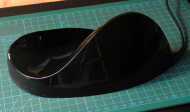
aP8240011.jpg
outlined some in this foto cause it wasnt so clear with the dark background (click fotos to enlarge)
each of those squares on the green cutting mat are one centimetre (2.5 cm = 1 inch)
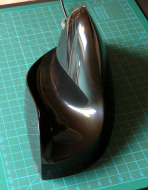
aP8209992.jpg

well,
I dont think anyone, excluding gamers(!), would pay this much (118 euros I mean) for a mouse unless they're having trouble in some way related to the use of regular mouse. I should probably state at this stage that I do have problems with my left shoulder (I'm left handed). In the past I've had problems with my wrist, arm, elbow as well but not at the moment.

With this mouse, the hand actually rests completely on the mouse, thumb to top. You can move the mouse and leave the hand completely relaxed. I personally at this stage cant really say how good this is - I like it a lot but it reminds me of the first time I drove a car with 5 gears (as opposed to just 4) - I found it so incredibly difficult to do this little extra movement that I wasnt used to doing. Likewise now, I'm aware of muscles in my shoulder & down my back that probably have never made these specific movements ..
This unfortunately means that I still have relatively little control over the mouse ..
When I get used to using this I'll post an update


The Good

The hand can rest completely relaxed on the mouse in the "upright" position (thumb to top)
Dont know can I emphasise how good this feels! So far it balances out all the cons

Doesnt discriminate against left-handed people - both left and right mouses are same price

Looks very good  :-[

aP8209997.jpg


Discussion including The needs improvement section

the weight of my hand/arm causes the mouse to drag a bit heavily and catch on the mousepad on the keyboard side of the mouse (weight comes down more on that side) - A possible solution to this catching/dragging would be if they added a third pad to the underside of the mouse on this side.

The scroll button is almost unusable - especially considering the mouse is aimed at people with, ehh .. problems. It's stiff to scroll and awkward to use. They suggest rolling it by "using the inside of the middle finger" - sounds like an after thought to me..
IMO it should be placed more towards the front of mouse where you're fingertips would be - or maybe under the thumb but I guess this could be a problem for some people.

In the manual they say you shouldnt need "to use the tip of the fingers to press the mouse buttons causing the fingers to claw". They then say: "a small movement of the finger easily presses the buttons" - I personally (so far) find this "small movement of the finger" incredibly difficult and tiring - but maybe again that's like getting used to the fifth gear.
Add to that:-
The top button is difficult to click - it's simply too short - click photo to enlarge to see buttons & mouse outline clearly
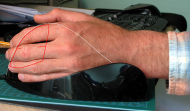
aP8240010.jpg

as you can see even my middle finger extends beyond the button, but it's the top one I have problems with -
They say there's three crease-lines on your wrist. They recommend aligning the middle crease with the edge of the mouse. That's very specific advice.
[edit] if I push the back of my hand against the outside of the mouse & then line up my wrist properly I can then better reach the buttons. Unfortunately this doesnt feel very comfortable for the bone on the underside of my wrist but I'll try it for a while [/edit]
Problem there is, as said above my fingers extend beyond the buttons (for the record: my hand, held upright, measures 7.8"/20cm from the first/top wrist crease to the tip of my middle finger - I know a lot of people with a lot bigger hands ...)
If I pull my hand back in order to better reach the buttons with fingertips my hand keels over a bit & therefore is no longer vertical

It's very difficult to find stuff at their website. No search box - that I could find at any rate. No FAQ's either but they do have a What to Expect page (The website I find the most frustrating thing in all this :down:)

They offer a mousepad at their site, they say to avoid older style cloth or hard plastic pads.
I have "new style" cloth gamer mousepad so not sure how that fits in - they talk somewhere (cant find now) about polishing or shining up the mousepad so I'm not sure what type of surface it is. In their online shop they dont say how big the mousepad is. It's not available in Europe that I could find
This is an important topic because when you move the mouse you are also moving the dead weight of the relaxed arm & hand. I can imagine a "polished" surface might be easier to work on than my cloth surfaced mouse pads.

They offer a software "Nib" or "McNib" (info in this pdf: http://aerobicmouse..../NibInstructions.pdf) which saves you from clicking. There's also links to videos on the What to Expect page. This costs $75 (ouch) I didnt bother checking out other currencies - if you pause moving the mouse it clicks - this reminds me of a laptop I was using for a while with a touchpad that was setup to click like that - drove me mad but might be helpful 1) if you're desperate; 2) because of the difficulty clicking top button because of (IMO) poor design.


Why I think you should use this product
Jury is out here :)
As said above, it's just incredibly comfortable to rest your hand in there ..

From their website:
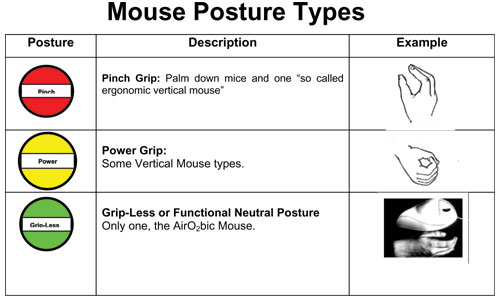
Mouse-Posture-Types.jpg


How does it compare to similar apps

unfortunately I can't say from experience. My sister has recently bought the Evolution vertical mouse & she's still not happy with it after two weeks. (she lives a good few thousand miles away so I cant drop by & check!)

I read a review in c't magazine (#4/2008 - deutsch) which reviewed a bunch of vertical mice and I chose this one in spite of a warning about the scroll wheel. I thought it sounded the best but it was a realistic article which basically concluded that all mice reviewed had drawbacks.
Reviewed were:
WACOM Graphire4 (CTE640), Microsoft Natural Wireless Laser Mouse 6000, WACOM Bamboo (MTE-450/KO-B), Designer AirObic 2, Ullman PenClic Maus, Animax Anir Vertikale Maus, EVOLUTION VerticalMouse 3, [Apparently the Evolution mouse = the Evoluent mouse (maybe European/American naming)] Contour Design Perfit Mouse Optical, Contour Design Rollermouse Pro, Humanscale Whale Mouse, HELA Grip Maus, Sun-Flex Nomus, Cirque Smart Cat Pro, Logitech TrackMan Wheel
Download article (German language) for money (90 euro-cents) here


Conclusions

  • from reply #12 below:
    The best thing about this mouse is the comfort of the hand support that allows complete relaxation of your hand. The wrist soreness has completely disappeared since using this mouse
    ...
    Unfortunately, because all motion is with the arm and wrist and not with the fingers, this mouse design does not allow for fine control of the cursor on the screen. Also, as you point out, the position and action of the buttons is awkward.

  • so, helpful if you have wrist problems (as Cranioscopical says, well worth it if it helps) with the drawback that it's not suitable for fine work and see next point -
  • if you have shoulder pain/problems DON'T buy this mouse - your shoulder has to do the movements that you probably previously did with your wrist/lower arm
  • I havent sent it back (too late soon)
  • I dont want to send it back
  • I dont know will it work out
  • I hope they take all my criticism in a constructive vein - I'm really only writing all this cause I like this mouse :) (& see also post #2)
  • Price is too high in my opinion. Price of software is far too high I think (I shouldnt be saying that here at dc should I :-\)
  • Mouse AND software cost $150 - I think they should offer an even larger reduction to anyone wanting to get both at one time - otherwise only desperate or rich people will go for the double package at that price


Links to other reviews of this application

from above:
I read a review in c't magazine (#4/2008 - deutsch) which reviewed a bunch of vertical mice and I chose this one in spite of a warning about the scroll wheel (Reviewed were:
WACOM Graphire4 (CTE640), Microsoft Natural Wireless Laser Mouse 6000, WACOM Bamboo (MTE-450/KO-B), Designer AirObic 2, Ullman PenClic Maus, Animax Anir Vertikale Maus, EVOLUTION VerticalMouse 3, Contour Design Perfit Mouse Optical, Contour Design Rollermouse Pro, Humanscale Whale Mouse, HELA Grip Maus, Sun-Flex Nomus, Cirque Smart Cat Pro, Logitech TrackMan Wheel
Download article (German language) for money (90 euro-cents) here
[First major update/edit will be in maroon colour font]
9245
General Software Discussion / Re: Your most used SPECIAL programs
« Last post by tomos on August 23, 2008, 05:02 PM »
2tomos

when you say "coding", do you think a non-coder could manage without staying up all night or something?!!!  :-)
-tomos

Sorry for measuring people by my own scale ;)
-fenixproductions (August 23, 2008, 04:54 PM)
- I'm presuming that means I'd have to stay up all night ;D

to clarify, I'm looking for a programme that can produce a pdf with embedded fonts (whether opentype or TrueType, document mainly type -layout important- and possibly with some illustrations) and without huge learning curve. I've heard and read about Tex, but you know the way, just reading doesnt really help sometimes ...
-tomos

Maybe use DTP tool (such like Scribus) then?
 (see attachment in previous post)
-fenixproductions (August 23, 2008, 04:54 PM)

I've tried that & will try it again, had some things that bothered me that are actively being worked on but using windows I'm always a version or two behind,
but also then, what I read about TEX - it sounds like it's much better/more advanced when it came to text & creating a layout & then adding the text (if I understood correctly)
Also not wanting to take the thread off-topic :-[
9246
General Software Discussion / Re: FIREFOX-PRIVACY PROBLEMS-HELP
« Last post by tomos on August 23, 2008, 04:49 PM »
<Click "I’ll be careful, I promise!".>

what do i have to be careful about?

it's just a disclaimer because you're going into the belly of the beast where things work via text as opposed to GUI
9247
General Software Discussion / Re: In search of ideal backup utility
« Last post by tomos on August 23, 2008, 04:44 PM »
You can have the same backup job in several backup groups, as long as you have a different name for the backup job (but it can have the same sources and destination). So your scenario works with Backup4all, and as mentioned above if you create a backup plugin for an application you can select its registry keys to be backed up too.
I can't quite understand what you have stated about the job sharing. Lets say I want a backup job A to be shared by N backup groups, do you mean: 
1) Those N groups can share the same piece of job A definition, but Backup4All requires different name in each group
or
2) I will need to repeat the same job A setup in each of the N group and each time with a different name
?
I hope you mean the 1) not 2).
If a job to be shared is complex, repeating the same definition in many groups is a waste of time and future change/remove of such job will become very difficult, because any change will have to be repeated in all the N groups and that is provided one can still remember exactly what are the groups that need to be changed.

it sounds to me like #2 the way it was described
-
in an "ideal" backup programme It would be great to be able to simply Control+DragDrop to create a copy of a backup.
-
SFFS offers a "save as" option for backup "profiles".
btw, Slim, you mention Genie backup manager pro - the advantage of Backup4all and SFFS is that they backup to zip - AFAIK Genie doesnt (?) - not sure about Titan either but think it does zip compression (another btw, did you get to try SFFS or does the lack of registry/keys stop you ?)
Rambling a little now - looking forward to version 4 of backup4all - I've been using their plugins for a bunch of programmes but haven't yet had occasion to restore so cant really comment ...

also just briefly re interface:
"wizard" means step by step options interface - it doesnt necessarily mean less options or less advanced - it normally means this, but only in the context where there is also an advanced options interface on offer (i.e. dont get too bogged down on what it's called - give it a try - disclaimer, I havent tried Titan- but then I'm happy with what I have :P :))
9248
Mini-Reviews by Members / Re: Jungle Disk Mini-Review: offsite data storage
« Last post by tomos on August 23, 2008, 04:17 PM »
thanks for the comparision/description, Change  :Thmbsup:

btw, re Filehamster, what I do is: always have comment window show & when the revision is important I select "Protect revision" & later I do a spring clean & delete all unprotected. It's worth my while because I'm working with relatively big files & they add up (I should actually request automatic protection when comment is made :-\)
but
if youre  "sticking to CVS/SVN" you're out of my depth anyways :D
9249
Living Room / Re: Take That Stupid Printer -- Stop Tricking Me Into Wasting Ink!
« Last post by tomos on August 23, 2008, 04:04 PM »
I have a brother laser printer and love it.. but it looks like next time it tells me it's out of ink i might just have to stage an intervention..
I think Brother are getting a bad attitude (maybe others too..)

I've had a Brother 1250 laser for over 5 years - it never did anything silly like that
and,
(as posted elsewhere), I recently had contact with very bad Brother inkjet experience:

I wanted to post about a Brother printer/Multifunktiongerät (all-in-one)
Specifically the DCP 130C but I suspect all Brother inkjets may be like this:-
-
They do automatic printhead cleaning every two days, not only that, they do it whether you print or not - if you're using the printer you dont need "cleaning", and, every two days ??? :huh: wtf :)
The costs of ink because of this cleaning are simply HUGE -

9250
Living Room / Re: using 2 mice - can I have different settings for each?
« Last post by tomos on August 23, 2008, 03:58 PM »
:) arrghhh, you're doing it again Skrommel (super :D !!!)
Pages: prev1 ... 365 366 367 368 369 [370] 371 372 373 374 375 ... 454next