topbanner_forum
  *

avatar image

Welcome, Guest. Please login or register.
Did you miss your activation email?

Login with username, password and session length
  • Saturday March 28, 2026, 8:55 pm
  • Proudly celebrating 15+ years online.
  • Donate now to become a lifetime supporting member of the site and get a non-expiring license key for all of our programs.
  • donate

Recent Posts

Pages: prev1 ... 282 283 284 285 286 [287] 288 289 290 291 292 ... 1515next
7151
Screenshot Captor / Re: Scrolling capture?
« Last post by mouser on September 30, 2014, 01:48 PM »
Of course SC does all that; newer versions of SC also include an additional manual-method for scrolling captures that will work when all others fail.
7152
Added some feature improvements to the region capture mode:

v4.8.8 - September 30, 2014
  • [MajorFeature] New action available when dropping an image file onto the current image: Combine images. Let's you easily line up images side by side with automatic scaling.
  • [Feature] Made it easier to abort scrolling and other capture operations (tray menu changes to display a cancel operation item).
  • [Feature] Added commandline option to change save file format.
  • [Feature] Added tools menu to SC system tray menu.
  • [Feature] When SC encounters an image file of a different format than the extension indicates, it is still loaded but a warning is shown.
  • [Feature] When SC encounters an error loading an image file, it reports the error and clears the current image selection.
  • [Feature] Select-region capture can now be performed in additional ways; you can use enter key to start and end capture regions (space bar resets initial position; cursor keys nudge; C toggles cursor; Z toggles zoom); quick single mouse click can also now mark start and end positions instead of holding and dragging.
  • [Feature] By default SC now checks if a capture is all white or all black, and reports the probable cause (interference from a Security App); see Tweaks option tab to turn this off.
  • [MinorFeature] You can now set a Screenshot directory that SC will always start with even if you changed directories on last run.
  • [MinorFeature] You can now use cursor (arrow) keys to adjust cursor location during shift+PrtScr selected region capture.
  • [MinorFeature] Added Up/Down keys to scrolling capture methods.
  • [MinorFeature] Better instructions for manual scrolling captures.
  • [MinorFeature] Better handling of canceled dropped file.
  • [MinorFeature] The warning about resizing images with objects can now be disabled.
  • [MinorFeature] Changed upload menu icon.
  • [MinorFeature] 'C' key in region-select mode can now be used to toggle off the display/capture of cursor.
  • [BugFix] DPI was sometimes not set properly if SC was set to not save image automatically.
  • [BugFix] It was possible to restore main SC window and then minimize it during scrolling capture, rendering all SC windows invisible.
  • [BugFix] Red box was flickering in object selection mode.
  • [BugFix] If using post-capture dialog after captures, and "stay hidden" option is chosen, main window was sometimes restoring if it was showing before capture was initiated.
  • [BugFix] Nudging selection with arrow keys in region-select mode had an annoying delay/stutter.

7153
Activation/License/Language Help / Re: License Key
« Last post by mouser on September 30, 2014, 01:18 PM »
You need to visit this page to get free license key, but the link to that page should show up at the top of all forum pages after your initial sign up to make it hard to miss:
https://www.donationcoder.com/Keys
7154
Post New Requests Here / Re: Folder Lock
« Last post by mouser on September 30, 2014, 11:26 AM »
nice work, mahanaim  :up:
7155
Yes, I'm looking at altering the plans to use glued up 1x lumber.  It takes away a little from the chunky feel of 4x4 but it would also let me use nice hardwood 1x3 and 1x4 lumber..
7156
Screenshot Captor / Re: So what other helper tools do you use with Screenshot Captor?
« Last post by mouser on September 29, 2014, 01:03 PM »
I'm thinking that what would really be useful is if i collected a list of the tools people like to use with SC, and made a special page for them -- with urls, tips, and how they are useful.
Sort of a page for people who use SC to help them find tools that will make their lives easier.
7157
New beta uploaded.
7158
Screenshot Captor / Re: So what other helper tools do you use with Screenshot Captor?
« Last post by mouser on September 29, 2014, 08:12 AM »
Nice  :up:
Very helpful to see what tools people use with SC.
7159
Living Room / Re: silly humor - post 'em here! [warning some NSFW and adult content]
« Last post by mouser on September 29, 2014, 07:15 AM »
hahahahaha
7160
PBOL / Re: Requests: count workdays only and show workdays remaining
« Last post by mouser on September 28, 2014, 02:58 PM »
That is a nice idea.. it could be done..
7161
DesktopCoral / Re: Help/About
« Last post by mouser on September 28, 2014, 09:08 AM »
i was just going to post what dr_andus said.. when the program is transparent you can still control it from system tray menu.
7162
Announce Your Software/Service/Product / Re: Paste As File 2.1.0.0
« Last post by mouser on September 27, 2014, 09:16 AM »
pasteasfile mentioned on dottech today:
http://dottech.org/1...iles-in-windows-tip/
7163
Clipboard Help+Spell / Re: Closing window
« Last post by mouser on September 26, 2014, 09:15 PM »
i will add it for next release (ill try to get a beta out this weekend).
7164
Clipboard Help+Spell / Re: Closing window
« Last post by mouser on September 26, 2014, 08:56 PM »
If I make ctrl+alt+W toggle the window closed if it is already showing, would that solve your problem?
7165
Screenshot Captor / Re: Changing the path to save screenshots
« Last post by mouser on September 26, 2014, 11:10 AM »
SC is definitely not thrilled with dots in filenames.  Can you confirm that is the problem?
7166
General Software Discussion / Re: Linux bash exploit discovered
« Last post by mouser on September 26, 2014, 08:49 AM »
ps. DonationCoder main and member servers were both patched to protect against the exploit (thanks DC member Gothic!)
7168
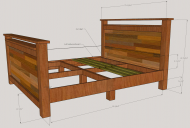
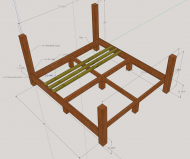
Ok i've got my basic structural plan worked out:
bedstructure_092614.jpg
bed6.jpg

I used SketchUp, which can be pretty darn painful to use.. I wish there was something better.  The dimensions are only rough estimates since they are difficult to tweak, but the basic idea comes through.

Main issue I was trying to solve with my plan was to provide rock solid stability and support for a large king size bed (76" x 80") and have the sides look reasonably nice (in my bedroom you can really only see one side of the bed).

Notes: Headboard and footboard will not look like exactly like that, I plan to use reclaimed wood for the inset part; slats will cover entire surface; dimensions are off a little because i couldn't get them perfect.


Inspiration came from the farmhouse bed plans on the Anna White site.


My main concern with the plan is the use of the 4x4s..  I am concerned that they are going to turn out ugly when stained and finished.
7169
Screenshot Captor / Re: black screen
« Last post by mouser on September 25, 2014, 11:51 AM »
Hi Ravin.

Let me ask you, does Screenshot Captor capture other programs ok when you trigger it in the same way?

The black screen could be caused by 1 of 2 things:
  • A security program that is blocking it -- this happens surprisingly frequently and there are threads on it (see here); fix is to add Screenshot Captor to the list of trusted programs or programs allowed to take screenshots.
  • An accelerated graphics directx game -- but i don't think Myst falls into this category.

What security program(s) are you running?
7170
Screenshot Captor / Re: Prevent Windows Explorer Window From Opening When Saving File
« Last post by mouser on September 25, 2014, 10:11 AM »
Look at the bottom of the "Miscellaneous Tweaks" tab and you will find options to make your wish come true.
Screenshot - 9_25_2014 , 10_10_33 AM.png
7171
General Software Discussion / Linux bash exploit discovered
« Last post by mouser on September 24, 2014, 07:36 PM »
"Akamai has validated the existence of the vulnerability in bash, and confirmed its presence in bash for an extended period of time. We have also verified that this vulnerability is exposed in ssh---but only to authenticated sessions. Web applications like cgi-scripts may be vulnerable based on a number of factors; including calling other applications through a shell, or evaluating sections of code through a shell.

There are several functional mitigations for this vulnerability: upgrading to a new version of bash, replacing bash with an alternate shell, limiting access to vulnerable services, or filtering inputs to vulnerable services. Akamai has created a WAF rule to filter this exploit; see "For Web Applications" below for details."

http://www.csoonline...h-cve-2014-6271.html
7172
I've added a video demonstrating the feature to the first post.
7173
Glad to hear it  :Thmbsup:
7174
Screenshot Captor / Re: ShareX Portable
« Last post by mouser on September 23, 2014, 10:57 PM »
try this for me, open up the .sctool in a text editor, and add this to bottom:

title = Easy Screencast Recorder
app = %THISDIR%\EasyScreencastRecorder.exe
params = -dir "%folder%"
iconfile =


then restart screenshot captor.
7175
Screenshot Captor / Re: ShareX Portable
« Last post by mouser on September 23, 2014, 10:20 PM »
Regarding Easy Screencast Recorder: Yep, same deal, and Screenshot Captor should pick up that you have ESR automatically, as it has a tool for it that should show up in Tools menu.
SC can work with the video files from ESR and let you extract image frames easily, etc.
Pages: prev1 ... 282 283 284 285 286 [287] 288 289 290 291 292 ... 1515next