Basic InfoEDIT / NOTE: this is a review of the Beta as of 2011-03-05. Version 1 for Windows is now released (Nov 2011)| App Name | Scrivener (for Windows) [Beta] |
| App URL | http://www.literatur...scrivenerforwindows/ |
| App Version Reviewed | 017 aka Beta 1.7 for Windows [note: there is also a linux version available at the above link] |
| Test System Specs | Dual core 2GHz, 2GB RAM (XP SP3) |
| Supported OSes | XP, Vista, 7 |
| Support Methods | Forum, bugs can be reported per email (windows(at)literatureandlatte(dot)com.), or via the programme itself (menu: Help) |
| Upgrade Policy | Unknown. Beta valid for less than a month. Release price below. |
| Trial Version Available? | Unknown |
| Pricing Scheme | $40 full, $35 educational |
| dc donation Link |  Donate to support the site during the March fundraiser Donate to support the site during the March fundraiser |
| Screencast Video URL | embedded video towards the bottom of this post |
| Relationship btwn. Reviewer and Product | none |
Intro:Scrivener is a tool for writers.
It's basically an rich text outliner with a very nice gui, and the ability to show/edit summaries of a folder's content (the corkboard), and of course the ability to export/compile all those entries as one document (images not supported)
It is still in beta. Initial impressions are good, but I have been able to crash it by importing an image (I have yet to see can I reproduce that), and I have found a bunch of minor bugs. In general it seems well behaved though and very usable.
In this "First-impressions" mini-review, I just want to give an overview of what the windows version can do (I'm not yet very familiar with the programme - so if I leave something major out please let me know!), and also how usable it is in current state. NOTE: this programme is new to me; I'm not familiar with the mac version beyond having seen a couple of video reviews.
There's a very good tutorial file comes with the app (menu: Help). It's defintiely worth working your way through it.
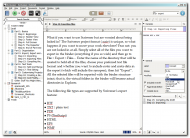 Tree
Tree on the left is called the "Binder".
~
Clicking on an entry in the tree (called a "document") will show it's text in the main pane (the editor).
For each entry, there is an associated "Indexcard"/"Synopsis". This is shown in the info pane as an indexcard. It has the same title as the entry and you can also add a text/summary to the "card". You can see/edit this in the info panel on the right. Larger amounts of text will scroll within the "card".
~
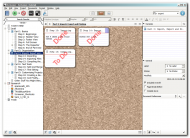
Clicking on a Folder in the tree will display the famous
Corkboard (see screenshot below). This board will show the Indexcards for the entries contained in that folder. These are also editable in this view

Obviously this is a good place to work on an overview. Also note that
sorting is always manual and that this can also be changed on the corkboard using drag n drop. In the tree it can be changed using keyboard (Ctrl+Arrow Keys) or drag n drop.
There are four views in the main pane:
- Text Editor view (shot #1 above)
- Corkboard (shot#2 above)
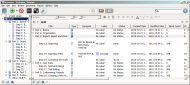
- Outliner mode (shot#3 below), as the tree, but with columns for details which can also be seen in the info pane
- "Evernote style" view of folder contents - this will show, at one time, the text of all the entries in the selected folder. Editable of course.
_____
_____
Other info:
- full-screen/minimise-distractions mode, with "typewriter" scrolling (text moves up)
- You can easily split entries
- autosave (default is every 2 seconds)
- good find & replace
- folders in the tree can be easily converted to entries (with associated text) i.e. the tree/binder is an outliner
- take snapshots of your entries/documents or of all the text and can roll back. [!] This didnt work for me - see "Bugs" below [/!]
- You can have different files/"Projects" open - they open in new windows. You can drag n drop (copy) entries between windows
- dualpane vertical/horizontal
- Collections (virtual folders) can be created by selecting multiple entries in the tree; via their context menu you can add them to an existing collection or to a new one. If you add them to a new collection, focus then goes to the collection. It's title can then be edited. They are automatically saved and can be displayed via menu: View>>Collections>>
- add keywords - cannot handle more than single words in my attempts
- ability to add footnotes (compiled as 'real' footnotes - or as endnotes) and annotations (can be excluded on compiling etc.) (Minor: these should be automatically formatted differently IMO, but arent)
- "bibliography" was not mentioned in the tutorial
- easy to add internal links to the text. I dont see how to add a url link to the text (!)
- In the info pane for each entry, you can add references with url links, internal links or links to external files (I dont honestly know if these can be used when exporting/compiling)
- Live Search - fast :up:
- Projects/Files are saved in a folder with a .scriv suffix to the name. Takes me a while to get used to this - I keep looking for a file instead of a folder...
- import: txt, doc/x (only with MS Office installed), RTF, PDF, html, Quicktime(?), image files. Text based files are converted to rtf
- + AFAICS, anything with images contained must be imported into the "Research" folder
- + you can import audio files and e.g. transcribe using dualpane layout to play the file (I tested with an mp3.)
- You can export selected entries, with or without notes & metadata. Will be exported to a folder & will create a folder hierarchy with one file per Scrivener entry/document. Formats: see list below for compile. Buggy - especially PDF, but it mainly worked.
- set a target wordcount - shows up to 100% in the statusbar (see first screenshot above) - no notification unfortunately though, then you have to check the actual wordcount to see if you over the limit.
- colour code entries, this not implemented yet in the tree (due this weekend)
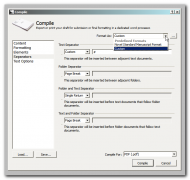
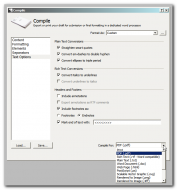
- You can compile your project into one file (you can pre-set entries to exclude them from the compiled version - or deselect from a list when compiling, you can also change formatting universally - unless this is previously disabled for individual entries). Save as: RTF / TXT / DOC / PDF / PS / HTML / EPS / WMF / EMF / SVG / JPEG / TIFF / BMP / GIF / PNG / TGA / PCX / PCL (NOTE: I only tested RTF and PDF.) "It is expected that .EPUB or .MOBI e-book formats will be freely supported after the initial release"
______
Some compiling options:
 Who is this app designed for:
Writers of any kind:
- fiction
- non-fiction
- poetry & lyrics
- scriptwriting (good keyboard support for changing "script element"/style)
there are various template files for the items in the list above.
The GoodFor me, it's the attention to detail in the GUI, and the editable overwiew using the corkboard.
It's obviously a
very evolved piece of software on mac so it's coming into being for Windows as a very mature programme. It's relatively easy to learn I found. Drag n drop is generally supported, including for import.
The needs improvement section(Note currently in Beta)
~
Outliner pane shows the synopses (from the "indexcards") - which is great, but it shows the
complete synopses, so long synopses really disrupt the outline overview.
~
copying an item via the tree or the outline pane (e.g. using Ctrl+drag-n-drop) is not possible (currently anyways).
[!] What would really interest me, would be the ability to show an entry in two different locations, i.e. changes to the entry in one location would be reflected in it's other locations (in an ideal world, the related notes [info pane] could be different in different locations)
~
Related to above idea, virtual folders would be nice. Select items and save that selection for displaying, same as a normal folder could be displayed (you can select various entries and display them on the corkboard but this cannot be saved). The mac version has something called "Collections" which could be something like this but I cant find any info about it. This is already implemented

I missed it

Select multiple entries in the tree; via their context menu you can add them to an existing collection or to a new one. If you add them to a new collection, focus then goes to the collection. It's title can then be edited. They are automatically saved and can be displayed via
menu: View>>Collections>> This is great!
~
Creating a new file confused me initially. You have to add a name - logical, but first I noticed that the [create] button was greyed out, got distracted with thinking that was a bug, and didnt connect the two. Maybe that's a mac thing, Windows normally keeps the [save] button active.
~
Keyboard navigation between the different panes does not seem possible - or if so, not documented that I could find.
~
editable shortcuts would be great - or at least less unusual use of keys (e.g. "{") - I use a German layout keyboard and some of the shortcuts dont work e.g. media keys.
~
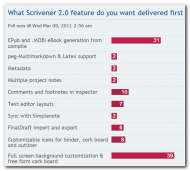
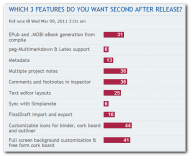
Current poll (till March 9th): from the
forum:
NOTE: Version 019 has just been released (downloading as I write) with these improvements:
Version 019 improvements
Bugs Fixed in this release include:
1. Ability to set a whole host of Edit>Options including: background editor color and text. These colors will also be reflected in full screen as well. Some folks might wish to change their poll votes in light of this?
2. Ability to change font size and type for project notes and document notes.
3. Ability to set a default zoom level for new projects to any value you wish.
4. Ability to set a default zoom level for project notes.
5. Ability to set a default zoom level for document notes.
6. Fixed scrolling zoom issue i.e. now doesn't need to scroll through text before it zooms.
7. Fixed empty find and replace string. Now replace button is enabled without the need for a replacement value.
8. Ability to remember general location in a document when you leave and return to it i.e. it does not return to top, but rather in the area (not exact location) you were working before so you should not need to scroll.
9. Fixed the ability to show sub document counts in binder.
10. Ability to View>Use Label Color in Binder. Yes, there's was lots frustrated people who should now be appeased with this missing feature - which I simply missed.
11. Just for good measure, added ability to reflect label color in binder icons and also in outliner.
12. Fixed crash perfectly reported by wfence here:http://www.literatureandlatte.com/forum/viewtopic.php?F=32&t=11915&p=89285#p89285
13. Fixed 'Copy without Annotation and Footnotes'. This was in the menu but never implemented. It works now.
14. Added several potential fix options for auto-update as many users were not able to run it from the menu, or the dialog did not function properly i.e. non functioning/crashing 'Close' button. For the life of me I can't duplicate this, it could be firewall/virus protection? So, I've added a few duplicate options to the 'Check for Updates' menu to see if one works better than the other.
15. We are also starting to look at performance and profiling tools to begin optimizing Scrivener as we have not done this yet.
16. Fixed remembering previous save locations in dialogs wherever save or saveas is used.
17. Folder retains content icon even though it is empty bug fix.
18. "Novel Standard Manuscript Format” line spacing is set was set to 1.0, not 2.0 - fixed.
19. Several Compile draft bugs have been addressed including page breaks, line spacing etc.
20. Font size in About Scrivener and Check for Update dialogs has been addressed i.e. it's readible now.
21. We have speed up the Scrivener start up time. It is now 80% faster than it was previously.
Next, week we aim to continue looking into optimizing Scrivener performance as well as sort out all the remaining compiler bugs and a whole swag of others.
:
I have discovered a handful of bugs already (that dont seem to be reported in their forum) but none of them would stop me using it.
~
Snapshot ability seemed to work first time. On trying to rollback, it sensibly recommended I take a snapshot of current version - unfortunately the second snapshot seemed to replace the first (both exactly the same in the viewer) and restore to previous version didnt make any changes to the document.
~
Scratchpad had various minor bugs with transparency, and text not being readable when selected
~
Export was very buggy in my attempts, but it mainly worked.
~
I dont know if this a bug or not: I was unable to print an entry/document directly
Why I think you should use this productIt's not that I think you
should, but I'd certainly recommend trying it though! It
is very polished. In spite of the problems listed, it doesnt usually
feel like a beta. I guess that's partly because of the maturity of the programme (via the mac platform), and also cause it's been in development for windows for around two years now. I think final release was initially planned for February, there is a beta version 18 that I couldnt find anywhere, beta #19 has
just been released (March 5th - announcment & more info
here).
I've personally been looking for an app where I can just add notes/ideas and link/connect them and gradually build up a network of items.
I dont think this is that app for me (maybe if it gets those virtual folders...) now that I've discovered virtual folders (collections), this could be that app for me. If you have a topic and want to write an article, or something bigger, I think this would be very suitable
How does it compare to similar appsNot my strong point here...
40hz compares it to Storybook:
Note: You can get very similar functionality (plus some extra features) with a free open source app called Storybook available here.
-40hz
Scrivener is not as Novel/Character/Scene orientated as
I think Storybook or e.g
yWriter are.
Page Four is comparable, but
much more primitive (also not updated in a good while, 2009 I think)
Conclusionsthis is a first look at a beta software. I have worked my way through the well made tutorial file (menu: Help) and tried things out, but I havent yet had time to really use the programme. So, I'll just conclude that I'm interested in continuing the relationship!
Links to other reviews of this application2007 review from
43 folders2007 review from
D*I*Y Plannerhere's an introductory video from the windows author:
[edit] added info about
collections (virtual folders) [/edit]


 Recent Posts
 ), even if I've waited a long time to ask my question. So it turns out the best way for me to figure something out is to ask here and then feel a bit foolish when an answer only comes to me afterward.
 - maybe it's called thinking outside the head


 Lots of people called Johnston Thompson or the like. Back the 19th century there was a landowner by the name of Porter Archdale for that very reason. Then he inherited the Porter estate, and changed his name to Porter Porter!