topbanner_forum
  *

avatar image

Welcome, Guest. Please login or register.
Did you miss your activation email?

Login with username, password and session length
  • Tuesday December 23, 2025, 1:16 am
  • Proudly celebrating 15+ years online.
  • Donate now to become a lifetime supporting member of the site and get a non-expiring license key for all of our programs.
  • donate

Recent Posts

Pages: prev1 ... 273 274 275 276 277 [278] 279 280 281 282 283 ... 454next
6926
Clipboard Help+Spell / Re: can I add new favourite to "end" of list?
« Last post by tomos on April 26, 2011, 04:45 PM »
this is now possible, but upgraders have to do a couple of steps to make a couple of changes that new users have set by default.
see: https://www.donation...ex.php?topic=25973.0

hmmm,
this is not working here -
I'm not sure if I'm an upgrader - I moved out (renamed) the old version and then reinstalled in the old empty folder

my settings are the same as in your image (by default) - except the value is 2000 not 3000 (so I changed that, but makes no difference)


but when I add a new clip it goes to top of the list - would I have to add ascending or decending to that?
6927
Clipboard Help+Spell / Re: can I add new favourite to "end" of list?
« Last post by tomos on April 26, 2011, 03:01 PM »
bump :)

Summary:
it would be great if new favourites were added to the end of the list - that way, there would be less changing of numbers making it easier to use
6928
Announce Your Software/Service/Product / Re: BonAView Photo Manager
« Last post by tomos on April 26, 2011, 08:29 AM »
 
all your links are wonkey :)
6929
I use ViceVersa Free for this type of thing.  Not sure if it will do quite what you want but perhaps the paid version will.

ViceVersaFree

thanks techidave - Don't think so though - like most sync software, it just compares: -
Three file comparison methods: file size & timestamp, CRC or both.

eh...
what exactly is CRC by the way ??
wikipedia wasnt any help. Seems to be a new buzzword, saw it related to FreeCommander sync as well, dont remember seeing it before...

Anyways, I'm now using XYplorer - with two custom shortcuts I can do this almost instantaneously = happy out :)
6930
@Abterix

I might have a look at scripts tomorrow, thanks for the tips :up:
(I'll definitely customise the shortcuts)
6931
@tomos:
I'm wondering can that compare files simply by filename - ignoring size and date, even (optionally) ignoring file-extension.
I don't think it can - or at any rate, I've never used it in that way. It might be able to.
Sorry, I don't have time to play with it to find out right now.

no worries Iain - I'll stick with XY as I have a full copy of that, thanks!
6932
Living Room / Re: Techno-Addicts
« Last post by tomos on April 25, 2011, 08:57 AM »
A lot of this can be cultural differences, I thought that zero-tolerance had been tried in parts of the US (with some fairly dysfunctional effects)

Coming from a land where it often doesnt feel safe to go out on a Saturday night, & your car never really feels safe (Ireland), to a land which seems relatively crime-free (Germany), I can see that a certain amount of that is cultural, even character (on the level of individual and society) differences.
Sometimes one feels pretty repressed; the other, nicely spirited.
Other times, one feels nicely organised, the other pretty chaotic.

i.e. as Renegade says, there's usually pros & cons

(for all that I suspect there's just as much theft here in .de as in .ie - just here in .de, it's more "white-collar"/scams.)
6933
General Software Discussion / Re: Intelligent comparision of folder contents
« Last post by tomos on April 25, 2011, 08:38 AM »
Abterix (hi!),
again, I'm not sure if these can ignore size and date:

I know that FreeFileSync cannot ignore the extension at any rate.
In a quick test, I see it will show which files are shown on one side and not on the other, but these are dispersed throughout the list, and I am unable to copy the filename or path which would make it easier for me to make a list of them. Similarly for FreeCommander.


XYplorer looks promising, but for some reason the Filter by Selections is greyed out. AHHH Okay  :D
I see now - I make my selection using menu: Panes >Sync Select (selects unique or same names, can also ignore file-extensions :up:) then Filter by Selection
That's it - SORTED :-*

I can end up displaying the unique files only and can ignore file extensions.
This very helpful when converting files of any type (e.g. converting music files to mp3) to check did you miss any ;)
6934
General Software Discussion / Re: Intelligent comparision of folder contents
« Last post by tomos on April 25, 2011, 08:24 AM »
@tomos:
I perform this kind of "intelligent" comparison of folder contents on a regular basis, and it works exceedingly well, using xplorer² - from zabkat.com
You can try out xplorer² with a free download.

IainB,
thanks for the suggestion of xplorer². I'm wondering can that compare files simply by filename - ignoring size and date, even (optionally) ignoring file-extension.
6935
General Software Discussion / Re: Intelligent comparision of folder contents
« Last post by tomos on April 25, 2011, 07:47 AM »
Apparently the highly regarded (but not free) BeyondCompare is able to do both things. This thread from their forum explains how:
http://www.scooterso...howthread.php?t=7350

Posts 1 to 6 in that thread cover your first requirement (ignoring sizes and dates), while posts 7 and 8 cover the second, and trickier, requirement (ignoring file extensions)

that helps a lot city_zen - thanks!
I just have to decide if it's worth $50 to me....


[edit] working my way through the others [/edit]
6936
[edit] for more clarity, I could have titled this something like:
Compare files by filename - ignoring size & date & optionally ignoring file-extension

see reply #6 for solution [/edit]


I'm looking for software that does "Intelligent comparision of folder contents". It sounds like syncing, but what I'm comparing are folders with different versions of the same file, so I want to check have I created all the versions I think I have.

So lets say, in a dual pane setup: the left-side folder has 132 files, the right has 133.
These files have the same names (they are different versions of the same file) but are different sizes & dates. I want to find out which file is missing on the left.

One practical example - I am producing PDF's with, & without, fonts embedded. I want to make sure I havent missed any files - I can quickly see from the number count (as above) that one file is missing, but which one (!!)

The next step up would be to compare files, again with the same names, but with different extensions.
e.g. I want 133 files on the left in PDF format and 133 on the right in text format  - so the software that compares the files can be set to ignore the file extension, i.e. it's only comparing by the filename.

A quick search didnt bring up anything...
6937
N.A.N.Y. 2011 / Re: NANY 2011 Release: Treat Yourself Nicely
« Last post by tomos on April 23, 2011, 09:12 AM »
Version 1.8.6.4 (Stable) now available for download.

See first post for full info.
-Stephen66515 (April 22, 2011, 05:51 PM)

Stephen, the download link (https://www.donation...24918.0;attach=53976) doesnt work ( -not that I need to reduce my weight- the opposite in fact :-[ but thought I'd have a look)

Ah, I see now - it's attached to the post - maybe you could correct or remove the other link too though? (Thanks!)
6938
I generally check reviews here - I've seen subsitute inks (in europe) that have been tested as even better -in ways- than the original inks.
I'd trust (german language) tests/reviews by C't or Stiftung Warentest magazines.

Canon ink has very good longevity, but there are other's that have that too. That aspect doesnt bother me that much (as long as it's not very poor in the replacement inks).
The substitute inks I use are KMP, JET TEC, and Peach (I dont like Peach black, and cant recommend their service). I dont know are these good for all ink types but have been generally reviewed "good" as replacement for Canon CLI-8 inks (original inks are better).

If you are looking for a review, and your printer model is very new, find out what type of ink it uses (e.g. Canon CLI-8) and then search for substitutes for that
6939
General Software Discussion / Re: SpiderOak - very nice people =)
« Last post by tomos on April 23, 2011, 07:16 AM »
thanks for those tips CleverCat :up:

The UI is very confusing here:
under the 'View' tab, you can view all of the documents you have uploaded to SpiderOak. Documents which have historical versions saved will be followed by a number in parentheses which indicates how many historical versions SpiderOak has saved. They will look like this: file.doc (3) To delete any of these historical versions, click on the file, and SpiderOak will open another window to the right showing you all of your historical versions, the date they were saved, and their size. Simply select any of these files and then click the 'Remove' button to remove them from your account. (To select multiple files, just hold down the Control key and click which files you'd like to remove.)

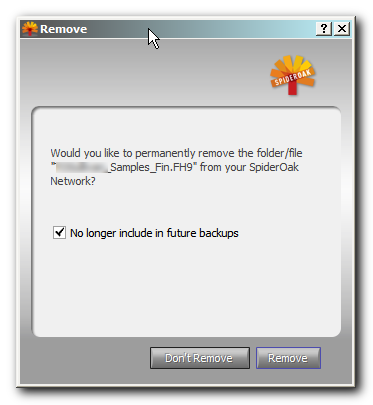
The way it's phrased (in the message-box shown on clicking delete - see below), is confusing - it talks about the file/folder as opposed to the revision, so I thought it was not connected - but now I know :)

SpiderOak001.png

With SpiderOak 9713, you can prevent historical versions from being backed up by going to 'Preferences' in the client and under the 'Back Up' tab check the box that says 'Don't archive folders older than' and then enter your preference.

in my version 3.7.9781, the option is "Don't backup files older than:[   ][hours/days/etc]"
again, I'm not sure what exactly this means -
e.g. if I choose 3 days, does that mean it will keep revisions of a file for a period of three days prior to the last modified date of the file,
or, is it going to delete -or refuse to backup- everything older than 3 days, or... :tellme:

I guess I should be asking these questions of SpiderOak but I'll throw them out here first...
6940
Living Room / Re: Apple - least green company
« Last post by tomos on April 23, 2011, 06:42 AM »
Apple...one bite....this does sound eerily similar to the poison apple from the fairytale 'Snow white'.

Guess I understand the turtleneck from Jobs now... :P

hah, I enjoyed that (I just read the Grimm Brother's version lately)
but I dont follow the turtleneck comment?  ...am I being a bit slow? - it has been known to happen :D
6941
Living Room / Re: Happy Birthday Renegade!
« Last post by tomos on April 23, 2011, 06:36 AM »
more birthday wishes: have fun :)

I am now 4.

we're all getting there!

or been there :p
6942
Living Room / Re: Hoppy Easter~!
« Last post by tomos on April 22, 2011, 06:22 AM »

and eggs to you too :)
6943
Peace! Michael and all!

:Thmbsup:
6944
Honestly I think having a whole section for it invites *more* topics of that kind, and makes for more contentious ones as well. Granted you could have the occasional thread turn nasty in the main forum, but I suspect it would be less often, and in general be less abused.

I think so as well.
i.e.
I'd scrap it - this idea of keeping it & strictly regulating it is not really dc style (that's more my style "delete the beggar" lol).
This place mostly gets along fine without a big rule-system, it would be a shame to have to bring one in now.
6945

Fair enough
6946
Living Room / Re: When you make your 100'th Post
« Last post by tomos on April 21, 2011, 10:10 AM »
Hope 4's a lucky number for you, tomos.  :D

thanks nosh :D
6947
Living Room / Re: Anyone here using a standing desk?
« Last post by tomos on April 21, 2011, 06:46 AM »
Everytime this comes up I say the same thing... sorry for being a squeaky wheel!  But, more important than sitting on a chair, standing, or sitting on a ball is your overall posture. 

I'm still using the Gokhale method (link to dc post). I can (and do) sit upright - no back support - all day :up:
I still dont do it perfectly (mainly due to my hip being slightly out of alignment - but doing this helps that too).

(thanks for the links btw)
6948
Living Room / Re: Anyone here using a standing desk?
« Last post by tomos on April 21, 2011, 06:42 AM »
I tried an exercise ball for a while, but it kept rollling (forwards or backwards - I cant remember).
It's kinda supposed to - you get exercise from trying to make it not roll :)

I remember now, I would slide forwards - but my trousers would stay in the same place :o - not comfortable** :P (but, as I said it could have been that the exercise ball was too large.)

** Actually that's a problem with any seat that slopes down, towards the front of the chair - which position (slope) encourages better posture. A bit of a catch 22 I find.
6949
Living Room / Re: Apple - not quite grasping the concept of privacy.
« Last post by tomos on April 21, 2011, 05:29 AM »
If I could, I would gladly live without a phone. Jobs would be in prison in my dictatorship until he could explain himself over this stunt. And his company would go broke paying all the customers he listened to. If he refused in any way, I could think of more creative ways to make sure billionaires learn to behave.
Withdraw his entire worth in pennies, and make him eat every single one of them. Twice.

ahh f0dder, I see you're a fan of recycling . . .  eeeuuuuuwwwww
6950
Living Room / Re: The Evil Side of Nature
« Last post by tomos on April 21, 2011, 03:39 AM »
But nature isn't all evil~! :D
...

That's impossible not to love~!  :-*

agreed !
top voted comment says:
ITS SO FLUFFY IM GONNA DIE
:D
Pages: prev1 ... 273 274 275 276 277 [278] 279 280 281 282 283 ... 454next