topbanner_forum
  *

avatar image

Welcome, Guest. Please login or register.
Did you miss your activation email?

Login with username, password and session length
  • Tuesday December 23, 2025, 7:59 am
  • Proudly celebrating 15+ years online.
  • Donate now to become a lifetime supporting member of the site and get a non-expiring license key for all of our programs.
  • donate

Recent Posts

Pages: prev1 ... 257 258 259 260 261 [262] 263 264 265 266 267 ... 454next
6526
N.A.N.Y. 2012 / Re: NANY 2012 Pledge & Early Beta: Got Space?
« Last post by tomos on September 22, 2011, 02:19 PM »
Anyone else in my boat?

no, for once things are going okay for me today (sorry)
6527
Found Deals and Discounts / Re: O&O DiskImage 5: Special Spring Sale - 75% Discount!
« Last post by tomos on September 22, 2011, 01:53 PM »
Anyone actually tested this i.e. used it to restore an image?

There appears to be a new version out #6.
    -  I couldnt find an upgrade price,
    -  I couldnt find a list of what's (hopefully) improved
    + it's only €29 including 19% VAT

I wouldnt stick with this though unless I knew there were going to be improvements to the interface. Initially I thought it was better than Acronis, but no, it's not. They both only really cater for the scheduled job - a lot of us dont want to schedule jobs, that's when the GUI becomes a PIA...
6528
Announce Your Software/Service/Product / Re: New program: ActiveHotkeys (freeware)
« Last post by tomos on September 22, 2011, 09:17 AM »
In any case, quitting ActiveHotkeys should restore all keys to normal behavior.

Yeah, it's no problem when closed down.
I wouldnt lose any sleep over it, just reporting.

also yeah, 64bit (Win7 pro)
6529
Announce Your Software/Service/Product / Re: New program: ActiveHotkeys (freeware)
« Last post by tomos on September 22, 2011, 08:16 AM »
Here is what happpens on my 64 bit machine:

I run activehotkeys, z,s, other keys stops working.
There are other things that happen, if this is useful to you, send me a response.

I guess it's not meant to be left running in the background, but if I use it to check Shift and Alphabetical keys:
the combination of Shift + any alphabetical key has no effect when typing.


(this is my pester Tranglos day :-[ )
6530
N.A.N.Y. 2012 / Re: NANY 2012 Pledge & Early Beta: Ethervane Echo
« Last post by tomos on September 22, 2011, 07:59 AM »
It does look as if some other process could be swallowing some combinations.

yes, that's it, thanks :up:
6531
N.A.N.Y. 2012 / Re: NANY 2012 Pledge & Early Beta: Ethervane Echo
« Last post by tomos on September 22, 2011, 07:12 AM »
[2] How do I change the shortcut - I tried Shift & F12 - typing in F12 but that didnt work (or does it need a restart? - no that no help)
Ctrl+Alt+v doesnt work either.
Win+v works - I'll stick with that**
(BTW what does the MK mean on the qualifier keys in options?)

Restart is not needed. The modifier is indeed optional, although it's usually not a good idea to use e.g. F12 by itself. The reason it's confusing is the same as why the whole Preferences dialog is confusing :) The hotkey is controlled by two settings:

In "ActivationHotkeyKey" type the name of the key itself, without modifiers, e.g. 'Ins', 'a' or 'F12'.

In "ActivationHotkeyModifier" click the + symbol at left to expand the list, and there'll be four separate modifier keys listed. Set to True for the modifiers you want, keep the rest False.

As soon as you click OK or Apply, the new hotkey should be active.

hmm.. yeah, I was doing it correctly - these particular combos still not working here.

         Shift+F12
         Ctrl+Alt+V**

Win+F12 does work so it's not a problem with F12.
Shift+F12 doesnt work with either Shift key.

I could try your app to show all shortcuts taken to see if something else is using them (what's it called again?!)

** Ctrl+Alt+V didnt work one minute ago - is now working. Something funny going on - obviously not necessarily with your app... I dont believe it's user error, but it could just be one of those days :D
6532
N.A.N.Y. 2012 / Re: NANY 2012 Pledge & Early Beta: Ethervane Echo
« Last post by tomos on September 22, 2011, 05:13 AM »
[1] Is there a pattern to where the window shows on the screen - it always seems to come up directly behind the Filehamster comment window (just right of centre-bottom of screen), but if I escape and call it again, it shows mid left of screen.

[2] How do I change the shortcut - I tried Shift & F12 - typing in F12 but that didnt work (or does it need a restart? - no that no help)
Ctrl+Alt+v doesnt work either.
Win+v works - I'll stick with that**
(BTW what does the MK mean on the qualifier keys in options?)

** Shift+Insert worked as well
6533

... so this is what the predictions for 2012 were all about :o
6534
what I have seen lately, but forgot to mention, was delays/short-freezes with FARR (typed letters not showing beyond the first one or two), with an associated CPU flurry which turned out to be MSSE - presumably checking out whatever was on the list. Not always, but often.
6535
Post New Requests Here / Re: IDEA ~ Show List of Shortcuts overlaid on Desktop
« Last post by tomos on September 22, 2011, 02:38 AM »
did I say thanks Target? :Thmbsup:
It's very polished really, I like the implementation.

That's an interesting implementation:
it recreates the menu, but just showing the shortcuts you have in the list.

is that not what you were asking for?

Originally I had the idea of a short list - then I was looking at/using XYplorer (which I only usually use for a couple of specific uses) and realised there was a lot I could learn there. So, then I had the idea of a long, possibly scrollable list.
So it is very different than I imagined - but I didnt really know what I was asking for, beyond help :)

and after all that, does it answer your original requirements?

I'll try it out with dopus (which I using more often) and see how I get on with it :up:
6536
Living Room / Re: BBC - inspiration?
« Last post by tomos on September 22, 2011, 02:26 AM »
  • Metro (Was the name of a car)
  • Metro (Is the name of a free newspaper in Manchester)
  • Metro (Public Transport)
  • Metro (An Abbreviation of Metropolitan)
  • Metro (A Radio Station in Newcastle upon Tyne, North East England)
  • Metro-Goldwyn-Mayer (MGM), the leading film studio during the first half of the 20th century
  • Metro, former code name of the XML Paper Specification, Microsoft's document framework
  • Metro (design language), crafted by Microsoft for Windows Media Center, Zune, and Windows Phone 7
  • GlassFish Metro, an opensource web service stack that is part of the GlassFish project

~ car, yes, I have heard of that (dont take much notice of cars though)
~ Manchester/Metro - never heard of it
~ Public transport in France?
~ Newcastle upon Tyne/Metro - never heard of it
~ MGM, yeah, I forgot that
~ the rest - never heard them

so, :D okay, metrosexual and metro (French public transport) were the first words that came to my mind when I saw/read the Metro name. But really, it was a word of the 90's - dont think it's getting much use these days (? but I wouldnt know really). So it dont really matter either way - did have a little laugh about it though.

6537

I had similar problems with the save/save-as dialogue in XP a few months back -
Avira anti-virus was the culprit.

Currently running win 7 SP1 (64bit pro) with MSSE without any problems...
6538
Living Room / Re: BBC - inspiration?
« Last post by tomos on September 21, 2011, 03:27 PM »
Does anyone else think of this word when they hear about Windows 8 "metro apps"?

well, metrosexual is the only other time I've seen the word metro used in English - so a definitive yes there.
6539
Living Room / Re: Thoughts in remembrance of 911
« Last post by tomos on September 21, 2011, 10:00 AM »
Having been brought up on WW2 documentaries, I used to feel slightly sick at the sight of that emblem, until - years ago - I saw it painted very large on the side of a Thai Buddhist temple.

That would have been strange if you saw an actual swastika on the side of a buddhist temple.  The swastika itself is an aberration- a reversed symbol from the one actually used, so the symbol should have been a reversed swastika, i.e. the original symbol...

well, the name swastika, is used for the original symbol and the nazi version [edit] am I nit-picking :-[ [/edit]

BTW I've seen swastikas (original) incorporated within Christian crosses, in medieval Irish Christian stone crosses, and tombstones. (Presumably it was also used elsewhere in Europe by Christians).
More info (wikipedia) [url=http://en.wikipedia.org/wiki/Swastika]Swastika
6540
N.A.N.Y. 2012 / Re: NANY 2012 Pledge & Early Beta: Ethervane Echo
« Last post by tomos on September 21, 2011, 08:50 AM »
thanks tranglos :up:

I ran into a problem with FileHamster (FHm) comment window - I have FHm set to show comment window when making a revision (when I save a file). This comment window is always on top.
If I then call Echo, it is below the comment window, so is not very usable - do you think could it be made more assertively (!) "on top" ?
6541
N.A.N.Y. 2012 / Re: NANY 2012 Pledge & Early Beta: Ethervane Echo
« Last post by tomos on September 21, 2011, 07:36 AM »
Trying this again - havent used it much yet.

I want to edit clips within the app but keep the original version - sort of like save as
is this possible? (I couldnt find a way)

It's easy for me to do this in a text editor, so, just wondering if possible here
6542
Living Room / Re: BBC - inspiration?
« Last post by tomos on September 21, 2011, 05:48 AM »
Windows 8, etc. etc. ...
or was it just a rhetorical question :)
6543
Post New Requests Here / Re: IDEA ~ Show List of Shortcuts overlaid on Desktop
« Last post by tomos on September 21, 2011, 04:45 AM »
sounds good Target,
needed a restart after adding new text file (logical - just noting)

That's an interesting implementation:
it recreates the menu, but just showing the shortcuts you have in the list.

Screenshot - 2011-09-21 , 11_31_13.png

It has focus, so I'm able to navigate it with arrow, enter & escape keys. As soon as I click on the Alt key (wanted to AltTab) it disappears :up:
It also disappears after clicking on the XY window

The thing is, with XYplorer, the shortcuts are already shown in the menu(s) so the temptation is to just use the XY menu's...
But one could also construct one's own menus e.g.
  • File-Operations
  • Views-Sorting
  • Panes
  • etc.


[edit] those extra spaces under File etc were in the text file - I had left blank spaces where I had cut lines from the list. It jumps these spaces when using the arrow keys :up:
List was created from my "Edited List" in reply #14. Attached in case - NOT a full list! [/edit]
6544
hah, super
looks even better with the fscking code - highlights red :-*
good design meets . . . eh, meets b!tchass code
6545
General Software Discussion / Re: Adobe Acrobat zoom/navigation frustrations
« Last post by tomos on September 20, 2011, 12:06 PM »
Wow! ...Broken is right. While I've never heard of that key combo, I do have Adobe Reader 9 installed. Ad when pressing Ctrl + Space the cursor changes to the little zooming + sign.
Pressing Ctrl + Space + Alt changes the cursor to the little zooming - sign.

But neither have any effect on the current document view.

:-[  a BIG OOUPs :-[
once the zoom sign shows, you need a mouse click to zoom in/out (which is done in increments).
[edit] mouse-click needed for zoom to work (incremental). Alternatively Click n Drag to select area to zoom into/out-of [/edit]

But for me it's when the transition from each setting to any other is broken is the problem.


IIRC Adobe is still doing security updates back to version 7 ... So you should be safe with 8 for a while.
I'll have a go at installing 7 if I can find it, & see how I get on.
[edit] Found it - nice site: http://www.oldapps.com/about.php [/edit]
6546
General Software Discussion / Re: Adobe Acrobat zoom/navigation frustrations
« Last post by tomos on September 20, 2011, 10:47 AM »
I'm on Acrobat 9 Pro, and I use CTRL + +/- for zooming. Is that what you are looking for?

Thanks Renegade, but no, that's not it - I'm looking for the method I described above (if you're not familiar with it, I think it's very difficult to explain it - it needs a "show me").

I'm trying to think of a metaphor but cant - I've been using this method for 11 years now, every workday, all through the day. When it's broken, it's very challenging. And really slows me down (so I come here and procrastinate lol) ...
6547
General Software Discussion / Adobe Acrobat zoom/navigation frustrations
« Last post by tomos on September 20, 2011, 10:05 AM »
I possibly should find a graphics forum but I lazy and hope someone here will know this:

There is a method of navigating/zooming which is used in some graphics programmes, also in Adobe Acrobat.
Some people say it's difficult to learn (it's mostly useful for graphics) but it is highly efficient, and a PIA when it doesnt work.

Here's a quick image of keys / combinations.
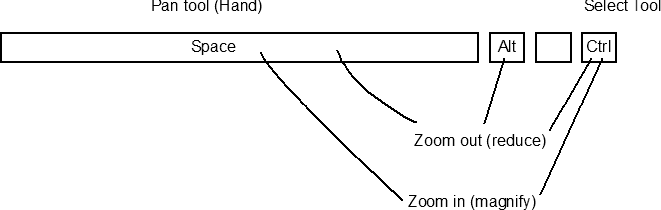
Zoom_Pan_Navigate.gif

[edit] mouse-click needed for zoom to work (incremental). Alternatively Click n Drag to select area to zoom into/out-of [/edit]

the beauty of it is that you can fluidly move between all these options by pressing or de-pressing one or more of the keys.

Ctrl = pointer
add Spacebar = Zoom in
add Alt = Zoom out
keep Spacebar pressed and release others = Pan/Hand

Long intro :)
this was broken in Acrobat 9 AFAIK (edit: I'm not sure now - it's possible I upgraded from 8 to 10)
They decided to spruce it up in version 10, which I hate, but could live with if it worked properly - but it doesnt (going from Ctrl+Space to just Space leaves you with Zoom in instead of Pan)

[1] Does anyone know if it works in Acrobat 8 (I cant remember)
[2] Wondering is it dangerous these days to use older versions of Actobat as default PDF opener (if so, I think can have two versions installed).
6548
Post New Requests Here / Re: IDEA ~ Show List of Shortcuts overlaid on Desktop
« Last post by tomos on September 20, 2011, 03:54 AM »
what other apps are you hoping to use this for (apart from DOpus)?
[...]
How did you generate the sample shortcut lists?  If this is a copy and paste from a help file it's fine, but if you have to manually produce them it may become a little onerous...

That XY one was generated by the programme itself** - I would definitely use a shortened version of that
I would like to use this initially for
  • DOpus
  • XYPlorer
  • Adobe Illustrator (CS4)

Manually producing lists need not be a problem - what would be important to me would be ease of editing of lists. Cause once I learn a shortcut I dont really need it on the list any more. Initially I might just start with a handful of key shortcuts I would like to learn. I could add shortcuts as I come across them or find I want to use them.
This was prompted by going back to default settings in dopus - I like some of the new(?) default shortcuts, but not familiar with them. Also I have started creating (again) my own custom shortcuts, ideally I could add these to the list as I create them.

** Xyplorer has a very advanced export capability for exporting shortcuts (wish I could say the same for other programmes)

Screenshot - 2011-09-20 , 10_53_51.png
6549
Living Room / Re: it's not Star Trek, it's Cosmic Journey
« Last post by tomos on September 19, 2011, 05:26 PM »
My only suggestion is to replace the one sound effect that sounds like someone coughing  ;D
hey,
that's someone making explosion noises :D

I'm not a gamer (as in, not at all) - but I grew up with Asteroids and Space Invaders (arcade versions).
Looks great, and is difficult!
I even cant get used to using the arrow buttons - yet - it doesnt help that I'm left handed and not a touch typist - I presume people who actually play games on computers wouldnt have this problem. But I find I dont have much precision control moving left to right - dont know if that's just me, or my keyboard, or the game.
6550
General Software Discussion / Re: Directory Opus 10
« Last post by tomos on September 18, 2011, 06:13 AM »
@Chris, thanks :up:

@Jim that does sound rough. Just curious - what OS are you on?
Pages: prev1 ... 257 258 259 260 261 [262] 263 264 265 266 267 ... 454next