topbanner_forum
  *

avatar image

Welcome, Guest. Please login or register.
Did you miss your activation email?

Login with username, password and session length
  • Tuesday December 23, 2025, 1:20 pm
  • Proudly celebrating 15+ years online.
  • Donate now to become a lifetime supporting member of the site and get a non-expiring license key for all of our programs.
  • donate

Recent Posts

Pages: prev1 ... 249 250 251 252 253 [254] 255 256 257 258 259 ... 454next
6326
Found Deals and Discounts / Re: Ashampoo Photo Commander 9: $9.99
« Last post by tomos on January 19, 2012, 05:28 AM »
I have Sagelight myself (and illustrator & Freehand for vector) so probably not going to be investing in Xara anyway...

I've never had the chance to play with Freehand. Well out of my budget range!  :mrgreen:

veering off-topic now 
but just to say FreeHand looks pretty dead now (although there is a lawsuit proceeding against adobe - see http://www.freefreehand.org/).
I still use FreeHand in preference to Adobe Illustrator due to speed of FH (and slooowness of illustrator) - and familiarity I guess. Xara seems to have the speed advantage as well as you say.

6327
Living Room / Re: When you make your 100'th Post
« Last post by tomos on January 19, 2012, 04:14 AM »
Sorry, I spent my 100th post protesting SOPA!

:Thmbsup: :)

I read the post but hadnt noticed the "100"...
6328
Found Deals and Discounts / Re: Ashampoo Photo Commander 9: $9.99
« Last post by tomos on January 19, 2012, 04:09 AM »
^ well that's a judgement in itself :D

I have Sagelight myself (and illustrator & Freehand for vector) so probably not going to be investing in Xara anyway...
6329
Screenshot Captor / Re: Scrolling Capture Deluxe Thread
« Last post by tomos on January 17, 2012, 05:12 PM »
can someone shed some light on a scenario where that would be useful?
-mouser
[...]
Can't paste the combined image into another document/cms/blog, but the parts would fit just about right (MS Word anyone?)

one I thought of too (plus one I mean!)
6330
Doesnt mousers CH&S have fancy scripting abilities these days?
Once setup, you would select the link and use a shortcut to convert. I know, it's not exactly what you requested - but worth suggesting anyway ;-) [edit] no, it doesnt copy the path... so not suitable that way, still, a possible solution for incoming paths [/edit]

Could only find a video and a thread for sharing scripts
https://www.donation...ex.php?topic=28312.0
6331
Found Deals and Discounts / Re: Ashampoo Photo Commander 9: $9.99
« Last post by tomos on January 17, 2012, 03:30 PM »
But Xara's P&G7 has a really good tool for removing unwanted junk from photos.
I think moderator Carol Haynes is a big fan of Xara stuff.

Xara started out as a vector programme, I wonder how advanced the photo aspect is...
6332
Finished Programs / Re: SOLVED: Copy Text From Error Windows
« Last post by tomos on January 15, 2012, 12:18 PM »
30 euro here - maybe it's a typo, the "box" version is the same price
Your URL is grunged?  Comes out as
[url=http://]here[/url]

sorry
http://buy.abbyy.com...69-812f-8b5f2d3fa347
6333
Screenshot Captor / Re: Scrolling Capture Deluxe Thread
« Last post by tomos on January 15, 2012, 12:16 PM »
Wish me luck -- today is the day I try to implement the auto-guessing of values -- and the day we find out if the autoscroll capture is going to be powerful but incredibly hard to use tool -- or powerful and mostly automatic.


 :)
6334
Found Deals and Discounts / Re: Bits - Ultra Recall
« Last post by tomos on January 15, 2012, 12:09 PM »
You have a choice whether to Link or Copy documents, emails, web pages, etc. to Ultra Recall.

that sounds better (choice). I have 100's of files linked to InfoQube and was able to successfully move machines in the summer. You are limited by using links, e.g. you can't easily change the file/folder structure, and have to open files externally.
At least you have the choice :up:


If that IE unable to read office files is with IE9 you could revert to IE8...
http://windows.microsoft.com/en-US/windows7/how-do-i-install-or-uninstall-internet-explorer-9
6335
Found Deals and Discounts / Re: Bits - Ultra Recall
« Last post by tomos on January 15, 2012, 10:46 AM »
[...] I store all my important documents in it. I can search for any document within Ultra Recall and usually find it faster than otherwise. Of course I only use the documents stored in UR for reference; if I need to revise and resend anything I will still use the original document in its native app.

that would bother me.
just curious:
  • does the file in UR contain a link to the original file?
  • can you search the body of the file?
6336
General Software Discussion / Re: Configuring Directory Opus for Fun and Profit
« Last post by tomos on January 13, 2012, 04:56 PM »
[edit] for newer version of this image toolbar see reply # 43 below [/edit]

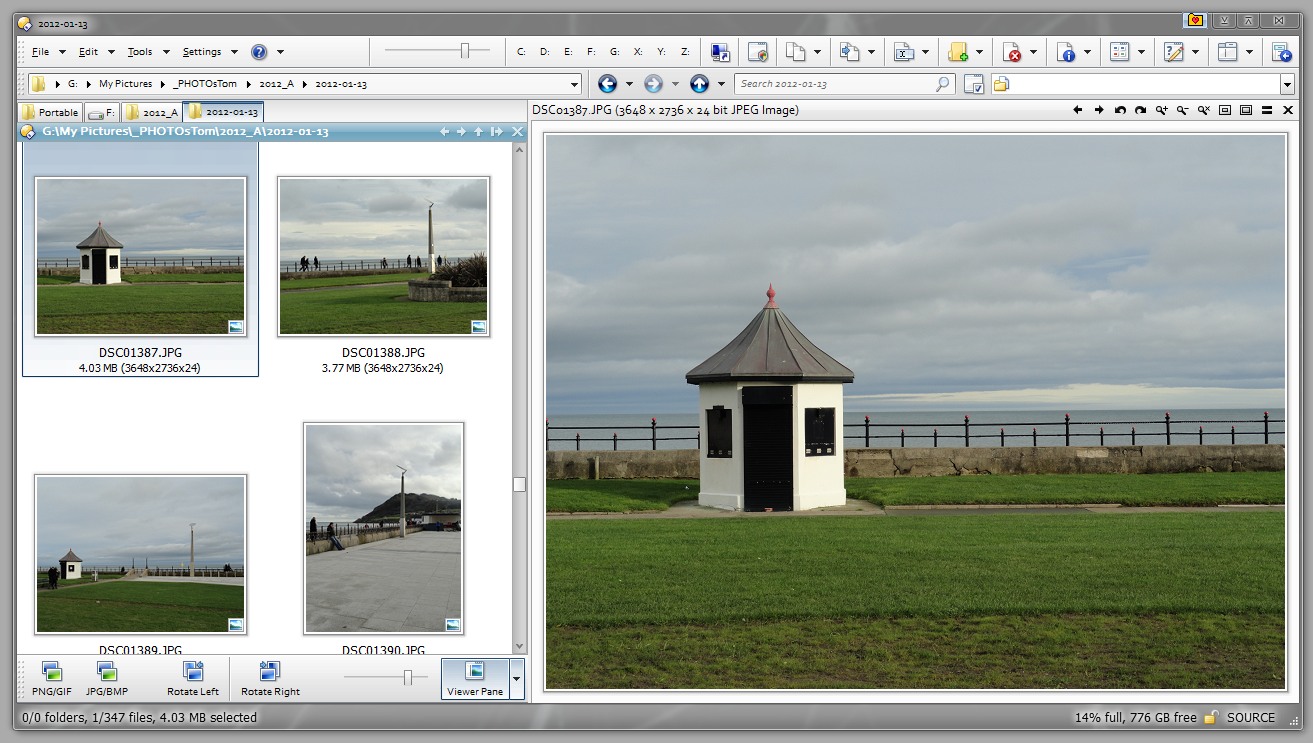
I've been working on photos this evening.
Seeing as I now know how to copy a toolbar, here's a couple of versions of the image toolbar.
I think the image toolbar comes by default, but this one is tidied up a lot -
 
  • convert to PNG and GIF buttons combined - left click for PNG, right click for GIF
  • convert to JPG and BMP buttons combined - left click for JPG, right click for BMP
  • Viewer pane button added (as menu button) - various thumbnail sizes and [make]wallpaper added as "sub-items"
  • second version is streamlined - images removed, text shortened
  • slider for thumbnail size only shows in thumbnail view

version 2_0
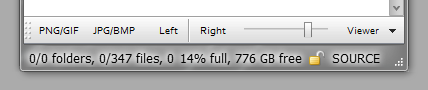
Screenshot - 2012-01-13 , 22_34_44.png

version 2_1 [version 3]
Screenshot - 2012-01-13 , 21_54_13.png

you can keep the toolbar very small (normally it would go under the viewer as well) - click on the left side & drag it over and back till it settles where you want it.

Screenshot - 2012-01-13 , 21_55_06.png


edit/ I forgot to tell you how to add the toolbar :-[
From Andy's "Other Manual" dopus page (link in previous post) -

• Open a dual lister. In the path bar (quick selection: F4), paste exactly this: /buttons
• Move the two toolbar files [see below] into that folder (you will notice that it contains all the other toolbars).
• Right-click any place on your old toolbars and select Toolbars, then [select one to test - drag to wherever you want]

EDIT/ there's no shortcuts included

EDIT/ new version 3 does *not* change the last modified date when rotating an image

[edit] for newer version of this image toolbar see reply # 43 below [/edit]
6337
General Software Discussion / Re: Configuring Directory Opus for Fun and Profit
« Last post by tomos on January 13, 2012, 04:40 PM »
Directory Opus 10: Quick-Start Guide, Tips & Tricks
Or: The "Other Manual" to Directory Opus


"The guide walks you through Andy's personal configuration of Opus and discusses how and why he got there."

He gives a couple of toolbars which you can add to your install. (I never knew that was so easy...)
If you have a portable option on your dopus license, it might be worth trying out new stuff on portable version first. He changes some default shortcuts so they will clash & be shown twice - he does tell you how to clear it up (scroll down the page), but you may wish to just cherry-pick from the modified portable install.

Copying a button: when in customise mode, simply right-click & Copy
This will also copy a full menu or a three-way-button
Paste works the same way, also in customise mode.
6338
Living Room / Re: When you make your 100'th Post
« Last post by tomos on January 13, 2012, 04:29 PM »
what can I say, it's friday night ;)

Screenshot - 2012-01-13 , 23_25_09.png
6339
Living Room / Re: When you make your 100'th Post
« Last post by tomos on January 13, 2012, 04:24 PM »
And we have a tilted behind, I guess:

. . . still easy to clean ?? :o
6340
Finished Programs / Re: SOLVED: Copy Text From Error Windows
« Last post by tomos on January 13, 2012, 04:18 PM »
But the price, in the UK at least, is "€ 9,95 / £ 8.99"

odd
your price here
30 euro here - maybe it's a typo, the "box" version is the same price
6341
Finished Programs / Re: SOLVED: Copy Text From Error Windows
« Last post by tomos on January 13, 2012, 12:42 PM »
lots of people swear by the Abby Screenshot Reader http://www.abbyy.com/screenshot_reader/
which does OCR on screenshots (and takes screenshots) I havent used it myself (€30 in europe).
6342
Screenshot Captor / Re: SC doesn't capture cursor on web pages
« Last post by tomos on January 13, 2012, 12:38 PM »
I dont think SC captures the mouse pointer *anywhere* when using "Grab selected region" (Shift+PrtScr).
Well it doesnt for me anyways...

If text is active, the text cursor is captured with this method.

(win7)
6343
Living Room / Re: For the Facebook Haters ;)
« Last post by tomos on January 13, 2012, 08:15 AM »
Facebook rhymes ;-)

[I guess NSFW but not really offensive, just honest]

6344
^ this might help -
Jimmy Savile had a show called Jim'll Fix It where he "fixed" things for people (not sure if that term used in American English - so translation from the wiki page: "Sir James will bring his influence to bear in arranging matters to your satisfaction.")

Aww, you've just deprived people of the fun of doing a bit of independent research!    ;)

edit/ with apologies :)
actually Stephen(66515) reported his death here on dc (with an impressive photo)
https://www.donation...ex.php?topic=28511.0
6345
^ this might help -

Jimmy Savile had a show called Jim'll Fix It where he "fixed" things for people (not sure if that term used in American English - so translation from the wiki page: "Sir James will bring his influence to bear in arranging matters to your satisfaction.")
6346
N.A.N.Y. 2012 / Re: NANY 2012 Mugs, etc. -- All participants please read in
« Last post by tomos on January 11, 2012, 12:57 PM »
And thank you again to the donator who paid for most of the mugs.
a big +1 :up:

A developer's life is same.

1. develop user's choice
2. gift madam's choice
3. if any doubt then goto step 1.
4. loop

 ;D
6347
General Software Discussion / Re: Configuring Directory Opus for Fun and Profit
« Last post by tomos on January 10, 2012, 12:17 PM »
Just updated to 10.0.3.0

there was a mention of an "Other Manual" in the info when I was prompted to download. Once installed, I had to search a bit before I found it.
I like what I've read so far - it seems to be a very good (in-depth) introduction :up:

Directory Opus 10: Quick-Start Guide, Tips & Tricks
Or: The "Other Manual" to Directory Opus


"The guide walks you through Andy's personal configuration of Opus and discusses how and why he got there."


_________________________________
via http://blog.dopus.co...us-other-manual.html
6348
Screenshot Captor / Re: Permission for a portable version
« Last post by tomos on January 09, 2012, 07:51 AM »
Should it be called donationware instead of freeware?
Possibly with a link to mouser's donation page here?

(mouser may not care, I dont know, I just throwing out the idea...)
6349
General Software Discussion / Re: Configuring Directory Opus for Fun and Profit
« Last post by tomos on January 07, 2012, 12:55 PM »
you can save a dopus window - it's called a Lister Layout.
I use this a lot - different tabs / layouts / views for different jobs, for different requirements. (I also use Session Manager to do the same kind of thing in Firefox.)

You can make a shortcut to save a lister layout thus:
Prefs LAYOUTSAVE=single

Screenshot - 2012-01-07 , 19_32_57.png

on saving you get offered some options:

Screenshot - 2012-01-07 , 19_33_38.png

If you change your layout and want to save the changes, you need to save it again, which can only be done like file/save-as, i.e. use the shortcut above, type in or select the name of the current layout => message: "do you want to replace..." => click "Yes". A bit messy, but you get used to it (well, I did :p )

Lister layouts can be opened via the tray icon, or via
menu: Settings >Lister Layouts
But I use FARR to open them :)
....
You need to create a shortcut to the layout:
menu Settings >Lister Layouts >Edit Layouts
  • drag relevant layout to desktop to create a shortcut
  • shortcut has funny name Layout "XXXX".dcf (where XXXX was the saved layout name) - I change name to the saved name
  • move to a location that FARR can read (I add them to the Start Menu >Programs folder)

With the TEST layout example:

Screenshot - 2012-01-07 , 19_46_52.png
6350
Living Room / Re: Recommend some music videos to me!
« Last post by tomos on January 06, 2012, 05:55 AM »
oh yeah, FWIW, the Bowie cover is Space Oddity
Oops...and I knew that too. :-[
I know, I'd make a good editor - of other peoples posts :-[


Oh BTW - she's done a cover of Ashes to Ashes too. Listen to it (sorry-no video) here. :)

Have to post a Bowie version now!


Pages: prev1 ... 249 250 251 252 253 [254] 255 256 257 258 259 ... 454next