topbanner_forum
  *

avatar image

Welcome, Guest. Please login or register.
Did you miss your activation email?

Login with username, password and session length
  • Friday April 17, 2026, 11:21 pm
  • Proudly celebrating 15+ years online.
  • Donate now to become a lifetime supporting member of the site and get a non-expiring license key for all of our programs.
  • donate

Recent Posts

Pages: prev1 ... 208 209 210 211 212 [213] 214 215 216 217 218 ... 251next
5301
General Software Discussion / Re: Must-have apps in the System tray?
« Last post by lanux128 on April 16, 2007, 01:13 AM »
Steve Miller's PureText is a very handy clipboard tool but its function can be replicated via Autohotkey, that's why no one mentioned it, i think.. :)

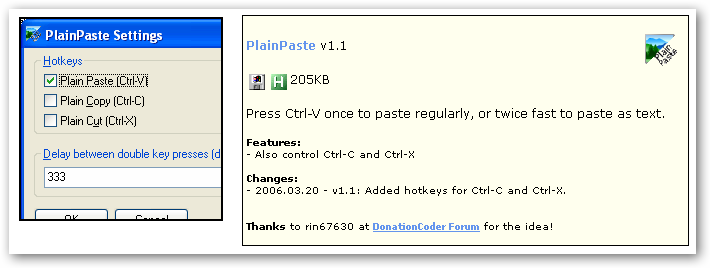
e.g. Skrommel's PlainPaste
ws-skrommel-plainpaste-1.png
5302
General Software Discussion / Re: Mac Software Clones for Windows
« Last post by lanux128 on April 15, 2007, 11:53 PM »
yes, Darwin.. Quicksilver's shadows loom large over the PC land and it grows bigger every day.. :)
5303
Screenshot Captor / Re: Text scraping: instructions
« Last post by lanux128 on April 15, 2007, 10:07 PM »
yes, i understand kleptomania's potential now after a trip to its website.. :up:
5304
General Software Discussion / Re: notepad-equivalent for spreadsheets?
« Last post by lanux128 on April 15, 2007, 10:03 PM »
there are some more options here.. :)
5305
this was already discussed here: DONE: Automatic Copy when highlighted :)
5306
Ampa, why don't you try the no-installer version?

http://mp3gain.sourc...rge.net/download.php
ws-mp3gain-1.png
5307
Post New Requests Here / Re: On Screen Status Display
« Last post by lanux128 on April 15, 2007, 09:44 PM »
I am pretty sure that skrommel has already done this, but i can't find it at his page!
Maybe someone will know where it is.
yes, you're right jgpaiva.. Skrommel had already done this but it's not on his page, however a DC forums search returned this link..

GreenOSD: https://www.donation...16.msg31387#msg31387

;GreenOSD.ahk
; Shows changing volume and selected keys on screen
;Skrommel @2006
5308
General Software Discussion / PhotoWipe
« Last post by lanux128 on April 15, 2007, 09:37 PM »
PhotoWipe is quite an interesting image tool. It can be used to "removes unwanted objects" from your photos.. :)

PhotoWipe
• PhotoWipe is a revolutionary image processing tool that magically removes unwanted objects from your photos. Just paint over them in black, and click go! Uncovers hidden details in your photos. Sit back and watch as cage bars disappear from the zoo, and your old girlfriend or boyfriend fades away. It removes wrinkles, or it can remove entire facial features.
• PhotoWipe uses a modified version of the greycstoration image processing library do its work.
• Freeware, donations accepted.

ws-photowipe-1.png
5309
Site/Forum Features / Re: should we get rid of the topic icons?
« Last post by lanux128 on April 15, 2007, 09:26 PM »
oh, okay.. i'm all for the less is more idea.. :up:
5310
Screenshot Captor / Re: Text scraping: instructions
« Last post by lanux128 on April 15, 2007, 09:24 PM »
or try this freeware: WinScraper.. :)

As a developer, I wanted a simple, free tool that would do all of the following:
    * 'Scrape' the text off a dialog box control or message box, so that it can be pasted as text into an email or whatever. (How often have I dismissed the error box without accurately noting down its contents?)
    * Capture images of controls or windows from my application for documentation purposes etc..
    * Resize my application or web browser windows to a specific size for testing alternate screen resolutions or consistent documentation of my application.

That's what the tool presented in this article sets out to do. As a full time developer I expect to make a lot of use of it from now on!

ws-winscraper-1.png
5311
General Software Discussion / Re: PowerPro development to cease this month
« Last post by lanux128 on April 15, 2007, 09:19 PM »
i heard of PowerPro's powerful features (no pun intended) but had not tried it myself.. hopefully someone will be able to coax the author to provide the source-code for further development.. btw, recently authors of Cobian Backup & AllChars (that i know of) gave up their development of their respective programs and made it Open Source..
5312
General Software Discussion / Re: Mac Software Clones for Windows
« Last post by lanux128 on April 15, 2007, 09:12 PM »
hehe.. no QuickSilver but cool find, though.. :up:
5313
Site/Forum Features / Re: should we get rid of the topic icons?
« Last post by lanux128 on April 15, 2007, 09:07 PM »
is it me or are the icons already gone? because i can see only one column of icons..

ws-topic-icon-1.png
5314
Mini-Reviews by Members / Re: List of disc catalogers
« Last post by lanux128 on April 15, 2007, 09:04 PM »
just my personal opinion, wouldn't such a long list make a person lose interest? btw, how about introducing some criteria and limit to final review to something like 10-15 apps, the rest can included in an appendix.. we can also suggest that readers who don't like the the first 15 can try out the rest by using the same methods followed for the first 15 and post a mini-review.. :)
5315
Official Announcements / Re: The Gizmo Effect!
« Last post by lanux128 on April 15, 2007, 08:50 PM »
evidence:
this is fantastic news, generated by good old word-of-mouth publicity.. :)
5316
Found Deals and Discounts / Re: doPDF (pdf creator) - Freeware
« Last post by lanux128 on April 15, 2007, 08:45 PM »
thanks Softland, doDPF will be in serious contention with some fine-tuning that you mentioned.. :)
5317
General Software Discussion / Re: Must-have apps in the System tray?
« Last post by lanux128 on April 15, 2007, 08:41 PM »
Hirudin, you can use Mike Lin's Startup Control Panel to remove the OEM icons that came with the hardware..

ws-mikelin-1.png
5318
General Software Discussion / Re: Must-have apps in the System tray?
« Last post by lanux128 on April 12, 2007, 10:37 PM »
Actually you can get rid of that annoying shield...
Open it up and click on the last option in the left hand side's little box, and uncheck all the boxes (3 of them). Ta-da!
-wreckedcarzz (April 12, 2007, 09:45 PM)

thanks, actually you're the 2nd person to point out to me, after Veign.. :)

ws-secuirtycenter-1.png
5319
from CyberNet News:
This morning I actually came across an interactive tutorial that Microsoft is offering for Word 2003 users that lets you hover over a command to see where you can find it in Office 2007 (as pictured below). If that isn’t enough for you then click on the command and it will actually demonstrate how you can find that command in Word 2007.

ws-off2007-1.png

btw, this was Ryan's conclusion:
Once you start to get used to Microsoft Office 2007 it is hard to switch back to the previous versions that only have the toolbars. Everything works so smoothly and, despite the initial frustration, you can find things much faster. If you really give the new interface a fair shot, and still walk away not liking it I would be quite surprised.
5320
General Review Discussion / Re: Free PDF tools review?
« Last post by lanux128 on April 12, 2007, 09:12 PM »
I believe doPDF does what Fineprint does, and it's freeware to boot.
i've tried out doPDF but it has some problems which i have mentioned here, so i would like to know if anyone else has these problems..

btw, for those who convert images/text files into PDF, IrfanView has also got into the act, via a plugin..
• IMPDF - (version 0.23): allows IrfanView to save PDF files (Portable Document Format)
5321
Post New Requests Here / Re: IDEA: Mouse Motion Shortcuts
« Last post by lanux128 on April 12, 2007, 09:00 PM »
Thanksfor the help.This is a very useful site    :Thmbsup:
glad to be of help.. 8)
5322
Official Announcements / Re: The Gizmo Effect!
« Last post by lanux128 on April 12, 2007, 08:55 PM »
yes, agreed.. i find myself quoting snippets from Gizmo's newsletter several times in the past few days.. it's a fantastic opportunity for DC.com that sometimes people do look at the quality of the software instead of judging based on its licensing policy..
5323
Living Room / Re: Why Linux is better
« Last post by lanux128 on April 12, 2007, 08:50 PM »
some light-hearted thoughts from the flip-side of Linux, courtesy of Gizmo's newsletter..

ws-techalert1.png

Here are the links:
http://www.techsuppo...or-windows-users.htm
http://www.techsuppo...ows-users-part-2.htm

5324
ProcessTamer / Re: run as a service?
« Last post by lanux128 on April 12, 2007, 08:43 PM »
you can use FireDaemon, though..

ws-firedaemon-1.png
5325
I found out another trick, by pressing Ctrl+F1 one can minimize the ribbon.. to make it appear temporarily, just do a mouse-over on the menu-item.. (will also work with keyboard alt accelerators)

also, check out CyberNet News.. they have very good write-ups, tips & guides on Office2007. one of which is: Office 2003 and Office 2007 Toolbar/Ribbon Size Comparison.


Pages: prev1 ... 208 209 210 211 212 [213] 214 215 216 217 218 ... 251next