Okay so in an attempt to get this thing back "on-track" There is now available a new build that has fixes for the Alarm Tab's crashing and other ill behavior.
I vaguely remember fiddling with some other stuff while romping through the weeds with this ]Expletive[ Time Sync fiasco. So some other stuff may (or may not) be changed/fixed/broken/updated/different ... I honestly do not recall.
Regarding the time Sync After a truly insane amount of digging, testing, futzing, swearing, & screaming (bad stoic...) I have
officially come to the conclusion that the time synchronization option is impossible to do without running the program with administrative rights. Which is to say that from here on-out, Time Synchronization
is not (
nor will ever be) Officially supported in T-Clock.
That being said... UnOfficially, if anyone wants to (fully of their own accord) run the damn clock with administrative (which I strongly disapprove of) rights. There is a (completely undocumented...) command line option /SyncOpt that will open the following dialog:
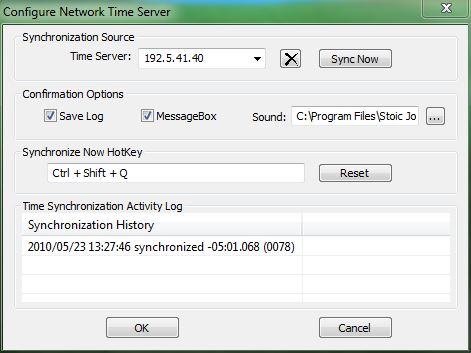
This is to be construed as an EasterEgg it will only be documented here, in this post, and shall
never be
officially mentioned in any documentation again. While all of the functions work, some require manual interaction (SNTP.log creation/permissions) - And never open the EE Time Sync Options Dialog and the Properties Dialog at the same time - It will crash. Beyond that it all works Hot keyed Time Syc with sound, message, & logging.


 Recent Posts
 - Not an altogether bad idea...
 A Y cable with three outputs?

 - and have no real clue as to which order those two points go in...