Recent Posts
4951
Developer's Corner / Re: Dice analyzer machine project
« Last post by mouser on January 26, 2016, 07:25 PM »A screenshot showing results of a very quick test of unsupervised clustering.
In this case the system took 17 photos and was told that it was taking a picture of a 6 sided die. It then grouped the 17 photos into 6 clusters most similar to each other.
(There was no stage of training telling it what each side of the die looks like).
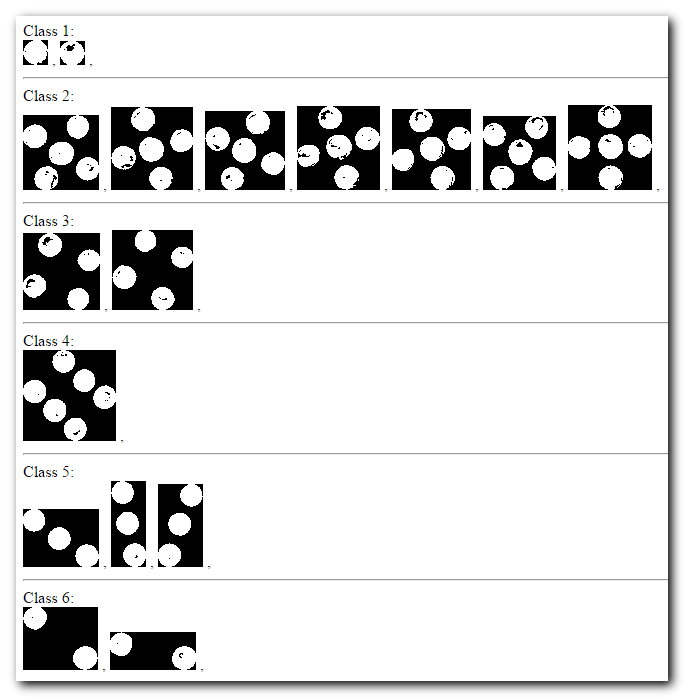
This gives you a sense of how the procedure would work for testing a die for fairness. User would insert a die and specify how many unique faces the die has (N). The system would then start rolling the die taking photos, eventually clustering the images into N clusters, and then computing statistics on the frequency and patterns of seeing cluster.
In this case the system took 17 photos and was told that it was taking a picture of a 6 sided die. It then grouped the 17 photos into 6 clusters most similar to each other.
(There was no stage of training telling it what each side of the die looks like).
This gives you a sense of how the procedure would work for testing a die for fairness. User would insert a die and specify how many unique faces the die has (N). The system would then start rolling the die taking photos, eventually clustering the images into N clusters, and then computing statistics on the frequency and patterns of seeing cluster.