topbanner_forum
  *

avatar image

Welcome, Guest. Please login or register.
Did you miss your activation email?

Login with username, password and session length
  • Saturday September 19, 2026, 6:06 pm
  • Proudly celebrating 15+ years online.
  • Donate now to become a lifetime supporting member of the site and get a non-expiring license key for all of our programs.
  • donate

Recent Posts

Pages: prev1 ... 184 185 186 187 188 [189] 190 191 192 193 194 ... 1515next
4701
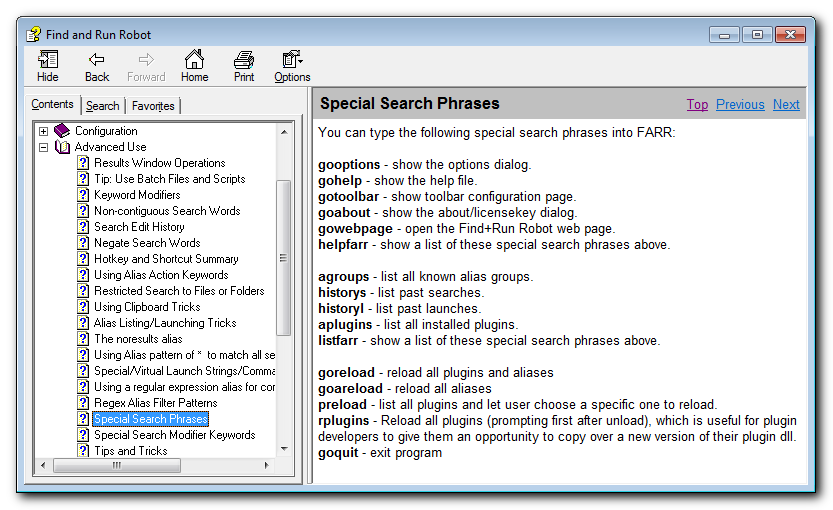
if you type: gooptions
it will open the options.
Screenshot - 5_21_2016 , 8_21_22 AM.png
4702
Living Room / Re: Show us a photo of your mutt or other creatures..
« Last post by mouser on May 21, 2016, 12:08 AM »
I'm so sorry to hear about your loss, Edvard.
I lost my cat over a year ago and i still haven't gotten over it.

You gave him a great home and a place to live a full life with people who loved him.. none of us can ask for too much more than that.
4703
Screenshot Captor / Re: Capture Window does not capture open menu
« Last post by mouser on May 20, 2016, 12:15 PM »
What about the bottom option on the "Window Capturing 2" tab "Do not try to use the PrintWindow Api" -- any difference if you check or check that?
4704
Screenshot Captor / Re: Capture Window does not capture open menu
« Last post by mouser on May 20, 2016, 11:59 AM »
If you don't care about transparent capture at corners, you can go to the "Window Capturing 1" tab and UNCHECK the option "Try to capture Aero Glass transparency effects".

This may fix your problem and also result in much faster active window captures as a nice side benefit.  Let me know if it helps.
4705
Q2:
The hotkey help page says that ALT+O will do it, but this doesn't seem to work anymore, at least for me.  I'm pretty sure there is a hotkey for it -- anyone know it?
Screenshot - 5_20_2016 , 11_15_01 AM.png
4706
Q1:
You want this option:
Screenshot - 5_20_2016 , 11_13_44 AM.png
4707
Screenshot Captor / Re: Capture Window does not capture open menu
« Last post by mouser on May 20, 2016, 11:09 AM »
there's no reason the menu shouldn't be captured.

if you use normal prtscr hotkey to capture whole screen, is it captured then?

does the menu disapear from your actual screen when it fails to capture? i.e. does it close up? some hotkey combinations can cause that but it sounds like you are saying it stays on screen just doesn't show on the capture..
4708
glad to hear it, thanks Iain.  :up:
4709
Screenshot Captor / Re: Setting Options
« Last post by mouser on May 19, 2016, 03:55 PM »
That's a good idea, i will add it.
4710
DC Website Help and Extras / Re: Can't post a post with just a video
« Last post by mouser on May 19, 2016, 09:29 AM »
The category for this thread is DC Website Help and Extras - yes?

wraith's post was appropriate for this section, as this is the section where we discuss features and bugs of the forum and website, and he was asking if this was an intentional feature or a bug.

and the reality is that this is a bug in the forum software, but not one that i think is worth the trouble fixing at this time.  simple as that :)
4711
Screenshot Captor / Re: Feature request: Hold Spacebar to pan image
« Last post by mouser on May 19, 2016, 08:35 AM »
There is no setting for it, but note that it won't work if the entire image is visible and there is no need to pad.
4712
Screenshot Captor / Re: Setting Options
« Last post by mouser on May 18, 2016, 09:01 PM »
Ah I know what setting you are talking about:
Screenshot - 5_18_2016 , 9_01_30 PM.png
4713
DC Website Help and Extras / Re: Can't post a post with just a video
« Last post by mouser on May 18, 2016, 08:47 PM »
interesting.. well i suppose it helps encourage people to describe the video so i won't worry about fixing it :)
4714
Screenshot Captor / Re: Setting Options
« Last post by mouser on May 18, 2016, 08:29 PM »
You can right click on the system tray icon and choose a capture from the menu that is shown.
4715
Screenshot Captor / Re: Setting Options
« Last post by mouser on May 18, 2016, 07:45 PM »
Does this help #1:
Screenshot - 5_18_2016 , 7_44_57 PM.png
4716
Screenshot Captor / Re: Feature request: Hold Spacebar to pan image
« Last post by mouser on May 18, 2016, 05:45 PM »
It must be a failure on my part that so many users don't know about that critical feature..
4717
Screenshot Captor / Re: Feature request: Hold Spacebar to pan image
« Last post by mouser on May 18, 2016, 05:41 PM »
In SC you hold down the right mouse button to pan.
4718
that made me smile  :)
4719
Actually it may have been this one I was thinking of:

Hyperdrive


But I think I was combining the two in my memory.
4720
Hot damn you found it, it was Gemberling!!!!!!!!!!!!!!!!!!!!!!

GEMBERLING!!!!!!!!!!!!!!!!!!!!!!!!!!!!!!!!!!!!

I guess I misremembered him being inside the computer as being in space.
4721
That's a good guess, but nope i don't think so.
4722
how strange.. does it happen all the time, and regardless of whether you use the mouse wheel or the zoom slider on the right?
Or does it only happen on rare occasions?
4723
Here's a challenge for the DC forum historians.

I'm trying to recall a youtube (i think) video series that was shared on the forum many many years ago.
It was a low budget comedy series set in space. I'm pretty sure it was from a local television station or something.
The star was an overweight guy i think who played a space captain.
4724
Site/Forum Features / Re: Adding back an Ignore Thread feature?
« Last post by mouser on May 16, 2016, 04:55 PM »
You can already ignore users and it will not show their posts when reading topics.
I may add code that automatically hides topics started by any user you have marked to ignore from your Recent/Unread lists.
4725
Site/Forum Features / Re: Adding back an Ignore Thread feature?
« Last post by mouser on May 16, 2016, 04:42 PM »
You can MARK threads to ignore/bookmark from the "MARK TOPIC" button at the top (and bottom) of a thread you are reading.
You can manage your marked (bookmarks, ignored) topics from the link at the bottom of the GOTO menu, or from a new menu in your profile area.

A reminder:

Ignored topics are hidden only from the recent/unread lists -- not when simply browsing a specific forum section.
Pages: prev1 ... 184 185 186 187 188 [189] 190 191 192 193 194 ... 1515next