topbanner_forum
  *

avatar image

Welcome, Guest. Please login or register.
Did you miss your activation email?

Login with username, password and session length
  • Thursday December 4, 2025, 3:17 am
  • Proudly celebrating 15+ years online.
  • Donate now to become a lifetime supporting member of the site and get a non-expiring license key for all of our programs.
  • donate

Recent Posts

Pages: prev1 ... 182 183 184 185 186 [187] 188 189 190 191 192 ... 1514next
4651
Post New Requests Here / Re: Focus Overlay
« Last post by mouser on June 04, 2016, 11:11 PM »
Ghoster featured on ILoveFreeSoftware today:
http://www.ilovefree...cept-active-one.html
4652
Find And Run Robot / Re: how does setuservar work ? [feature request ?]
« Last post by mouser on June 03, 2016, 04:04 PM »
PS: I'm sending a quick video on your email (for your eye's only, there are some personal stuff)
video received.. those are definitely some serious farr aliases and configurations :)
4653
Find And Run Robot / Re: how does setuservar work ? [feature request ?]
« Last post by mouser on June 03, 2016, 04:03 PM »
Yeah im afraid that might be a commandline limit.. ill check.
4654
Find And Run Robot / Re: New internal browser engine ?
« Last post by mouser on June 03, 2016, 04:03 PM »
no plans to do so any time soon, im afraid it would involve quite a bit of work.
4655
Living Room / Re: Gadget WEEKENDS
« Last post by mouser on June 03, 2016, 12:25 PM »
I thought I'd post about a phone gadget, the panasonic Link2Cell functionality in their most recent line of cordless home phones.

Looks like cheapest model is about $60 (2 handsets), and most expensive is about $140 (5 handsets):
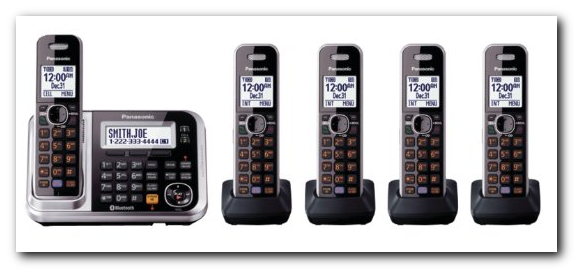
Screenshot - 6_3_2016 , 12_17_13 PM.png

Amazon link: http://www.amazon.co...nabled/dp/B00BP7SW0C

What's special about this phone, the Link2Cell feature, is that it can use bluetooth to connect to your cell phone and basically let you use your home phone system as if it was on your cell phone plan.


Let me explain:

I very rarely use the phone, but I do need to use one at times.  I work from home, and but need a cell phone for those rare times when I travel. 

This presents me with a bit of a dilemma in terms of paying for phone service.  Even basic landline home phone service costs $40/month.  And mobile plans seem to start at about that much, with some pain-in-the-ass pay-per-day services available for significantly cheaper but with limitations.

What I've been doing for the last few years is paying for home landline service, which amounts to about $45/month and then I have a t-mobile pay-on-days-you-use-it plan for when i travel and so that i have a phone in the car for emergencies.

The pay-per-day thing is a hassle in terms of how it has to be constantly refilled and will expire if you're not careful.  And it's annoying to have to make sure the phone is turned off when not being used, and it means if anyone tries to send me a text message it will disappear into the aether if the phone is off for too long.  And it's not good having two phone numbers.


But up until now I've been very reluctant to get rid of my home phone, because I hate the idea of having to physically interact with the cell phone which just feels unnatural to me.  I also like having multiple handsets in different rooms, etc.


So that's where this new panasonic Link2Cell feature comes in.  It basically lets you pair your cell phone with this phone system and you can now make and receive phone calls using these standard home-phone handsets through your cell phone (and/or landline).  I've only had it for a few days now but it seems to work remarkably well and seamlessly.  The cellphone just stays plugged into a charger near by and you never have to deal with it.  Everything happens through the normal home phone handsets but routes through the mobile phone.  Pretty impressive feature.


So assuming I don't discover any showstoppers, I will soon be dropping my landline and moving to just one single mobile plan, and leaving the phone paired with this base unit when i'm in the house.


Video someone made of using it:
4656
Screenshot Captor / Re: configuration for enterprise use
« Last post by mouser on June 03, 2016, 11:43 AM »
Hello Timo.

It is easy to do what you want and have the license key and custom settings installed at the time of installation for all users.

Email me and I can assist ([email protected]).

4657
Screenshot Captor / Re: Default save directory
« Last post by mouser on June 02, 2016, 03:59 PM »
.objects files are created when you add objects to an image (arrows, text boxes, etc.) -- they are what enables Screenshot Captor to let you move those objects around in an image at a later date.
4658
General Software Discussion / Re: TeamViewer hacked?
« Last post by mouser on June 02, 2016, 03:22 PM »
It's a pretty safe assumption -- it would be unfathomable for such a mature enterprise-level product not to use encryption for something like this.

And in fact you can read about the encryption they use here:
https://www.teamviewer.com/en/security/

"TeamViewer includes encryption based on 2048 RSA private-/public key exchange and AES (256 bit) session encryption. This technology is based on the same standards as https/SSL and meets today's standards for security. The key exchange also guarantees full, client-to-client data protection. This means that even our routing servers are not able to read the data stream."
4659
Find And Run Robot / Re: how does setuservar work ? [feature request ?]
« Last post by mouser on June 02, 2016, 03:05 PM »
dear lord you are doing some advanced farr stuff..

as for #1, have you tried separating multiple commands with ;;; so for example:
setuservar MyVars.var1=value1;;;setuservar  MyVars.var2=value2

as for #2, i can add an eraseuservar command.


i'd love to hear what crazy stuff you are using these things for :)
4660
General Software Discussion / Re: TeamViewer hacked?
« Last post by mouser on June 01, 2016, 09:46 PM »
good idea, done.
4661
General Software Discussion / Re: TeamViewer hacked?
« Last post by mouser on June 01, 2016, 06:53 PM »
Thanks for the update, that's a scary possibility.  I'll note from the web page that TeamViewer denies they've been hacked.

But it sounds like those of us who have TeamViewer running in the background need to keep a close eye on it and maybe disable it for now if feasible.
4662
General Software Discussion / Re: What website has the fewest files?
« Last post by mouser on June 01, 2016, 05:23 PM »
Tux, Your advice to not use MS Word was good advice, but rather than explaining why you soon resorted to calling people names.  We don't do that kind of thing here, please respect that.
Let us now resume helpful advice mode.

Kunkel, to elaborate on what people have said -- you really do not want to export HTML from MS Word because it will generate very convoluted html code that will be very hard to maintain and edit in the future.  It would be far better to use a tool that will generate clean simple html.
4663
Living Room / Re: Show us a photo of your mutt or other creatures..
« Last post by mouser on June 01, 2016, 03:34 PM »
Beautiful dog.
4664
Screenshot Captor / Re: Feature Request: Save a group of PREFERENCES settings
« Last post by mouser on June 01, 2016, 01:50 PM »
Hi Wilson,

Welcome to the site and thank you for such kind words -- I'm glad you like the program.  It's only because of generous people like you who have donated that the program exists.

Ok, so first, this is a good idea.  There are 2 ways that it sort of already exists, but perhaps it can be improved.

First, all of the drawing object settings can be saved and recalled easily from the Object Presets menu on the main menu.  This is for things like arrow styles, colors of objects, etc.

Second, you can actually save and recall your entire settings (as you seem to be requesting), from the menu in the OPTIONS dialog.  This is slightly more inconvenient to navigate to and to select from, but it should work.  The one thing I noticed when i just checked it out is that it seems to default to the Program Files directory of the program, which is no good, since you shouldnt be saving your settings in there.  So I need to fix that.

One option I could add is perhaps an Advanced Tweak option that would let people tell SC that when they save and load from the easy "Object Presets" menu, it should save all settings in there.  That would make it especially easy to switch between complete settings sets.
4665
Let me look into it -- perhaps i can improve grabbing url and make it work for chrome again..
4666
Screenshot Captor / Re: Default save directory
« Last post by mouser on May 31, 2016, 08:07 PM »
Alternatively, you could download the PORTABLE version of the program, and run that from wherever you want. Settings will be saved in the directory itself.
4667
Screenshot Captor / Re: Default save directory
« Last post by mouser on May 31, 2016, 08:06 PM »
Edit the ConfigDir.ini file in the C:\Program Files x86\Screenshot Captor directory
(remembering to remove the // characters at start of line to uncomment it).

This lets you override the default location where the program settings are saved.
4668
Living Room / Re: Show us a photo of your mutt or other creatures..
« Last post by mouser on May 31, 2016, 03:00 PM »
The foster kitten I adopted:
cat.jpg

she soon found her homemade bed:
catbed.jpg

and she likes to play fetch with this homemade catnip mouse:
catcarry.jpg
4669
You are talking about when you copy some text on a web page, in firefox CHS ALSO saves the page url, but this doesn't work in Slimjet?
If so, this is because Chrome blocks this for "security" reasons, and there is no fix I know of.
4670
Finished Programs / Re: DONE: File/Folder Deleter Based on Text File
« Last post by mouser on May 30, 2016, 07:53 AM »
Mentioned on ILoveFreeSoftware today:
http://www.ilovefree...ing-a-text-file.html
4671
Developer's Corner / Re: Hi, first post in the developers section
« Last post by mouser on May 29, 2016, 11:40 AM »
Hi Jumper and welcome to the site.
Absolutely, share away!
4672
N.A.N.Y. 2011 / Re: SnapDB: Really nice software
« Last post by mouser on May 29, 2016, 08:05 AM »
Excellent  :Thmbsup:
4673
N.A.N.Y. 2011 / Re: SnapDB: Really nice software
« Last post by mouser on May 29, 2016, 07:14 AM »
My apologies, I got here through a link in the software. I'm talking about SnapDB.

Ok that helps -- I've modified the subject lines to reflect it.

Now to part 2 of the confusion:  Your subject says "Got odd results" but your actual posts doesn't seem to mention anything about odd results.
4674
N.A.N.Y. 2011 / Re: SnapDB: Really nice software
« Last post by mouser on May 29, 2016, 06:17 AM »
What I mean is.. It's not clear which program you are talking about -- you've posted this message in a forum section that covers all of the programs written for our NANY 2011 event, and you haven't said which program you are referring to.
4675
Screenshot Captor / Re: No fill tool?
« Last post by mouser on May 29, 2016, 12:49 AM »
There actually is a fill tool, it's part of the freehand drawing tool (looks like a paint brush, 4 icons up from bottom of toolbar icons).
Pages: prev1 ... 182 183 184 185 186 [187] 188 189 190 191 192 ... 1514next