topbanner_forum
  *

avatar image

Welcome, Guest. Please login or register.
Did you miss your activation email?

Login with username, password and session length
  • Thursday March 19, 2026, 1:47 pm
  • Proudly celebrating 15+ years online.
  • Donate now to become a lifetime supporting member of the site and get a non-expiring license key for all of our programs.
  • donate

Recent Posts

Pages: prev1 ... 173 174 175 176 177 [178] 179 180 181 182 183 ... 246next
4426
Living Room / Re: Is your Hosting Company Secure ... Really?
« Last post by Stoic Joker on March 23, 2011, 07:53 AM »
I've advised the client to switch hosting companies ... and they are.

And thanks for all that mail… some interesting reading, eh?
-cranioscopical (March 22, 2011, 06:19 PM)

 :huh: Ya know, I'm usually pretty good at this ... But I have no I dea what you mean by that.  :huh:

=>
2nd Call:
I requested that all the existing MX records be removed (Um... Yeah), a new MX record be created, and that all the mail was now to be sent to an off-host IP address that I specified.

...you gotta be on your toes with that guy :D

 :wallbash: ROFL Okay, got it ... Thanks for the map!

 :D
4427
Living Room / Re: Is your Hosting Company Secure ... Really?
« Last post by Stoic Joker on March 23, 2011, 07:52 AM »
I'm with a VPS.  If you were to call or email them about something like MX records, they would point you at a website that tells you how to do it and tell you to do it yourself.  I call it security through RTFM.

C

 ;D ...I like that! (hehe) - However this particular hosting company doesn't give its users that option unfortunately (I checked for that first). Which is also quite sad for a $600 a year hosting account.

DNS is one of my favorite things to play with...So I tend to insist on having unrestricted access to it.
4428
Living Room / Re: Is your Hosting Company Secure ... Really?
« Last post by Stoic Joker on March 23, 2011, 06:50 AM »
I've advised the client to switch hosting companies ... and they are.

And thanks for all that mail… some interesting reading, eh?
-cranioscopical (March 22, 2011, 06:19 PM)

 :huh: Ya know, I'm usually pretty good at this ... But I have no I dea what you mean by that.  :huh:

Previously they had their Exchange server suspended between the hosting company (via POP Connector) and their ISP (via SmartHost forward), on a increasingly shakey DSL connection. Now their Exchange server is fully public on a fiber connection (one of yesterday's speed tests hit 35Mb - I wonder if the wife will let me get one...).

So the mail load (for them) hasn't really changed, it's just fast & reliable now.
4429
Living Room / Is your Hosting Company Secure ... Really?
« Last post by Stoic Joker on March 22, 2011, 05:41 PM »
From the Department of You Gotta be Kidding Me...

While working with a client's network trying to resolve some mail flow issues...I was required to contact their web hosting company. This can be "fun" to varying degrees depending on what type of verification is used to ascertain whether or not you should be allowed to be making change requests. This is frequently called Big Fun with Social Engineering when the client can't remember or find the account info. which nobody has seen for 8+ years.

Now imagine (if-you-will) my dismay at getting absolutely no challenge what so ever. None. Nothing. Notta.  Straight to the red carpet from hello. This has now happened on two separate occasions, which were weeks apart. So it ain't like somebody was having a bad day, and let it slide... What were the changes I was requesting you ask?

1st Call:
I requested that all mailboxes be tripled in size to (and this was directly stated) allow for larger Emails (with 20+MB attachments)to be sent.

2nd Call:
I requested that all the existing MX records be removed (Um... Yeah), a new MX record be created, and that all the mail was now to be sent to an off-host IP address that I specified.

And at no time was I asked for anything (not even my name - which I didn't offer) other than what domain I would like to make changes to.

Now the web-based management interface requires, domain name, user name, and pass word ... ALL of which are case sensitive. So there seems to be some level of understanding in regard to security. It just doesn't extend (or pertain) to the folks at phone support. Try this with your hosting company sometime to see how well they fair ... You might just be mortified ... I was.

...I've advised the client to switch hosting companies ... and they are.
4430
Skwire Empire / Re: Birthdays (simple birthday tracking app)
« Last post by Stoic Joker on March 21, 2011, 12:44 PM »
For the new parent users, can you add something that does (something like) month anniversaries for the newly born?

Do you mean it would add a separate entry in every month for said newborn?

Yes, which admittedly sounds terribly cluttered ... But new parents (and grandparents) are (ok with) like that. :)

Oh yeah, but only up to the age of 2.
4431
Skwire Empire / Re: Birthdays (simple birthday tracking app)
« Last post by Stoic Joker on March 21, 2011, 11:51 AM »
Okay... Completely off-the-wall thought: Babies (not a freaking clue why I went there either)

For the new parent users, can you add something that does (something like) month anniversaries for the newly born? Seems like they measure time in month for the first year or so for the little ones (e.g. how many months is he/she/it...).

So anybody under 2 years old (that seems like the usual cut-off) gets a monthly entry for being X months old.
4432
Living Room / Re: KewlAid.net - My Deepening Hatred for Fanboys
« Last post by Stoic Joker on March 19, 2011, 11:49 AM »
I wonder where he makes the step from "OS suited for professionals" to "MacOS/Apple"?

Probably about the same point people step off buildings thinking they can fly while on PCP...
4433
Living Room / Re: Amazing LEGO Great Ball Contraption Breaks World Record
« Last post by Stoic Joker on March 19, 2011, 11:07 AM »
This is extremely awesome.
I wish lego wasn't as expensive as it is :(

Keyword: Yard Sale (a.k.a. Garage Sale)

;)
4434
I think it was Chrome that started this stupid trend - the page title is only displayed in the tab, and the window title is empty. Now they all do it - IE, Firefox 4. It makes it impossible to see what page you're on when there are more than 5-10 tabs open, without hovering over each.

When I first saw this topic, I was 100% ready to jump in and adamantly agree. For me a dozen tabs in a browser window is a good start. But then I saw the part about IE doing the same seeming foolish blank title thing ... And it got me thinking...Does it?!?

Here's the thing, I saw the thread at work, where I use IE8, which still has page titles. SO I had to wait until I got home, where I use IE9, to see this with my own eyes ... And there were no titles.

...Now I'd have sworn, that I both used and depended on them. But the (apparent) reality is that I didn't even notice they were gone.
4435
Living Room / Re: Amazing LEGO Great Ball Contraption Breaks World Record
« Last post by Stoic Joker on March 19, 2011, 10:53 AM »
I guess it does work, but in some locations it can take quite some time for the necessary amount of balls to arrive. As it is viewed by a lot of persons (as part of an exhibition) and given the declining attention span from most people, it becomes a necessity to drop in extra balls at some locations.

To me it is still a work of art and I am a bit jealous for not having lego anymore or the time to play with it. :(

+1
4436
T-Clock / Re: T-Clock 2010 (download)
« Last post by Stoic Joker on March 18, 2011, 06:29 PM »
@tomos - Thanks for the assist. :)

I´d like to change a systray background colour under the date&time digits.

With the default (themes in XP and) transparency in Vista & 7 the clock background color feature really didn't work that well anymore, which is why it was pulled. I have had a few requests for it's return, but am honestly not sure if it can be done (properly). It is something I plan to explore at some point, but can't specify when as it is not a high priority.
4437
T-Clock / Re: T-Clock 2010 (download)
« Last post by Stoic Joker on March 17, 2011, 11:55 AM »
It is possible that something else is also hooking into the shell at the same point, but I would think that more of the clock would be lagging then ... Or is it?
No, nothing else lagging on my system. If another app hooked into the shell that would surely affect the native windows clock also

Not necessarily... Ever hear the expression two is company, three is a crowd? ...Shell hooking is/can be a lot like that (not everybody exits with CallNextHook(...)).

which brings me to

By more of the clock I meant other parts of T-Clock itself (Properties dialog, Stopwatch, Timers, etc.). - I was not implying a system level issue - Are all of T-Clock's responses a tad slow, or just the calendar's?

If T-Clock is closed, does the default Win7 calendar pop up quickly?
Here's a comparison video of T-Clock vs. Windows clock. Since I couldn't visualize the moment of the mouse click I tried to show that with moving of the mouse cursor hectically :)
http://screencast.com/t/hejixsGx

Hectic works (rather clever actually), but the speed of the calendar windows opening (viewed by itself) doesn't really strike me as that odd. However, compared to the default windows calendar it is perceivably slower. It could be a code optimization issue, perhaps...
4438
T-Clock / Re: T-Clock 2010 (download)
« Last post by Stoic Joker on March 16, 2011, 07:11 PM »
It takes about 2 seconds on my machine to make the calendar pop up after I click. Is there a way to decrease the delay the calendar is shown, by configuration or such?  Or is it just the time the calendar dates need to be calculated?

---------------------------------------------------------
 
It doesn't matter what config, it's present with all of them (and the delay was already there in build 90). I am running Win7x64 and my machine is a quite fast one (Core i7-860).

---------------------------------------------------------

I checked with Sysinternals ProcessMonitor for errors but the only item was a
"HKLM\SOFTWARE\Microsoft\CTF\KnownClasses"  --> "Name not found"
which doesn't sound like a real problem.

Quite faster than mine by a mile or so ... I'm running a (4 year old) 2.4Ghz E6600 (Same OS)

Maybe we pick at the missing class name a bit...

Note: I took the liberty of stitching some of xcopy's posts together to clarify what the issue is...So folks don't have to jump around trying to figure out what the hell we're talking about. ;)

Well, I took a peak at the calendar with ProcessMonitor on mine (also Win7 x64 - which pops open instantly), and I too have the same unknown KnownClasses reference. So I gotta guess that is probably a normal part of the control's backward compatibility stuff. There really is nothing to the Calendar; it's a standard Windows Common Control in a basic, plain window. So the lag is really quite confusing.

It is possible that something else is also hooking into the shell at the same point, but I would think that more of the clock would be lagging then ... Or is it?

If T-Clock is closed, does the default Win7 calendar pop up quickly?

If anyone else is also experiencing this Slow Calendar issue (on any OS), do please chime in.


Don't forget the calendar window close on lose focus issue...not as sexy as the timer thing, I know.

I'm getting there. It's on the list ... I'm just bouncing around a bit trying to make sure there aren't any tip-of-the-iceberg type issues. ;)
4439
T-Clock / Re: T-Clock 2010 (download)
« Last post by Stoic Joker on March 16, 2011, 06:15 PM »
Further please note that the keyboard shortcut: "Display Time Watch Hotkey" is not working. I pressed it a couple of times during the video (and other times during my testing) and it launches a new timer window (not the current running timer) completely blank, with only the window's title and the column names. This little window automatically disappears within one second, without displaying anything, eventhough a timer is actually running in the background. To properly display the timer I have to right click the clock, scroll up to the timers and choose the one running, except if I am doing something wrong.

Okay, now this part is (confirmably) broken. I'll see if I can figure out what happened tonight.

Correction ... After tracing through the code for an hour or so, I realized that I'd forgotten how to operate the damn thing (e.g. It's supposed to do that).

I Will Make a Proper Help File.


Ehm... :)

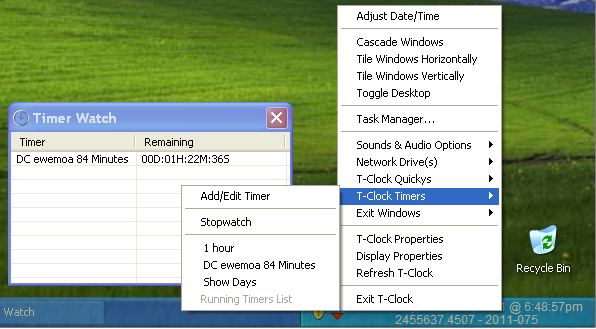
So... The Watch Window is actually only for Timers that have been selected to be Watched. Say you have several timers running at once, if they are all automatically added to the list, then it'll get rather busy quick...So The Watched Timers list is populated manually. This way you can have 10 timers running, but keep only X number of the currently really important ones available for quick access. Like so:
TimerWatchBugg.jpg

Even though there are 3 timers running, only 1 of them is on the (really "Important") Watch list.

The Timer Watch window is also designed to automatically close when the last watched timer expires. This is why the HotKey activation of the Watch window caused it to flash, as there was nothing on the "Watch List". However, clicking on a Timer in the Running Timers menu automatically adds it to the Watched Timers list...Which is why the window would/will then stay open.

This behavior can be demonstrated by adding a Timer to the Watch List, closing the Watch window, and then pressing the HotKey.

So... (perhaps unfortunately) it was designed to do that. ...Mind you I am on-the-market for better ideas...So feel free to suggest anything. :)
4440
General Software Discussion / Re: A LOUDER Internet
« Last post by Stoic Joker on March 16, 2011, 01:52 PM »
I doubt this would satisfy everyone in the thread, but my personal preference would be an AJAX-type pop-up when I visit a page with audio asking me if I want to listen. It could auto-dismiss in e.g. 5 seconds with an automatic "no" answer. That way pages that depend on audio for a big part of their experience, e.g. band pages, could get the benefit of it, but without the annoying auto-play blast. I imagine many would be hesitant to have such a question thrown up for every visitor though. Maybe if it could be remembered for successive visits to the site...

Works for me. Especially the automatic no, because I frequently open batches of sites in new tabs when doing a search ... And really hate having to scramble to find out which one (of the dozen that are loading) is screaming at me for no particularly sane reason.
4441
Planned abandonment, implies that it will be (intentionally) "Out-of-Date" for much longer than it will be current ... So go for a past tense name like:

What-I-Thought-in-2011.com
My-World-in-2011.com
HappeningsThen.com
4442
General Software Discussion / Re: A LOUDER Internet
« Last post by Stoic Joker on March 16, 2011, 11:46 AM »
And people who do audio in advertisements should have their guts removed with rusty spoons.

Yeah, I'm a day late...But I'd still like to 2nd the sentiment. I tend to like things quiet, I really do not need some jarring cacophony derailing my train of thought because of some clowns interpretation of an immersive experience.

It is idiot simple to put a play button in a easy to access location ... which would of course be the exact opposit of where these idiots invariably hide the friggin stop button.

Hell, here's and idea that'll satisfy everybody ... pop open a question box on page load:

Would U like Background Noise?
 | yes | no |

U click yes it streams, U click no - Done.
4443
Living Room / Re: USB Madness With Cooked-Off Ports
« Last post by Stoic Joker on March 15, 2011, 08:00 PM »
I turned it loose in shotgun mode (because it matched the mood I was in)....

How does that line up with:

Warning:
So use it with care and only if you know what you are doing!

 ;D

I think the name explains it all.  ;D

Hell, now I'm confused...Which name? Stoic Joker? Or Shotgun Mode? Or if you mix them together, you get some Joker with a Shotgun... Which would be an apt description of the attitude I approached the project with. Much like the one fine spring day I decided to trim up the hedged, with a riding lawnmower... It was so much easier to maintain after that...  ::)
 :D


A) What is shotgun mode?

Also called the Scattergun Approach: Pertaining to fault finding it, basically, means that when you have no idea where the fault lies you do something that changes a lot of things, (multiple component/board replacement, multiple software removal, etc), in the hope that what you will do will fix it.

This is analogous to using shot cartridges, (not solids), in a shotgun where you hope that at least some of the shot will hit it's intended target.

Normally if this particular methodology fails you revert to S.O.P. #1, ie. hit it with a hammer.

ROFL ...I strongly suspect we may have both gone to the same diagnostics academy (BFHU).


On a side note: The printer decided to "celebrate" by taking a complete shit 20 minutes later...However it was printing a job when it died.
4444
Living Room / Re: USB Madness With Cooked-Off Ports
« Last post by Stoic Joker on March 15, 2011, 07:43 AM »
You could try GhostBuster to show/remove the ghosted devices and then uninstall the USB driver so that Windows has to reinstall it on next boot.

Quick follow up:

Had another Cooked Port episode this morning (still haven't had time to get back to the other one) ... So I decided to give this one a shot.

I turned it loose in shotgun mode (because it matched the mood I was in), and let it kill any & everything identified as a "Ghost". It was quick & simple enough to use as to almost be boaring ... (There should be screaming)... *Sigh*

The printer works. and! It did not kill the machine (frequent downside of the "shotgun" method), or any of the other actually present devices. So I'm calling this one a keeper.

 :)
4445
T-Clock / Re: T-Clock 2010 (download)
« Last post by Stoic Joker on March 15, 2011, 06:30 AM »
@Babis - About the Not Blinking. I have a theory I'm working on, but wanted you to try something for confirmation. Set you clock text color to something (Um...) jarring Red, Green, yellow *Shrug* something loud guarantees contrast. Then re-run the blink test and let me know what it does.

Hi Stoic Joker, this is working. I tried it with various colors and all are working except the white. I hope in the future you will make a custom blink color   8)

I thought I did...(oops)...Guess I'll be needing to make it adjustable now. Thanks for helping me nail it down.
4446
Just wanted to say I hope you have better luck with it than I did - Lacking a good mic at the time - I ended up scrapping the idea after 20 minutes of (um...) "enthusiasticly" swearing at it because it wouldn't respond at all, unless I yelled directly into the mic.

[Bad Stoic Moment...]
4447
I'm the kind of person who keeps their hand on the touch pad most times, using a combination of key presses and touch pad movement and buttons to accomplish most tasks, so I'm often using both at the same time. Systems like this just slow down my work (by a noticeable amount).

Don't use a laptop for that sort of thing frequently, but I can easily see (your point) where it could be frustrating. Creating dialogs in MSVS resource editor frequently requires this type of key/mouse combination. Holding Alt key while moving control to keep it from snapping to the border being one I use a lot.
4448
T-Clock / Re: T-Clock 2010 (download)
« Last post by Stoic Joker on March 14, 2011, 06:01 PM »
@Babis - About the Not Blinking. I have a theory I'm working on, but wanted you to try something for confirmation. Set you clock text color to something (Um...) jarring Red, Green, yellow *Shrug* something loud guarantees contrast. Then re-run the blink test and let me know what it does.

Here's why. The clock should blink to white ... and I suspect it's trying to "blink" to the same white you have your text set too.

*Crossing Fingers* :)
4449
T-Clock / Re: T-Clock 2010 (download)
« Last post by Stoic Joker on March 14, 2011, 12:04 PM »
I am running Win7x64 and my machine is a quite fast one (Core i7-860).

Quite faster than mine by a mile or so ... I'm running a (4 year old) 2.4Ghz E6600 (Same OS)

Maybe we pick at the missing class name a bit...
4450
T-Clock / Re: T-Clock 2010 (download)
« Last post by Stoic Joker on March 14, 2011, 11:53 AM »
Dang, typed one and it is not here...must not have hit save.

Set to show 1-mo calendar on left click and keep it on top and close on lose focus
open cal
click in open app
cal closes (correct)
open cal
click in open app
app gains focus, cal stays open behind (oops)
close cal with x corner
open cal
click in open app
cal closes (correct)

It just alternates between closing right and just losing focus.

Hm... Okay [SJ Fiddles with calendar for 10min] that's interesting. Actually it isn't failing to close on loose focus, it isn't actually gaining focus it to start with. Even if you click on the caption bar (to give it focus) it doesn't go/show as active (red exit button etc.). You actually have to click back and forth between calendar and desktop (or other app) to get the thing to go/show as active (red exit button etc.).  Damn peculiar behavior I must say.
Pages: prev1 ... 173 174 175 176 177 [178] 179 180 181 182 183 ... 246next