FWIW for anyone else wanting to own their music (on android) bought with amazon music:
I have the amazon app installed *and* the amazon music app. I think they forced me or tricked me at some stage to install their music app. You may be better off without this -- I dont know. In the amazon music app, initially at least, they keep steering you towards amazon music or unlimited or whatever they call their music service.
There's a setting in the music app "Automatic downloads" which once ticked will download your purchases to the following path:
/Android/media/com.amazon.mp3in my case it's on the SD card -- YMMV
The music will download, in my experience though it can take a long time after purchase before it actually shows locally in the
com.amazon.mp3 folder.
Next problem is they chuck all the files you buy in the same folder -- no sub-directories. You might have ten files from ten different albums all starting
01 - [tracknamehere].mp3I installed X-plore, an android file manager recommended by Tuxman. It's sort of a two pane manager, with one pane pinned on the side. If you copy/move from one pane, the destination will automatically be the other pane.
On this side, the default amazon directory (unfortunately took the screenshot after relocating everything from the folder)
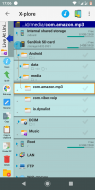
Pressing the arrow on the top-left corner with show the other pane:
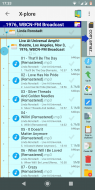
On this side, the path is
Music/Linda Ronstadt/Live at etc. showing music I have moved from the amazon folder.
So, my relocating is done, for now. Next step clean the kitchen

EDIT// in retrospect, it's not that difficult once you have a good file manager app to 'reclaim' the music -- but the whole experience (also with the music app constantly steering me away from my bought music) just pissed me off so I tried to find an alternative....


 Recent Posts


