topbanner_forum
  *

avatar image

Welcome, Guest. Please login or register.
Did you miss your activation email?

Login with username, password and session length
  • Monday December 22, 2025, 4:28 am
  • Proudly celebrating 15+ years online.
  • Donate now to become a lifetime supporting member of the site and get a non-expiring license key for all of our programs.
  • donate

Recent Posts

Pages: prev1 ... 145 146 147 148 149 [150] 151 152 153 154 155 ... 454next
3726
Living Room / Re: Movies or films you've seen lately
« Last post by tomos on April 15, 2014, 03:17 PM »
In preparation for spring cleaning, I have been watching a lot of post-apocalyptic movies & TV shows.

I was wondering initially if your spring cleaning was the equivalent of the apocalypse :P ;) :D
but then I read on - good logic, must try it :up:
3727
General Software Discussion / Re: Microsoft dropping support for Windows 8.1
« Last post by tomos on April 15, 2014, 03:09 PM »
Not clear to me - I presume you can still update to the prerequisite level after that date?
-Carol Haynes (April 15, 2014, 12:24 PM)

Seems to be what they're saying. But it would have been helpful if they had said that more explicitly.
3728
N.A.N.Y. 2014 / Re: NANY 2014 Release: Blasteroids
« Last post by tomos on April 14, 2014, 02:59 PM »
Sounds good :up:
I have a banjaxed wrist again so unable to play at the moment myself :-( and I still haven't graduated to the world of tweeting :P
3729
IIUC flat view (displaying all the files in a folder *and* it's sub-folders in a non-hierarchical view) and virtual folders cover what you're looking for. Dopus has both. Check out the free file managers, or the cheaper ones - there may be something there too if you're lucky.
3730
You need a new file manager ;-) :D
If I understand your requests correctly, Dopus can do most of this. Not sure about other file managers.

EDIT// not sure if I understand your second post. Can you try and give more detail - maybe give an example too.
3731
Living Room / Re: Anyone here using a standing desk?
« Last post by tomos on April 10, 2014, 05:50 PM »
I suspect these things depend on your posture and, if relevant, your reason for having back pain in the first place. I'd imagine that standing could help correct, or exacerbate a back problem, depending on what it is.

FWIW, standing gets me in the legs. After an hour or so I have to keep going up on my toes, after a couple of hours, I just want to put my feet up for the rest of the day.
Then again, I dont like sitting for too long either :-\ :)

This is making me think about my desk setup - think my monitor is too high for the way I sit...
3732
Living Room / Re: Recommend some music videos to me!
« Last post by tomos on April 10, 2014, 01:51 PM »
French band Nouvelle Vague do great covers of 80's music. I like them a lot, I loved a lot of the originals first time round but the covers are so very different (usually a breath of fresh air, and sometimes I prefer the new version).

Here's a cover of a song I didnt know: Eisbär from the Swiss neue deutsche welle group Grauzone (1980).
Wonderfully clicheed sixties-Bond/French style video


Lyrics are basically:
I want to be a polar bear,
then I wont have to cry [cry out] any more,
Polar bears never have to cry [tears]


Original here

In a very different style, I like this cover from Oomph too:

3733
General Software Discussion / Re: Internet Explorer Front End
« Last post by tomos on April 10, 2014, 12:04 PM »
^Great, happy to hear that :)
3734
General Software Discussion / Re: Internet Explorer Front End
« Last post by tomos on April 10, 2014, 10:36 AM »
What I'm looking for is the equivalent of the Firefox add-on that enhances the front end (the text that makes up the menus and the like) without running the page off the screen. Heck, I'd gladly settle for making the character weight 'bold' instead of 'normal'.

To make the menus bold in Windows 7 (this for all programmes!)

Right-click desktop, click "Personalize" - your current theme will be selected.
To be on the safe side, right-click your current theme and save it.
Now, in the bottom of the same window, click on "Window color"
At the bottom of the next 'page', click "Advanced appearance settings"
-
a new dialugue window open - same as the one to modify the classic theme. Click on the text for menu etc. in the image, and change text to bold below, you can also modify text size, etc.
3735
Clipboard Help+Spell / Re: Quick Paste pop-up
« Last post by tomos on April 09, 2014, 03:40 PM »
if you want to keep the clips open and paste multiple ones, just use ctrl+alt+W to show the main window and then double click items to send them to the last window.

This sounds useful - unfortunately it doesnt work with Win8 (tried with Firefox & Notepad).
I get the copied sound, but nothing pastes. Can try it on Win7 tomorrow.

(and sorry, cant help either with 'Stack' feature. And another welcome to ClipPete :-)
3736
^I *think* VPN is your keyword. Never used one myself though.

But (unclear if you missed that) the Hulu offer was for a weekend in February...
3737
Now I have to find a way to get rid of the BAD copy and replace it with a good one.
Sounds easy enough but if using a browser that is already infected it redirects you back to another infected copy.

You/they/someone has to find a way to get rid of whatever it was that was installed - and to be very sure that it's gone.
Then you wont be getting redirected anymore. And removing Java completely might be a good idea: I lived without it for most of a year without problems. (Some sites do need it though, some software too.)
3738
Hello.  Wondering if the videos still active?  

I have clicked and got only a blank page with start arrow which does not work for me.  Not sure if my computer or if vids not active.  Trying to see how to do a continuous scrolling capture.  

videos are still active; I have mixed success with this depending on the page in question, but getting a look at the video definitely helps :-)
3739
Living Room / Re: Funny Animal Videos
« Last post by tomos on April 04, 2014, 02:38 PM »
I know you've all seen videos of cats pulling town toilet paper rolls, but this cat has learned a new trick:


Didnt like the direction the toilet paper was hung :D

The great toilet paper debate
https://www.donation...ex.php?topic=26572.0
3740
Mini-Reviews by Members / Re: FreeFileSync - automated backup - Mini-Review
« Last post by tomos on March 28, 2014, 08:26 AM »
^Missed that one.

Oddly, what happens here is that it starts and works fine if I start it using the shortcut, but gives an error if the exe is started 'directly'.

FWIW, neither of the xml files I created have been used.
3741
Mini-Reviews by Members / Re: FreeFileSync - automated backup - Mini-Review
« Last post by tomos on March 28, 2014, 05:09 AM »
Installed on Windows 8 laptop yesterday - kept getting an error:

---------------------------
FreeFileSync - An exception occurred
---------------------------
Cannot open file "GlobalSettings.xml".

Error Code 32: The process cannot access the file because it is being used by another process. (CreateFile)
---------------------------
OK  
---------------------------

I created an empty xml file with that name in the programme folder & copied into a 'Bin' subfolder there. It still didnt work so I gave up - today it's working though (didnt reboot - just hibernated, so not sure what resolved it).


Current version has no 'extras' selected - user has to make a choice which seems fair enough.
3742
Screenshot Captor / Re: [SC] Minor Requests
« Last post by tomos on March 23, 2014, 02:53 PM »
Thanks for the bug report about pixelation, will fix.
What would be a better default hotkey for deleting image?

thanks mouser,
re changing the default delete hotkey - you're going to have the problem of upsetting all the people who are used to using the currrent one... Do whatever you think best (for me, best would be anything except Ctrl+Q, *but* saying that, I have an AHK script that uses Ctrl+Q for close app/window on my Win7 machine. I can just try on my second machine - and see if it that also works on Win8, in which case I would no longer have the 'problem').
3743
Post New Requests Here / Re: IDEA: drag window to edge automatically resizes it
« Last post by tomos on March 23, 2014, 02:36 PM »
I am finding that its not working very well in Windows 8.  I have a donation ready to go.... can you fix it?

this might be worth testing (I havent tried it lately, so cant comment) -
GridMove Lite Portable | Windows7/8 ready, combine w/ Aero Snap | XP/Vista Supp.
3744
General Software Discussion / Re: Nimblebox - Evernote plus Twitter client
« Last post by tomos on March 23, 2014, 02:19 PM »
hi Paul, good to see you again!

NimbleBox looks good, might give it a go.
3745
Screenshot Captor / Re: Flash video capture
« Last post by tomos on March 21, 2014, 06:29 AM »
I believe Easy Screencast Recorder is very much a work in progress. I didnt have much success with it myself (but cant remember the details now).
3746
General Software Discussion / Re: Free Harley Davidson Engine ScreenSavers
« Last post by tomos on March 20, 2014, 10:42 AM »
Well, I know a *lot* more about engines than I did before (which was almost nothing) :up:
Love the way it's self-perpetuating (is that the right description?) - well obviously, and unfortunately, not quite like a perpetual-motion machine.
(You're probably laughing at me now, but I swear, I've never even wondered before how engines actually work :p )
3747
General Software Discussion / Re: Configuring Directory Opus for Fun and Profit
« Last post by tomos on March 20, 2014, 06:49 AM »
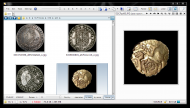
New version of the image toolbar, based on the one above.
I added the "Sort by" buttons from the Dopus 11 images toolbar.


with viewer on:
Screenshot - 2014-03-20 , 12_18_26.png


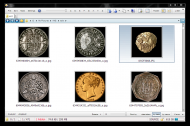
with the viewer off:

Screenshot - 2014-03-20 , 12_34_44.png


  • Buttons on the left convert according to whether left or right-clicked
  • Rotate L|R seems clear enough (this and above greyed out when no file selected)
  • "Sort by" text is a label button - makes for large spacing between it and the next, but still seemed the best solution. (I'll probably remove the label myself). Current sort is highlighted.
  • See notes below re setup


NOTEs:
# the toolbar initially went under the statusbar - I had to go to "Status Bar" in prefs, and select "keep at bottom of the lister".
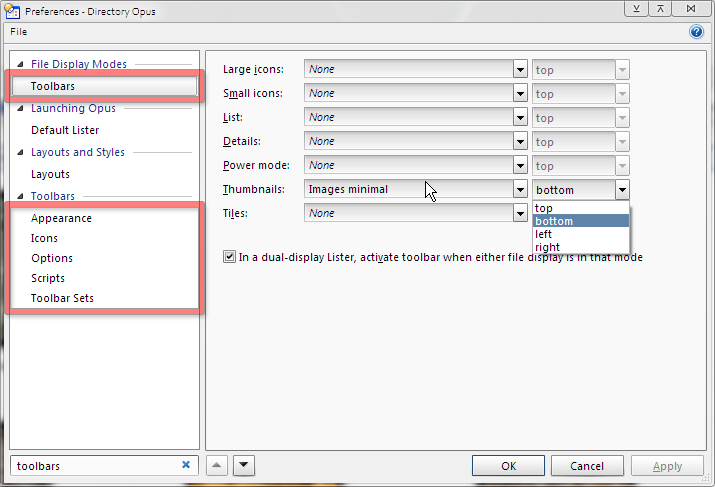
# in Dopus 11 the images toolbar appears by default when you change view to thumbnails. To change this, search for "Toolbars" in prefs, and under File display mode/Toolbars change toolbar that will show when Thumbnail view is used (also see location). FWIW I prefer to have the toolbar showing all the time - I like being able to see the sort at a glance.
Screenshot - 2014-03-20 , 12_21_39.png
# follow first link in this post if you need help adding toolbar - or read the manual  : )

There are *no* shortcuts in the toolbar - related ones suggested:
See also post about shortcuts to toggle/change sort;
and post about toggling Thumbnail/Detail views

Toolbar attached - I zipped it as not accepted otherwise.
3748
General Software Discussion / Re: Photos that spontaneously change
« Last post by tomos on March 19, 2014, 05:18 PM »
^maybe his monitor is like a dying star...

btw, Giampy, have you tried any of the suggestions in this thread?
3749
^oh well, there goes even the idea of OneNote....
3750
FARR Plugins and Aliases / Re: Google Translation Plugin
« Last post by tomos on March 19, 2014, 02:12 PM »
hi asrjcb
I dont know if this one works any more - check out this thread/post:

Since CZB's Google Translate script doesn't work anymore (because of the Google Api changes) I thought I'd make a script that loads the GoogleTranslate page in FARR with a given word.
Pages: prev1 ... 145 146 147 148 149 [150] 151 152 153 154 155 ... 454next