topbanner_forum
  *

avatar image

Welcome, Guest. Please login or register.
Did you miss your activation email?

Login with username, password and session length
  • Sunday December 21, 2025, 11:40 am
  • Proudly celebrating 15+ years online.
  • Donate now to become a lifetime supporting member of the site and get a non-expiring license key for all of our programs.
  • donate

Recent Posts

Pages: prev1 ... 135 136 137 138 139 [140] 141 142 143 144 145 ... 364next
3476
Who lets these people be in charge of things they know nothing about? How did the world get this way?
It's called democracy, baby.

Capitalism has made it this way - good old-fashioned fascism will take it away!
* f0dder ducks and covers.
3477
General Software Discussion / Re: Win7, disk imaging, vmware
« Last post by f0dder on May 13, 2009, 06:39 PM »
OK, I've played around a bit.

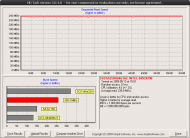
First, SSD performance... wow :). HD-Tach rates it at 240MB/s read over the entire drive. Copying a 5gig file from my 2x74gig raptor raid-strip to the disk delivered a constant 113MB/s speed (gotta test with a ramdisk source to see whether it's the SSD or the raid that's setting the speed limit). Of course both of those speeds are relativel irrelevant, what's important is the random-scattered-read/write performance, which I don't have anything to benchmark... but it will be "subjectively tested" once I put an OS and all applications on it.
zoom_zoom_zoom.png

Next, for the disk imaging applications... I followed  the link to the Paragon Drive Backup site and registered for a license code. There was no download there, so I though I was supposed to grab the trial. Looked nice, features were good etc, but no place to enter the license code, and thus I couldn't test the backup functionality. Considered whether I had to grab the files from #2 site in 4wd's first reply (which doesn't feel 100% right since it's not Paragon's own site), but I only got ~20kb/s from there, so I uninstalled and rebooted... and then my system was hosed, because the uninstaller for some reason had removed the 32bit MS VC++ runtimes from my system, wtf? Fortunately I was still able to use explorer.exe to locate some random application that had decided to bundle the runtimes in it's own install folder and copy to %WINDIR%\SysWow64... phew.

So I think I've decided to play with Acronis TrueImage instead, even though PDB looked like it might be as good (or better, with SID changing and all). A shame both applications are so damn huge these days, all I really need is the recovery CD iso image, I don't need all the bloated junk :)

Anyway, tested in vmware: seems like Win7 has no trouble restoring an image from a disk at IDE0:0 to IDE1:1 (primary master -> secondary slave) - that rocks. And I did create an entirely new, empty disk to restore to, so bootloader etc. were restored just fine - rocks! Trying to restore a vmware image to physical machine won't be tested until I've made a new install and tweaked it some more. And I'll probably try it out on my testbox before I do it on my workstation on the SSD, just to play it safe.

Hopefully I'll be running Win7 off the SSD no later than friday :)

UPDATE: I still wonder what use the 100meg BCD partition is. For fun, I wiped virtual disk #2, and restored only MBR and the Windows partition (ie, not the BCD area). Gave "BOOTMGR missing" error when trying to boot. Booted from the Win7-RC ISO and choose a system repair (which created C:\boot, ie the BCD files) - still BOOTMGR missing. Copied BOOTMGR from the BCD-partition on vmdisk1, and... presto, things work! So it seems you don't need that partition, I still wonder if it's useful to keep it split that way, though.
3478
General Software Discussion / Re: Win7, disk imaging, vmware
« Last post by f0dder on May 13, 2009, 08:22 AM »
Ah, all sounds very good, 4wd!

Today's java'ing is done, and FedEx got their fingers out of <wherever> and managed to deliver the SSD - I only have a few hours before work, so no OS reinstall today... but there's time to play around with the Win7 VM and DB9 (and a little speed testing).

For your envy viewing pleasure (yes, it's a 64GB SLC X25-E):
x25e-broke-cody.jpg

...I need to get some superglue and fix poor Cody, and punish the girl_friend who broke him >_<
3479
General Software Discussion / Re: Win7, disk imaging, vmware
« Last post by f0dder on May 13, 2009, 02:38 AM »
Btw, does the Paragon app do a raw partition dump sector-by-sector, or will be backup file be limited to the used partition size?
You can specify Raw processing under the Advanced tab during a backup which is what you want I believe.
Actually I'd prefer only backing up the used part, getting a 12gig file for 4gig used is silly - but if the raw dump is an option then it's all cool. If the tool supports restoring to a different partition size, it'd be even cooler.

Doesn't most of the registry refer to locations as the Volume, (eg. C:, D:, etc) ?

With only the boot.ini, (or BCD thing), referring to rdisk and partition, etc.
I think the registry contains mappings between drive letters and partitions, but I'm not sure!

Who knows, maybe the Boot Corrector on the PDB9 Rescue disk will fix any boot problem ;)
Soooounds interesting!

I'm just about to do a backup of my VirtPC W7 and then I'll restore it to something, possibly my old Acer laptop, and see what happens.
Thanks for doing this!

Well, sounds like the Paragon tool might fit my needs after all - that'd be quite nice. The rescue image interface looks nice... can it be put on a USB stick, and can it access network locations? :P

(I ask too many questions instead of trying myself  :-[, but I'm currently quite busy with school exam programming project)
3480
General Software Discussion / Re: Win7, disk imaging, vmware
« Last post by f0dder on May 13, 2009, 01:38 AM »
4wd: thanks for the suggestion. I recall grabbing a copy of the free drivebackup, and for some reason not being super impressed with it (can't recall why, though). You say it has a rescue disk, but I assume that's strictly for restoring a backup - it would be nice being able to backup from the bootmedia as well. But if the boot media can restore backup from, say, a network location, I could live with the boot media only being able to restore.

Btw, does the Paragon app do a raw partition dump sector-by-sector, or will be backup file be limited to the used partition size?

Wrt. backup a virtual drive and restore to real drive - doesn't Win7 install all drivers during a normal install ?
If so, when you booted it would it not just reinstall all the "new" drivers for the real PC from it's CAB, (or whatever), files ?
Very good question! That would definitely solve a lot of problems. And since I will be installing to a SATA drive, there hopefully shouldn't be any boot device driver problems. I guess there could be other problems, though - like, the location of the boot device being different between the VM and the physical hardware you try restoring to. I don't know supermuch about how the BCD works, but it's probably fixable like boot.ini was, but would the registry also contain some invalid entries?

I guess I could try messing around with my current vm install of Win7, since I haven't put much time into tweaking it yet.
3481
General Software Discussion / Win7, disk imaging, vmware
« Last post by f0dder on May 12, 2009, 04:47 PM »
Here goes...

I'm (hopefully!) getting hold of a nice SSD tomorrow, which means reinstalling Windows (the main reason for getting an SSD is fast application loadtime et cetera). While I don't usually like running bleeding-edge OSes, Win7-RC seems pretty nice & stable to me, so I'll give it a go. It's basically either that or Vista, and Win7 does have some neato improvements as well as being ~4GB freshly after install (my vlited Vista on the laptop is ~6GB).

Win7 part
First, does Win7 need it's BCD in that little 100meg-or-whatever hidden partition it creates by default, or is it possible to have the BCD on the system partition? If it can go on the system partition, is there any advantage whatsoever to keep the two partitions separate?

Disk imaging part
Next, I'd like a recommendation for disk imaging software. I used to use ghost and then TrueImage, but haven't been into system recovery by disk image for some years now (I've used DriveImage XML for the purpose of picking out individiual files that I might have forgotten to backup before a format, but that's it). So, what some good (and preferably free) disk imaging software today that...

1) can handle partition bootsector and perhaps MBR (ie, restore an image to a blank harddisk and then boot from it)
2) can be booted from a DVD or (preferably) USB keyfob
3) has windows software to extract individual files from it's image (not a requirement, but would be nice).

Acronis TrueImage probably fits the shoe, but I don't have a license for it anymore, and frankly all the different versions listed on their site leaves me damn confused.

VMWare -> hardware part
And, finally - what about creating an image from a vmware virtual machine and transferring it to real hardware? I believe this is possible, but does it require any special trickery, and would there be any downsides from doing this? I have nicely working vLited Win7-RC setup disc, but it's impossible to disable pagefile and hibernation on that disc, which thus has to be done post-install... and frankly, it's nicer doing setup & testing in a VM before going to real hardware.
3482
General Software Discussion / Re: RAMdisk on XP 32bit - brainstorming!
« Last post by f0dder on May 12, 2009, 07:11 AM »
I am wondering whether eboostr (www.eboostr.com) with its cache mechanism could also be applied with benefits here ?
Dunno, I wish I knew wtf that application really does - there's no technical explanations (that I've found), so it sounds like a bunch of marketing snake-oil to me. That app probably won't be able to use the high physical memory anyway.
3483
General Software Discussion / Re: RAMdisk on XP 32bit - brainstorming!
« Last post by f0dder on May 12, 2009, 12:51 AM »
Ramdisk holds my pagefile 1.5 GB and my firefox cache and yes I do notice a difference in speed and less HD thrashing.
It's silly putting pagefile on the ramdisk - instead, make the ramdisk smaller and turn off the pagefile completely.

f0dder, you have SuperSpeed - does it add that switch or use some other nefarious means ?
Wouldn't know, as I run 64bit XP :). I thought the default for 32bit Windows was running in PAE mode if the CPU supports it, since that's a requirement for getting hardware no-execute page protection support... you definitely do need to be operating in PAE mode to access high physical RAM in 32bit mode.
3484
Living Room / Re: SSD File System Recommendations
« Last post by f0dder on May 12, 2009, 12:46 AM »
4wd: the "especially suited for flash drives" of exFAT would be flash memory cards, not SSDs - and primarily because of things like being much simpler to implement than NTFS (digital cameras and other embedded devices are still relatively limited).

Kamel: you can't compare linux NTFS access speed to native speed... the only reliable NTFS support for linux is ntfs3g which is implemented in userland, and at least previous versions have been known to be pretty slow.

Bulk read/write of large files should be the same speed on nonfragmented FAT and NTFS drives. Lots of tiny modifications (creating small files or directories, manipulating dates/permissions etc) is where you'd be able to see a difference between FAT and NTFS - and I honestly don't know which one would have the speed advantage. NTFS needs to journal the fs metadata, which obviously takes some time, but on the other hand it uses smarter data structures, like not having to use the FAT hack of multiple fs entries for long filenames, and storing really small files directly in the MFT entries.

Iterating over the filesystem (search for files, whatever) should be faster on NTFS than FAT.
3485
Living Room / Re: SSD File System Recommendations
« Last post by f0dder on May 11, 2009, 05:26 AM »
yksyks: there's probably a lot bigger speed gain to be seen from disabling last-access timestamp update on SSD than on mechanical disks. Why? It's tiny data - mechanical disks are addressed in 512-byte sectors. SSDs are organized differently... the block size is larger, and even worse you get the "erase unit size" which is multiple blocks large. When updating data on an SSD, you get a sequence like the following (doesn't take some of the more advanced latency-hiding and lifespan-improving SSD features into account)
1) read entire erase-unit-size block
2) merge modified data
3) erase block
4) write block

Would be interesting to see some benchmarks of NTFS vs. FAT, but I'm pretty convinced that
1) FAT wouldn't be faster
2) people would do the benchmarks wrong
:)
3486
Living Room / Re: My (Somewhat Realistic) Dream PC - Is it necessary?
« Last post by f0dder on May 11, 2009, 05:12 AM »
I have never set up a RAID and I don't plan on doing that. I know I probably ought to but I just can't stand the idea of having two 1TB drives but only being able to use 1 TB because everything is mirrored onto the second hdd. I know this is wrong, but it just feels like such a waste of space.
You'll stop feeling this way once you've had a taste of major data loss... and then you'll be regretful :)

I figured I might need the thermal compound for the Thermaltake CPU cooler. Speaking of which, are there any opinions on whether or not I'd need the beast of a CPU cooler? I don't ever mess around with overclocking my machine, but I do play games which tend to make things run hot. Is the stock Core i7 cooler sufficient and/or is the Thermaltake upgrade necessary?
Personally I'd just go with the stock cooler (they sucked in The Olden Days, but are fine now) - you can always replace if it turns out it isn't adequate, or if you want to overclock or whatever.

You both said that 12GB is overkill, and yet, f0dder, you said you'd go for it anyway, which surprised me. Last I'd heard, there weren't really any applications out there built to handle more than 2GB of RAM, even on a 64-bit OS. Out of curiosity, are you running a 64-bit OS? (Vista?) How much of your 8GB are you using for ramdisks? And, erm, what is a ramdisk and what are the benefits and drawbacks of a ramdisk?
Indeed there aren't many individual applications that can take advantage of huge amounts of RAM, but if you run a lot of individual applications it helps... and it's always nice to have a large filesystem cache (but 12GB would be overkill for this).

A RAMDisk is just that - a virtual disk drive that exists solely in ram. The benefit? read/write speeds of several gigabytes per second, and seek time measured in nanonseconds rather than milliseconds. With 12GB of ram, you could affort to keep a several gigabyte ramdisk enabled at all times, and run your applications out of that. Necessary? No. Nice? Yes :)

You both bring up a good point. Is the Core i7 necessary? I can tell you I would notice an advantage from my current single-core machine. But is there a noticeable difference between a Core 2 Quad and the Core i7? I don't know the answer to that.
Depends on your needs, really. I certainly wouldn't mind a core i7, but my current Q6600@3GHz fits my needs. Most of the time, I could go with a decent dualcore - but sometimes I run heavy transcoding, and some of the recent games are starting to utilize more cores.

This is another one of those "I can't stand to see the space wasted" problems. I can't stand the idea of spending $100 for a 74GB 10k RPM drive when I could buy 1TB 7.2K RPM drive for the same price.
For typical workloads, you don't really get that much advantage from a 10k RPM drive anyway - lower seek time, sure, but you probably need to go from 7200rpm->SSD to notice an advantage for desktop use.

Don't know for sure as I do not speak of experience, but when comparing with 7200RPM drives, do 10000RPM and/or 15000RPM drives generate a lot more noise? Or a higher pitched noise (more "penetrating" effect)?
I don't noice the "spinning" noise from my 10k RPM raptor drives at all - moving the read/write heads are loud, but that's only really noticable if I stress the drives with multiple access streams, and it isn't an unpleasant noise (compared to the spinning whines of my first 5400rpm drive, for instance).

As for SLI/CrossFire... it does enable you to run higher resolutions at a higher framerate. But afaik there is (or at least there was!) trouble distributing shaders across SLI - and modern games are more shader- than fillrate-heavy , so SLI might not give you all that much bang for the buck. Go for a decent mid-end card, they're plenty fast. Running 4200x4200 with 16xFSAA is only a penis thing, it's not that much more enjoyable than, say, 1680x1050 with 2xFSAA :P
3487
General Software Discussion / Re: RAMdisk on XP 32bit - brainstorming!
« Last post by f0dder on May 10, 2009, 02:19 PM »
I don't feel comfortable running the Gavotte ramdisk - it doesn't seem to have any official site, nor to be supported...

I wonder why there aren't any (decent) opensource ramdisks around? I would think that it's a relatively simple thing to implement the basics, especially considering there's (afaik) a sample limited ramdisk in the NTDDK. PAE memory on 32bit non-server systems might be tricky, and save+restore contents might also have some complications, but... meh.
3488
Living Room / Re: My (Somewhat Realistic) Dream PC - Is it necessary?
« Last post by f0dder on May 10, 2009, 10:58 AM »
fenix: I wouldn't go with a single drive either, no matter what the capacity. For my storage needs, 2x500GB disks in a raid mirror would be quite adequate - and since I use a fileserver for bulk storage, I don't even need that much for my workstation.
3489
I would recommend Vista to friends if they have at least 4 GB RAM, and to enemies if they have 2 GB RAM or less.
My laptop "only" has 2GB of ram, and Vista runs very smoothly here... and that's running stuff like Eclipse, Visual Studio 2008, SQL Server Express et cetera. For "normal user" needs I expect it would run just fine with 1GB and some component tweaking.

There's a few things here and there I don't like. You might want to browse the Vista Immersion Experiment thread :)
3490
Living Room / Re: My (Somewhat Realistic) Dream PC - Is it necessary?
« Last post by f0dder on May 10, 2009, 07:53 AM »
12GB is overkill, you'd probably be fine with 6GB. I'd personally go for 12GB though, as I've gotten used to 8GB in my workstation, and 12GB would allow for even larger permanent ramdisks :)

I wouldn't go for SLI, I don't need the juice (a GF8800GT/512meg does just fine) - costs too much, draws too much power, generates too much heat.

Dunno about PSU - I got a 700W, but even when maxxed out, my system draws ~250W or so... and that's with a 2.4GHz Q6600 overclocked to 3GHz. I'd probably have been better off with a decent 400W PSU, from what i understand a PSU runs most effectively near the power consumption it was designed for.

So you received an offer, but "they" don't even have the hardware in stock?
They might have pre-built PCs ready but not the individual parts...
3491
General Software Discussion / Re: RAMdisk on XP 32bit - brainstorming!
« Last post by f0dder on May 10, 2009, 07:45 AM »
SuperSpeed ramdisk - but I'm on the lookout for an alternative... for whatever lame marketing reason, I'll have to get a new license when I move from XP to Vista/Win7. And the 64bit version is almost twice as expensive as the 32bit >_<

I've set %TEMP% and %TMP% to point to the ramdrive too, which occasionally causes trouble (lame installers), but as a whole is nice.

I haven't moved the firefox program files to the ramdrive, because it doesn't give that much extra speedup - but keeping the cache and the profile there is nice. It's noticeable once firefox's .sqlite files grow big and fragmented :)
3492
Living Room / Re: SSD File System Recommendations
« Last post by f0dder on May 10, 2009, 07:08 AM »
4wd: good point - for that kind of setup, it does make sense. I'm still slightly skeptical wrt. the registry not being persisted, though.

As for last-access timestamp, it did make a speed difference back when I originally turned it off. Disks are faster nowadays, so it might not be as big a speed hit... it does mean unnecessary read-erase-write cycles on an SSD though, and why waste your time on bookkeeping that you most likely won't be needing? :)
3493
Depends on the user etc...

Personally I'd rather wait for Win7, but if it's somebody who needs a new machine now, I'd go with Vista. UAC means less risk of getting infected by malware, and the OS really isn't all that bad (I do recommend running it through vlite to get the install size down a bit, though).

Of course if we're talking about really limited hardware, Vista might not be an option since it is somewhat heavier than XP. But that'd be rather low-end hardware we're talking then...
3494
DC Gamer Club / Re: 3D Realms closes down - Duke Nukem Forever no more
« Last post by f0dder on May 09, 2009, 11:22 AM »
A shame, but I didn't really expect to ever see DNF.

About living up to expectations, well, I wouldn't need it to be an earth-shattering cool new engine... just the same kind of humor and some nice maps would be great. How many times during development did they switch to a new engine?

* f0dder sighs.

3495
Living Room / Re: SSD File System Recommendations
« Last post by f0dder on May 09, 2009, 11:19 AM »
EWF is a nice thing and all, but imho not suitable for normal desktop (or laptop, for that matter) use - power loss or BSOD, *blam*, all unsaved data gone? No thanks.

NTFS doesn't really do that much more bookkeeping than FAT, but it does do fs metadata journalling which I wouldn't want to be without. You'll probably want to disable "last access-time timestamps" (iirc Vista does this by default, but XP certainly doesn't).

As for cluster size, dunno... if you start speculating in this, you'd have to know the erase-unit size of your flash, and you would have to get your partitions aligned to this boundary as well... otherwise it's pointless.
3496
General Software Discussion / Re: RAMdisk on XP 32bit - brainstorming!
« Last post by f0dder on May 09, 2009, 11:11 AM »
Yes, superspeed (and another which I forgot the name of) can use >4GB memory on 32bit systems, since it does PAE magic. XP itself can do this as well, but it's disabled in the client versions of Windows.

Pagefile on ramdisk = lame. If you've got enough ram, simply disable the pagefile altogether.

I've put my firefox profile (and disk cache) along with a few other often-accessed things on a ramdisk, and it does make my system seem slightly snappier - before, if I had heavy disk I/O, firefox could stall a bit when loading new pages - not so anymore.
3497
General Software Discussion / Re: Is Windows 7 RC spyware?
« Last post by f0dder on May 09, 2009, 11:07 AM »
I would hardly call this spyware. As already mentioned, the OS is a release candidate, not final. And if you look at the MS developer blogs, you will see what kind of (good!) use the telemetry data is being used for.
3498
DC Gamer Club / Re: 30 PC Games to Play Before You Die
« Last post by f0dder on May 08, 2009, 06:01 AM »
Dungeon Siege was really cool. Unfortunately never completed it in single player mode, since we took on MP rather early (damn it was buggy >_<) - but we had some very great moments playing it. Especially when we went into the Endless Dunes and found that hellish place it hid... much too early. Pretty scary being hunted round and round the pyramid by one of those wraiths, while the rest of the group tried getting a little damage done on it :)
3499
Living Room / Re: The Geek's "100 things to do before you die" list
« Last post by f0dder on May 08, 2009, 05:58 AM »
*) The most right-handed people I know have watches on left arm.
-fenixproductions (May 07, 2009, 07:01 PM)
I'm a lefty, and when I whore a watch (many years ago), it went on my left wrist.
* f0dder shrugs
3500
On first view USB Safely Remove might be easier to use than USBDLM but it takes by far more memory.

@superboyac: All you need is XP SP3. It fixes the problem at least for new drives.
What are the stats? (In "private bytes", not silly default taskmgr stats).
Pages: prev1 ... 135 136 137 138 139 [140] 141 142 143 144 145 ... 364next