GOE: THE GREAT DONATIONCODER.COM 2006
GETTING ORGANIZED EXPERIMENT
- WEEK II + III -
DAVID ALLEN'S "GETTING THINGS DONE" (GTD)
The deadline for this assignment is September 23.
1. Introduction to the Getting Organized Experiment (GOE)In the
First Week of the Getting Organized Experiment we started you off very gently with a basic overview of our plan for the three month experiment, and a simple assignment to secure some basic supplies and arrange a dedicated work area in your home free from distraction.
If you will recall, the objective of this three month project is to take a whirlwind tour of various Time Management systems and techniques, and find out which techniques work best for each of us. We start with the belief that there is no one single best system that for all people - but rather that different people respond best to different strategies.
It is your job, should you choose to participate in this experiment, to ensure that at the end of the 3 month period, you have formulated a system of habits and techniques that works for you, and transforms you into a more relaxed and more efficient person.
By the end of this experiment, you *will* have a working system in place, either by adopting one of the existing frameworks completely, or by creating your own hybrid set of strategies based on what you learn from existing systems. That is the commitment we want you to make to yourself. There is no room for excuses about "this system is a gimmick and it didn't work for me!" - because if it doesn't work it's YOUR responsibility to invent a system that does.
By sharing our ideas and experiences, we hope to be able to learn from each other and come up with some novel principles of our own. But remember that your success in this experiment probably has less to do with the particulars of any system than it does with your willingness to commit to the discipline of following some regiment of planning and working.
2. Week Two Assignment: Learn the Getting Things Done (GTD) SystemDavid Allen's Book "
Getting Things Done, The Art of Stress-Free Productivity" (2001), has developed something of a cult status among time management and efficiency fanatics.
Your assignment for Week Two of the experiment is as follows:
- Learn the Getting Things Done (GTD) System.
- Experiment with GTD.
- Decide which aspects of it seem useful to you.
- Think about which aspects of GTD do not suit you well.
- Think about what's missing from GTD that you still need.
3. A Short Course on GTDThere are plenty of good sites on the web devoted to GTD that you can learn from without reading the original GTD book, or David Allen's follow-up book
"Ready for Anything", so I'm not going to attempt to present a comprehensive explanation of the every nuance of the system.
However, I will try to discuss what I personally think are the most significant and unique ideas that make up the core of the GTD philosophy.
From my view, there are really only two major concepts at the heart of GTD:
- 1. The critical importance of getting things out of your mind and organized externally.
- 2. Formulating concrete "actionable" next steps for each task as early as possible.
So let's take a look at these two concepts in more depth:
a) The critical importance of getting things out of your mind and organized externally.This is the idea that to me has the strongest intuitive appeal. Our brains are never fully at rest - they are constantly churning through the unfinished tasks that pre-occupy our minds. Many of us walk around in a kind of anarchistic state with a hundred different ideas and obligations vying for contention. This is essentially wasted mental effort - it's energy spent by your subconscious trying to interrupt you and remind you not to forget about one responsibility or another.
The solution to eliminating the stress and distraction of this background subsconscious effort is to have a system for moving these tasks out of your mind and into some external storage medium. While this may seem like common sense, one novel consequence of this interpretation of the problem is the critical importance of having an external system which is absolutely complete, up-to-date, and
frequently reviewed.
This is such an important insight that it bears repeating. Many of us keep track of project ideas and todo lists in some notebook or notetaking program, but do we regularly review these lists? If not, then the exercise is fruitless because your subconscious will not be able to let go of "managing" these ideas and trying to remember them and remind you of them.
Only by having a formal mechanism for offloading tasks and ideas and getting into the habit of regularly reviewing these notes (on a weekly basis for example), will you be able to relax and trust in the knowledge that you no longer have to "remember" what you have to do, because you know that it's written down somewhere where and doesn't have to be kept in mind in your subconsciousness. The idea is to keep your mind nimble and non-preoccupied with anything but the current task you are working on, confident that there is nothing you are forgetting or could forget.
b) Formulating concrete "actionable" next steps for each task as early as possible.While I am completely sold on the first principle of GTD, I find the second principle a bit less compelling, though I acknowledge its usefullness. The idea of the second principle is that we can become much more efficient if we simply try to figure out the next concrete action that can be applied to any task, as early as possible, and as explicitly as possible.
In practice, this means that whenever you process an incoming new item, or update the description of a task or project for your external file/list, you want to be asking yourself: "What is the next *action* I can take to advance this project/task". You would apply this to everything that passes through your hands, and use the answer to that question to guide how you respond to new tasks and how you file these tasks in your organizational system.
In answering that question, David Allen also recommends a
"2 minute rule" - when you encounter a new item (for example you receive an email), you immediately ask yourself "what is the next action i need to perform to process this item?". If the action can be performed in under 2 minutes (delete the email, send a rapid response, etc.), then do it right away. Otherwise, file it away for later processing in a way that will guarantee you come back to it and review it in a reasonable period of time. GTD says you should move that email OUT of your inbox, where it has not been categorized and marked with a next action, into some special folder related to the action to be performed with it. For example you might create a secial folder for all email that requires you to perform some common action (like reply with a price quote).
By always focusing on identifying actionable steps associated with a process, the idea is that you transform an amorphous task which would require concentration and effort to work on, into something that is immediately available for processing when the opportunity arises to do some action. For example, rather than simply making a note that you need to "plan your vacation", you would attempt to identify some concrete actions you could take on that project, like "pick up travel brochures at the corner travel agent." By taking the time to identify that actionable step, you can now do work on this item almost subconsciously the next time you head out to the corner shop (one trick Allen advocates is organizing actionable lists by task or locale, to make it easier to find tasks that are actionable in any given context).
My only problem with this second principle is that it seems to me that so many of the tasks and projects I work on are not easily amenable to identifying a simple "next actionable step", and involve much more complicated multi-dimensional problem solving simply to discover reasonable paths of subsequent work. There is a real risk of taking counterproductive steps if one is always insisting on taking concrete steps before one knows which direction you want to travel in.
4. Organizing Your Stuff in GTDThere are some specifics of GTD that may be more or less appropriate to different people, depending on the nature of your work. In general, GTD is very big on the idea of using manilla file folders and full sizes sheets of paper to store each idea/task on a separate page. GTD suggests the use of a "tickler" container which contains 43 separate folders designed to hold information arranged by date (think of it like a calendar in folder form where you can store multiple pages inside each day and month box). One of the more popular time management websites (
www.43folders.com) got its name from this idea. Personally I find the idea of a tickler container of questionable value, but it may be useful to those who have a high number of time-sensitive deadlined tasks. It does seem to me like a very high maintenance thing for casual use.
GTD recommends keeping separate folders for Projects, and for collecting items that you don't plan on working on immediately but want to review later. While GTD advocates for the use of full sheets of paper, I have personally found that using 3x5" index cards is much more practical. They are easier to organize, manipulate, rearrange, and store.
Remember that the process of Regular Reviews, where you go back over all of your projects, your action lists, your calendar, etc., is absolutely critical to the success of the system. If you fail to perform regular reviews or failt to keep your records complete and up-to-date with EVERY task, deadline, and project, then the entire system breaks down because your subconscious will insist on resuming the role of nagging distractor, trying to juggle in memory all the items that might be missing, and interrupting your productivity at inopportune times in an attempt to ensure that these non-documented items are not "forgotten."
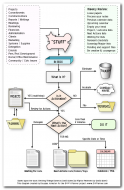
5. The GTD Processing DiagramThe diagram below (from
www.diyplanner.com) shows an outline of the basic GTD processing cycle. New items/tasks are always immediately classified as actionable or not (garbage or reference material). If they are actionable, you ask if it can be done in less than 2 minutes and do it immediately if so. If it can't be done in two minutes you file it away for later review, either in a Project file for multistep projects, or in a Calendar if it has a specific deadline, or in a file for tasks that should be done when opportunity arises. Additional lists (folders) can be used to keep track of items which have been delegated to someone, and thus the action now consists of Waiting for someone else to do something. Depending on the size of your lists you may want to break them down into subfolders for better organization.
 6. How is GTD Different Than Other Techniques?
There are a few aspects of GTD that are unusual and somewhat controversial:
- GTD eschews the notion of detailed prioritizing - the approach is much more one of opportunism. It emphasizes having actionable next steps for all items, and being agile enough to operate on any task when the opportunity arises. This is also one of the weaknesses of GTD, in that it provides very little guidance on choosing WHAT to work on and WHEN, mostly leaving it up to you to choose intuitively [Allen suggests a few different loose guidelines to choosing what actions to work on and when, but this is one of the areas that other time management systems, which we will be visiting in upcoming weeks, place much more emphasis on].
- GTD eschews the notion of daily todo lists - Allen argues that they just don't work well. The basic argument is that they become messy half completed catch-all collections without proper context, which are impossible to maintain. Instead he advocates for the use of action lists and calendars. The calendar is to be treated as a sacred resource for hard deadlines, while action lists contain items that can be immediately acted upon as single-step operations, not tied to a specific day or time, and which can survive prolonged periods as independent items (one item per sheet of paper usually).
7. Learn More About GTDI've only presented a brief outline of what I think are the most important core elements of GTD. You still need to read more in order to understand the details and figure out how well it will suit your needs. Below you will find some of the best GTD resources on the web. Go explore and think about what aspects of GTD you want to adopt in your quest for the perfect time management system..


 Recent Posts


