topbanner_forum
  *

avatar image

Welcome, Guest. Please login or register.
Did you miss your activation email?

Login with username, password and session length
  • Sunday March 29, 2026, 8:12 pm
  • Proudly celebrating 15+ years online.
  • Donate now to become a lifetime supporting member of the site and get a non-expiring license key for all of our programs.
  • donate

Recent Posts

Pages: prev1 ... 1153 1154 1155 1156 1157 [1158] 1159 1160 1161 1162 1163 ... 1515next
28926
Announce Your Software/Service/Product / Re: Quick Thumbnail (an online approach)
« Last post by mouser on November 04, 2006, 05:39 PM »
very nice; you forgot to say one of the best parts is simultaneous generation of different sizes.
28927
Clipboard Help+Spell / Re: Feature suggestion: search and replace
« Last post by mouser on November 04, 2006, 03:30 PM »
thats a good point.
actually you know chs has a way to apply an external program/script on a clip through a menu.
a great way to do what you want might be to write a perl script to do this, and then add it to your chs text formatting menu.
28928
Clipboard Help+Spell / Re: Feature suggestion: search and replace
« Last post by mouser on November 04, 2006, 02:52 PM »
there is powerful search and replace within a single clip, but do you meant for a whole set of clips?
28929
Post New Requests Here / Re: IDEA: Remember Folder Setting (Windows 2000)
« Last post by mouser on November 04, 2006, 02:16 PM »
good points.
28930
General Software Discussion / gPhotoShow Pro - A Nice Screensaver Maker
« Last post by mouser on November 04, 2006, 01:42 PM »
Basic Info

App NamegPhotoShow Pro
App URLhttp://www.gphotoshow.com/gphotoshow.asp
App Version Reviewed3.63
Supported OSesWinAll
Support MethodsGreat email support and quiet yahoo group
Upgrade PolicyAll upgrades free for life
Trial Version Available?30day trial available (puts trial text on created screensavers)
Pricing Scheme$19 for full pro version, limited free version may contain bundled adware?
Screenshotshttp://www.gphotosho...m/gpspro_screens.htm


Intro:

App and I went looking for screensaver makers recently, for building a screensaver of Nudone's Cody Images.  One requirement that I had which was a bit unusual was good multimonitor support.  I also wanted the user to have control over most options after installation (transition times, etc.)  And if possible I wanted support for flash and avi animations.

After trying out a ton of different programs, I narrowed down my selection of best screensaver makers to a short list of 3 tools:

Stardust is $90 (ouch!) and Screensaver Factory is about $40 for an equivelent edition; gPhotoShow Pro is only $19.

After evaluating and trying all 3, I finally purchased gPhotoShow Pro; this minireview explains why.


More Details:

Stardust and Screesaver Factory are more polished then gPhotoShow, but I wouldn't say they were more powerful or easier to use, except when it comes time to building a final setup exe if you want people to be able to easily install the screensaver on their pc.  If you are a novice to such things and you intend to build screensavers for others this is something you will have to consider.

gPhotoShow requires that you have Inno Setup installed, and does not include any license key system.  Both Stardust and the $60 version of Screensaver Factory do, so if you want to sell your screensavers you will want to spend the money buy one of these more expensive tools.  One advantage of the gPhotoShow approach though for coders is that you can customize the setup template and you have more control over it.

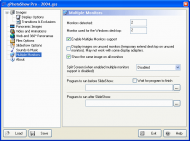
All 3 have good multimonitor support, but I think gPhotoShow has the best multimonitor support, which was important to me (but might not be for you); Screesaver Factory will work well on multimonitors but has no options.  Both Stardust and gPhotoShow have nice options about what to show on different monitors (see my special comment below).  Stardust has a nice option that will actually stretch an image across multiple monitors, which is fun but perhaps not often useful.  gPhotoShow had a nicer set of options imho.

All 3 support not only images but sound, avi files, and flash animations.  gPhotoShow also supports raw files and dcif information from them, and panorama images which i don't think the others support.

gPhotoShow also has a unique frame option that looks nice, but i haven't played with it too much.

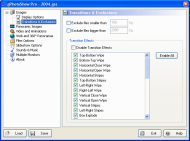
All 3 have reasonably good transitions and good control over them.  ScreenshotFactory has a few unique transitions that I liked.


Screenshots:
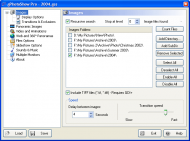
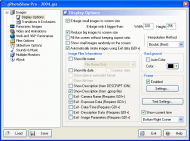
gPhotoShowScr1.gif
gPhotoShowScr2.gif
gPhotoShowScr3.gif
gPhotoShowScr11.gif
gPhotoShowScr12.gif


Wow, What Great Support!

After I decided to go with gPhotoShow I emailed the author and suggested a feature to him.  I wanted to have a random image on a random monitor, and have the other monitors be blanked.  The normal options are one image on all monitors, or different images on each monitor.  In two days he wrote back to me with the new feature implemented. Wow! Talk about great support!!  Really great to see a project like this maintained by someone who cares.  I'd like to see that kind of response from Stardust.. unlikely..


Good and Bad

I like the way the projects work by specifying directories of images/movies/sounds/etc. I find this a smarter way of keeping track of pictures for a screenaver, rather than identifying them manually.  However note that this requires you to specify comments for images in separate files which again means that this would be more suited to experienced users creating screenavers.  The other two tools let you add comments to the images from within the program itself.

As I described above, i think the exe creation could be made simpler and cleaner.  There are some options that only the creator has control over and not the end user, for no reason (like sound controls and some multimonitor options).


Conclusions

gPhotoShow is a terrific Screensaver maker at a steal of a price, made by a very nice developer.  Advanced users will enjoy the level of control, and those who want a screensaver maker for themselves and to make stuff for friends and family can't go wrong with it.  I'm extremely pleased with it.

People who tend to want a more gentle experience and are thinking of selling screensavers should check out Stardust Screensaver Toolkit and Screensaver Factory, which are good products but a bit costly.


28931
Any thoughts on this issue?
I have a 1yt old motherboard with built-in sound, and a 5-10 yr old pci creativelabs lowend sound card.
Which is likely to be better?
28932
LaunchBar Commander / Re: Fonts problem
« Last post by mouser on November 04, 2006, 11:16 AM »
i do know about that and some others.. i might try them out again.. delphi and c++ builder actually have fairly nice resizing stuff, just not well suited to solving the large font issues.

what irks me is i'd think at the very least it would be possible to easily say: "don't use large fonts for this form" even if OS is set to default to large fonts.  that wouldn't by ideal for you large font lovers but at least it would make the forms usable.  maybe i just need to hunt around more for a way to do this programmatically..
28933
Living Room / Re: what do YOU install on a fresh Windows PC?
« Last post by mouser on November 04, 2006, 09:33 AM »
yeah we really need to consolidate these threads since we have a few of them now :)

jammo - you've got some nice things on your list  :up:
28934
LaunchBar Commander / Re: Fonts problem
« Last post by mouser on November 04, 2006, 09:32 AM »
mike - i completely understand your position.

please understand that i am not one of those developers who says, well because only a small percentage of people need a certain feature i will ignore.  the large font issue has come up several times before and it makes me very mad that it is so hard to fix properly(!).  one of the few areas that c++ builder really falls on its face. i have tried to fix it in the past and indeed i can make things a bit better but not solve it perfectly.

part of the problem is that my own personal aesthetics are for nice tight options without much blank space, which is part of what causes the problem.  maybe i should just give this up and use lots of blank space for option dialogs.

i have not given up on fixing this problem and i hope you will keep your eye open for when i do; it's just proven painfull enough that it's one of those things i tend to put in the back of my mind and plan to revisit when i stumble upon a good solution..
28935
General Software Discussion / Re: IE7 Rant
« Last post by mouser on November 04, 2006, 08:46 AM »
ive been growing more and more fond of FF (v1.5), but i have to say that starting it is sooo slow that i either have to keep it running at all times, or suffer each time i launch it.  IE does not suffer this issue.  Hopefully FF2 will improve this.
28936
Post New Requests Here / Re: IDEA: Remember Folder Setting (Windows 2000)
« Last post by mouser on November 03, 2006, 11:36 PM »
a better solution might be to install an alternative file explorer like:
directory opus
xyplorer
xplorer^2
etc.
28937
Finished Programs / Re: DONE: Push2Talk
« Last post by mouser on November 03, 2006, 10:14 PM »
as jgp says, alainch you shoud download autohotkey and check out the .ahk script - i'll bet you figure out how to customize it without much difficulty.
28938
stay away from cvs.

but as mwb says, the tortoise svn is actually really nice in that you can run it entirely on your local pc.
though running it with an offsite server has the benefit of a nice offsite safe backup.
28939
Ok Tekzel finally packaged up his DC Tiles program with instructions on how to add your own tile images:


DC Tiles is a customizable tile matching (memory) game where you turn over tiles to try to find matching pairs.

However, what's special about DC Tiles is that you can easily use your own images (and sounds even) and create fun games to send to your friends and family, or make a game using pictures of your kids or pets. The game supports multiple difficulty levels and scores you on your performance - great fun to compete with your kids.

Requires the .NET v2 framework from Microsoft. Free for non-commercial use.


Note for you aspiring coders: this program was created in response to one of the assignments in the self-teaching programming school!
28941
Find And Run Robot / Re: Links to Review and Comments - Add yours!
« Last post by mouser on November 03, 2006, 07:51 PM »
in this case i have to side with jgpaiva that double click to launch should be default, but i suppose i could add single click as an option.

however i must point out that farr is made for keyboard freaks, and the idea of having to use your mouse to launch it is heresy!  :'(
28942
yep, i tend to use like
Thesis_A1.txt
Thesis_A2.txt
...
then on major milestones i change letters and start again
Thesis_B1.txt

the only real danger you have to worry about is that you might accidentally load and work on an old file, or have a cluttered directory.

because of this what i usually do is i make a subfolder called OLD
and move the old ones in there.

remember people, with drive sizes as big as they are, don't be paranoid about keeping a few hundred backups of your current working documents.

28943
like i said, the sample files include pictures and are the best way to experiment.

download program here: https://www.donation...dingSnacks/index.php
28944
it's been so long since i used temporality screens..

the .thm files are just text files you edit in a text editor like notepad.exe
the sample .thm files tell you most of what you need to know.

here's the hourly.thm sample file which sets a dif picture for each hour of the day:

// First the settings (position can be: center, tile, stretch, max) (ATTN: unfinished)
// position=center

// Then the files (file= DATEMASK|TIMEASK|FILENAME, where:
//  DATEMASK is of the form MM/DD/YY-MM/DD/YY
//  TIMEASK is of the form HH
//  and * is allowed
//  and FILENAME is relative path
// if multiple times match due to wildcards, the earliest match will be used.
// if multiple files are specified separated by ; then one will be chosen randomly
// For example
//  */*/2005 - */*/2006 | *-* (the entire year of 2005)
//  */*/* - */*/* | 01-02 (1am to 2 am every day)
//
*/*/* - */*/* | 1-1 | hour1.jpg
*/*/* - */*/* | 2-2 | hour2.jpg
*/*/* - */*/* | 3-3 | hour3.jpg
*/*/* - */*/* | 4-4 | hour4.jpg
*/*/* - */*/* | 5-5 | hour5.jpg
*/*/* - */*/* | 6-6 | hour6.jpg
*/*/* - */*/* | 7-7 | hour7.jpg
*/*/* - */*/* | 8-8 | hour8.jpg
*/*/* - */*/* | 9-9 | hour9.jpg
*/*/* - */*/* | 10-10 | hour10.jpg
*/*/* - */*/* | 11-11 | hour11.jpg
*/*/* - */*/* | 12-12 | hour12.jpg
*/*/* - */*/* | 13-13 | hour13.jpg
*/*/* - */*/* | 14-14 | hour14.jpg
*/*/* - */*/* | 15-15 | hour15.jpg
*/*/* - */*/* | 16-16 | hour16.jpg
*/*/* - */*/* | 17-17 | hour17.jpg
*/*/* - */*/* | 18-18 | hour18.jpg
*/*/* - */*/* | 19-19 | hour19.jpg
*/*/* - */*/* | 20-20 | hour20.jpg
*/*/* - */*/* | 21-21 | hour21.jpg
*/*/* - */*/* | 22-22 | hour22.jpg
*/*/* - */*/* | 23-23 | hour23.jpg
*/*/* - */*/* | 24-24 | hour23.jpg

and here's one with a dif pic for each month:

1/0/* - 1/31/* | 01-25 | month1.gif
2/0/* - 2/31/* | 01-25 | month2.gif
3/0/* - 3/31/* | 01-25 | month3.gif
4/0/* - 4/31/* | 01-25 | month4.gif
5/0/* - 5/31/* | 01-25 | month5.gif
6/0/* - 6/31/* | 01-25 | month6.gif
7/0/* - 7/31/* | 01-25 | month7.gif
8/0/* - 8/31/* | 01-25 | month8.gif
9/0/* - 9/31/* | 01-25 | month9.gif
10/0/* - 10/31/* | 01-25 | month10.gif
11/0/* - 11/31/* | 01-25 | month11.gif
12/0/* - 12/31/* | 01-25 | month12.gif

the temporalityscreens.ini may be created on first use, i don't remember.
28945
LaunchBar Commander / Re: Time delay setting for rollout/in of autohiding toolbar?
« Last post by mouser on November 03, 2006, 03:25 PM »
yeah.. the autohiding really doesn't work well, it's not just you.. i almost just disabled the feature completely but i figured i have to leave it in so that i can remember to fix it.  i'll try to get it working. as a side note i actually find it very helpfull to have mine visible at all times; it takes up a little bit of space but it's kind of like a reminder for me of the tools in my toolbox :)
28946
Living Room / Re: ChatterBlocker
« Last post by mouser on November 03, 2006, 08:23 AM »
Sounds quite interesting, especially the part about it playing unintelligible human chatter.  Would be nice to hear if it really works for you.

Introducting ChatterBlocker, the PC software that reduces distraction from nearby conversations so you can stay focused anywhere.

ChatterBlocker does not use noise cancellation; instead, it blurs recognizable speech with a soothing blend of nature sounds, music and background chatter. Intelligible speech is often the most distracting sound in the workplace. ChatterBlocker lowers the intelligibility and reduces the distraction.

ChatterBlocker also offers mindfulness meditation tracks intended to increase concentration, reduce distractibility and minimize the stress response to office noise.

Use ChatterBlocker to tune out disruptions and increase concentration at the office, airports, cafes, or anywhere.
28947
Living Room / Re: LangaList is merging with Windows Secrets
« Last post by mouser on November 03, 2006, 06:40 AM »
very interesting.. i wonder what the rationale behind the merge was.. anyone know?
28948
Most people have learned the lesson to save their work frequently.

Writing a document in MS Word or Open Office, you know you should hit Ctrl+S to save your work every 5 or 10 minutes don't you - you don't want a computer crash to kill your last great burst of inspiration.

Butting here's some advice that less people follow:

Every once in a while save your file using "Save As" and give it a versioned name.

For example:  Thesis_34.txt
or MyNovel_Oct22_2006.doc

If you don't like the idea of your file changing names, then you can do it from windows explorer and just copy the document to some extra folder and rename it.  Or if you use a backup program that will auto-version your files what could work too.

Why bother with versioning multiple backups of your files?

Occasionally files get corrupted, or you realize a week later you've somehow deleted 10 of your best pages.  You don't want to find yourself in the position of only have the one latest version of your document and no way to get back at what you had yesterday.  Never rely on the integrity of a single version of your important stuff.

So my advice is, disk space is cheap enough that any time you are righting some document, use Save As and use versioning.
28949
Living Room / Re: Vista licensing - will it kill enthusiasts interest ?
« Last post by mouser on November 03, 2006, 06:04 AM »
looks like ms realized this limitation to transfer was insane and unacceptable and fixed it:

On Oct. 16, Microsoft issued the new user license for Vista, including terms that would have limited the ability of those who buy a boxed copy of the operating system to transfer that license. Under the proposed terms, users could have made such a switch only one time.

However, the new restriction prompted an outcry among hardware enthusiasts and others. Microsoft is returning the licensing terms to basically what they were in Windows XP--users can transfer their license to a new PC an unlimited number of times, provided they uninstall and stop using it on the prior machine.

from http://news.com.com/...1900.html?tag=cd.top


it's a good thing too because i wouldn't use any program that wouldn't let me transfer it to a new pc on retirement of the old one, or let me upgrade my hardware.
28950
Finished Programs / Re: REQ: Pushtotalk alternative on off method .. ??
« Last post by mouser on November 02, 2006, 11:34 PM »
hi alainch, sorry no one else has responded before now; the pushtotalk autohotkey script should be quite easy to edit to do what you want, i think it would only take skrommel or jgpaiva a minute to modify it to use a different key combination - i will alert them to this post and see what can be done!
Pages: prev1 ... 1153 1154 1155 1156 1157 [1158] 1159 1160 1161 1162 1163 ... 1515next