topbanner_forum
  *

avatar image

Welcome, Guest. Please login or register.
Did you miss your activation email?

Login with username, password and session length
  • Saturday December 6, 2025, 11:57 am
  • Proudly celebrating 15+ years online.
  • Donate now to become a lifetime supporting member of the site and get a non-expiring license key for all of our programs.
  • donate

Recent Posts

Pages: prev1 ... 105 106 107 108 109 [110] 111 112 113 114 115 ... 146next
2726
I've released a WinButtons update today (here for who missed it), and just for the heck of it, I turned Off the 'return mouse to previous location after touching the touch-screen' option 8) (conveniently called 'Anchor mouse' in the settings' Properties page, AFAICS)  (I turned it on earlier, to work in a configuration closely like nudone), to see if my CursorRestore feature works as designed, and I can report after about 1/2 day of use, it just 'feels right' (but I may be biased, though I try to avoid that).
I have not had the urge to turn that option back on in the touch-screen driver yet, so I guess it should work with most other touch-screens equally well, even if they don't offer a similar setting. Unless ofcourse their driver insists on moving the mouse to the touch-screen any time you bring your finger close to it :down:
2727
Finished Programs / Re: DONE: On Screen Button That Sends Keyboard Commands
« Last post by Ath on September 11, 2011, 01:19 PM »
Maybe this kind of feature would lead to more confusion, though, as the button wouldn't reflect any program (Photoshop) state changes that were performed via menu commands or keyboard shortcuts.
I think this is the biggest disadvantage of a button/function like that. What if you changed it from the application menu, or using a keyboard shortcut? The state wouldn't be in sync with what WinButtons is displaying to you. Unless ofcourse there's a way to retrieve the setting from somewhere :-\ And if those states could be explicitly set, but lots of times it's a toggle, and not one menu-item for On and another for Off.

In fact, a toggle-button is currently possible, by defining 2 adjacent buttons with conditionmode set to 0 (or conditionmode 2 and arrangement 2) and having a reverse condition state. I've done so in the copymenu.ini example layout (it's an early version of a layout that is in actual use). But it requires the state to be measurable, as is a directory or file that exists or not, or set to a :varVariable:.
Hm, I have 2 more items for my todo list ;)
2728
After the generously receiving a 7" MIMO touchscreen from nudone I was able to do some real touch-testing myself. :D It's been real fun ;D

I solved some issues with application focus, and added a few features, like getting program updates by selecting that option from WinButtonEdit (using mouser's dcuhelper),
and a feature I called FlipKeyColor, reverting the button colors on activation for at least 250 msec. to better indicate a button was touched effectively.

All this was on my (private) todo list (there's some more), distilled from these threads and PM's received 8), and improves the usability of WinButtons combined with a touch-screen, IMHO.
WinButtonEdit got a few bugfixes, all details are in the readme.txt files.

Here's an update release of:
and

Download available from the release message, linking to my DCMembers pages.

Any feedback is still welcome, as usual :)
2729
Living Room / Re: Thoughts in remembrance of 911
« Last post by Ath on September 10, 2011, 04:20 PM »
Killing each other is evil, period.

IMHO, that says it all.
2730
N.A.N.Y. 2012 / Re: NANY 2012: Promotional Videos (With Bonus Competition)
« Last post by Ath on September 10, 2011, 04:18 PM »
(Video Contains Sound)
The suspense created by that sound is awesome :Thmbsup:

I still want to enter a pledge, but I'm not sure what project to start as there haven't been many requests lately :-\
2731
Living Room / Re: When you make your 100'th Post
« Last post by Ath on September 10, 2011, 08:57 AM »
I'm getting closer and closer :D

Last night I made my 900th post (and on a subject I like too):

Screenshot - 09-09-2011 , 21_30_24.png
2732
Hi there, the author speaking. I found this thread through my web server logs, and I love to discuss about fairware, can I jump in?

Hi there hsoft, welcome to the site, and welcome to the discussion :up:
2733
Oh, and if you might also get a MIMO, do get the drivers from the MIMOmonitors support pages, don't use the CD-ROM delivered ones, these are a bit out of date, at least on the CD I got. The updates improve the overall behavior of the screen and the touchpanel.

And be prepared to some heavy screen on/off flashing and resolution changes during installation of the display-link drivers :o but it all works afterwards :up:
2734
Hm, that first picture hardly shows how I've positioned the screen on top of my keyboard:

IMG_1860.JPG
2735
I've received the MIMO Touchscreen, as ordered by nudone, today.

I've been a kid in a toy-shop ever since I unpacked it, it's soooo nice :-*

Like reported by nudone, it works like a charm. I didn't release a new WinButtons version yet, but I've improved a few things already (last night), and I can now have a numeric keypad that sends it's digits and other keys to the active application 8)

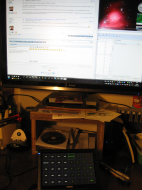
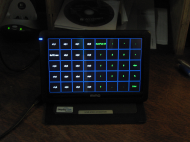
Made a few (not so sharp) pictures, to show what my first setup is.
It'll probably change a bit in the coming weeks, but I think I like it to be rather close to the keyboard, to be both easily viewable and hand-reachable.

This is the main screen, the MIMO and the keyboard (there's a second screen to the left of the main screen, but not on the photo)
IMG_1854.JPG

And here's the layout nudone sent me, that I messed up for my own purpose, having a second layout of a numeric keypad (in green) on top of it. Just hidden under the NumPad Off button there's a NumPad On button, positioned exactly on top of each other. (The touchscreen is free-standing here, but I use it like in the other photo, resting on top of the keyboard)
IMG_1859.JPG

I keep on thanking nudone for giving me this superduper gadget, but it's so awfully nice :D
2736
DC Member Programs and Projects / Re: Simple Text Verifier (Autohotkey script)
« Last post by Ath on September 09, 2011, 03:13 AM »
I can see a few use-cases for this, great :Thmbsup:
2737
I got an exopc. The touch screen is sort of ok. I wonder if it could be used as a remote controller for another pc...
That thing is running Windows 7 :o Guess some sort of RDP/VNC/etc connection could, but that's not really convenient.

I've been thinking about some sort of (web)services 'interface' (for WinButtons), so I can use my remote Windows, Android or iOs device to display the UI, and have the service app send/execute the commands on the host. Couldn't get that to work easily (found a presumably dead Android project on Google code) so I kinda abandoned that, waiting for someone to re-ignite the idea. Would require a 'redo' in something different from AutoIt3 (again, it's on the todo-list), like the host in .NET and the frontend/UI in Java or HTML5+javascript.
2738
^+1

Quote from Touchscreen pioneer "I've invented this brillliant touchscreen display - only one problem - it doesn't work."
;D ;D ;D
2739
Official Announcements / Re: 2011 Fundraiser Giveaway Extravaganza - WINNERS POSTED
« Last post by Ath on September 07, 2011, 03:11 PM »
oh wow :D
those are beautiful

Hey, I was going to say that ;D ;D
2740
Oops, so now I've found the bug that stopped WinButtons 3.4.1 from working properly :-[

A quick update is available:

Please re-download from the original release thread

WinButtonEdit wasn't hindered by this issue, so wasn't changed.

I have a list of some feature requests, compiled from what was said in this thread and this 'praise' thread by nudone, but any other comment, tip or whatever is welcome :D


It was suggested (by PM) that a mouse-position-buffer wouldn't be needed if I kept the last position of the cursor outside of the WinButtons window, but I'll test with the touchscreen that is due to arrive, and eventually remove that code if it doesn't add anything useful.

2741
Finished Programs / Re: DONE: On Screen Button That Sends Keyboard Commands
« Last post by Ath on September 07, 2011, 02:27 PM »
I guess a "lock" template feature would be nice too, i.e. force a "group" template to appear all the time regardless of whether its related program is in focus.
Yup, that's what I had in mind. :up:
2742
This touchscreen system is working  f a n t a s t i c a l l y  even in these early stages.
I can hardly wait for mine to arrive :greenclp:
2743
There is also a strange layout problem. My Photoshop specific "group" of buttons now is offset to the left by about 200 pixels and the background is bright orange - it was black before the udpate.
Both these settings I found in the Group settings for the Photoshop group. Select the group or one of the buttons of that group, then select the 'Group parameters' tab. The setting for Left is -135 (close enough to 200 :P), and the background is set to red (0xff0000), but that might look like orange on the touchscreen, compared to your high-quality 30" monitor. On my medium-fi 26" Iiyama, it's a tad pink between the (black) buttons, and glowing reddish orange if I disable one button:

Screenshot - 07-09-2011 , 21_21_28.png

Edit:
Oh, and how to correct the strange behavior: Set Left to 0 (or empty), and change the color if you need/want that (it looks just fine IMHO, a nice contrast from the 'default' buttongroup)
2744
One thing I'd like to point out that appears to be working very well is that the, original, "Restore cursor after button" feature provides a very nice "cosmetic" solution to MIMO's software failings.
Hmm, I'll probably revert to that method then, and see if the performance improvement I did, is also useful.
2745
Finished Programs / Re: DONE: On Screen Button That Sends Keyboard Commands
« Last post by Ath on September 07, 2011, 01:39 PM »
to make that simple I'd assume it to be the last active window
Haven't tried that (yet), but it would be a nice feature, expect improvements after I receive the touchscreen 8)

display the more "generic" number keypad button layout.
A feature similar to that is on my todo list, I was thinking of a 'DisplayAlways' group, but temporarily hiding it would be useful too.
This can be nearly achieved by running 2 instances of WinButtons, one on the left or top half and the other on the right or bottom half of the TouchScreen. WBE has a feature to use current Preview location as Top/Left coordinates, so positioning would be fairly easy :)
2746
What is the "Caption" for?

It can be used to have a button without text or image, just color, or to have a dynamically updated caption (displaying time for instance, see the examples for condition<n> in the WinButtons.Readme.txt file)
2747
A point of attention:
If WinButtons or WinButtonEdit have a current file that is not named WinButtons.wbuc or WinButtons.ini, they try to read any missing Settings values from WinButtons.wbuc or .ini (dependent on/same as the extension of the current file).
So if you have said file in the current directory while editing, but not in the actual directory where WinButtons is reading the current file, behavior will be different. (there is a corresponding remark in the WinButtons.readme.txt file about this)

And a small tip: WBE offers to run the current file with WinButtons from the 'File/Run WinButtons with current file  Ctrl-R' menuitem, for a quick 'Real World' test :)

The cause for losing all Captions is not clear to me, I've never seen that happen before :'(, I'll investigate.
2748
Screenshot Captor / Re: Screenshot Captor: Improved Arrows
« Last post by Ath on September 07, 2011, 12:19 PM »
Ooohh, I love them :-* :-* :-*
2749
The new cursor memory feature doesn't seem to make any difference regardless of the setting it's on
Setting the CursorRestore buffer to Small should give the same buffersize as the previous version, but I also tweaked the buffer-fill-code to try to be a bit more efficient. Might be I messed up something :-[

There is also a strange layout problem.
Could you PM or e-mail me that layout file, so I can have a look at it?

I have noticed that, even though I firmly press the keys to compile the AutoIt3 source, it sometimes produces a bad/partly corrupted .exe, so I should probably do some more quality assurance before packing stuff into the zip-file. :huh:
I'll re-compile later today, and upload again (can't ftp from work).

One, thought and question: are the old .wbuc button templates compatible with the updates of WinButtonsEdit?

It's going to be a long process of having to recreate all the templates everytime if so.
The file-format has been backward compatible from day one, I only added settings (and sections) that are not interpreted by older versions of WinButtons but they do no harm. And ofcourse the default extension changed from .ini to .wbuc, some time ago, but it does work with .ini files equally well.
When unpacking my zip-file, just get the *.exe and *.readme.txt files. Unzip *.au3 if you want the source, all other files are hardly ever changed and meant as examples for new users.

For the keyboard shortcut keys I'm working on built-in support for WB, to avoid the load-time of WinSendKeys, and the AutoIt3 'rules' can be found here. Anything you can Send(), you can use with WB (though WinSendKeys can do a bit more, like mouse-clicks).
The WB built-in Send function will get a new command (not '-send'), so that would require a 1-time change to your .wbuc file(s). :-\
2750
I published an update for WinButtons and WBE in this thread, adding a configurable buffersize for the CursorRestore feature.

@nudone, I expect that setting CursorRestore to 'Regular', using WBE, should eliminate most of the 'missed mouse-cursor restores' you saw until now.
Pages: prev1 ... 105 106 107 108 109 [110] 111 112 113 114 115 ... 146next