topbanner_forum
  *

avatar image

Welcome, Guest. Please login or register.
Did you miss your activation email?

Login with username, password and session length
  • Saturday December 6, 2025, 12:01 pm
  • Proudly celebrating 15+ years online.
  • Donate now to become a lifetime supporting member of the site and get a non-expiring license key for all of our programs.
  • donate

Recent Posts

Pages: prev1 ... 103 104 105 106 107 [108] 109 110 111 112 113 ... 146next
2676
Ath: could the editor be made so that the colours can be updated live with a slider control (or windows colour dialog panel); something that would let you see the colours change whilst the template is is on the MIMO.
I'll see what I can do, don't know if the color selection dialog has some kind of callback capability that I can hook into. Putting up a slider control would probably mean I have to create a custom color selection dialog, what I'd like to avoid :huh:
Workaround for now could be to (also) drag the color selection dialog to the MIMO 8)
2677
General Software Discussion / Re: Logging out of Facebook is not enough
« Last post by Ath on September 25, 2011, 01:07 PM »
But abandoning Facebook completely is still a viable option. :)

As would not creating a profile :D
2678
Living Room / Re: Micro Reviews of Board Games From a Non-Competetive Perspective
« Last post by Ath on September 25, 2011, 12:23 PM »
Good review :up:

Q: There are 4 player seats in the photo, but only 3 players are mentioned. Where you playing for 2 seats? (and still scored only 7 out of 10 :P) or was that Cody's spot?
2679
but now I realise I really do need 40 buttons (or even more).

After you add graphics to each button, it would be feasible to trim down the size of the buttons, as the resistive touch foil on the MIMO, registers touch equally well from my fingernails as from a full finger-touch.

It's even possible that the touch-foil is interfering with the proper color-display we've been discussing here, but I won't be ripping off the touch-foil just to try that out ;D
2680
Living Room / Re: Would you trust this ... ?
« Last post by Ath on September 25, 2011, 11:02 AM »
I was under the impression that passwords for e-mail were sent in plain text anyway.  Has SSL changed that?
An SSL connection is encrypted by default, so even though the password goes into the comms channel in plain text, because of the entire channel being encrypted, nobody but the receiving end can read it. It's just like with https vs http websites.
2681
This Pantone chart on my MIMO might as well be from a different range compared to what shows on the others.
;D ;D
But yes, that's confirmed :(
2682
I can also visit that site without trouble, but I tried downloading and it gives an error that the page isn't there.

Must be a site error :(
2683
Here's an example of the "metro" Photoshop layout
That's looking good :up:
Must say that the purple is more like blue on the MIMO, but that's the same lack of red displayed, I assume.

The advantage of the "metro" design is the spacing between the buttons, so you can drag the preview to the mimo for testing ('Allow Window Movable' should be checked for that to work) and a quick color comparison.

I know how time-consuming setting up a lot of buttons can be, so I'm thinking about the workflow of WBE, and how to improve that. Especially the new parameters for the images are hacked in, so I'll probably better create a separate screen just for setting that up nicely.

OT:
I see you're using "{ctrldown} s {ctrlup}" to send in fact "^s" to Photoshop. If you change the Command separator (Global parameters) to something like &, you can use "^s" for the WinSendKeys performed -send command. It'll save you some typing, and the command will execute a few-hundred milliseconds faster 8)
2684
And the same image photographed from my Iiyama screen: (without the annotations)

IMG_1866.JPG
2685
With a full red button (0xFF0000) it really looks more like orange, I just made a photo of that as well:

IMG_1865.JPG
2686
Hmm, it doesn't appear that the MIMO responds to any kind of colour correction controls either (maybe I've just not found the right way to do it though).

I have been unable to find those controls too, there are only 2 brightness buttons (+ and -) on the left side, but that shifts from barely usable to rather unusable (dark). The option in the driver that says 'Advanced Configuration...' just opens the Windows display settings :o

Tried to make good photos of the MIMO and my not very good Iiyama screen, but like before they're not great.
The MIMO colors are a bit dull, though brightness is at the highest level, the Iiyama colors are acceptable for the non-Graphics person I am ;D

MIMO:
IMG_1863.JPG

Iiyama:
IMG_1862.JPG
2687
Living Room / Re: When you make your 100'th Post
« Last post by Ath on September 25, 2011, 08:13 AM »
And nudone has done a few more already, but also reached a nice number today:  :Thmbsup:

Screenshot - 25-09-2011 , 15_11_08.png
2688
Living Room / Re: When you make your 100'th Post
« Last post by Ath on September 25, 2011, 08:11 AM »
Stephen just put in his 1000th post, as noted in this other DC thread
2689
Finished Programs / Re: DONE: On Screen Button That Sends Keyboard Commands
« Last post by Ath on September 25, 2011, 07:38 AM »
That is one of the features I was going to work on next :up:
2690
I wasn't expecting it to be a brilliant monitor but it's not even close to being simply "good". All colours seem to be fine except for RED which never appears as anything better than ORANGE.

I can confirm that. With a somewhat complex colored background it's kinda Ok, but with the standard boxed colors like the new Metro-like setup that will be used more in the near future, it's not really good enough.
It is also very dependent on the viewing angle.

Example that has quite lame colors:
Screenshot - 25-09-2011 , 14_28_11.png

And a bit less dimmed:
Screenshot - 25-09-2011 , 14_31_57.png

(Screenshots from NASA/JPL-Caltech Windows 7 Hidden Universe theme)
Screenshot - 25-09-2011 , 14_37_23.png

Guess your statement about the general (un)usability of touch-screens will stay valid for some time to come :( unless there's a real market for WinButtons ;D
2691
Now that nudone kept asking for .png support, I couldn't resist the challenge, so I added that. :P
It requires a different approach of the concept 'Button', so that's why I introduced the 'Borderless button'. And that was another feature request of nudone fulfilled  8)

This Borderless button offers several new layout features, like combining images and captions in several ways, resizing the image, adding offsets to the image-location within the button, and as usual, it's all optional and backward compatible.
With these features it's possible to create a Metro-like UI, as introduced with Windows Phone 7 and Windows 8, by Microsoft. It doesn't mean that I like or dislike that design style, it's just possible to mimic it with WinButtons  ;D

Here's an update release of:
and

Download available from the release message, linking to my DCMembers pages.

Updates can be downloaded also from the WinButtonEdit File/Check for updates option, using DCUpdater when installed.

I'll be doing more testing in the next couple of days.
Any feedback is still welcome, as usual :)
2692
Finished Programs / Re: DONE: On Screen Button That Sends Keyboard Commands
« Last post by Ath on September 24, 2011, 12:03 PM »
I've been working on the graphics support, and am now displaying all filetypes that are supported by the GDIPlus routines (most likely the supported types are: BMP, GIF, JPEG, PNG, TIFF, WMF, and EMF, and maybe even Exif, but I'm not sure that's an actual filetype).
That is in addition to existing Icon display capability, but because of a lack of transparency in the corresponding control I won't promote that feature much ;)
All this new graphics support is 'limited' to the new borderless type of buttons, that aren't actual buttons :-[, and can best be used combined with the FlipKeycolor feature, to indicate the button has been pressed, instead of the standard 3D effects that buttons have.

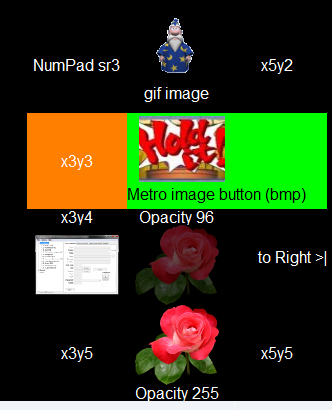
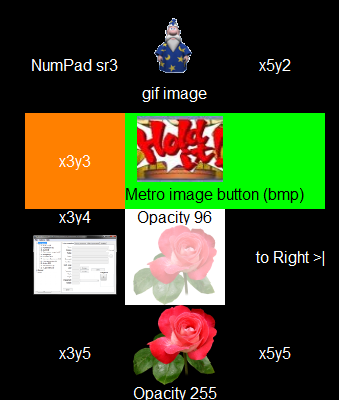
Here's a teaser: :P

Screenshot - 24-09-2011 , 18_02_51.png       And with Opacity 96 pressed:    Screenshot - 24-09-2011 , 19_09_13.png

It allows for stretch-scaled and exactly sized images that can be 'shifted' within the rectangle space, most in the example are resized because they share the button-space with the caption label.

The specialities in the sample are (by button caption):
  • gif image: A gif image and a caption combined
  • x3y3: A 'simple' colored button with no image
  • Metro image button (bmp): A double-width button, with a bmp image shifted to left and down, left aligned caption text, like 'Metro' WPhone7/Win8 UI
  • x3y4: A button with an ico file (WBE), and the label on top. (Labels can also be on left or right)
  • Opacity 96: Displays the label on top, and a PNG image with opacity set to 96 (out of 255)
  • to Right >|: Text only button, right aligned
  • Opacity 255: The same Rose PNG image, but with opacity 255 and label at the bottom

I'll be working on the docs and testing some more, and hope to release later today.
2693
General Software Discussion / Re: Help me pick the right name for my software
« Last post by Ath on September 24, 2011, 09:06 AM »
"RealWorld Paint" makes the most sense to me,
+1, shorted to RW Paint as on the website, still makes sense ;)
2694
Finished Programs / Re: DONE: On Screen Button That Sends Keyboard Commands
« Last post by Ath on September 21, 2011, 05:16 PM »
I've been hacking away on the AutoIt version, and I'm slowly getting somewhere:

  • Colors
  • Images (bmp, gif, jpg/jpeg)
  • images combined with (bottom) labels work
(these last 2 features only on border-less buttons):

Screenshot - 22-09-2011 , 00_10_01.png           and when pressed (x4y3):        Screenshot - 22-09-2011 , 00_11_43.png

Still got a lot of testing to do, maybe I can make a release during the weekend :)
2695
Finished Programs / Re: DONE: On Screen Button That Sends Keyboard Commands
« Last post by Ath on September 20, 2011, 05:07 PM »
If you are working on a new way for adding images to buttons, I'd like to add another request: is it possible to add a small image to a button so that it appears above the buttons text/name/label?
That's one of the parts of the stuff that doesn't (and didn't before) work :( A limitation of the standard Button control, AFAIK.

I've been busy the last couple of days, rewriting the whole shebang in Delphi (7) (spare-time only), but that's hardly showing anything yet (doing it in OO but I didn't write/draw anything on paper before I started coding :-[).
It will probably be easier to solve all the graphics related stuff/issues with Delphi, but I'd like to have it working for 'most of the fancy stuff' in this AutoIt version also. The re-write is going to take some time, as my Delpians is a bit rusty :huh:, but google has been patient with me ;)
2696
Finished Programs / Re: DONE: On Screen Button That Sends Keyboard Commands
« Last post by Ath on September 20, 2011, 04:41 PM »
Well, compared to my previous screenshot, I've come to this:

Screenshot - 20-09-2011 , 23_37_37.png

But it has no button-borders at all (unless I set a background color different from the buttoncolor), so that's what I'll be working on :)
The buttons do work, but I still have some issues with images :(

Colors do work:
Screenshot - 20-09-2011 , 23_42_12.png    and when pressed:    Screenshot - 20-09-2011 , 23_44_29.png
2697
Finished Programs / Re: DONE: On Screen Button That Sends Keyboard Commands
« Last post by Ath on September 20, 2011, 12:16 PM »
I couldn't check during my earlier messages, but now I see what you mean, it's the dark-blue borders that are the actual _borders_ of the button surroundings. Hm, I kinda like the thin hair-lines between the buttons, probably because of my fat fingers :P, makes it easier to aim at the right function.

I've been playing a bit with the colors, and by selecting blue text color (0x0000FF) it looks rather Ok to me:

Screenshot - 20-09-2011 , 19_16_06.png

Still, let me see what closer to your taste solution I can come up with ;)
2698
Finished Programs / Re: DONE: On Screen Button That Sends Keyboard Commands
« Last post by Ath on September 20, 2011, 10:28 AM »
AFAIK that's the Windows selected/hovered-button-color, not sure how to change that :huh: I'll look into it.
2699
Finished Programs / Re: DONE: On Screen Button That Sends Keyboard Commands
« Last post by Ath on September 20, 2011, 08:01 AM »
Are you talking about an extra border around/behind each button with a specific color, different from the background color, or about a part of the current button?
2700
I think that the driver added a significant delay in my boot process, but I'll have to un-install to confirm that. I'll probably do that sometime in the coming weeks, just to know for sure that this driver is causing the heavy HD grinding at boot, after boot-up the system works just as before. I can keep the screen connected during boot and it works just fine, as reported before.
Pages: prev1 ... 103 104 105 106 107 [108] 109 110 111 112 113 ... 146next