topbanner_forum
  *

avatar image

Welcome, Guest. Please login or register.
Did you miss your activation email?

Login with username, password and session length
  • Sunday December 21, 2025, 7:25 am
  • Proudly celebrating 15+ years online.
  • Donate now to become a lifetime supporting member of the site and get a non-expiring license key for all of our programs.
  • donate

Recent Posts

Pages: prev1 ... 102 103 104 105 106 [107] 108 109 110 111 112 ... 454next
2651
Living Room / Re: The End of my Macbook Pro Experiment
« Last post by tomos on June 23, 2015, 05:31 AM »
this kind of half-on/three-quarters-off topic :p

One of the things that make macs attractive is lovely screens:
I know this from monitors: once you've worked with a good one, it's hard to even imagine going back.
So I've been looking for a laptop with a good IPS screen.

I was looking at 13" notebooks for a while, but have moved up to 15" because the 13" ones are too expensive :-/
What is driving me crazy is this:
a laptop with a good screen will cost 100+ more than a similar model - but that similar one (without the good screen) will have: a more powerful CPU; up to double the harddrive and memory sizes. (This in EU-land - this might not be as extreme in the US or elsewhere.)
And then seeing the one I want to buy with the good screen -- but again with better specs -- for 150+ dollars less in the US.
(FWIW I've been looking mainly at DELL models lately.)

It makes buying stuff here a painful experience :(
Share the pain :-*
a pain shared is a pain halved
2652
Screenshot Captor / Re: Path to ScreenshotCaptor settings can't be modified
« Last post by tomos on June 23, 2015, 04:58 AM »
The ScreenshotCaptor.ini file is now always created in the ScreenshotCaptor-folder on my computer's desktop, instead of the program's installation folder.

you dont say if this the portable or the installed version of SC (?)

The ini file should be created in MyDocuments for the installed version.
The portable version creates it in own folder.

I'm not the expert here but wondering is this something to do with permissions -
Could it be that you have the portable SC in the windows program folder?
2653
Screenshot Captor / minor UI bug Quick-CaptureBar
« Last post by tomos on June 23, 2015, 02:05 AM »
Windows 8.1 x64 // latest SC

Fourth button from the right on the Quick-Capture bar:
"Select post-capture options (etc.)" > drop-down menu
=> dont select/deselect anything -
then click somewhere else on the screen - the capture bar disappears, but the menu will not go away -
I have to go back to the bar and click the button again to make menu disappear
2654
Living Room / Re: Interesting "stuff"
« Last post by tomos on June 23, 2015, 01:56 AM »
I like the first trick here best, but others are cool as well.

that was fun - well filmed too :up:
2655
but my goal is for them to land there completely automatically.

yes, those instructions above are for getting screenshot automatically copied to clipboard.
All options under that button are for what will happen post-capture:
post-every-capture :)
2656
I hope someone can tell me how to fix the settings ...

I told you how to in my last post - did you have a problem with the instructions?

The easiest way I know to change this, is using the "Quick Capture Bar" - which auto-hides on the top of the screen (it's top-middle here). Move mouse to edge of screen to show it (if not there, it's the option top of the list on the tray icon's context menu).

Fourth button from the right on that bar:
"Select post-capture options (etc.)" > "Copy image to clipboard"
2657
Third problem -- I went back to my old technique, defining the region myself with the cross hairs and the dragging, but the capture didn't automatically get put into the clipboard as it used to do before I updated the software.  This is the problem that I really need to solve -- I can live without the scrolling feature.

I'm a bit responsible here having recommended the upgrade :)

The easiest way I know to change this, is using the "Quick Capture Bar" - which auto-hides on the top of the screen (it's top-middle here). Move mouse to edge of screen to show it (if not there, it's the option top of the list on the tray icon's context menu).

Fourth button from the right on that bar:
"Select post-capture options (etc.)" > "Copy image to clipboard"

This is probably in the Preferences dialogue as well - but I do know there's a mountain of stuff in there :-)


Re the scrolling capture:
I'm not sure what's happening there - you could try the option to do a manual scroll. After you've selected "Begin a scrolling capture on this object" - the next window offers manual scrolling option.
2658
hi aparente001,
I'm presuming you mean scroll the contents of a window and take a screenshot of the whole lot:

Some relevant video here (first one is something else, but the following ones are on topic):
https://www.donation...ndex.php?topic=29821

And I would recommend updating SC as the scrolling capture has been upgraded not so long ago - there's no an option to scroll manually. I *think* the UI hasnt been changed much lately - if at all, so should not be a problem.
2659
Living Room / Re: good Videos [short films] here :)
« Last post by tomos on June 21, 2015, 04:24 AM »
... overseas viewers may need to access it via VPN.

If your computer shows as being in a different timezone to New Zealand you'll get a message saying Timezone incorrect, however if you go into your settings and change your timezone, clear out your browser cache, and reload the page, it will allow you to sign up to watch it.

It may do an IP check after sign up but I would have thought that would be part of the initial check before you got that far.

I registered successfully, but video didint work - in spite of disabling flashblock (PaleMoon) or allowing all plugins (Chrome). Flash is getting more and more problematic in my experience lately, so I dont know whether that's simply a flash problem or that they just blocking it cause of my location.
2660
Living Room / Re: Movies or films you've seen lately
« Last post by tomos on June 20, 2015, 06:49 AM »
^^ I remember watching The Player (http://www.imdb.com/title/tt0105151/) in the cinema when it came out ('92 or '93) and the first take lasted a few minutes and there was a lot of fuss about it at the time. I didnt know technology (and direction) had advanced so much.

Tbh, while watching the film [Victoria] I kept forgetting about the concept - and then remembering it again. That's a compliment to the acting and storyline. It was over two hours, and I tend to get very restless unless a film is really gripping - but this one was. FWIW it's very real life, young one in party mode in a club, meets a bunch of lads celebrating a birthday, who turn out to be decent enough blokes, if not averse to a bit of petty crime. Later a real criminal element gets involved ...
2661
Made me larf:
 (see attachment in previous post)

me too ;D

beautifully worded too :Thumbsup:
2662
Living Room / Re: Movies or films you've seen lately
« Last post by tomos on June 19, 2015, 06:07 PM »
Victoria - set in Berlin nightime, mostly in (broken) English.
Unusual movie - it's filmed in one take (!) so it's set in real time. Starts out in a club (too much strobe-lighting for me), moves onto the streets.
A wee bit slow maybe in the first third, but still enjoyable, and when it really gets going, it does a good job of it ;)

I'd highly recommend it. I enjoy going to films knowing as little as possible about them, so if you want to know more, follow the link.
2663
General Software Discussion / Re: Softmaker Office 2016 released
« Last post by tomos on June 19, 2015, 01:48 AM »
^ yeah, I'd say 2012 version is fine (2010 not). Having used it a fair bit though, I'm looking forward to minor changes in 2016 UI (some of which I requested).

TBH, it's mostly UI changes that interest me in upgrades - more often then not the new features are thing I dont use. (This applies to almost all the software I use.)

I still think you're being harsh on Softmaker in particular - as said, this is a problem for all software developers. I'm happy to pay for that "bundle of 3 years of service packs" - no matter how it's dressed up. And let's be honest, no software markets those three years of updates, but many do just that - and much of it very good software (Syncovery comes to mind). The other option is subscription which I dont want. Or free e.g. Libre Office, which, while good, is not up to the compatibility standards I need.
2664
General Software Discussion / Re: Softmaker Office 2016 released
« Last post by tomos on June 18, 2015, 05:40 PM »
^in fairness, apart from any changes, you're also paying for multiple service packs over the next few years. But yeah, it is the problem as described above (how to get revenue).
2665
Mini-Reviews by Members / Re: Tabs Outliner for Chrome
« Last post by tomos on June 18, 2015, 04:34 AM »
GROUPs:
a group can be created 'within' a window in the outline.
When you open that window - the groups within it will not open. They have to be double clicked in turn to open them, and they will open in a separate window.
Drag Group button from toolbar to location you want to create a group.
Youtube video: How Groups Work

I added some info about Groups - they do seem like a good way of organising stuff, especially related infos, e.g. researching compact cameras: one window with groupings for 30x, 20x, cameras etc.
Also makes it easy to open a window without opening all it's contents/'children'.
2666
That vimeo video is really incredible.  I'd be curious how difficult it was to get it to look like that, and what kind of equipment was used.  Looks amazing.

I came across this description:
I had to import and customize the NEF files before I
equalized them with the great LR-TIMELAPSE from Gunther Wegner. (http://www.lrtimelapse.com/)
(Adobe Lightroom is necessary)
The observed jpeg had then to be droped into virtual dub and were rendered as avi.
When this was done, I had to stabilize the sequences manually frame by frame (AE motion tracker) and rendered each of them in 3 different sizes: (4928x3264 pixels, 1920x1080 pixels, 1024x768 pixels)
Last but not least the snippets were edited fitting to the beautiful title "Diving Through The Blue" by the respectable composer and musician Valentin Boomes.
from this video -
https://vimeo.com/50238512

Tbh I dont understand half of that description - but it does sound like a lot of work. Surprised the stabilizing has to be done manually. Also not sure what exactly the LR-Timelapse software does.

They seem to generally use full-frame cameras - I guess if you're going to put all that work in, you may as well start with a quality image.
2667
Living Room / Re: Interesting "stuff"
« Last post by tomos on June 17, 2015, 02:47 PM »
Especially enjoyed the Ford Mustang and the Champagne stories :Thumbsup:
2668
Mini-Reviews by Members / Re: Tabs Outliner for Chrome
« Last post by tomos on June 17, 2015, 01:47 PM »
I really miss Firefox's Tab Group feature.

There is a group tabs feature here, but I haven't used it (nor have I used Firefox's tab group). I used mainly work with Session Manager - if something was worth saving I would either save an appropriately named session, or bookmark it.

Everything else just got abandoned after a period of time.
Was using Tab Grouping comparable?
2669
Mini-Reviews by Members / Re: Tabs Outliner for Chrome
« Last post by tomos on June 17, 2015, 01:40 PM »
^ I'm not the expert on Chrome having just moved over from Firefox :-)

It *looks* as if Chrome loads all tabs if I open a window (same as if it restores last tabs via it's own settings). Yet if I click on a tab shortly later, it seems to have to load it. So I *think* it dumps the tab if it's not being viewed.

Firefox would just load the page header and nothing else.

Do all of those tabs reside in memory like Chrome does by default?

all the open tabs work as I describe above
Note: in the 2nd screenshot above, there's only one tab open in the 'Snooker' window) - the window above it (in outline - not visible in shot) has 15 of 28 tabs open - yet if I click on one in the browser, it needs to load (as described).

FWIW:
I used keep a lot more tabs open before using this - now I can close them and know I can acces them again easily - even if they arent sorted/categorised properly.
2670
Mini-Reviews by Members / Re: Tabs Outliner for Chrome
« Last post by tomos on June 17, 2015, 10:06 AM »
reserved
2671
Mini-Reviews by Members / Tabs Outliner for Chrome
« Last post by tomos on June 17, 2015, 09:58 AM »
'Tabs Outliner' is an addon for Chrome:
"The next generation session manager; a really working too many open tabs solution; and your browsing notebook."

App NameTabs Outliner
App URLChrome Webstore: https://chrome.googl...mamlbiijnphhppkpkmkl
App Version Reviewed0.4.81
Test System Specsa very basic win.8.1 x64 laptop with 4GB ram
Supported OSesTested on Win.7 & 8 (I presume any OS that can run Chrome)
Support Methodsvia Chrome-store link above and there's also a google group
Pricing SchemeFree/donation-ware
Author Donation Linkcant find...
Screencast Video URLOverview // How Groups Work
Relationship btwn. Reviewer and Product None

Screenshot - 2015-06-17 , 16_37_55.png

This is a first look at Tabs Outliner Addon/Extension for Chrome.
I moved recently from Firefox to Chrome and was looking for a replacement for Session Manager addon. Tabs Outliner [TO] is very different, and a lot more powerful, but it also covers Session saving in it's own way, and could be used as a bookmarks manager.
To cut to the chase: I love it so far, it's helped my browsing to become a lot more organised without too much effort
 :up: :up: :up: :up: :up:


OVERVIEW
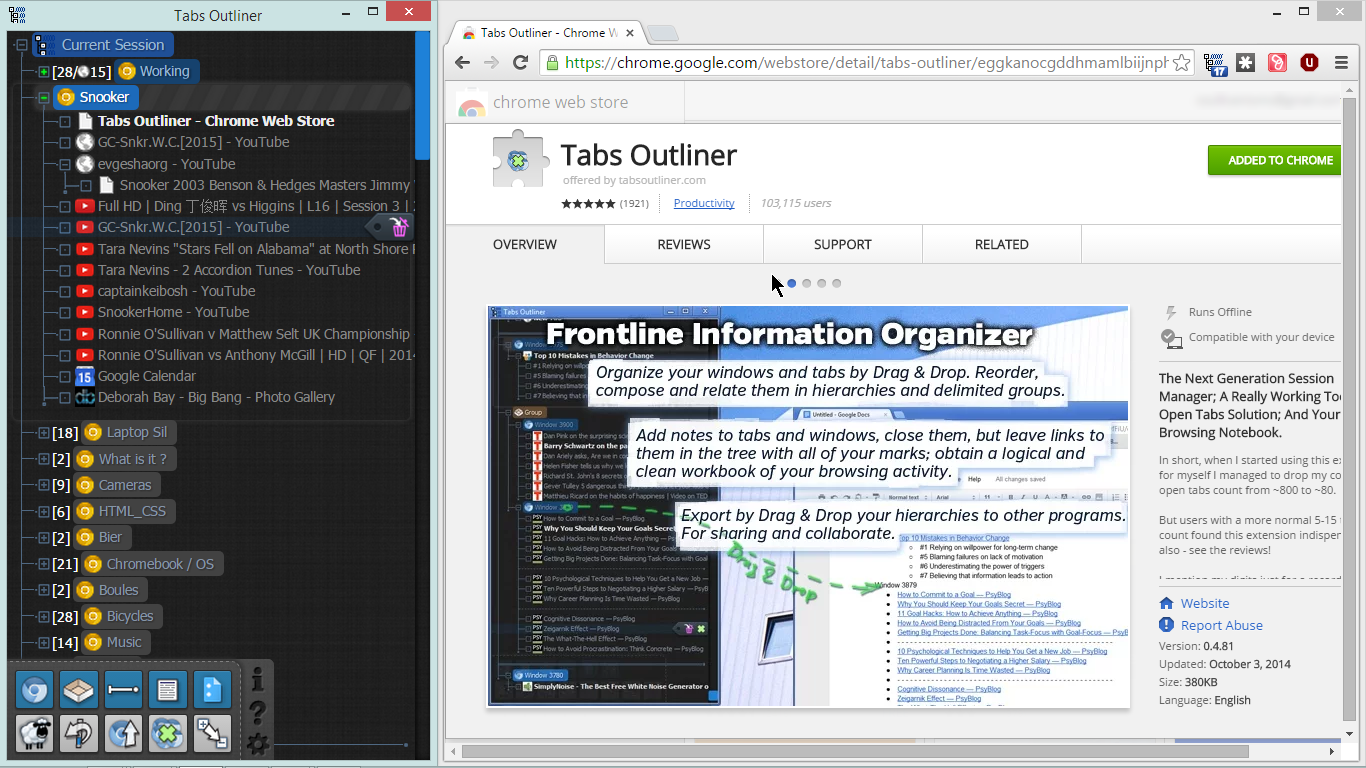
Tabs Outliner will open a second window showing it's outline of webpages. Sticking with the outline approach, I call this a 'pane'.
Screenshot - 2015-06-17 , 15_14_16.png

If you open say three Chrome windows, they will show as an outline in Tabs Outliner: within that pane, you can drag pages from one window to another; close tabs so they will be remembered; close/delete tabs completely.

FUNDAMENTAL CONCEPT: it is important to understand that (initially at any rate) what is closed outside of Tabs Outliner is lost/gone/forgotten - and what is closed from within Tabs Outliner is saved.

Windows can be renamed within the outline (from the default "Window").
Once they are renamed, they will be saved - so closing them via Chrome itself is okay. The caveat above still remains for tabs though: any tabs closed from within the browser window will be deleted from Tabs Outliner.

When you reopen Chrome, and open TO:
  • double-click a tab or window will open same
  • Ctrl+single-click will open a copy of the tab in the last active Chrome window
To rearrange the outline:
  • Drag n drop to move tabs or hierarchies
  • Alt+DragnDrop to copy hierarchies

TOOLBAR:
the toolbar is more like a box and is always on top (even though it disappears) in the bottom right of the pane. This can lead to confusion if you are dragging an entry down to a window that is actually behind the toolbox - but the full line is active so you can drag to bottom right.
I havent used the tools that much:
  • (new) Window
  • Group
  • Separator
  • (create) Note
  • Google Docs
  • Clone View (I *think* it just clones selected window)
  • Undo scroll (stop it jumping to e.g. newly created window)
  • Scroll up to next open window
  • Close/Save all open windows
  • Expand all (/Collapse all) - e.g. for searching, also for saving all as export/backup

NOTES (within outline):
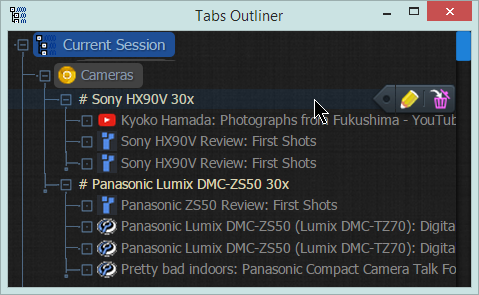
Notes can be added to the outline, and used hierarchically. The notes in this image start with a '#'
Screenshot - 2015-06-17 , 12_53_27.png

click once on the notes button - a note will appear down at the very bottom of the outline list. I nearly always want it in the active window - to do this click on the note icon in toolbar, and drag it to desired location.

NOTES DIRECTLY FROM WEBTEXT: highlighting text on a webpage, and dragging it to the outline will create a note with the text.

GROUPs:
a group can be created 'within' a window in the outline.
When you open that window - the groups within it will not open. They have to be double clicked in turn to open them, and they will open in a separate window.
Drag Group button from toolbar to location you want to create a group.
Youtube video: How Groups Work

OPTIONs:
I went with recommended settings in options (probably worth reading through it to see possibilities.

PORTABILITY:
works with Chrome portable and SRWare Iron portable.

SYNCING:
I think this not supported yet - but I dont use (login-)syncing in Chrome so dont know if that works.

BACUP:
backup is important (after my first couple of days with Iron portable I upgraded Iron and lost all extensions, so I was straight in the deep end).
According to the author simply saving the contents of the pane (as a html file) will work as a backup. But I dont know how to restore that. There is a much more detailed description from the author of how to restore via profile (my emphasis):
Spoiler
I decide to provide some other algorithm to surely load TO database from other PC.

0) check the chrome://version/ page to find a path to your current Chrome profile (Profile Path field)

then intall the TO (if it's not installed already) and then completely shut down Chrome (on a Windows PC without this
you will not be able to delete some files that you will need to delete on next steps)

then:

1) Delete all next files and folders from the current Chrome profile

"\Local Storage\chrome-extension_eggkanocgddhmamlbiijnphhppkpkmkl_0.localstorage"

"\Local Storage\chrome-extension_eggkanocgddhmamlbiijnphhppkpkmkl_0.localstorage-journal"

"\databases\chrome-extension_eggkanocgddhmamlbiijnphhppkpkmkl_0"

"\IndexedDB\chrome-extension_eggkanocgddhmamlbiijnphhppkpkmkl_0.indexeddb.leveldb"

"\File System"

Please backup the \File System folder before delete, as it might contain data from other Chrome applications, and also it's contain the readable backups of the Tabs Outliner tree - so if you do so on a system that previously have the TO it's a must to backup this folder.

2) Restore your TO database in the
"\IndexedDB\chrome-extension_eggkanocgddhmamlbiijnphhppkpkmkl_0.indexeddb.leveldb"
folder
The content of this folder must not contain any other subfolders.


3) Start Chrome, start TO - it must read the database.

If this not hapen, because the database is corrupted for example, then there is a way to restore tree by backups from \File System folder on source PC.

2672
One way of testing is to disable half the addons, and see which gruop sets the thing off - continue in that manner to hopefully narrow it down to the culprit.
2673
General Software Discussion / Re: LastPass alternatives? (including premium LP)
« Last post by tomos on June 16, 2015, 02:06 PM »
Thanks app, xtabber.

Am I the only person in the world who just remembers all of his passwords, instead of trusting any service (be it online or offline) to store it?
-Stephen66515 (June 16, 2015, 01:46 PM)
how many :tellme:
2674
General Software Discussion / Re: LastPass alternatives? (including premium LP)
« Last post by tomos on June 16, 2015, 12:15 PM »
Thanks wraith, will check that out.

ah yeah, I'm working from desktop here:
there doesnt seem to be a version of Google's (or MS's) authenticator for windows - well not for Win.7 at any rate.
I came across recommendations for WinAuth (Windows Authenticator) - https://github.com/winauth/winauth
might try that out.
https://winauth.com/

You don't have a mobile at all?  You should be able to install that on your mobile... and your mobile phone becomes your 'key'.

ah okay, I hadn't understood the concept. (Thanks.)
2675
General Software Discussion / Re: LastPass alternatives? (including premium LP)
« Last post by tomos on June 16, 2015, 10:46 AM »
Thanks wraith, will check that out.

ah yeah, I'm working from desktop here:
there doesnt seem to be a version of Google's (or MS's) authenticator for windows - well not for Win.7 at any rate.
I came across recommendations for WinAuth (Windows Authenticator) - https://github.com/winauth/winauth
might try that out.
https://winauth.com/
Pages: prev1 ... 102 103 104 105 106 [107] 108 109 110 111 112 ... 454next