BTW, is it possible to disable the numbers in the "big icons" mode?
yes.
can you elaborate on what the "automatic learning" thing is?
Another question that I have is: how does the new version of FARR handle "alternative" modes? I really like how in Launchy if you select "Google" (by typing gg for instance) and type TAB you go into "google search mode". In Dash this is even more evident, as the "Google search" text appears on top of your editbox which makes it clear that any words that you type will be used for a google search.
Another related question is how does FARR handle "alternative actions". By default, hitting ENTER opens or executes the program or file selected. Can you select things such as "open folder" or "copy", etc? In Dash and Quicksilver you can by hitting TAB until you select the action that you want to perform.
FARR is designed to work a little bit differently than these, though i'm considering adding some kind of hybrid modes.
With farr, most of these things like searching the web are done through regular expression aliases.
So for example as you type "search blah" you trigger the search alias and see:
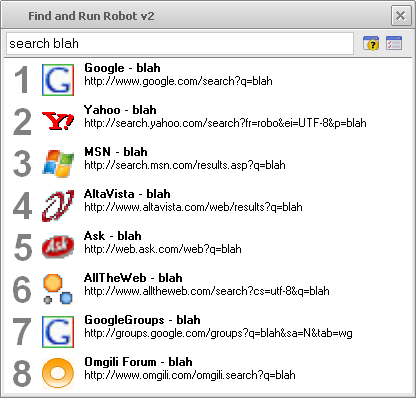
This is a menu of actions to perform on the search text, and as always hit Enter to launch first one, or choose the one you want to launch directly with function/alt+# or click, etc.
Farr also can use +ACTION expressions to say you want to perform some action on an item, for example jgpaiva added an action to zip files and folders:
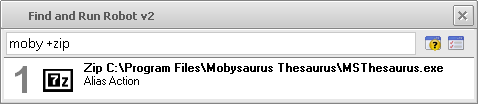
I guess these are cases where FARR is trying hard to let you type what you want to do as fast and efficiently as possible, sacrificing a multiple-step action with one string specifying the entire command.
one thing that I like in Launchy, Dash and Quicksilver is how they really "highlight" the current selection. That is, the element would be launched if you clicked ENTER. I think that this should be prominent in the interface, not just be the first result in the list of search results.
One of the things that is different about FARR compared to the others is that it really treats the result list as a kind of menu. It's true that you can hit enter to launch the first result, but while most of these other programs show one results and then after some delay show some extras like a hint, FARR has always been designed to present you with top matches, which is even more important in aliases, where often the results act like a menu.
QuickSilver has a really neat "multi-level" "stack" interface, where you can select a file, type tab, select and action, type tab and select a "modifier" for the action (e.g. select a filename, select "copy to..." and select the folder to which the file will be copied). I don't think that this is something that is too difficult to implement. But in Quicksilver it is very natural as every time that you hit tab the selected item is "saved" into a "stack" that is shown in the interface very clearly.
I think this is something we are going to have to think about, i can definitely see the value of it for some things, and in walking the user step-by-step through a series of choices, i'm just still a bit doubtfull about how often it would really be used vs. the paradigm of finding a file and launching it. But i'm not at all opposed to implementing a kind of stack-like thing.
Amadawn I hope you will keep trying FARR every once and a while and reporting what it would need to be a viable replacement for what you are currently using. My guess is that it's going to be a while before you would switch to FARR, but your comments/insights/suggestions can only improve the program, so keep them coming.


 Recent Posts

