topbanner_forum
  *

avatar image

Welcome, Guest. Please login or register.
Did you miss your activation email?

Login with username, password and session length
  • Sunday December 21, 2025, 5:00 am
  • Proudly celebrating 15+ years online.
  • Donate now to become a lifetime supporting member of the site and get a non-expiring license key for all of our programs.
  • donate

Recent Posts

Pages: prev1 ... 6 7 8 9 10 [11] 12 13 14 15 16 17next
251
Interestingly, Speedfan is freeware or should I say Donationware as there's a donation button on the site.
http://www.almico.com/speedfan.php

I guess Speedfan would do the job as well if not better.

Just take note that you will not be able to reinstall HDDLife for Notebook (giveawayoftheday version) if you reinstall your notebook.

But again, one should not over-rely on these utilities for the condition of harddisks.

Nothing can replace a consistent backup routine.
252
Giveaway of the Day - HDDlife for Notebooks

HDDLife for Notebooks is a real-time hard drive monitoring utility with alerts, malfunction protection and data loss prevention functions. This hard drive inspector is a proactive hard drive failure detection system which manages all of your hard drive risks."
http://www.giveawayoftheday.com/

I have for sometime now been telling my family members to be careful about using their notebook mobility with some care.

I mean it's so easy to bring it onto your bed and fall asleep with it on, or for that matter, use it for an extended period while having it sit on your mattress, sofa etc.

But have you noticed that laptops have ventilation holes at the bottom of their casings.

The soft mattress can really block these causing a progressive deterioration of the hardware and maybe cause a catastrophic harddisk failure (through over-heating) or worse still, cause the battery to catch fire (maybe explode) - what with the recent massive battery recall becoming a distant memory.

One way of having your cake and eating it is to use a hard surface (maybe a board - I use a strong plastic box lid [flameable !!!] that will not obstruct the vents). And I make sure my laptop is set to standby or hibernate if there's prolonged period of inactivity)

Now maybe I'm paranoid - but who knows - But here's a freebie to confirm this - HDDlife for Notebooks - I think it will measure the temperature of the Notebook harddisk too.
253
Hmm, no one seems to have mentioned the ScanSnap.

I don't own one but I have tried one on loan to me. It is very fast, has a 50 page ADF, double sided scanning capability and a rather small footprint. The version I tried is the somewhat older model without OCR and Microsoft Office support which the current model has. Please be aware that ScanSnap is non twain compliant (at least the model which I tried fi-5110EOX wasn't). So using this older model, I could not detect the scanner from a software  that required a twain-compliant scanner to scan say an image or even a document in.

However, if works very well with the software that came with it.

There's also an accessory software that can be purchased called
"Rack2-Filer™ converts scanned documents and digital data into PDF files and inputs this data into e-files for total document management purposes. This "life-like" data can then be viewed by flipping through "e-binders" with the simple click of a mouse. Furthermore, Rack2-Filer is also loaded with a vast array of editing functions that renders troublesome digital data management a relic of the past."
http://www.fujitsu.c...oup/rack2-filer.html

Quote Smallbiztechnology.com - technology is a tool! Use it to GROW your business.
"Fujitsu's ScanSnap scanner is good.

USA Today reports that Fujitsu's new $495 scanner is worth it, not only because it bundles Adobe Acrobat Standard 6.0 which retails for $300, but because of the many features it includes such as it scans up to 15 pages per minute and converts them into the ubiquitous Portable Document Format with the touch of a button. It also captures both sides of a sheet of paper at the same time. (Unlike a flatbed, paper feeds through the top, much like many printers.)

The document feeder can accept up to 50 pages. To save disk space, it eliminates blank pages. It also automatically detects paper size, straightens and rotates images and figures out whether the document is in color or black and white.

The device also can scan business cards and includes software that reads the text and organizes it into a database. (It does require some manual setup through ScanSnap software)."
http://www.smallbizt...canner-is-good.shtml

Check it out further at

ScanSnap S500 Instant PDF Sheet-Fed Scanner : FUJITSU United States
"ScanSnap S500 Instant PDF Sheet-Fed Scanner"
http://www.fujitsu.c.../s500.html#Tab0/tab2
254
Giveaway of the Day - True Launch Bar

True Launch BarTrue Launch Bar is an ultimate experience of a manageable file system. It gets the best of MS Windows OS and streamlines it for greater comfort of use. Its unique system of switching toolbars and expandable menus gives instant access to files, applications, and settings from the taskbar. In addition, overlay images and skins give system polish and slick looks."
http://www.giveawayoftheday.com/

Or you can take your time and still get 50% off at URL below until Jan 1st 2008
   
TrueLaunchBar - 50% Discount"
https://www.donation...index.php?topic=4241

That is called Freedom of choice.
255
Found Deals and Discounts / Re: Acronis True Image for FREE
« Last post by patteo on December 25, 2006, 09:22 AM »
Thanks Mouser and Tinjaw for the reply.

Just another thought that came to my mind.

I assume that Acronis True Image is smart enough to even detect an unformated drive in the USB enclosure or do I have to format or at least partition it first with a Partition Manager like Paragon Partition Manager or Partition Magic.

Ghost is smart enough to do this even in Dos mode.
256
First a Blessed Christmas to all.

You know it's the time of the year when family members gather and guess what, you appear to be the most knowlegeable within the family on computers and invariably you end out helping with a myriad computer problems. Sigh ! :-\

Anyway, for some years now, I have used Ghost (cannot remember which version but I know it's not version 9 or 10 but even older) to image my harddisk (and that of a few family members- I make them buy a harddisk to do that) so that I can restore the system partition easily with the backup image.

Basically, this is the process I take with one key basic assumption.

Basic assumption:
You cannot trust imaging software that runs in Windows since there are so many things and services running in the background when Windows is running)

1. I use my Desktop to boot up Norton Ghost (which basically runs in Dos Mode from a Diskette) and copy the entire System partition from one harddisk to another harddisk through an IDE to IDE interface.

2. I then put the "cloned" harddisk into the laptop and boot it up to make sure it works.
Sometimes, there's a problem and I have to Fix the MBR with Fdisk.exe  before it will reboot.
If it can reboot and run properly, I know the Ghost image is fine and I keep the cloned harddisk away for a rainy day as an "insurance policy" so I don't have to spend hours reinstalling from scratch.

Unfortunately, I have a close relative who returned this year with a new laptop and one with a SATA harddisk and my Desktop only have an IDE interface.

So my cloning equipment using Ghost and an IDE interface is now stumped.

Questions:

Does Acronis True Image V7 really clone a System partition while running Windows XP Pro (or XP Home) on it - ie is my basic assumption that you cannot run a cloning software in the computer A while trying to clone the System partition of computer A.

If my basic assumption is wrong, then effectively I do not even need a Desktop to clone my laptop system partition. All I need then is a USB Drive (with a SATA interface) to plug another harddisk into the laptop and use Acronis True image to clone the system partition onto the harddisk in the USB Drive. Once cloned, I assume that I can then place the cloned SATA harddisk into the laptopn and reboot it successfully.

Another question - Assuming I can do the above, will the cloning process be very slow through the USB 2.0 connection. (When I use the IDE to IDE connection via the desktop, the ghost cloning process can take say 30mins for a 25GB partition).

Any advice would be appreciated.

Thanks


257
If you missed this, there's a free copy available via

NovaPDF Lite 2.5 - vnunet.com
"NovaPDF Lite 2.5

Full commercial download, worth £10"
http://www.vnunet.co...2168551/novapdf-lite
258
I know, I know, there are not too many PocketPC enthusiats around here (I never leave home without one though). But for those who are, this is worth a read.

Top 10 Applications - 2006 on Clinton Fitch (Dot) Com!
"So with that, I’m happy to present to you the 3rd Annual Clinton Fitch (Dot) Com! Top 10 Application List."
http://www.clintonfi...p10-2006/default.asp

I would add a few other "must haves". (Note - I don't use all the above Top 10 - Just 3 out of 10)

Pocketbible from www.laridian.com Try Priority Code NYP126 for 25% New Year discount on some of their titles
Buttonmax from www.pocketmax.net
Phatnotes from www.phatware.com
Listpro from www.iliumsoft.com
259
Mini-Reviews by Members / Re: Mini-Review of Fineprint (Virtual Printer)
« Last post by patteo on December 20, 2006, 10:42 PM »
Just posted an update on the Review as follows :

Update on 21 Dec 2006

I'm using ClickBook now - it is impressive. I'm not sure why I dismissed it so quickly before... I'll have to play around with it before commenting on it further, though.

Darwin, thanks for posting your comments for the benefit of all.

Any takers for a Clickbook Mini-Review ?

Actually I might now be somewhat more tempted to do one if no one is willing to do one.

It is likely that both products have their respective strengths and will suit users with differing needs and we should be fair to both.
260
Mini-Reviews by Members / Re: Mini-Review of Fineprint (Virtual Printer)
« Last post by patteo on December 20, 2006, 11:57 AM »
ClickBook can do some unique things that can be really useful if you are doing things like booklet printing, because it has additional options for laying out the pages so that they properly oriented after folding.

Booklet printing is something that Fineprint does exceedingly well. Sometimes, I think a one trick pony is a good concept for a software. It enables the author to really fine tune it so that it does the "one trick" exceedingly well.

And although one can say Fineprint can be called a one-trick pony since it basically intercepts your print job and let you preview and tweak various settings like background, how many to a page, footers, headers, save to jpg etc, remove graphics and so forth, it does add quite a bit of variations to the primary one-trick really seamlessly and well.

So if your primary interest is to print and save money, paper + convenience all rolled up into one, and I think most of us would fit into that category, then Fineprint will fit the bill very well.

But if you are also looking to print banners, day planner pages, wallet booklets, church bulletins, greeting cards, business cards, catalogs etc, then you are probably going to have to look at clickbook.

Somehow, looking at these other additional features, it gives me the impression that these are nice to have features that I may or may not use. But it would certainly be nice to have provided the baseline features which Fineprint has, are as well implemented in Clickbook (which I'm not in a position to comment). Hint hint - maybe someone can volunteer to do a Clickbook mini-review.

But as for me, Fineprint does what I need very well and I think I will just stick with it and it's one of the very few software I use that I would attach a "Work of Art" label to. As I said earlier in the mini-review, it is hard to improve on a Work of Art.

Perhaps that's the key reason I did not go and also try to do another mini-review of Clickbook. Maybe someone else will prove me wrong.  :-[
261
Mini-Reviews by Members / Re: Mini-Review of Fineprint (Virtual Printer)
« Last post by patteo on December 20, 2006, 09:05 AM »
Added some modifications to mini-review :

An Update on 20 Dec 2006

If you're trialing Fineprint, have a look at Blue Squirrel's ClickBook before you commit.
It may have a similar enough feature set it's also $49.95
I last used Clickbook in 1998
http://www.bluesquirrel.com/products/clickbook/


Clickbook in fact appears to have even more features.

I have not attempted to review Clickbook in the light of this new information.

Perhaps someone else would may want to attempt a Clickbook mini-review.

But do see remarks by none other than Darwin below :

Now, I actually showed up here to say: Curse you patteo! I've assiduously avoided trying FinePrint for at least 5 years (I kid you not) because reading about it I always thought "what's the point"? Zaine's review of it at the Great Software List has been wearing me down for over a year but this was the last straw and I installed both it and ClickBook last night. ClickBook is already gone but I am hopelessly in love with FinePrint. Patteo, this is going to cost me money! My wife will be wanting a word with you when she sees the credit card statement. You have been warned.
262
Mini-Reviews by Members / Re: Mini-Review of Fineprint (Virtual Printer)
« Last post by patteo on December 15, 2006, 12:13 AM »
Ok Darwin, I'm outta here. I'm going into hiding  8) for a few days until your wife cools down. (Jokes aside, I'll be away for a few days - but keep your suggestions coming so I can improve, add or subtract from the review for the benefit of all donationcoders- I'll make the modifications when I return)

The point is, you have to spend to save - "Big time" in outrageous ink cost. Just show her how much more romantic dinners you can take her out to because of the time and ink cost you save. Now let's see, 1 gallon of ink at around US$2000 over say two or three or more years (depending on how many pages you print and also waste) less $49.95 - hey you can take us all out to dinner as well with change to spare !  :D
263
Handango - 25 Ways to Save on Mobile Software
"Gifts up to 25% off your entire order!
Don't forget to check back each day through the end of the year to see the new savings and spread the news to other Smartphone users!"
http://www.handango....mp;CKey=PROMO_25WAYS
264
Living Room / I wish there was some way to Encrypt my bike so it won't be stolen
« Last post by patteo on December 14, 2006, 09:31 AM »
Lost two (old) but good quality mountain bike over the last few years.

So I thought the best solution was to buy a cheapo bike. Got one at a Hypermart that was about US$50; good enough for a quick ride to the local train station. Surely nobody will want to steal a US$50 bike. But for a good measure, I went looking for a good lock; didn't want to buy a cheap job from one of the emerging economies.

So I bought a lock with a specially hardened steel chain - EU made so I was told - but at US$20, I thought it was OK - strong enough to deter the average crook since it was about 40% the cost of the bike.

Today, yikes, I discovered how bad my statistics were.

Someone swipe the bike in broad-daylight and it was chained to a big metal pole. Maybe they had a bump key.

It's not going to break the bank - but it is downright frustrating, trying to beat the bike thieves.

Looks like I need to buy another US$50 - no maybe US$40 bike and protect it with a US$120 lock.

So let me see - the lock is about 300% of the bike. Maybe they will steal the lock instead - but I may have no choice. I hate to be buying another bike every other month.  :(

Anyone can recommend a good lock - maybe a Kryptonite U lock

http://www.kryptonit...icArticleFind@Public


I know. I know, they had a real shocking problem not too long ago but I think they got their act together again - I hope.

Kryptonite Evolution 2000 U- Lock hacked by a Bic pen - Engadget
"Kryptonite Evolution 2000 U- Lock hacked by a Bic pen"
http://www.engadget....hacked-by-a-bic-pen/


Any suggestions/sharing of experience is most appreciated.

265
Mini-Reviews by Members / Re: Mini-Review of Fineprint (Virtual Printer)
« Last post by patteo on December 14, 2006, 07:15 AM »
Concerning Fineprint, is it possible to configure it to print 12-up as well?  I'm asking because I sometimes design tickets for events (like dances), and I want to print 12-up and 16-up on a page.

No - it is not possible as far as I know. But you could for example design a page with 2 tickets and print 8 Up and what you got is essentially 16-Up.

Or you may want to take a look at :

DesignPro Limited - Avery Official Website
"DesignPro Limited
      Customize and print professional looking labels, cards, dividers and more in minutes!
      More Avery Templates than any other software
      More than 2,200 pre-designed Avery Templates.
      Import your own graphics or use the 3,400 images included*
      Includes step-by-step project wizard, built-in photo editing, mail merge, text curving and more
      *Limited & SE versions have fewer pre-designed templates and images"
http://www.avery.com...mp;softwarecode=3200

If I remember correctly, the limited edition is free. But the objective is to have you use their Avery Labels. Of course you can use plain paper, but you just have to cut to size etc.

I guess it is no different from why the printer manufacturers literally sell their snazzy looking printers dirt cheap which are gas ink guzzlers (at US$2,000 per gallon of ink)

It's just a commercial decision for them.
266
Mini-Reviews by Members / Re: Mini-Review of Fineprint (Virtual Printer)
« Last post by patteo on December 13, 2006, 10:39 AM »
I don't want to be a downer, but one of the features I miss in Fineprint (or pdfactory) is that it won't add page numbers after you've sent several jobs to it.  For example, let's say you send 2 different multiple page documents to fineprint.  The pages will be numbered "1 of 3" for the first job, "1 of 4" for the second, etc.  But what if I want the pages numbered for the total print job, like "1 of 7".  That would be nice.

Yes, but that can be easily solved by combining the original documents into one and then re-printing it.

And of course, that's the missing kitchen sink that I was referring to near the top of the review.  :D
267
Mini-Reviews by Members / Re: Mini-Review of Fineprint (Virtual Printer)
« Last post by patteo on December 13, 2006, 10:38 AM »
patteo i just made a minor adjustment of your table to make clear in the donation link that you are the author of the REVIEW not the program.

Thanks Mouser. That was in the template. And I did not notice it.

I guess it should be removed from or changed in the template since it would be inappropriate for the program's author to review his own program.
268
Mini-Reviews by Members / Re: Mini-Review of Fineprint (Virtual Printer)
« Last post by patteo on December 13, 2006, 10:19 AM »
actually i think the paragraph needs changing come to think of it.

perhaps the best thing fineprint can do is lay out multiple pages on one page of paper - that should really be made clear right in the beginning.

Added the following to the review :
In a nutshell, not only can Fineprint help you lay out multiple pages on one page of paper, but it allows you to easily add watermarks, custom footers and headers (date,time, pagination, name......), gutters for binding the printout, transform your lowly non duplex printer into a duplex printer, combine print jobs, save print jobs for reuse, print without graphics, save a page as graphic, save time, save paper, save ink, create custom virtual printers.  And all this is very easily done and visually guided by a previews of results. And you won't even bother with the help file.

No convoluted step by step tutorials needed - fly solo on your first flight with Fineprint !

Hmm, it looks like the only thing missing is the kitchen sink.
269
Mini-Reviews by Members / Re: Mini-Review of Fineprint (Virtual Printer)
« Last post by patteo on December 13, 2006, 07:44 AM »
i agree with mitz, this paragraph of yours could go right up front as first thing:

WHAT FINEPRINT DOES:
Fineprint allows you to intercept your print job if you so choose and after applying any printing enhancements you so choose, send the enhanced output to the physical printer you choose. You can even edit the print job such as inserting a blank page, deleting a page or just print a single page or save to a jpg or tiff etc, combine it and print several jobs all at one go.

Done - Duplicated that Paragraph at the top
270
Mini-Reviews by Members / Re: Mini-Review of Fineprint (Virtual Printer)
« Last post by patteo on December 13, 2006, 07:33 AM »
Hey man, nice review.. but I feel I had to read 3/4 to actually know what the program does..
Maybe at the beginning you can put it's purpose and what it does instead of burring it down below,
cuz I know a lot of people won't even bother to go as far as I did to see what it's about..

"(ie how many trees you saved.)" - lol


Yes, you are right. But basically I was following the structure of the Mini-Review Template and I did not want to fiddle with the template too much as that would delay this long overdued review which I had wanted to do and especially since I'll be disappearing for a few days soon.

I take your point and may tweak it a little after I received some feedback.
271
Mini-Reviews by Members / Mini-Review of Fineprint (Virtual Printer)
« Last post by patteo on December 13, 2006, 07:17 AM »
Mini Review of Fineprint

What Fineprint Does
Fineprint allows you to intercept your print job if you so choose and after applying any printing enhancements (and there are many) you so choose, send the enhanced output to the physical printer you choose. You can even edit the print job such as inserting a blank page, deleting a page or just print a single page or save to a jpg or tiff etc, combine it into one print job and print several jobs all at one go.

In a nutshell, not only can Fineprint help you lay out multiple pages on one page of paper, but it allows you to easily add watermarks, custom footers and headers (date,time, pagination, name......), gutters for binding the printout, transform your lowly non duplex printer into a duplex printer, combine print jobs, save print jobs for reuse, print without graphics, save a page as graphic, save time, save paper, save ink, create custom virtual printers.  And all this is very easily done and visually guided by a previews of results. And you won't even need to bother with the help file.

No convoluted step by step tutorials needed - fly solo on your first flight with Fineprint !

Hmm, it looks like the only thing missing is the kitchen sink.

This program is so well designed it is a real "Work of Art" and very functional at that !

App NameFineprint
App URLwww.fineprint.com
App Version ReviewedVersion 5.55
Test System SpecsToshiba Tecra Laptop 1.70Ghz 1GB Ram Windows XP SP2
Supported OSesWindows 95, 98, NT, 2000, XP with at least 128 mb RAM.
Support MethodsEmail and web http://www.fineprint...m/support/index.html
Upgrade PolicyMajor upgrades are released every 18 months and generally cost 30% of the original purchase price if maintenance (15% of purchase price) is not purchased
Trial Version Available?Trial version prints a small banner on each page. Purchasing will remove the banner.
Pricing SchemeSingle Licence of US$49.95 with discounts for quantity purchases down to US$25 per licence for 500-999. There is also a server edition available with somewhat higher discounts
Reviewer Donation LinkDonate to patteo, the Writer of this Review
Screencast Video URLhttps://www.donation...userup/Fineprint.swf
Do press F11 after the video launches so that the flash video can be seen clearly. Press F11 again to exit Full Screen mode for your browser.


SCREENSHOTS

The first screenshot should actually be a Blank - simply because Fineprint doesn't show you anything after you first installed it. It hides itself unobtrusively until you print and the first screen you see is below. As you select the options, the preview changes (cool - WYSIWIG)
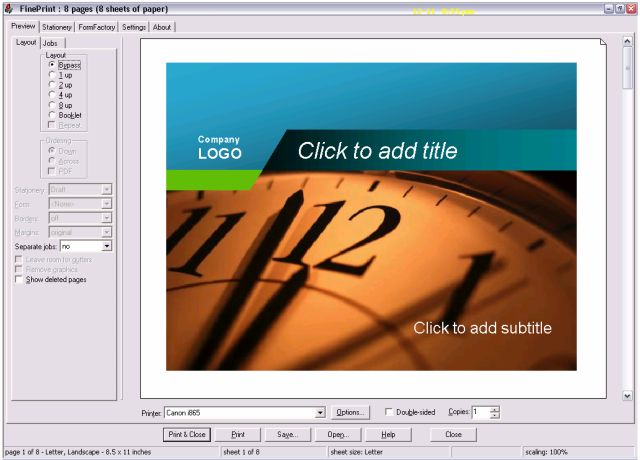


1Bypass.jpg

When you select Bypass (Top left), what you see is essentially a preview as if you are using your default printer. So anything like watermarks, footers etc will not be shown.
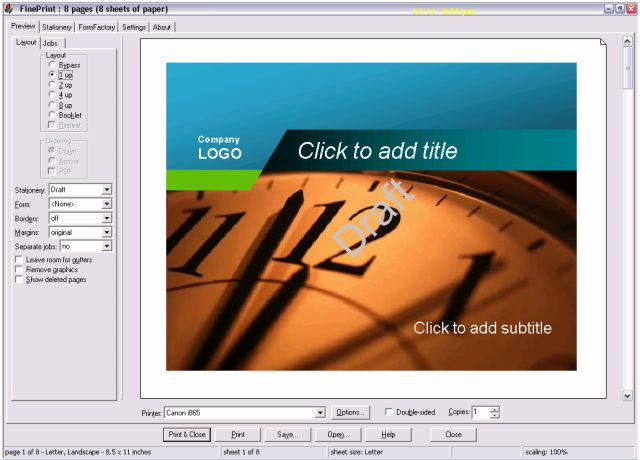


1Up.jpg

1 Up basically prints each page with various settings like Watermarks, Footers on 1 sheet.
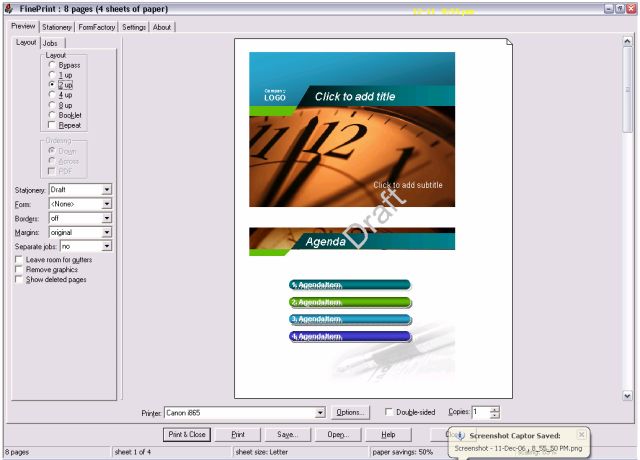


2Up.jpg

2 Up basically prints two pages with various settings like Watermarks on 1 sheet.
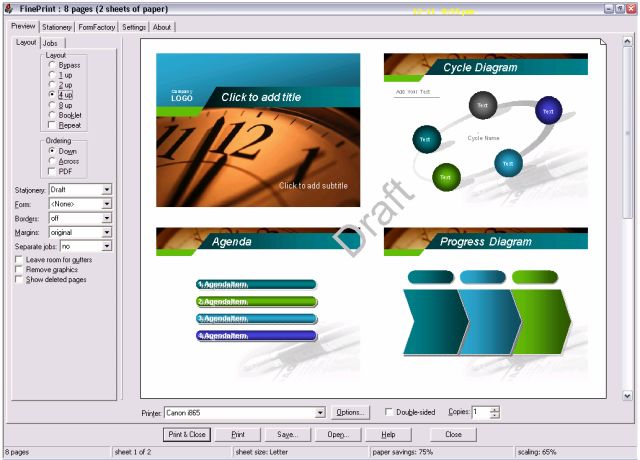


4Up.jpg

4 Up basically prints four pages with various settings like Watermarks on 1 sheet.
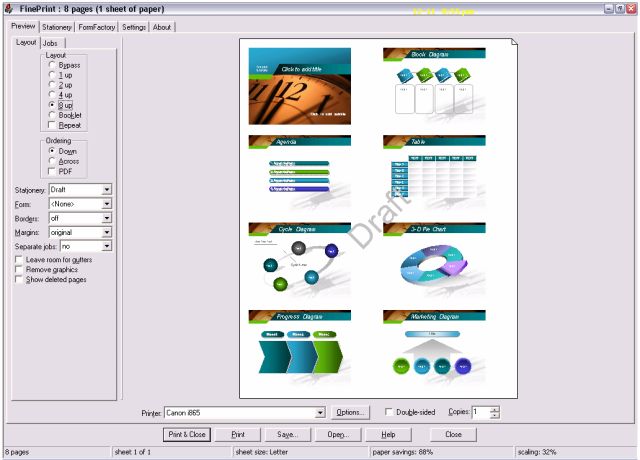


8Up.jpg

8 Up basically prints eight pages with various settings like Watermarks on 1 sheet.
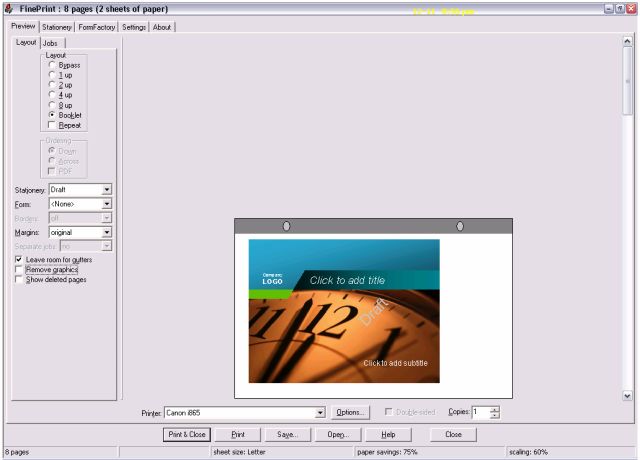


Booklet.jpg

Booklet basically each page with a margin at the correct place,  so you can bind it into a presentation booklet.
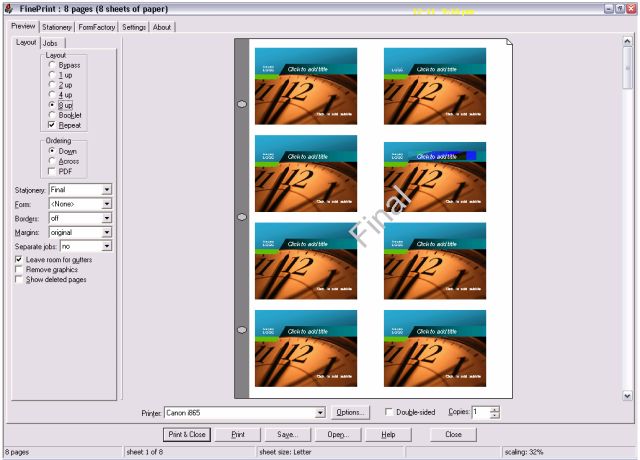


Repeats.jpg

Repeats prints each page repeatedly on the sheet depending on whether you set it to 2,4 or 8
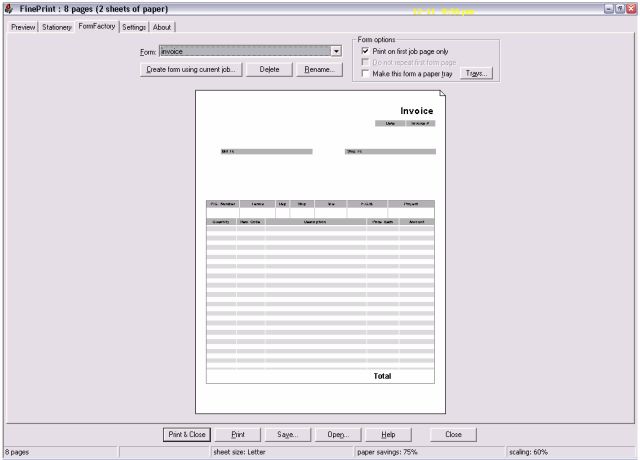


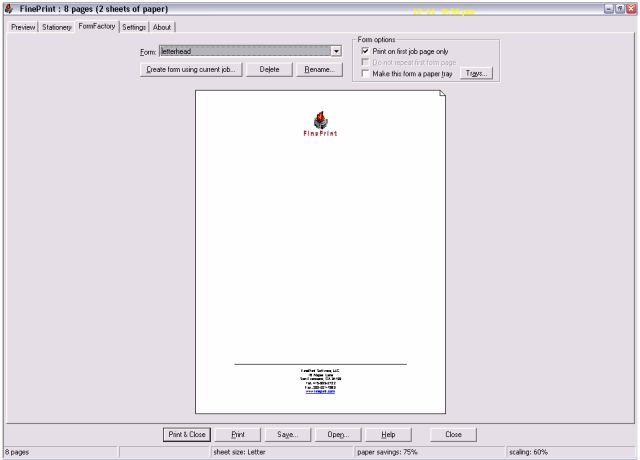
Forms - Invoice.jpgForm - Letterhead.jpg

Forms allow you to design and print your Invoice blank or Letterhead Blanks
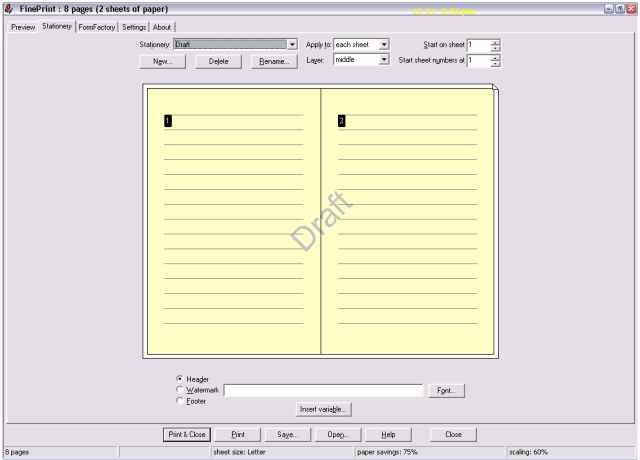


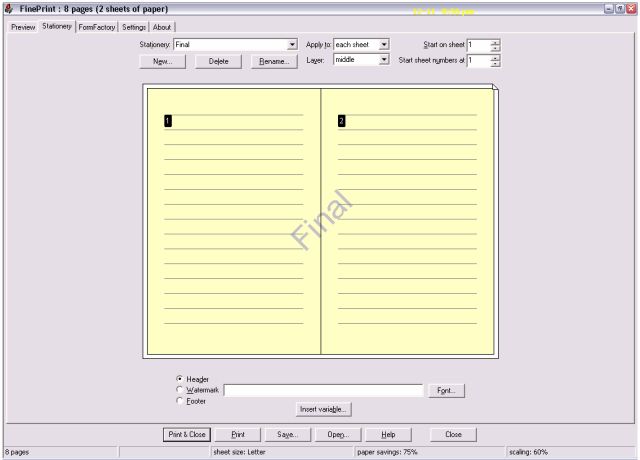
Stationery Draft.jpgStationery Final.jpg

Stationery allows you to design your own stationery with for example a Draft or Final Watermark with Footers and Headers.
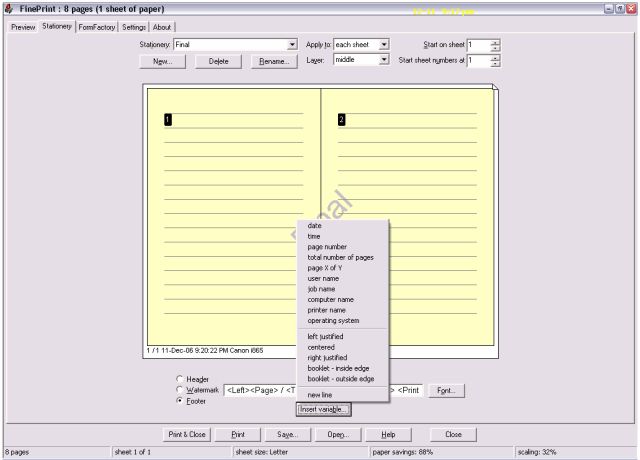


Add Footers or Headers.jpg

You do not need special skills as the Headers and Footer selection fields give you all the available options such as Date, Time, Page Number, Computer name etc.
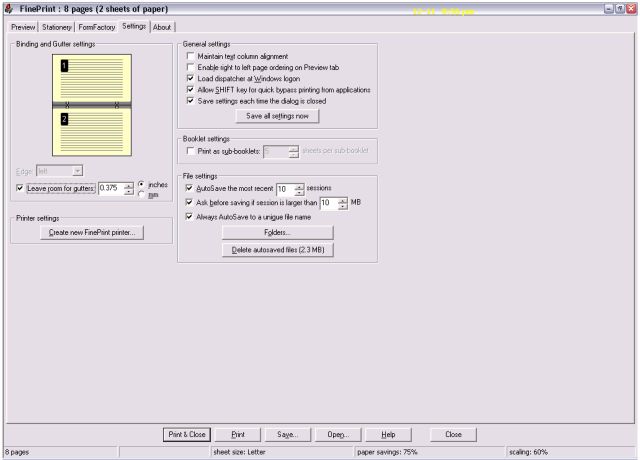


Settings.jpg

The settings tab allow you to make many other setting changes like create another virtual Fineprint printer, where the autosaved Fineprint files are saved etc. You can create other Fineprint printers and give them names like Canon8upDraft to signify that you are using a Canon to print 8 pages to a sheet with a draft watermark. These Virtual printers will then appear amongst other printers that you normally see in your Printers and Faxes selection screen and can be selected from the print dialog of any programs.
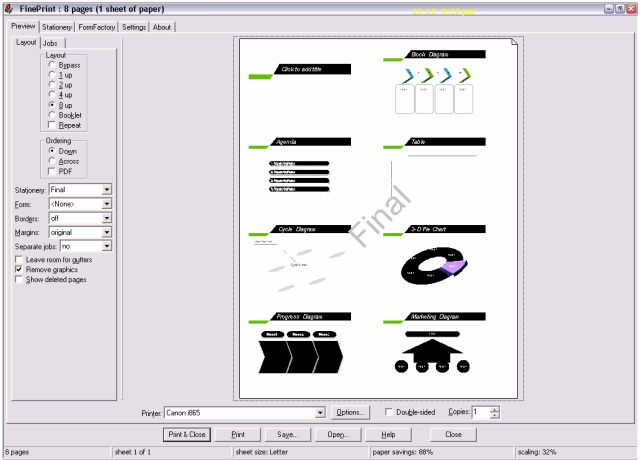


Remove Graphics.jpg

Remove Graphics allow you to print a draft without the graphics - keeps you richer and from the clutches of the mean oil Ink Barons.
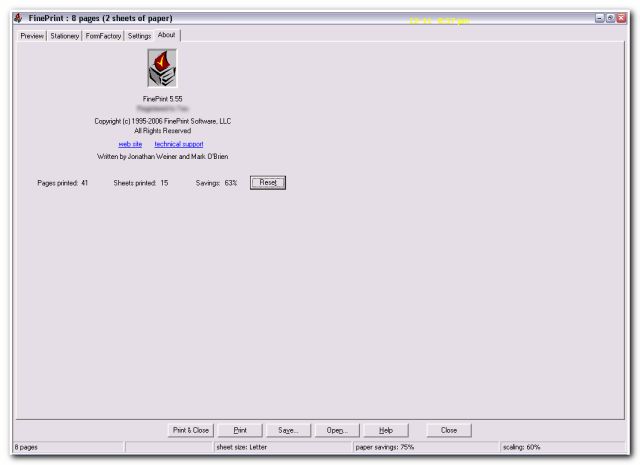


About and statistics.jpg

About box includes some information for the control freak who like to know how many trees you have saved so far as you use Fineprint etc.


Intro:

The word Fineprint is generally associated with "hidden" disadvantageous terms in commercial contracts.

But happily, this is not the case with Fineprint. When I first chanced on this application, my initial reaction after trying it out, without even looking at the documentation was that it was a Work of Art.

The interface, the usability, the value it gives to the user, is almost unique. It integrates seamlessly into your computer system and you don't really notice it until you next do a print. In fact you can easily figure out all the various options without reading the help file.

You are then pleasantly presented with a new-born refreshing looking WYSIWIG preview that refreshes as you click or enter the various options.

The various options are neatly laid out in a series of tabs. A sample output is always shown to give you immediate feedback of the result of the options you choose, giving you a great sense of control over what you have selected; in fact almost encouraging or enticing you to try the various options available.

It basically gives you great confidence via the immediate visual feedback.

And all this without loosing any functionality provided by your native printer driver software.

Fineprint allows you to intercept your print job if you so choose and after applying any printing enhancements (and there are many) you so choose, send the enhanced output to the physical printer you choose. You can even edit the print job such as inserting a blank page, deleting a page or just print a single page or save to a jpg or tiff etc, combine it with other print jobs and print several jobs all at one go.

Although a well laid out help file is available, I simply did not have to refer to the manual even when I first used Fineprint because of the well laid out interface with lots of in-Context popup tooltips to guide you along.

Who is this app designed for:

This app is designed for the computer user who owns and uses a printer fairly regularly, who wants to control and modify the printed output easily.

It is for a typical user who :
1. Wants to print on both sides of a piece of paper (even for a non duplex printer)
2. Who wants to save ink (ink is outrageously expensive - I will explain in a bit more detail later)
3. Wants to print many pages on to a single sheet of paper - like a overview guide sheet.
4. Create many predefined virtual printers for say two to a sheet, 4 to a sheet, with a specific watermark, different physical printers.
5. Wants to print with watermarks embedded, like drafts, confidential
6. Add customised headers and footers and or gutters
7. Wants to combined print jobs and print them at one go (eg at a remote network printer)
8. Wants to print letterheads, invoice blanks
9. Wants to print drafts without the pictures (save ink)
10. Wants to print to a graphic, eg Tiff etc


The Good

Some of the key advantages I find are :

1. Fineprint is really free once you realize how much ink it saves - did you know that a gallon (approx 3.78 litre) of inkjet ink is in the region of US$2,000 - Who needs oil when you can manufacture ink and sell it for outrageous prices.
(Note: a typical Original Inkjet Ink Cartridge with about 45ml of ink retails for about US$25)

2. It makes print preview a cinch with the ability to modify to preview to say two per page, add watermarks, footer (page numbers, dates etc). You can cancel the print job easily or even save it for future reprints (like printing a booklet)

3. For the control freak, it even reports how pages you printed and on how many sheets (ie how many trees you saved.)

4. Turns your non duplex printer into a Duplex printer - you are guided by a Wizard which makes it painless.

5. Enables me to easily print multiple pages on one sheet or create booklets.

The needs improvement section

Like I mentioned earlier, the usability "out of the box" is almost "perfect". I called it a work of art. You must use it to be able to admire it. And it's hard to improve a work of art.

I did not encounter any bugs during testing and the program worked flawlessly.

Perhaps not all of us need all the features and Fineprint could probably increase its market penetration by offering a lite version for less. But having said that, Fineprint at $49.95 is good value if you realize the outrageous price of ink.

Why I think you should use this product

If you are a greenie and also just want to save money (and who doesn't) and reduce waste or just to make the printing process much more customizable and friendly or if you print regularly, you need this software.

If you have looked at recent models of printers from all the big players, you may have noticed that it is getting much harder to do ink refills. At the outrageous prices they charge for inkjet ink, if you can easily print two or more pages on 1 sheet easily, and minus the images for drafts, Fineprint would easily pay for itself.

I think the operative word is "easily". Yes, some of the native printer software drivers that comes with your printer like a Canon does allow you to set page layout mode etc, unfortunately, it is not that easy to set it up.

In Fineprint, you can just print to Fineprint (as if it's a printer), preview and make changes to the layout immediately view the result - in WYSIWG - What You See Is What You Get. Quite idiot proof !


How does it compare to similar apps

There are no alternative apps that are in this category save for what comes bundled with your printer which no doubt can do some of what Fineprint does like page layout, is nonetheless very basic and can be a real pain to use each time you print.

An Update on 20 Dec 2006

If you're trialing Fineprint, have a look at Blue Squirrel's ClickBook before you commit.
It may have a similar enough feature set it's also $49.95
I last used Clickbook in 1998
http://www.bluesquirrel.com/products/clickbook/


Clickbook in fact appears to have even more features.

I have not attempted to review Clickbook in the light of this new information.

Perhaps someone else would may want to attempt a Clickbook mini-review.

But do see remarks by none other than Darwin below :

Now, I actually showed up here to say: Curse you patteo! I've assiduously avoided trying FinePrint for at least 5 years (I kid you not) because reading about it I always thought "what's the point"? Zaine's review of it at the Great Software List has been wearing me down for over a year but this was the last straw and I installed both it and ClickBook last night. ClickBook is already gone but I am hopelessly in love with FinePrint. Patteo, this is going to cost me money! My wife will be wanting a word with you when she sees the credit card statement. You have been warned.

Update on 21 Dec 2006

I'm using ClickBook now - it is impressive. I'm not sure why I dismissed it so quickly before... I'll have to play around with it before commenting on it further, though.


Conclusions

I would say, if you print, and do not own a bank, you need Fineprint for it's ease of use and savings. It would rate a 5 out of 5.


Links to other reviews of this application

The following are other reviews refferred to at Fineprint website

http://www.hanselman...gesTheWayIPrint.aspx

PC PRIMER # 615
"PC PRIMER # 615
By R.L. Creighton
Copyright 2004
I owe credit for this week’s software find; to a very dear friend that insisted that I look at it. I’m glad that I did. Ok, it’s not magic, but it is pretty darn close. I have been working with a new product (new to me anyway) called “Fine Print” from a company named oddly enough “Fine Print”  The company was founded in 95 as an aid to programmers to allow for the efficient printing of massive numbers of pages, for easy perusal.  The end result is a really great printing product that really rocks."
http://www.rollanet....primer/prime615.html


http://www.fineprint...print/reviews_1.html

Credits
The screenshots were done with Mouser's wonderful Screenshot Captor https://www.donation...hotcaptor/index.html

The Flash Video was done with Wink
"Wink is a Tutorial and Presentation creation software"
http://www.debugmode.com/wink/
272
General Review Discussion / Re: Review Templates
« Last post by patteo on December 12, 2006, 06:01 PM »
i know it sounds like a waste, but the easiest way is to simply click modify on your post in personal area, copy the post contents, and make a new post in the mini review section and paste the contents..

as an administrator i ican also MOVE your post, but the only problem with that is that it will get sorted as if it was written a long time ago.  you can send me a private message to work out more details.

Looks like the best way is to use the first method. The only thing that will make it a slight hassle is that of uploading the jpgs. Will have to put them in the right order or the jpgs will be all jumbled up.

Ideally there should be a way to select multiple jpgs and they will upload in sequence.

Also, there seems to be no way to insert a new jpg in between previously uploaded jpgs, or for that matter, reordering them when changes are made to the review.

That said, there should of course be a way to just Move the post and still have it reflected as a new post. Of course, this could just be a limitation in the forum software.
273
that's why i made the "My Personal Area" section of the forum (at bottom of section list on main forum page):
https://www.donation...index.php?board=55.0

only you (and admin) can read the posts you make there, so it's perfect for writing a draft and modifying it over time until you get it just like you want it before you make the real post.  :)


Now that I have almost completed the review, what is the action to post the review to the Mini-Review section from the Personal Area
274
General Review Discussion / Re: Review Templates
« Last post by patteo on December 11, 2006, 12:02 PM »
normally you would just attach it at the bottom of the new post form, the same way you would attach an image - im not sure if it will like having swf's attach though.  if not, send me the swf from your mini review via emal and i will upload it to the site and you can just link to it.

What is puzzling me is that I believe that I have seen others post a ...swf file inline in a review. I have tried various tags without success

When I clicked the Flash icon in the editing toolbar of the forum, I get

{flash=200,200}{/flash}

But {flash=200,200}abc.swf{/flash}


Where abc.swf has been added as an attachment.

All I get is http://abc.swf

The flash file does not animate or for that matter appear.

I wonder what I'm doing wrong.

Please note that I have used {} instead of [] so that the simulated tags can be seen

275
General Review Discussion / Re: Review Templates
« Last post by patteo on December 11, 2006, 11:34 AM »
OK, I just email you the swf.

It's not 100% done yet as I was testing it to see how it looks. But I think it's almost there and I may not make further modifications to it.

Thanks
Pages: prev1 ... 6 7 8 9 10 [11] 12 13 14 15 16 17next