


 Recent Posts
1976
Post New Requests Here / Re: IDEA: sort of launcher for command lines with parameter in a pre-defined place
« Last post by Ath on October 06, 2012, 09:00 AM »For teasers, here's a screenshot:
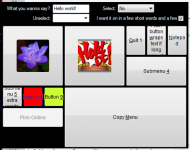
A few notes:
- 7 types of input controls:
- Textbox with history
- Textbox no history
- Combobox
- Combobox with edit & history
- Combobox with edit, no history
- Checkbox with history
- Checkbox no history
- All parameters are connected to a Variable, as can be configured using WinButtonEdit, and the variable is to be used like :varVarName: in the command defined.
- Checkboxes can be easily mapped to a checked/unchecked value
A few notes:
- 7 types of input controls:
- Textbox with history
- Textbox no history
- Combobox
- Combobox with edit & history
- Combobox with edit, no history
- Checkbox with history
- Checkbox no history
- All parameters are connected to a Variable, as can be configured using WinButtonEdit, and the variable is to be used like :varVarName: in the command defined.
- Checkboxes can be easily mapped to a checked/unchecked value


