topbanner_forum
  *

avatar image

Welcome, Guest. Please login or register.
Did you miss your activation email?

Login with username, password and session length
  • Tuesday April 7, 2026, 4:33 am
  • Proudly celebrating 15+ years online.
  • Donate now to become a lifetime supporting member of the site and get a non-expiring license key for all of our programs.
  • donate

Recent Posts

Pages: prev1 ... 758 759 760 761 762 [763] 764 765 766 767 768 ... 1515next
19051
General Software Discussion / Re: Microsoft Security Essentials (Morro) Beta
« Last post by mouser on June 29, 2009, 11:24 AM »
Thank you for posting your views -- very helpful  :up:
19052
Find And Run Robot / Re: FARR can't find .exe file - Newbie question
« Last post by mouser on June 29, 2009, 10:57 AM »
note:
i am going to be posting some video tutorials of using FARR soon, so stay tuned for that.
19053
Find And Run Robot / Re: FARR can't find .exe file - Newbie question
« Last post by mouser on June 29, 2009, 10:56 AM »
good questions all.

first lets start with the fact that it sounds like you have an odd situation with quick view plus.. im not sure the details but it sounds like maybe the shortcut is named oddly.  if there is a shortcut to qvp32.exe in your start menu, with a nice name, FARR should be able to find it and let you launch it.

so one of the easiest things you could do to get what you want is CREATE a normal windows shortcut to qvp32.exe and place that in your start menu.  Then if you can launch it manually from your start menu, farr should be able to find it and launch it as well.  this has the advantage that you can name the shortcut anything you want and place it anywhere IN YOUR START MENU that you want.

now.. you also came to a good conclusion that an alias could also be used to solve this problem -- and offers additional benefits sometimes.

the help you found wasn't very helpful.  part of the problem is that aliases changed in v2 and the help file may lag a bit.  while it tells you the truth about where alias files are located and named -- as an end user this isnt very helpful to you.

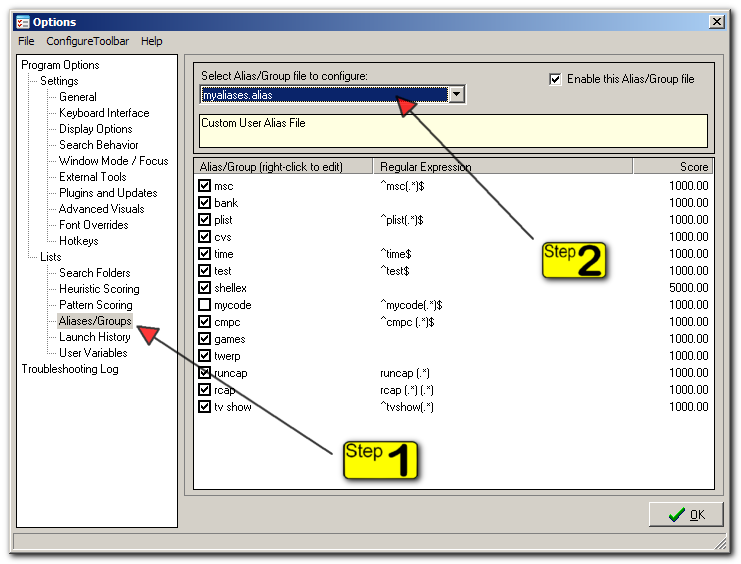
as an end user, what you would do is go to options, then select the Aliases/Groups tab, then choose "myaliases.alias" file from the drop down on the right:
Screenshot - 6_29_2009 , 10_52_40 AM.png

this tells far you want to edit your custom alias file -- the others items in the drop down are predefined alias groups you can view, disable, but not edit.

now right click in the list of your aliases, and choose to add a new alias.

then you might configure your new alias with a name of
qvp or quickviewplus (no spaces are allowed)
and put the path to the file in the results list.

everything else can be left alone.

that should be it.

19054
Find And Run Robot / Re: Faster startup by disabling plugins ?
« Last post by mouser on June 29, 2009, 10:11 AM »
Maybe it's the history display that takes time, and the search plugins is displayed as long as the history is  not ready ?

this could in fact be the case.. i will check and fix it if so, so we can better get a handle on it.
you might try shortening the # of items to keep in your past history to see if that solves it.
19055
Find And Run Robot / Re: Faster startup by disabling plugins ?
« Last post by mouser on June 29, 2009, 09:29 AM »
when you mean it "searches for plugins".. do you mean that the statusbar says its searching plugins for that time? is that how you are concluding that the delay is due to plugins?

if so.. it's probably one specific plugin doing that.. see if you can figure out which one..
19056
LaunchBar Commander / Re: In Search of A Shutdown/Reboot/Hibernate App
« Last post by mouser on June 29, 2009, 09:02 AM »
The latest LBC release includes a nircmd tool button you can add.
Go to where you want to add it, and click to insert a node and choose last item in menu to insert from plugin/tool.  then choose nircmd tool.

Now your launchbar will have a nircmd submenu with options for shutting down, rebooting, hibernating, locking workstation, starting screensaver.
19057
Clipboard Help+Spell / Re: bug ? :"windows" key not working properly
« Last post by mouser on June 29, 2009, 08:55 AM »
Sorry for the late reply -- this is a limitation of the program currently.. it doesn't know how to detect windows key.
I'll try to add it in for the next version -- it's definitely possible (i did it for one of my other programs) just requires a bit of a workaround.
19058
Living Room / Re: Members Only! A good way to randomly view DC
« Last post by mouser on June 29, 2009, 08:43 AM »
Should have replied to this earlier.. it's a fun idea  :Thmbsup:
19059
Find And Run Robot / Re: Faster startup by disabling plugins ?
« Last post by mouser on June 29, 2009, 08:36 AM »
if your history is *always* slow at being shown.. that is a clue in one direction, as is easier to diagnose.  if its only rarely slow to show, then the problem is more difficult to diagnose.  if you want to email me about it we might try to figure it out offline and then report back on this thread what we find.
19060
Find And Run Robot / Re: Faster startup by disabling plugins ?
« Last post by mouser on June 29, 2009, 08:32 AM »
you can disable plugins from the options tab about plugins.. but plugins shouldn't be doing anything when you bring up farr window showing history, so i doubt that is the cause.

you can easily test though by exiting farr, removing all plugins and moving them to some other directory, and restarting -- just to make sure they are not the cause.
19061
Find And Run Robot / Re: Option to start Find And Run Robot after installation
« Last post by mouser on June 29, 2009, 08:30 AM »
Why not open the folder where Find and Run Robot start menu item are lying, so the user just has to double click on the icon to restart FARR with the right elevation

That's a reasonable workaround, not a bad idea at all.. if i don't find a better solution soon i'll do that.
19062
LaunchBar Commander / Re: I think a search bar would make LBC more convenient
« Last post by mouser on June 29, 2009, 07:33 AM »
In addition to LaunchBar Commander I have written a program called "Find and Run Robot" (FARR) which focuses entirely on the idea of keyboard/text based launching: https://www.donation...r/findrun/index.html

I personally find that both programs have their different uses.  LaunchBar Commander more as a visual reference and reminder to let you see which programs are available to you and let you visually launch.  And FARR for when you know exactly what you want to launch.

It has been suggested that the two programs be combined, and it's something i think about sometimes, but truthfully there's no reason not to just run both programs -- they don't really have to know about each other.

The one thing i could do pretty easily is have a way that FARR can know about all the items on a launchbar dock so that it would find them faster -- but truthfully FARR is pretty good at finding stuff quickly anyway so i'm not sure that's really necessary.

To summarize: try installing FARR alongside LaunchBar Commander and see if they don't make a good team.
19063
Find And Run Robot / Re: Option to start Find And Run Robot after installation
« Last post by mouser on June 29, 2009, 07:26 AM »
The reason it doesn't offer to start the program after installation/update on Vista/Win7 (it does on others) is that it would end up running the program under the elevated administrator account that all installers run as, which could cause problems if you normally run as a different user.

What i need to do to fix this is to figure out if there is a function in Inno Setup installer that lets me tell it specifically not to do this, or if i can put something in the program manifest to have it revert back to normal user when launching.
19064
Find And Run Robot / Re: Latest FARR Release v2.107.04 beta - Sep 23, 2012
« Last post by mouser on June 28, 2009, 10:21 PM »
Version 2.68.01 - June 29th, 2009
  • [BugFix] Using the new "dolaunch" feature when your hotkey is set to not-clear text resulted in FARR launching the item every time it was displayed.
  • [BugFix] The visit alias and explore here right-context menus were not being shown appropriately for all result items.
  • [MinorFeature] Added values that plugin can get to help center pop-up forms on the current monitor displaying the FARR main form.
19065
And here we have our winners:

Winners of 'AntispamSniper for TheBat' (10):
  • botkachenko
  • zoril
  • Hypophyse
  • qdm99
  • erikts
  • dcm
  • beethoven
  • rlw
  • The_Doomer
  • a_lunatic
Winners of 'DonationCoder Mug' (2):
  • 4wd
  • aarontx

All winners are now being notified by email to their forum email address.  If you haven't received an email but your name is listed above, check spam filters and forum email address, and then mail [email protected] and let us know you never got any mail.  It can take a few days for companies to send you your serial number; if a few days pass and you haven't received it - send a reminder to the company email as noted in your winning notification email, or to us by replying to the email you received or to us directly.

Curious about how we award prizes?  See https://www.donation...dex.php?topic=1684.0 for a discussion about our custom prize optimizer utility. Winning something one month reduces your chances of winning the next month, and being helpful on the forum slightly increases your chances.
19066
FARR Plugins and Aliases / Re: hamNotes (A FARR2 Plugin by hamradio)
« Last post by mouser on June 28, 2009, 04:34 PM »
i really like the idea that you can do a quick note add which bypasses the confirmation note dialog, or the normal add which brings up the confirmation note edit dialog where you can add keywords, etc.

just thinking out loud -- i wonder if sometimes you might not be thinking AHEAD of time which you want to do -- or more specifically i wonder if you might type "hnote /a blah blah" and then want to say: just accept this with no edit dialog.. maybe with ctrl+enter instead of enter, or with a * at end of text.

in other words im just saying i wonder if it would be nice to have a different way of indicating that you want the edit dialog by typing something at the end of the sentence.


on the other hand this is a really minor request because i suspect that users will all fall into one of two camps -- those who want the dialog to always pop up (they will use hnote /a) and those who dont want it to ever show, and they will learn to use hnote /q.  so im not sure this is really needed.
19067
Find And Run Robot / Re: how can execute a alias without hit enter key ?
« Last post by mouser on June 28, 2009, 09:28 AM »
ok so my results dont quite match with what you appear to be saying,
But what i do see is that if you have the hotkey NOT set to clear search when triggered, then you get this behavior, which makes some sense since its seeing the kkSpace all over again each time you trigger.  i will fix.
19068
why didn't anyone tell me i broke the code that grabs icons for non-executable document files?!

v1.108.01 - June 28, 2009
  • [Bug Fix] It seems that recently the icon loading of document files stopped working (executable file icons were detected properly but not document file icons); this is now fixed.

19069
you are quite right, let me try to fix.  :up:
19070
Find And Run Robot / Re: how can execute a alias without hit enter key ?
« Last post by mouser on June 28, 2009, 06:53 AM »
that's actually an interesting clue about how farr is behaving on wake up that suggests a bug.. i'll see if i can't fix it today.
19071
DesktopCoral / Re: Command-line parameters?
« Last post by mouser on June 27, 2009, 04:39 PM »
i changed my mind and put up a beta for testing before i release:

https://www.donation...esktopCoralSetup.exe

Available Commandline Options/Parameters:

-floatpos X Y WIDTH HEIGHT
-monitorid #
-placement float|left|top|right|bottom
-dockwidth #
-dockheight #

For example:

DesktopCoral.exe -monitorid 2 -placement left -dockwidth 100
DesktopCoral.exe -placement float -floatpos 20 30 600 480
19073
The big addition here is support for tool "packs" as described here.  I've included one for the great ColorCop tool.

v2.57.01 - June 27th, 2009
  • Carriage return characters in filename (from variable field replacements) were causing file save errors; now converted to underscores.
  • Used HamRadio's new icons for system tray.
  • You can now specify separators in your custom tool configuration by using - as the title.
  • You can now create external .sctool tool configuration files.
  • Added new filename actions for external tool launching that forces files saved with no objects (and re-adds object after).
  • If you use the %fileplain% field when launching tools now, it will pass the image file without objects, and continually reload it and add back objects when it changes.
19074
v1.107.01 - June 26, 2009
  • [Major Feature] LBC now scans the Tools subdirectory for .lbctool files which define pre-configured menu items that can be added easily to launch bars using the tree configuration gui.  This works with the new commandline tool output system to provide a kind of limited on-demand Plugin functionality.
  • [Minor Features] Better commandline output processing into submenus.
  • [Feature] Better error detection during file save and load.
  • [Feature] SaveAs now defaults to current filename.
  • [Feature] Unhiding trigger on mouseover now ignores top right and bottom left corners of screen to avoid maximized window buttons and start menu.

Included is the first version of the MruCmd tool by phitsc.
19075
Today Cnet download blog procalims "AutoCopy" the 'best' firefox extension.  Worth checking out:

http://download.cnet...7_4-10274187-12.html

Oh yes, I did just go there. Hands-down, without a skerrick of doubt, AutoCopy is the best Firefox extension. It may also be the best Firefox extension you've never heard of. Here's what it does, and then I'll tell you what makes it so great.

Developed at Mozilla, AutoCopy is a lightweight, single-feature add-on that copies any text you highlight to your clipboard. No more hitting CTRL+C, or using the context menu. That in and of itself is not so revolutionary. The feature has been around for a while in other programs. What makes it the must-have extension is that there's practically no other reason to highlight text on a Web page except to copy it to your clipboard.


autocopy_options_270x322.png
Pages: prev1 ... 758 759 760 761 762 [763] 764 765 766 767 768 ... 1515next