topbanner_forum
  *

avatar image

Welcome, Guest. Please login or register.
Did you miss your activation email?

Login with username, password and session length
  • Thursday April 9, 2026, 6:45 pm
  • Proudly celebrating 15+ years online.
  • Donate now to become a lifetime supporting member of the site and get a non-expiring license key for all of our programs.
  • donate

Recent Posts

Pages: prev1 ... 693 694 695 696 697 [698] 699 700 701 702 703 ... 1515next
17426
N.A.N.Y. 2010 / Re: NANY 2010 Teaser: FarrSpell
« Last post by mouser on December 26, 2009, 10:06 PM »
Here's how it works: When you type in a word, it finds 2 dif kinds of synonym lists:

1. The type is shown all on one line -- that's what you have in your result, and it happens when the word youve typed is not a "head word" but merely in a list with others.  So your word is IN that list shown.
2. If you word is a "head word" then you get all of the results listed individually.  The easiest way to see this is to click (or arrow down and hit enTer) on that second result, which by default will change the word in the search to the head word, thus showing all the synonyms listed individually.
17427
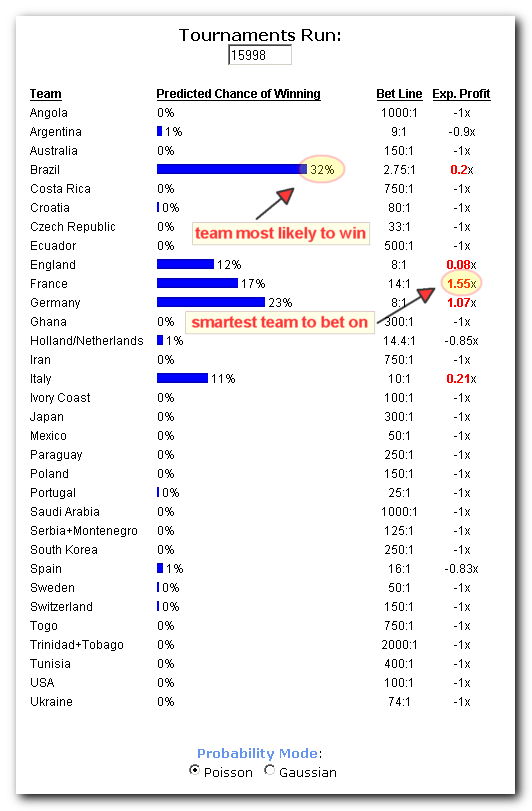
Pretty much done updating it for 2010.
Odds aren't correct because I haven't written scraping code yet.
And the there are no good expert ratings yet (please add some!).

Should be ready by Jan 1, 2010.

Now the trick is going to be finding some people to put in some good pairwise score estimates (see here for more info).
17428
N.A.N.Y. 2010 / Re: NANY 2010 Teaser: FarrSpell
« Last post by mouser on December 26, 2009, 09:43 PM »
by the way if you get sick of typing fspell you can go to advanced options for a plugin and change the alias trigger to something like fsp or even fs or s
17429
N.A.N.Y. 2010 / Re: NANY 2010 Teaser: FarrSpell
« Last post by mouser on December 26, 2009, 09:42 PM »
yes, you have large mode result mode.. it will look better once we get some better icons.
17430
N.A.N.Y. 2010 / Re: NANY 2010 Teaser: FarrSpell
« Last post by mouser on December 26, 2009, 05:53 PM »
The icons suck at large size -- i'm hoping hamradio or someone else will make some new .icon files with 32x32 and 16x16 resolution.
17431
N.A.N.Y. 2010 / Re: NANY 2010 Teaser: FarrSpell
« Last post by mouser on December 26, 2009, 05:52 PM »
Preview release posted -- download at link specified above, and unpack into a subdirectory of farr Plugins folder (Plugins\FarrSpell).
17432
N.A.N.Y. 2010 / Re: NANY 2010 Teaser: FarrSpell
« Last post by mouser on December 26, 2009, 12:18 PM »
updated with screenshot teasers.
17433
N.A.N.Y. 2010 / Re: NANY 2010 Teaser: FarrSpell
« Last post by mouser on December 26, 2009, 08:37 AM »
that it would spell in English English as well as American English (maybe show both even?)

you will be able to choose your dictionary, same as Clipboard Help+Spell does it.
17434
N.A.N.Y. 2010 / Re: NANY 2010 Teaser: UQ
« Last post by mouser on December 26, 2009, 07:00 AM »
UQ will not be done in time for NANY, but will be coming soon..
It was a little ambitious to try to get it out the door by Jan 1, but we will aim for Feb 1 instead.

I will pledge one or two other smaller NANY projects (see here).
17435
N.A.N.Y. 2010 / NANY 2010 Release: FarrSpell
« Last post by mouser on December 26, 2009, 06:55 AM »
NANY 2010 Entry Information

Application Name FarrSpell - Spellchecker+Thesaurus Plugin for FARR
Version v1.03.01
Short Description A plugin for Find and Run Robot which will spellcheck words and list synonyms
Requires Find and Run Robot
Early Download Link FarrSpell.zip v1.03.01
Screencasthttp://donationcoder...c/fspell/fspell.html
YouTube: http://www.youtube.c.../watch?v=iGSUdFCjX4w

Description
This will be a plugin for Find and Run Robot to help people who quickly need to spell a word or look up synonyms.

Screencast


Screenshots
Screenshot - 12_26_2009 , 12_14_20 PM.png
Screenshot - 12_26_2009 , 1_25_20 PM.png
17436
Find And Run Robot / Re: FARR will not run
« Last post by mouser on December 25, 2009, 11:09 PM »
if you double click the tray icon, does it show farr normally?
if so, the first task will be identifying whether another program has taken over the break hotkey maybe..
try opening up farr options and go to hotkey tab and add another hotkey and see if that hotkey works.

when you say beep.. are you hearing the farr sound? the same sound as when you double click on the tray? or is it the system beep?
17437
Do we have a python and ruby example somewhere?
17438
N.A.N.Y. 2010 / NANY 2010 xmas regifting
« Last post by mouser on December 25, 2009, 06:45 PM »
I thought maybe i would start a thread where people who have stuff to give away could give it to NANY participants as a way of saying thanks.

I have some Graphic Novels to give away.
Here they are, some I loved (Criminal series), some I hated (The Filth):

Screenshot - 12_25_2009 , 6_35_43 PM.png
Screenshot - 12_25_2009 , 6_35_17 PM.png
Screenshot - 12_25_2009 , 6_37_44 PM.png

Sorry for not providing links, you'll have to search amazon for more info.


So who wants them? You must be a participant in NANY2010, and I will give priority to anyone who is willing to send all or most of them to someone else after they finish reading).
I think maybe best to send them all as a set, to someone in the US because of postage.  Some of these have adult/violent subject matter.
17439
Hey isn't this a candidate for entering into NANY 2010?
17440
Find And Run Robot / Re: Cannot get FARR to search as expected
« Last post by mouser on December 25, 2009, 05:30 PM »
Another question: FARR sometime will find 30+ entries.  It will display only a few of them.  Is it possible to scroll thru the entire list?

you can change the # of results farr lists by default from the "Display Options" tab, or you can leave it how it is and add "+sall" to your search to show all results.

After discussion on the forum, I've agreed we need a faster way of showing all resutls -- that is on my todo list.


ps. if you haven't seen them, there are over 3 dozen FARR screenscast videos showing how different features work:
https://www.donationcoder.com/3ds
17441
Find And Run Robot / Re: Cannot get FARR to search as expected
« Last post by mouser on December 25, 2009, 05:27 PM »
Welcome econdoc  :up:

1. In order to try to understand how FARR searches, I switched off all the virtual folders except %FARRDIR%\scripts.  I then searched for 'excel'.  It returns one item: C:\Program Files (x86)\FindAndRunRobot\scripts\Control Panel (cpanel)\Printers and Faxes (cpanel).lnk.  Nowhere in that path is the string 'excel'.  Why did it find this?

By default FARR has enabled "non-contiguous matching", which will match (albeit with a low score) against strings where the given letters are found in the right order but not next to each other, so for example: "Printers and Faxes (cpanel)"

You can disable this if you like from the "Search Behavior" tab.


I think you are going about this the right way, trying to simplify in order to understand what FARR is finding, so disabling non-contiguous search can help.  You can also turn on FARR's display of subfolders as it searches, which is in the "Display Options" tab.

One thing to keep in mind is that FARR tries hard to find lots of matches, but score them in a way so that the one you are most likely to want is listed at the top.  You can alter the scoring heuristics in the "Heuristic Scoring" tab.  Note also that once you launch a file once, it goes into your history list where it will be found instantly, and scored higher, the next time.  So even if the file you were looking for wasn't at the top position the first time you launched it, it will be higher and faster next time.
17442
Ok let me see if i can track down the cause..

Here's a thought -- if one of you feels comfortable sending me your "corrupted" clipboard history data file from CHS, then zip up the Clipboard Help+Spell \ Database directory in your MyDocuments area and mail it to: [email protected]

I will treat it with utmost privacy but i also understand if you'd rather not send it.
17443
Minor Update:
v1.110.01 - December 25, 2009
  • [Feature] Some people were getting error about missing drives when LBC tried to resolve paths for items that no longer had valid paths; such resolution is now not enabled by default, but can be enabled in the main Options page.
17444
Older Newsletters / Re: --> Newsletter for December 22nd, 2009 - "NANY EVE"
« Last post by mouser on December 25, 2009, 08:37 AM »
:)  glad to help distract you with a little bit of distraction :Thmbsup: :Thmbsup:
17445
Screenshot Captor / Re: Links to Reviews and Comments - Add yours!
« Last post by mouser on December 25, 2009, 05:19 AM »
"But the surprises do not end with the capture of the desired object, on the contrary - just beginning... "

http://www.esoft.web...m-your-computer.html
17446
v1.17.01 - 12/25/2009
  • Added commandline options for printing.
  • Added print button.
  • Hitting Escape key in main form will now exit.

v1.16.01 - 3/12/2009
  • Added commandline options for resizing

v1.15.01 - 12/08/2008
  • Added commandline option -postrun "commandline" to run a post processing program on the captured image (use $file$ to replace saved image filename in commandline)
17447
Living Room / Re: Best. Shop. Ever.
« Last post by mouser on December 24, 2009, 10:56 PM »
can't wait to see the pictures :)
17448
Latest version:
v2.78.01 - Dec 24th, 2009
  • [Feature] New option to auto-file older screenshots into a subdirectory based on date -- useful in keeping your workspace cleaner.
  • [Minor Feature] You can now use Ctrl+A in the thumbnail panel to select all files.
  • [BugFix] Fix for thumbnail creation flickering.
  • [Minor Feature] When capturing desktop and no active window is selected; instead of the file comments saying "explorer.exe" they say "Desktop"
  • [Minor Feature] Transparency tool setting was not being saved between runs.
  • [Minor Feature] Added list of capture types you can trigger from commandline.
  • [Minor Feature] Fixed the "-printnext" commandline option.

Note: The updater doesn't know about this yet, going to wait for some feedback first; you can force the updater to grab it by right clicking on the item and choosing "Install from the web..".
17449
Living Room / Re: BetaNews on Google: Simply brilliant business, but is it evil?
« Last post by mouser on December 24, 2009, 01:08 AM »
I don't think google is evil.

But I think the reason google open sources much of their code and gives it away for free is the same reason the infomercials for the SlapChop, Snuggy, and Ginzu Knives give away a free vegetable pealer with every order -- because it helps them make a bigger profit on their sales.

Having said that, i'm not sure why it would matter what their motivation is -- the bottom line is that much of google's efforts benefit many of us, and that is a good thing.

The part about google that i view is harmful is the same thing i view as harmful in all giant corporations -- a driving force of greed that seeks to maximize profits and dominate as much of every market as they can, through monopolistic practices when the easier methods don't work.
17450
N.A.N.Y. 2010 / Re: NANY 2010 - Prizes
« Last post by mouser on December 24, 2009, 12:17 AM »
can you make me a version of that where the black areas are saved as transparent in the image format?
Pages: prev1 ... 693 694 695 696 697 [698] 699 700 701 702 703 ... 1515next