topbanner_forum
  *

avatar image

Welcome, Guest. Please login or register.
Did you miss your activation email?

Login with username, password and session length
  • Wednesday December 3, 2025, 11:28 am
  • Proudly celebrating 15+ years online.
  • Donate now to become a lifetime supporting member of the site and get a non-expiring license key for all of our programs.
  • donate

Recent Posts

Pages: prev1 ... 62 63 64 65 66 [67] 68 69 70 71 72 ... 1514next
1651
Living Room / Re: Best Programming Jokes
« Last post by mouser on March 10, 2019, 11:41 PM »
 ;D ;D ;D ;D ;D
1652
Skwire Empire / Re: Release: sWeather (tray-based weather app)
« Last post by mouser on March 10, 2019, 11:19 PM »
I think the place to start from -- the first thing that needs to be said -- is that drugwash was trying to help and improve the program.  And that furthermore, he was making the non-trivial effort share his improvements in a respectful way with the author (our wonderful skwire) and the rest of us.

So in my humble opinion, the first thing that needs to be said to drugwash is "thank you".

After that, it's skwire's right to ask that drugwash not share/post modified versions of his software.  I can understand why that would be disappointing to drugwash, who was just trying to contribute some improvements to a program he obviously likes.

Most of the people on this site are fans of open source software -- coding and using it.  Many of the coders here release some, if not all, of their source code as open source and participate in open source software.  People who are sharing their programming skills here on this site are doing so largely because of the enjoyment we get in having others use our software.  But many of us here also have some software which we have, for various reasons, decided not to open source. For whatever reason, it is ultimately the coder's prerogative. 

Anyway, this is just my long way of saying to drugwash that I (we) appreciate the good deed you were trying to do, and don't want you to walk away with bad feelings about this -- rather I hope you will stick around and continue to participate, offer improvements of other sorts, and feel welcome here.  We are nothing if not a home for unusual people with unusual skills :up: :-*


1654
Screenshot Captor / Re: save shot of object to specific folder?
« Last post by mouser on March 09, 2019, 08:33 AM »
Hi helmut.. you say screenshot of a "specific object".. can you elaborate what exactly you are wanting to do?
Do you mean to save the entire screenshot to a specific folder? or do you mean just some smaller area you have selected from within the Screenshot Captor interface?
And are you asking specifically about keeping the Screenshot Captor save directory in one place and then occasionally saving an object in another place? Or are you asking about changing the screenshot directory for new captures?
1655
LaunchBar Commander / Re: LBC delete the target instead of shortcut
« Last post by mouser on March 09, 2019, 08:08 AM »
Ok that's a good find.. I would consider that highly undesirable and will endeavor to fix it.
I guess now that I think about it, it's happening because LBC is showing the context menu of that item just as if you had right clicked on it on the desktop.. But yeah, that could lead to some real unpleasantness.. I will try to have an update asap.
1656
LaunchBar Commander / Re: LBC delete the target instead of shortcut
« Last post by mouser on March 08, 2019, 04:05 PM »
Right-click deleting an item in LBC should never delete the original file.
1657
Find And Run Robot / Re: #filecontents FILEPATH -- how does it work?
« Last post by mouser on March 08, 2019, 07:58 AM »
After a second an error popup shows with the text "Error: Access violation at address 00598228 in module 'FindAndRunRobot.exe'. Read of address 656D696C." Perhaps the problem is that ping.exe outputs lines incrementally as it gets results back from the ping and FARR's appcapresults expects the output all at once?

Sounds like a bug.. FARR should be fine with a commandline tool that does not output it's contents all at once -- I think..  Either way it's a bug that it throws that error..

Actually let me revise that, the function to display the results of a commandline tool as text in memo mode should be happy to have the results come in slowly from a continually running commandline tool.. but the new function to grab output as results may not be nearly so happy to do so :)
1659
Thanks deo+disenchanted.

I used Acid many many years ago to make some songs.. tempted to pick this up just in case the urge hits me again :)
1660
The page is somewhat confusing regarding SoundForge.. it says it at the top but then doesn't seem to list it.. Thoughts?
1661
Thanks for posting this, I've blogged it so other see it.  :up:
1662
Living Room / Re: Looking for "Smart"watch Recommendations
« Last post by mouser on March 06, 2019, 12:57 PM »
I'm interested in this too.
1663
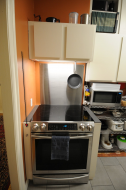
Decided to DIY remodel my kitchen myself.. New floor already tiled (not fun!!), old counter and sink just removed.. never done kitchen plumbing before... it will be interesting..

kitchen_renov1.jpg
1664
It's wonderful to see these threads with a bunch of people helping each other and coding and sharing stuff  :up:

Don't forget if you appreciate the coders, send them some donationcredits!
1665
DonationCoder asks that I state my relationship to Polywick.  I am a soon-to-be user of StoryServer who has been waiting as long as everyone else for today.  I'm also an Ecco user since almost day 1 and have been offering Polywick developers "old fart perspective" and early feedback.  Sorry it has taken longer than anticipated to reach this point but hey, I have looked at SS for a couple days and I think "yes, this is the real deal" and "this is a dream come true".  Looking forward to seeing what you think.

Nice to meet you Mark, welcome to the site  :up:
1666
Thanks for posting this -- blogged it.
1667
Living Room / Re: Thread on 3d Printing Cody Model
« Last post by mouser on March 01, 2019, 10:03 AM »
I'm finally printing out more 3d cody+coin models.. If I have previously promised to send you a 3d cody, OR IF I SHOULD HAVE, please message me to remind me now!
1668
Easy Screencast Recorder / Re: Path settings ?
« Last post by mouser on February 28, 2019, 07:39 AM »
Hi Mohkraats.

I'm glad it's useful to you.

In general with my apps, you can either download the portable version and put it where you want, or use the setup version which should use default MyDocuments folders.

And it should be able to create its own folders in those places.

In unusual cases where the default locations have permissions that don't allow the program to write to them, the best solution is to edit the configdir.ini file in the program directory; my apps check that and it will let you set a custom directory where files should be saved.
1669
Living Room / Re: Animal Friends thread
« Last post by mouser on February 27, 2019, 12:45 PM »
Dog clears path in snow for his stuck friend:
1670
Ok let's see if we can get things to work for you and figure out what's going wrong.

First, can you make sure you are using the latest version so we know we are talking about the same thing.

Second, and most import, is to make sure AS *can* capture the window you care about, and that the saved screenshot is correct -- that is, it shows the contents of the captured windows.  Leaving aside the issue of whether it detects all changes or not.

If it does that, then there is no reason it shouldn't be able to do what you want.

Assuming that the above works, it may simply be a matter of AS not capturing/monitor what you think it is.

It sounds like the "Active window or desktop" is the setting you want.  Note that this captures the currently active window on the desktop (the one receiving focus of the mouse/keyboard).
Set capture rate to 1 second for maximum capture speed.

Now, the option "Also capture whenever the active window changes" may be slightly misleading.. It has nothing to do with checking the content of the active window -- that should already happen automatically.  It's simply saying you want AS to capture IMMEDIATELY any time the user selects a new active window.

Let me know the answer to those questions.

It may be that what you would benefit from more would be an option to tell AS to watch and capture only the window of a specific executable...

But let's first focus on getting AS to perform properly for you given the current options.  The main reason I would think it might be failing is if you are switching away from the window you are about (making another window active), OR more likely, if you have the capture rate too high.  Set that to 1 and it should be capturing once every second and evaluating the window for changes.

Try keeping the main AS window open and then select your active window and look in the AS window to see what it tells you it is doing.
1671
Find And Run Robot / Re: Latest FARR Release 2.234.01 - Feb 26, 2019
« Last post by mouser on February 26, 2019, 10:43 AM »
Version 2.234.01 - Feb 11, 2019
  • [BugFix] The htmlviewurl command used to display a web page in the FARR window was not urlencoding some urls, so that the + sign in urls was not being encoded properly.
  • [Feature] New virtual launch string (command) to run a script/executable and grab output as a list of results to display: appcapresults.
  • [Feature] New virtual launch string (command) to read a text file and display as a list of results (very similar to the special #filecontents alias results, but can be chained with other commands): fileresults.
1672
Living Room / Re: Apologies, confessions and a bit of a rant
« Last post by mouser on February 25, 2019, 06:50 PM »
I'm sorry to hear about your struggles with humans and office politics.. This article about autistic workspaces came to mind -- though I'm not saying your issues have anything to do with that.

I don't have any good advice about such things.. It sounds incredibly stressful.  But you aren't giving up and that's the important thing, I think.  Try to rise above the bitterness and frustration and be as zen about it all as you can be.
1673
Living Room / Re: Kill me if you want
« Last post by mouser on February 25, 2019, 11:30 AM »
!! Contro, we will probably kill you first for forcing us to follow your links -- not for buying what you want ;-)

Or for posting topics titles that are misleading..
1674
Automatic Screenshotter / Re: Automatic Screenshotter v1.13.01 beta - July 29, 2019
« Last post by mouser on February 23, 2019, 04:14 PM »
v1.11.1 - Feb 23, 2019
  • [BugFix] Region capture mode would not accepted negative coordinates, which are needed for some multimonitor setups.
  • [Feature] You can now select the region to capture graphically.
  • [MinorFeature] New menu item to open last screenshot.
  • [BugFix] Automatic Screenshotter would sometimes store duplicate screenshots if the active window/process name was changed, even if screen contents had not.
1675
Automatic Screenshotter / Re: how to use region function
« Last post by mouser on February 23, 2019, 04:03 PM »
Great  :up:
Pages: prev1 ... 62 63 64 65 66 [67] 68 69 70 71 72 ... 1514next