topbanner_forum
  *

avatar image

Welcome, Guest. Please login or register.
Did you miss your activation email?

Login with username, password and session length
  • Thursday April 9, 2026, 2:51 am
  • Proudly celebrating 15+ years online.
  • Donate now to become a lifetime supporting member of the site and get a non-expiring license key for all of our programs.
  • donate

Recent Posts

Pages: prev1 ... 644 645 646 647 648 [649] 650 651 652 653 654 ... 1515next
16201
regardless of the success of this particular model -- those of us pining for more choices for really high quality full sized ebook readers should be encouraged.. i'm getting excited at the possibility that 2010 may be the year for me to buy an ebook reader.
16202
WorldCup Predictor / Re: FIFA World Cup Predictor 2010
« Last post by mouser on June 04, 2010, 06:37 AM »
the simulator doesn't make per-game predictions.. in fact it relies on a user to tell it how every possible per-game match up could result, and from that it calculates how the tournament would end.
16203
Screenshot Captor / Re: Blurred Captures?
« Last post by mouser on June 04, 2010, 06:18 AM »
when you are viewing a screenshot, if the image is scaled down to fit in the window for viewing, it can appear blurred.  look at the zoom level on the right hand side of the main screenshot captor window to see if this is the case.  if so you can set the zoom level to 100% by clicking the 100% label at the top right.  this only affects the preview not the actual saved file.

let me know if that was what was happening for you.

ps. you can adjust this smoothing effect from the "Interface Options 1" tab of options.
16204
Clipboard Help+Spell / Re: Any screencast for Clipboard Help+Spell?
« Last post by mouser on June 03, 2010, 11:21 AM »
I need to make some screencasts for it for sure -- maybe i can try to do that this weekend.
16205
Here is another simulation run using a different user's ratings file:

Screenshot - 6_3_2010 , 7_22_01 AM.png

In this case, the simulator predicts Spain has highest chance of winning (25%), with Germany (23%) and England (18%) close behind.

However in this case, it recommends the best bet is on Germany, with an expected profit of twice what you bet.
16206
fixed :)
16207
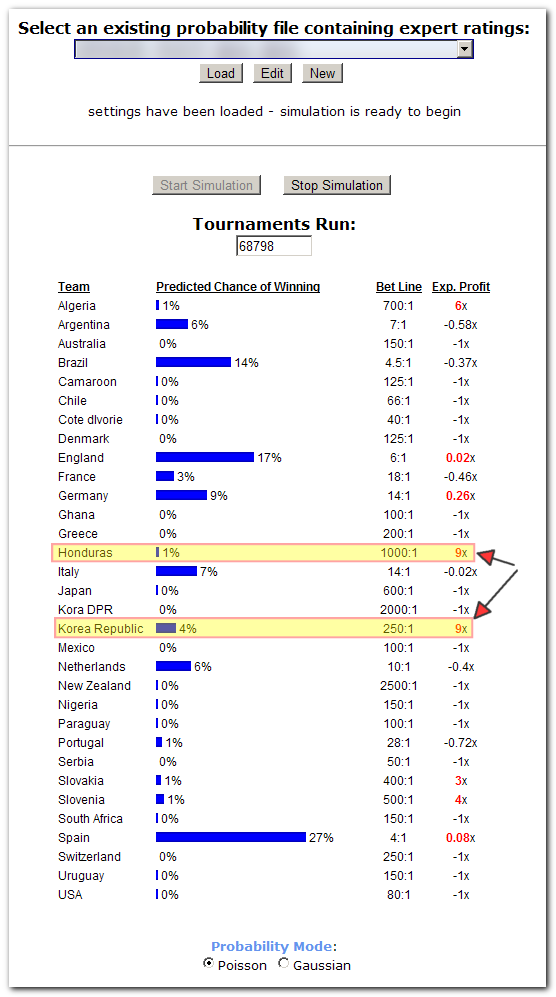
I thought it would be worth while for me to post a screenshot of a simulation and visually demonstrate the difference between the simulator picking a winner and advising a bet.

Let's look at one person's ratings data used to simulate the world cup on June 3rd, 2010, with current betting odds.  After running for 30 minutes or so here are the results:
Screenshot - 6_3_2010 , 6_55_46 AM.png

We see that using this person's pair-wise team match up ratings, the simulator predicts that Spain has the best chance of winning the tournament (27% chance) followed by England (17%), Brazil (14%), Germany (9%), Italy (7%), Netherlands (6%), Argentina (6%); this is shown by the blue bars.

However, looking at the far right column, we see the expected profit from betting on the different teams; red numbers mean a positive profit is expected (negative numbers mean predicted loss of money).

Note that none of the teams with a high likelyhood of winning are good bets(!)  Why?  Because too many people are already betting on them and the payoffs for betting on them are so low.

The simulator advises betting on Honduras and South Korea, because even though these teams have a relatively small predicted chance of winning (1% and 4% respectively), their high payoffs make the bet a smart one.


REMEMBER: THIS IS THE RESULT OF ONE PERSON'S RATING FILE ESTIMATING HOW THE TEAMS MATCH UP PAIRWISE -- IF YOU USED A DIFFERENT PERSON'S RATINGS YOU WOULD GET DIFFERENT RESULTS!!!
16208
i'm dying for a perfect ebook reader, but even for someone who loves a multi-monitor setup, this seems overkill to me..
for an ebook i'd prefer a single lightweight, thin, large (12+ inch) display.  but i look forward to reading more about it.
16210
Site/Forum Features / Re: post photos in forum
« Last post by mouser on June 02, 2010, 07:43 PM »
that's a nice idea for sure, but not trivial to implement.
it is a nice idea though.
16211
i've uploaded ewemoa's modification -- the colors look a lot better now.
16212
Site/Forum Features / Re: post photos in forum
« Last post by mouser on June 02, 2010, 06:48 PM »
I need to save the photo to my computer and upload it as an attachment first?
right.

now there is a way to show an image hosted on another site using [img]url[/img] but we HIGHLY discourage it, since inevitably over time the remotely hosted images disappear, resulting in confusion.
16213
Site/Forum Features / Re: post photos in forum
« Last post by mouser on June 02, 2010, 06:39 PM »
keep studying that thread, it shows the code to use.
16214
Clipboard Help+Spell / Re: Understanding Clips with URLs
« Last post by mouser on June 02, 2010, 05:56 PM »
i think you can put things in the favorites folder this way by making the favorites folder a virtual folder; it should also still show things added to it manually.
it looks like the favorites folder IS by definition a virtual sql folder which starts out with the following SQL:
"IsFavorite=true AND NOT (IsInRecyleBin)"

SO..
if you wanted to ALSO have clips listed what contained an @ sign but not @yahoo you could do:
(IsFavorite=true OR ((ClipText LIKE '%@%') AND NOT (ClipText LIKE '%yahoo%')) ) AND NOT (IsInRecyleBin)
16215
Site/Forum Features / Re: post photos in forum
« Last post by mouser on June 02, 2010, 05:06 PM »
16216
General Software Discussion / Re: Clipboard Manager with this feature
« Last post by mouser on June 02, 2010, 10:37 AM »
it's a neat idea..
though i'm guessing that you could instead use a clip merging function instead if your clipboard tool has that, to get nearly the same functionality; i.e. keep copying clips and then when you have many of them copied, go to the clipboard tool and merge them into one big clip and then paste into target application.
16217
LaunchBar Commander / Re: Text Description of Nodes
« Last post by mouser on June 02, 2010, 10:35 AM »
go to the launchbar commander configuration options.
from the file menu you can close the file that contains "my first dock" and LOAD BobsLaunchBar2.mcf.
after that it should remember to load that one in the future.
16218
it dosnt save the cm/inch thing, i need to fix that.  i think if you set it in inches it will remember.
16219
Screenshot Captor / Re: Screenshot Captor Splice Tool
« Last post by mouser on June 02, 2010, 03:56 AM »
thanks for the icon image abterix!
i'll try to fix up object positions.
16220
Screenshot Captor / Re: Screenshot Captor Splice Tool
« Last post by mouser on June 02, 2010, 03:47 AM »
lol patent it.. there is nothing complicated or clever about it.. i'd be surprised if it wasn't already in photoshop somewhere.
16221
Screenshot Captor / Re: Include cursor while takeing a region capture
« Last post by mouser on June 02, 2010, 03:22 AM »
tell SC to use red-box-mode when doing region capture, and this should work.

(alternatively, use a full screen capture and crop afterwards -- this always seems more sensible to me).
16222
following ewemoa's suggestion i made a meager $10 donation to geshi's sourceforge donation account on behalf of dc members.
16223
all thanks should go to geshi -- i didn't do much more than download the latest zip file :)
16224
LaunchBar Commander / Re: Text Description of Nodes
« Last post by mouser on June 01, 2010, 08:57 PM »
welcome bob :up:

click on the dock node itself and tell it you want to show the captions:
Screenshot - 6_1_2010 , 8_58_28 PM.png

or if you want most of the icons on the dock to not have any text caption but only a few, select those few one at a time and on Node Overides tab for them choose to overide the caption style.

you might also try checking "All Same Width" on the dock node itself if you want to prevent wrapping in the case that you have some icons with large captions and some without.

let us know how you get on with it; check out this thread for people posting images of how they have their LBC set up: https://www.donation...ex.php?topic=18759.0
16225
Autohotkey has been added to the list of languages the forum knows how to color syntax highlight in posts.

To highlight code for a language, select the text and then choose the language from the "Code Highlighting" drop down combo box, on the Post form.

ps. thanks to dc member ewemoa for getting me to update to latest version of geshi that supports ahk; huge thanks to the geshi open source project.
Pages: prev1 ... 644 645 646 647 648 [649] 650 651 652 653 654 ... 1515next