topbanner_forum
  *

avatar image

Welcome, Guest. Please login or register.
Did you miss your activation email?

Login with username, password and session length
  • Wednesday December 3, 2025, 11:18 am
  • Proudly celebrating 15+ years online.
  • Donate now to become a lifetime supporting member of the site and get a non-expiring license key for all of our programs.
  • donate

Recent Posts

Pages: prev1 ... 59 60 61 62 63 [64] 65 66 67 68 69 ... 1514next
1577
Then I clicked ctrl + v but I still get 222 (I thought it should be 111222

Ah i see the confusion.
Ok what CHS is doing is appending the new item (222) to the LAST STORED CLIP in its database.  (can you check that that is the case?).

But it's not actually modifying the contents of your clipboard to be the appended complete text.

So it's useful for building up an appended clip but its not available automatically when you ctrl+V, you'd have to access the built up clip from the main CHS window.

I suppose I should fix that so that it ALSO modifies the clipboard with the full appended text.. Stay tuned.
1578
Automatic Screenshotter / Re: Capturing Black Window
« Last post by mouser on May 06, 2019, 04:20 PM »
Can you elaborate a little on what is happening and what you would like to happen?
1579
Clipboard Help+Spell / Re: Spanish (or other languages)
« Last post by mouser on May 06, 2019, 03:48 PM »
1- Easy Switch between spelling languages
Let me see what I can do about that -- truthfully despite the program name it doesn't seem like there is much interest in the spelling options in CHS..
1580
Clipboard Help+Spell / Re: Spanish (or other languages)
« Last post by mouser on May 06, 2019, 03:47 PM »
I think you should be able to change the date/time formats on the "Quick Paste Pop-up tab" -- see upper right:
Screenshot - 5_6_2019 , 3_46_44 PM.png

Let me know if that doesn't solve that problem.
1581
Can you try this beta version and let me know if it performs any differently with shift+prtscr:

(all i changed was told the manifest that SC was "per-monitor dpi aware" which *might* prevent the weird scaling.
1582
Let's try to tackle the issues one at a time.
First, the red-box capture mode should not be hanging(!).  Can you track down any extra info about that? Sometimes I've noticed that when an app appears to be hung, if you alt+tab to it you will reveal a dialog that was hidden for some reason.
Can you see if you can figure out any clues about when it hangs during a red-box capture?

After that, perhaps I can try building a version of SC that forces itself to be dpi-aware in a way that will not mess up the resolutions when doing a shift+prtscr capture...
1583
Screenshot Captor / Re: Jpg captures B/W
« Last post by mouser on May 05, 2019, 02:49 PM »
I can move the thread.. This is really an odd phenomena.  Let me ask if changing the compression level makes any difference? (or color depth for that matter)
Screenshot - 5_5_2019 , 2_48_01 PM.png

Can you show a screenshot of your options dialog on the "Image File Format" tab?

Oh! And attach one of your jpg captures that shows up in black and white?
1584
but I don't know how to print to a pdf these lists.
there are virtual pdf printers.. you install them and then from any app that can normally print something to a printer you can print it to pdf file instead.
or you could take a screenshot and save it in pdf format.

does that answer your question?
1585
Living Room / Re: Hidden Netflix Marathon Gems to Watch Online
« Last post by mouser on May 03, 2019, 04:11 PM »
oy vey! fixed.
1586
Living Room / Re: Gadget WEEKENDS
« Last post by mouser on May 03, 2019, 12:21 PM »
what ayryq said.
99% of my use is seated at pc as well.. BUT having a cord dangling from your head is no fun.  that's what i upgraded from.  so i'm glad to be wireless even when i'm seated at my pc.  i just have to remember to occasionally charge it.
it uses a standard micro(?) usb cable for charging.
1587
Living Room / Re: Hidden Netflix Marathon Gems to Watch Online
« Last post by mouser on May 03, 2019, 07:19 AM »
Shtisel:
https://www.netflix.com/title/81004164
shtisel.png

2 seasons (over 20 episodes) about an orthodox jewish family.  Subtitled.

It takes an episode or two before you get absorbed into the world, but after that it's extremely compelling, sweet, fascinating.  For most of us, a view into a very different culture.
1588
Living Room / Re: Gadget WEEKENDS
« Last post by mouser on May 03, 2019, 07:05 AM »
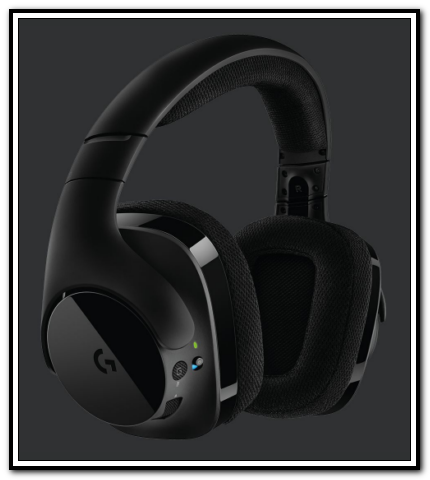
Got myself a new wireless headset for the computer.

It's a logitech G533:
401scan 003_thumb001.png
https://www.logitech...-gaming-headset.html

purchased from Amazon for about $75 (https://www.amazon.c...dset-x/dp/B01MXE0FKC)

I like it.  It has good range, feels comfortable, has no leather/pleather but fabric instead (this is important because the older pleahter headsets I have had have all disintegrated over time).  Nice physical on off switch on the headset, along with a swivel down microphone for chat/gaming.

It is *NOT* bluetooth.  I actually have a different bluetooth headset and transmitter for my stereo, and don't have serious complaints about it, but it IS a bit more fussy in terms of connecting between the base and headset whenever you turn it on.  For my pc, I wanted something that was easier.

This is a nice small usb stick I just plug in when I want to use the headset and it instantly connects, no muss no fuss.  Unplug the usb stick to disconnect.

Overall, I'm quite happy with it.  :up:

A couple more neat features:  Compact mic folds up out of the way and when it's up it automatically mutes.


UPDATE 5/21/19 - After a few weeks with them I am quite happy.  There are some small details you don't realize are important.  For example these headsets have an easy to access, clearly visible, on off switch.  Another bluetooth headset i have uses one awkward button you push and hold to turn on and off.  You'd be surprised at how much more functional and easy the physical on off button is.. Huge usability difference.
1589
I've promoted the last beta release (2.45.01) to a normal release.
1590
Living Room / Dell laptops and computers vulnerable to remote hijacks
« Last post by mouser on May 03, 2019, 04:23 AM »
If you have a dell laptop you need to make sure you are up to date.

A vulnerability in the Dell SupportAssist utility exposes Dell laptops and personal computers to a remote attack that can allow hackers to execute code with admin privileges on devices using an older version of this tool and take over users' systems.
Dell has released a patch for this security flaw on April 23; however, many users are likely to remain vulnerable unless they've already updated the tool --which is used for debugging, diagnostics, and Dell drivers auto-updates.


from slashdot.org
1591
Good idea.  I have added it as the first sentence of the request permanent license key page.
1592
They are coming through this page:
https://www.donation...ermanent-license-key

Where people leave comments they can say why they are requesting a permanent key.  From October 2018 through April 2019, no less than 16 requests have mentioned why they need the license key for POKEMON GO.

People occasionally ask for a key for other things, but pokemon go is requested enough that I'm sure something is telling them to go to us for a key... Strange.
1593
For the past couple of months I've been getting a small but steady stream of people requesting DonationCoder license keys for "Pokemon Go".  It's baffling.
It seems that somewhere people are getting the idea that our license keys work for Pokemon Go.
Does anyone have any idea where this idea is coming from?
 :huh:
1594
it would be nice to see a recent screenshot.
1595
Find And Run Robot / Re: Use of Variables inside Aliases
« Last post by mouser on April 29, 2019, 01:39 PM »
Yes, I should provide a list of order of resolution.  Even smarter might be to have FARR resolve what it can, and defer resolving those that it can't if they might be expanded by another.
Spoiler ha !  ;D
1596
Screenshot Captor / Re: Screenshot Captor - How to improve image quality?
« Last post by mouser on April 29, 2019, 01:36 PM »
Now, if you find that when SC displays a large image by fitting it on your screen for display that it seems too blurry for your tastes, you can adjust the algorithm used for that on the Interface Option tab:
Screenshot - 4_29_2019 , 1_33_31 PM.png

The description on that tab will explain it a bit to you.  Again, your options there ONLY effect how screenshot captor displays images in its window when they are too big to fit on screen.  They do *not* effect the quality of the captured screenshot, which will always be perfect when you share it, mail it, print it, etc.

So again, the quality of the saved image is always going to be 100% lossless perfect copy of your screen when saved to disk and manipulated.  If there is any bluriness it is an artifact of the algorithm used to shrink the image temporarily in order to display it at a smaller size. 
1597
Screenshot Captor / Re: Screenshot Captor - How to improve image quality?
« Last post by mouser on April 29, 2019, 01:32 PM »
Now, as for quality of screenshot, there are a couple of things to note:

First, make sure you are saving in PNG format for screenshots (the only exception to this would be if you are capturing mostly photographs and want small file sizes).

PNG is a LOSSLESS format, which means that the image will be an EXACT copy of what you see on the screen, with no blurriness or loss of quality.

HOWEVER, what does confuse people sometimes is that when a large image (say of your whole desktop) is DISPLAYED on the screen and has to be reduced in size, there are different ways to display the smaller version of the screenshot which may look more or less blurry on the screen.

It's important to realize this is only effecting the quality of the DISPLAY of the image at that size, not the inherent quality of the stored image.

You can see that by clicking on the upper right of the Screenshot Captor main window and going to 100% zoom, which will show you the original image quality, rather than the image reduced in size for display.
1598
Screenshot Captor / Re: Screenshot Captor - How to improve image quality?
« Last post by mouser on April 29, 2019, 01:28 PM »
The DPI setting (as it says on that dialog in the description) does *NOT* effect quality of captured or saved images, it only effects printing.  The default values for that dialog in Screenshot captor are as follows and can be left as is:
Screenshot - 4_29_2019 , 1_28_24 PM.png
1599
 :up:
and remind me if you have any pending feature requests...
1600
Beta v2.45 Apr 28, 2019

Download:

v2.45.1 - Apr 27, 2019
  • [MinorImprovement] Excerpt of last clip is now shown in print menu item caption
  • [BugFix] Crash could occur if manually editing a clip field and then typing something in search bar
  • [Feature] You can now specify a list of applications to monitor the keyboard from, with all others being ignored.
  • [MinorImprovement] Minor optimizations/improvements to last active window information.
  • [Feature] You can now set a hotkey to copy the text under the cursor (by triggering a Ctrl+C) and then APPENDING it to last clip.  Useful for building up clips.
  • [BugFix] Sometimes the text put on the clipboard from an ignored application could be stored after switching to another application.
  • [MinorImprovement] Clarified instructions on Capture Options about last active window.
Pages: prev1 ... 59 60 61 62 63 [64] 65 66 67 68 69 ... 1514next